Can anyone recommend a method of storing passwords securily in a way that I can access them easily but with minimal risk of someone hacking in to my laptop and finding them all in one place. It doesn't have to be an electronic method, on paper would be fine too.
I cannot remember most of my passwords. I have previously tried setting them all the same (bad I know) but different sites have different requirements. I'm tired at having to spend two days and a phone call logging into my ISAs!
Many thanks,
Something like [url= https://agilebits.com/onepassword ]1password[/url]?
Yes - something like 1password. Basically, if you have a Mac, you get equivalent functionality built right into the Operating System in the next version - OSX 10.9 (and it syncs your passwords with ios7)
Rachel
[i] It doesn't have to be an electronic method, on paper would be fine too.
[/i]
🙂
Write 'em down, keep them somewhere none-obvious.
I use LastPass and it works a treat
On a piece of paper is perfectly acceptable. Hackers aren't so advanced yet that they can access your desk drawers via the internet. I've generally switched from jumbles of upper and lower case mishmash such as gHz3bx0O2 to [url= http://lifehacker.com/5796816/why-multiword-phrases-make-more-secure-passwords-than-incomprehensible-gibberish ]longer phrases[/url] of three or four words. Easier to type a sentence than to try and make sure you get all the upper and lower case right. I don't generally need to write them down as I've usually taken them by looking across the spines of books on the shelf next to where I sit
A common practice is to have your own unique password suffixed with the name of the service - so no two are the same and easy to remember.
For example
gfd34fg_facebook
gfd34fg_twitter
Wow! That was quick!
I've tried adding the name of the service on the end, but lots of sites seem to blocking these types of passwords.
For 1Password. Surely this is all my passwords and accounts in one place. One online place. How long before that gets hacked?
Paper seems to be the best suggestion so far. Anything else?
Anything else?
Vellum 🙂
Written in my diary - if I lose my diary I change my passwords not unlike if I was to lose my bank card, I would cancel the card.
Yes - something like 1password. Basically, if you have a Mac, you get equivalent functionality built right into the Operating System in the next version - OSX 10.9 (and it syncs your passwords with ios7)Rachel
If it works as well as keychain, then I'm ooot.
*shakes fist at forgetful keychain*
For 1Password. Surely this is all my passwords and accounts in one place. One online place. How long before that gets hacked?
Good to see you actually read the info linked.
...from 1password.com:
All of your confidential information is encrypted using AES, the same state-of-the-art encryption algorithm used as the national standard in the United States. (Fun fact: AES stands for Advanced Encryption Standard.) 1Password uses 128-bit keys for encryption, which means it would take millions of years for a criminal to decrypt your data using a “brute force” attack.[b]Of equal importance is where 1Password stores your data: neither an Internet connection nor an online storage is required. All your data is stored locally, on your computer. Even if you choose to sync your 1Password data with other devices using an online service like Dropbox, though, your master password keeps you in complete control of your data.[/b]
-[url= http://help.agilebits.com/1Password_Windows/index.html ]Sauce[/url]
Double Bubble 😡
Papyrus is known to last a lot longer than paper.
KeePass is good and free.
It is available for lots of different platforms. I run it on my Win7 PC and Android phone. I use Dropbox to keep the files synchronised.
I've tried adding the name of the service on the end,
Throw in a couple of letters.
So you have your master password, "norbertcolon," interspersed with say the first two characters of the domain at points you recognise. Eg, [b]fa[/b]cebook, "nor[b]f[/b]bertco[b]a[/b]lon."
Then, lettershift to stop reverse engineering. "norgbertcoblon" is your new facebook password, "norfbertcoclon" is eBay; long enough to prevent brute forcing, memorable, and won't grant access to all your other sites if it gets compromised.
maccruiskeen - Member
I've generally switched from jumbles of upper and lower case mishmash such as gHz3bx0O2 to longer phrases of three or four words.
I've whispered them in my elephants ear.*
*getting him to type them in for me is proving problematic.
keepass does this. Encrypted and stored in a single file with a master password.
All mine are written on paper and kept in a safe in the house....
[url=www.safe-in-cloud.com/]www.safe-in-cloud.com/[/url]
I sync the secure file across all my devices using SkyDrive... but you can use other cloud-based services.
+1 for Keepass: *cough* 256 bits encryption too. More bits innit, gotta be better.
I use a system very similar to the one Cougar describes. It's actually very effective once you get into it.
I also use simple passwords for sites that I don't really care if they get hacked. Like this one.
Always use phrases or abbreviations to help your remember too. Random characters is crazy and counter productive. Use song titles, advert phrases or sayings.
This site is called Singletrack and this is my password for it.
Ts1cSat1mpf1
Absolutely impossible to guess but easy to remember and repeatable for many sites.
+1 for Keepass: *cough* 256 bits encryption too. More bits innit, gotta be better.
The encryption algorithm is very rarely the weakest bit, it's normally the implementation which lets encryption down, eg not scrambling data, known key words such as always starting the payload with "Password 1=" etc, which makes breaking the encryption orders of magnitude easier. Also storing passwords in the clear in memory / on the stack during encryption which means they are accessible to nasty apps looking for them. Hackers always look for the weakest link and that's never the encryption algorithm (unless the NSA recommend it, in which case they've nobbled it).
+1 lastpass.
nice iOS integration too.
Password protected Excel not very clever then?
I'm not really sure my life needs to be any more secure than that if I'm honest.
So, is my spreadsheet that is password protected with a really (what i think) quite difficult password no good?
So, is my spreadsheet that is password protected with a really (what i think) quite difficult password no good?
Crackable in minutes unfortunately.
http://arstechnica.com/security/2013/05/how-crackers-make-minced-meat-out-of-your-passwords/
Dustin's computer can perform 30 billion guesses per second against standard Windows hashes. The $800 system uses four AMD Sapphire Radeon 7950 cards.
Be afraid.
Also
[img] 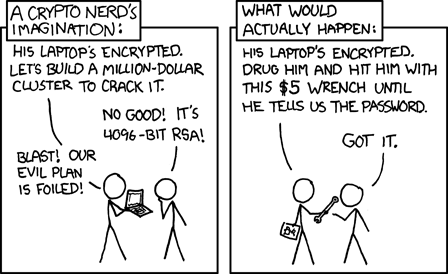 [/img]
KeyPass for me, BTW.
Most of mine are written cryptically on a scruffy old piece of a tear-off pad that is usually buried under a pile of others on my desk. So for example instead of "Specialized15" I've written "bike/street number", which seems to work.
In my mind. I hope the hackers dont get in there .
I put them in a .txt file and store it in a hidden, locked folder. I have a mixed character/case password to unlock the folder. I only have to remember one password.
[url= http://www.tweakandtrick.com/2012/12/lock-folder-password.html#Folder ]This is the software I use[/url]
Notebook in drawer.
If the house is broken into they will probably nick my phone, tablet, jewellery, cash, car keys,bikes but I doubt they'd go looking for passwords on the off chance I'd written them down.
Interestingly a number of security experts agree that very strong passwords written down and hidden offer much better protection than weak passwords and repeatedly used passwords.
Its also amazing how quickly you can learn to remember complex passwords for commonly used sites.
I use Oplop (appspot.oplop.com) to generate the random password as I can recreate that password using Oplop if I am not at one of my own computers.
On my own computers I use Keepass to store them.
Cheers
Danny B
+1 for LastPass, used mainly because work requires me to manage lots of online credentials on multiple computers. I do a lot of work around software security and in my view there's no perfect solution - many of the suggestions above are as good as anytying. GoFaster's cartoon hits one nail on the head!
If you're interested, here's some thoughts on password managers
[url= http://ask-leo.com/are_password_managers_like_roboform_and_lastpass_safe.html ]http://ask-leo.com/are_password_managers_like_roboform_and_lastpass_safe.html[/url]
+1 for this, works a treat, no need to reply on third partie software or websites.
A common practice is to have your own unique password suffixed with the name of the service - so no two are the same and easy to remember.For example
gfd34fg_facebook
gfd34fg_twitter
How many do you need. I have ebay, Pp and all these stupid forums plus email. Only the first two have any importance.