I've got a bunch of photographs I've taken for an ecommerce website, that are a little ...racy.
The model has quite a large distinctive tattoo on her thigh that she doesn't want going online.
I've been using Photoshop CS2 for years now ever since it became free*
I did see a demo of some form of intelligent clone tool in CS6 that looked like it could do a decent job of tattoo removal. Is there anything in the newer versions (CC?) that would do the same or better? And do they do still do free trials? Or can you sign up to CC just for a month?
*ish.
Unlikely that it could work better than a person who's been using the software for years. Post pics.
Yep post away and we will all fix it
Just pixellate it. I presume that's what you're doing with the faces of the participants who aren't wearing masks?
Tattoos, racy pictures and photoshop. What could possibly go wrong 😈
Quite a racy picture but no tattoos
[img] 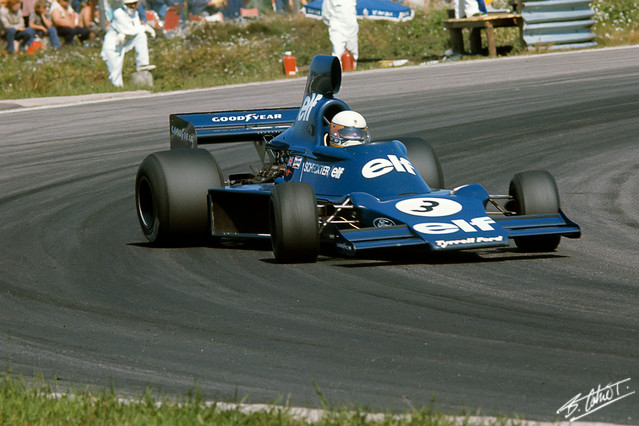 [/img]
Mail a couple. I'll remove the tats as well. Unless mikewsmith has got it covered.
CS2 is free??? I'm still using a buggy cracked version 🙁
*bookmarks* 😀
skin is very tricky to retouch and there are people who specialise in just that. the frequency separation technique is usually a starting point where the texture and colour are separated and you can change one without affecting the other.
the clone tool in lighten mode would be an obvious place to start with a tattoo.
the healing brush in CS is a huge improvement over PS-6 and below but no idea if you can subscribe for just a month.
the other option is to pay somebody in Bangladesh or India to do it for $4 but no guarantee how good the results would be, i use these services for doing clipping paths at .50¢ a pop when i have a large volume of cut-outs to do or anything time consuming like a bike or hair.
CS2 is free??? I'm still using a buggy cracked version
They shut down the authentication servers, so if you've bought it you could download a version from Adobe that doesn't require the online authentication.
It's not "free" exactly, just freely available.
elzorillo - Member
CS2 is free??? I'm still using a buggy cracked version
you'll need to be logged in for the link to work.
https://helpx.adobe.com/creative-suite/kb/cs2-product-downloads.html?promoid=19SCDRQK
a 'model' has a tattoo that she doesn't want anyone to see?
Makes you wonder why they got the tattoo / having got it decided to become a model.
It's your wife, isn't it 😉
It's your wife, isn't it
Nah, if it was his wife, he could get her to take the picture again with the tattoo covered up.
It's his wife's sister. 😉
He doesn't want his wife to recognise the tat.
Another plug for Affinity Photo for 50 quid - excellent "in-painting" tool, which may or may not be OK right out of the box, or in combination with frequency separation or other techniques.
Yes they still do free trials and yes you can sign up for the full CS suite for just a month.
Depends on the size and detail around the area you are trying to change.
In Photoshop CC - the content aware fill is very, very good.
Here is a tutorial:
I've used content aware fill to fill in whole landscapes where I've removed pylons or sometimes just full on trees.
That's what I would use, takes 20 seconds to draw round a shape and content aware fill it. Wouldn't dick about with clone stamp tools personally.
[img]  [/img]
For banter I removed some bits from the racy photo posted above, using only content aware fill. Spot the difference!
Dunno about spot the difference but that 1 meter long bit of Armco will help protect the table.
Ah different days
Good example of the pluses and minuses actually - the missing red cylinder is fine where the background is unstructured grass. The signature removal has left a mess where the background was detailed and structured.
For banter I removed some bits from the racy photo posted above, using only content aware fill. Spot the difference!
Well I can't see his tattoo
DrJ - Member
Good example of the pluses and minuses actually - the missing red cylinder is fine where the background is unstructured grass. The signature removal has left a mess where the background was detailed and structured.
aye was just about to say, the auto tools are nice and can work well, but you should touch them up with the stamp tool properly afterwards though, they aren't 100%, fix the bits of imperfections you'll get at times.
Well I can't see his tattoo
He doesn't have one.
His wife is charming, however. She doesn't have a tattoo either. As far as I know.
You just don't know how to ask cfh
Yes, the content aware fill is the one I was thinking about.
That's good they do a trial of the new photoshop, I will download it tonight and give it a go.
Need to get the pics (they are of my girlfriend prancing about in her pants - which we're selling online) off the SD card and do the basic post processing stuff, then I'll try and edit out the tattoos.
It's all kind of a trial - previous pics were just the pants themselves, not on someone.
She just doesn't want folk linking them back to her.
(they are of my girlfriend prancing about in her pants - which we're selling online)
Yeah there's quite the market for used underwear on the internet.
Yeah there's quite the market for used underwear on the internet.
there is a Manchester based mens clothing brand called Private White VC that i quite like and own a few pieces but their prices started to get a bit silly so i made the mistake of searching ‘Private White’ in clothing on eBay.
i never knew there was a market for such things
For banter I removed some bits from the racy photo posted above, using only content aware fill. Spot the difference!
Nothing that would have been difficult with the clone stamp and few other tricks, that's not to say that your method wasn't easier or faster though so I'll look into this content aware fill.
[quote=yourguitarhero ]they are of my girlfriend prancing about in her pants
That explains why you're worried about your wife finding out
She just doesn't want folk linking them back to her.
DNA?
Nothing that would have been difficult with the clone stamp and few other tricks, that's not to say that your method wasn't easier or faster though so I'll look into this content aware fill.
Oh yeah, the point is it's mad quick. You can draw a loose polygon lasso round what you want to remove, and two clicks later its gone. The lasso doesn't need to be tight at all, just a rough outline. It's pretty great!
[quote=aracer ]yourguitarhero » they are of my girlfriend prancing about in her pants
That explains why you're worried about your wife finding out
My wife doesn't speak to me any more any way. Since she's not my wife any more.
[quote=seosamh77 ]DrJ - Member
Good example of the pluses and minuses actually - the missing red cylinder is fine where the background is unstructured grass. The signature removal has left a mess where the background was detailed and structured.
aye was just about to say, the auto tools are nice and can work well, but you should touch them up with the stamp tool properly afterwards though, they aren't 100%, fix the bits of imperfections you'll get at times.
The auto tool wasn't doing a good job, too many colours in the tattoo possibly.
Clone stamp and a little blurring has worked out OK, and is stuff I can do on my old version.
You can tell something has been photoshopped, but not what it was - which is good enough for our purposes.