
MegaSack DRAW - This year's winner is user - rgwb
We will be in touch
I was having problems with the internet at home recently. As soon as you turned on certain devices (usually the xbox, which is wired) it would crash the whole network.
I thought assigning static IPs and port forwarding might eliminate a potential cause, but then I found out that it wasn't possible on my absolute POS router, so I decided to buy some decent kit to see if that would work.
I've now got a Draytek Vigor 120 modem, running as a PPoPA to PPoPE bridge to an Asus RT-N66U (Dark Knight) router.
Everything seemed to set up fine. I've left the 2.4ghz and 5ghz bands under seperate SSIDs and all tablets, phones and laptops connecting in via wifi are working great.
However, whenever I turn on the xbox 360 (which is wired) the whole network hangs.
Also, whenever I turn on my chromecast, I can stream local files from my tablet, but it crashes internet access.
As soon as I turn off the xbox or chromecast (whatever one happens to be on), everything goes back to normal.
Completely stumped since my knowledge of such things is limited to what I can learn online, and I don't know where to start with this.
Can anyone even point me in the general direction of what could be causing this so that I can go off and research it?
Have you tried replacing the cable between the xbox and the router. I know it sounds basic, but you need to start from the bottom up. A damaged cable can cause very odd behaviour.
Also, when you say the network 'hangs' is that your local network or access to the net or both? Can you still ping your local router from a pc when the xbox is on and the network hangs?
Thanks matt. I've tried changing the xbox cable, no joy.
When I turn on the xbox, all access to the internet hangs from all devices and the xbox won't log in to xbox live.
I can still access my router from any device on 192.168.1.1 without any difficulty, regardless of what other problems i'm having on the network. It always remains responsive and never crashes itself.
You mentioned you've assigned static IP addresses to the devices on your network, can you list what IP address each device has along with the internal IP address(s) assigned to your router?
Thanks.
Can you / have you reset the network settings on your Chromecast and XBox? I take it everything is set to get a DHCP address from your router?
RM.
A list of each device, its IP, and how it gets that ip would be a good start. Include the modem and router.
And check they're what you think they are (ping or otherwise).
No VPN getting in the way? I have a home network, started allocated addresses from 1, which was OK until the device address was .10 which was my work VPN access IP 🙂
plug the xbox cable into a laptop and see what happens?
You mentioned you've assigned static IP addresses to the devices on your network, can you list what IP address each device has along with the internal IP address(s) assigned to your router?
I've gone back to default settings for the moment, so no static IPs.
Can you / have you reset the network settings on your Chromecast and XBox? I take it everything is set to get a DHCP address from your router?
I've tried resetting all settings on the xbox, chromecast and router a number of times, it doesn't seem to help.
A list of each device, its IP, and how it gets that ip would be a good start. Include the modem and router.
All DHCP at the moment...when i get home I can put up a screenshot of the live devices on the network, there's a detailed summary on the routers config page.
Have you checked if you have more than one DHCP server running? On my home network my son set up his RasberryPi and enabled DHCP on it and all hell broke lose (networking wise rather than the gates of hell opening in my lounge).
Did you have the issue you've described with your Chromecast on your old network kit too?
RM.
Have you checked if you have more than one DHCP server running? On my home network my son set up his RasberryPi and enabled DHCP on it and all hell broke lose (networking wise rather than the gates of hell opening in my lounge).
hmmmm, I do have a raspberry pi hooked up and running XBMC but I haven't used it for months. I had completely forgotten about that! Doh! I'll try disconnecting that when i get home and see if it sorts it out. 😳
Did you have the issue you've described with your Chromecast on your old network kit too?
Chromecast issue is a new one, since I bought the new kit.
It does sound like a second device is trying to act as a DHCP server. I had a very similar problem last year. Came back from holiday, powered everything back up including a NAS drive I don't normally use. Couldn't get any internet access (but could still see the router as you can and it told me I had a broadband connection). Eventually figured out that the NAS was acting as a DHCP server. Unplugged it, reset everything and it's been fine ever since.....
Actually, I don't think the Pi is hooked up to the router (it's ethernet only).
I've got a NAS but I've not had it hooked up since getting the new kit.
How long does it take to crash? If it's almost instantly, then DHCP seems unlikely, as it will take a while (hour or more) for the DHCP leases to expire.
Can you put a PC on your network and check network settings ("ipconfig /all" in a cmd if windows) before and after.
But if it's crashing immediately, I wonder if you've got some kind of loop in your network somehow, e.g. an ethernet cable connected to two ports of a switch.
To diagnose that, you could try running wireshark on a tame PC and sniff the traffic.
With the chromecast and xbox off all other devices function normally.
As soon as I turn on either the chromecast or xbox the internet access immediately crashes.
I'll try pulling the whole network apart again and gradually rebuilding it, along with your wireshark suggestion 🙂
How long does it take to crash? If it's almost instantly, then DHCP seems unlikely, as it will take a while (hour or more) for the DHCP leases to expire.
Duplicate IP addresses will, theoretically, cause both duplicate devices to fall off the network.
I think I'd start again, disconnect everything, switch off the wireless, then reintroduce devices one at a time.
Make sure any static IP addresses you are using are outside of your DHCP range.
Switch everything off that you know about and then look on the Asus, it will show you what's connected (refresh device list). Could be something running somewhere that you've forgotten about, Pi, TV, NAS, Neighbour! etc.
the internet access immediately crashes
You could do with being a bit more specific than this.
When the internet "crashes":
Can you ping the router?
The modem?
Other devices on the network?
Do you have a valid IP still?
Can you connect a new device and receive a valid IP?
Is the xbox connected to both wireless and ethernet and is somehow bridging the two interfaces?
1) Knock the xbox out of the equation. Plug the 360 in to the modem and make sure that you can get on to xbox live.
2) if 1 works, test without wireless. Plug the xbox in to the router as the only device on the network.
3) if 2 works, plug a laptop or something in with a network cable and see if you have the xbox and the laptop on at the same time
4) if 3 works, turn wireless back on and try the same laptop over wireless.
One variable at a time 🙂
Download superscan V3 from this link
http://www.mcafee.com/uk/downloads/free-tools/superscan.aspx
Unplug everything Ethernet based
Scan your network to see which IP addresses are in use , the tool should give some info on the devices
Turn off wireless and plug the ethernet devices back in and run the scanner again to see if there are any duplicates
Some AV software will delete superscan so turn it off before installing
OK, firstly I've turned off DHCP on the modem (which I had forgotten about).
I've tried hooking the Xbox directly into the modem and inputting my ISP settings into the xbox 360...it works. I can connect to xbox live if I go straight through the modem.
So that means it's a problem with the router?
I've got up to date firmware and have tried a static IP and port forwarding for the xbox. No joy.
As soon as I hook the xbox up to the router and turn it on it won't connect to xbox live and no other device on the network can access the internet. The INSTANT I power down the xbox all other devices start working instantly.
Have you tried a laptop in the same port?
If you're plugging straight into the 'modem' and getting to the internet, then its routing.
I wouldn't expect this to happen.
Can you describe how you're doing this in more detail?
Have you given the Xbox the same IP as the router?
Static IPs are, generally, evil.
Also,
OK, firstly I've turned off DHCP on the modem (which I had forgotten about).
Are the modem and the router both DHCP servers?
You need one DHCP server, and any static IPs you assign (why?!) need to be outside the DHCP scope.
Have you checked the IP address of every device for conflicts?
Are you asking for advice and then ignoring it and making things up?
To further what Cougar says, pf, can you list all the devices, which ones have static addressing, what those addresses are, and what DHCP servers are running? I know its a PITA but its necessary info.
Some DHCP servers will gracefully check to see if an address is in use before assigning it, but its uncommon.
No offence, but you've not really helped us to help you.....
If you're plugging straight into the 'modem' and getting to the internet, then its routing.I wouldn't expect this to happen.
Can you describe how you're doing this in more detail?
Just to reiterate my OP... I've now got a Draytek Vigor 120 modem, running as a PPoPA to PPoPE bridge to an Asus RT-N66U (Dark Knight) router. Two completely separate devices.
The Vigor acts as a PPoPE bridge, it's not a router, it's a pure ADSL modem. The Asus handles the ISP credentials.
As scaled suggested, I tried hooking the Xbox directly into the modem, which meant I needed to add in my ISP connection details to the network configuration on the xbox. That worked fine. Which I think means the problem lies with my router.
Are the modem and the router both DHCP servers?
There is an option in the Vigor which allows you to disable the DHCP server function of the modem. On the basis that the router is also acting as a DHCP server and since jate suggested that two devices trying to act as DHCP servers could be causing a problem, I deactivated it.
Here is a screen shot of the option on the modem below (not my settings, just a random internet pic)
[img] 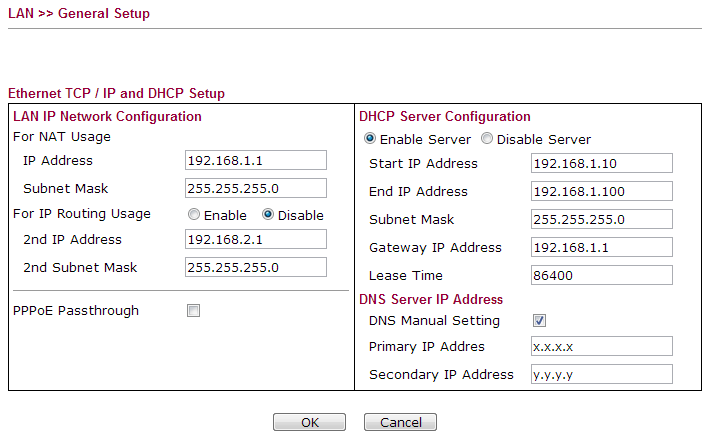 [/img]
You need one DHCP server, and any static IPs you assign (why?!) need to be outside the DHCP scope.
Since I've deactivated the DHCP server on the modem, I now have one DHCP server...on the router.
I just tried assigning a static IP to the Xbox since I'm trying absolutely anything I can think of to make it work. It no longer has a static IP assigned since it didn't work and I reset it.
Have you checked the IP address of every device for conflicts?
Yes. There are none. The only devices on the network while I'm doing any of this are the Xbox and occasionally a PC laptop to access the router.
To further what Cougar says, pf, can you list all the devices, which ones have static addressing, what those addresses are, and what DHCP servers are running? I know its a PITA but its necessary info.
I have absolutely no static addressing on the network now. I reset everything after that didn't work.
The only DHCP server running is the one on the router, I have disabled the one on the modem.
I've just taken a screen shot of the only two devices on my network at the moment.
[img] 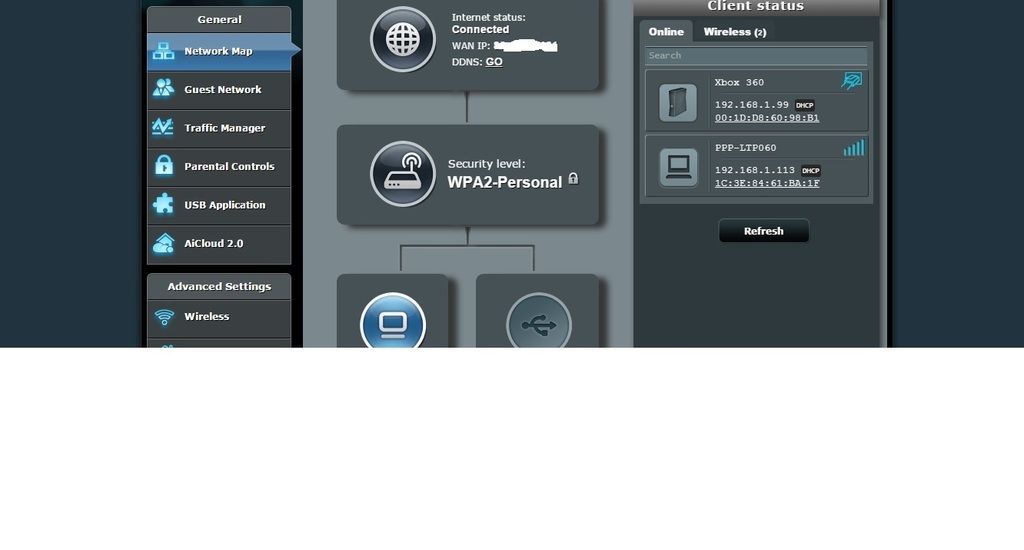 [/img]
It's it cos you've set for manual dns and then not provided any ip's?
I've got the option "Connect to DNS Server automatically" ticked "yes"?
But on the router you've not given a dns address?
I'm not an expert, btw.
So there's nothing whatsoever addressed statically now, and the only DHCP server is the router, and all devices are going via the router and the router alone?
Yup.
I've been trying everything I can to identify the issue and something VERY bizarre has just happened...
Xbox is wired to router.
Xbox HDMI goes to an AV receiver and then an HDMI goes from the AV receiver to my TV (bog standard LCD, bog standard AV receiver, no wifi or smart stuff)
When I turn on the xbox and the AV receiver, my internet on my laptop still works.
It's not until I turn on the TV that things start crashing??!!
I've just tried connecting the xbox directly into the TV and when the xbox is on everything is fine, but again, as soon as a turn on the TV the network crashes and I can't access the internet. As soon as I turn off the TV the internet works fine again.
wtf??
Internet works fine when just the TV and AV receiver is on. Problem seems to be when the TV AND XBOX are both on.
Could some sort of electromagnetic problem from my TV cause this?
Or is this just a red herring and the xbox doesn't fully activate until it detects an hdmi connection?
Interesting....is it a "Smart" TV? Or indeed a 'smart' AV receiver?
Sorry, you said its not a smart telly- apols.
Any Powerline adapters running here?
No powerlines adapters.
I've just stripped absolutely every single media connection out in my house now!
Going to start from the ground up in case it's even something as basic as a faulty device/socket etc that's throwing things off.
Yeah- good idea. I was leading up to trying to work out whether a broadcast storm was killing everything, it certainly sounded like one. But its a dumb telly.....
I guess I would just make sure that nothing is looped back into any other things, which is a bit captain obvious I know.
Oh, and just to check- there's no Chromecast or other similar device plugged into the TV? Something that's powering up when its switched on?
Oh, and just to check- there's no Chromecast or other similar device plugged into the TV? Something that's powering up when its switched on?
At the moment, I've got nothing else in the house hooked up to anything!
It has to be something to do with the TV.
I set the xbox up ready to select "test network settings". Turned off the TV and pressed the button. Internet was working fine on my laptop the whole time the TV was off, then when I turned it back on the results of the network test were on the screen...the xbox had connected to xbox live and was running fine while the tv was off...as was the internet on my laptop.
As soon as the TV is turned back on, everything goes down again.
What in the world could a dumb telly be doing to cause that?!
😆
Its very odd indeed.
When you say "everything goes down again", can you describe exactly what you mean? Is there any access at all, albeit slow?
Any devices that are connected to the internet are unable to access web pages/netflix/email servers etc.
There is no impact on wifi connection dropping out etc, it's just the ability to access the internet.
You can type in an address in a browser and it will just be a blank page.
As soon as the TV/Xbox is turned off, that page loads immediately.
If I start downloading something from a website, then turn the xbox/tv on, it will immediately stall. As soon as I turn it off, it starts again instantly.
Bizarre.
Warning - extreme IT ignorance risk:
Don't suppose the telly's connected to the phone line ?
I can only imagine at this stage that something on the TV or mains is causing interference on the dsl connection, which is possible but unlikely.
Have you got another TV that could be used to test with the Xbox? Or a socket bar with an isolator?
Is the TV floating (not earthed) ?
On a lot of cheap bits of kit there's no earth connection anywhere, and so everything floats up to 120V (240/2). Some things won't like that much.
If you've got a voltmeter, just measure the voltage from a real earth connection to something like one of the HDMI connectors on your TV.
Thanks for all the help last night guys, much appreciated.
I'm going to try (one at a time!):
1. Different gang socket
2. Different sockets around the house
3. Different TV!
4. Different xbox power pack
4. I'm going to try to get a hold of another xbox 360 too
I find it completely perplexing that the TV/Xbox combo has been causing me to lose access to the internet across two different sets of router/modems.
I don't want to go off and buy a new TV or Xbox unnecessarily, so the hunt for the problem shall continue 🙂
I'll keep you updated!
Good stuff pf!
Different HDMI lead? 1.4hdmi spec does ethernet.
An Xbox doesn't boot fully till it detects the telly has come on, it's probably still the Xbox.
Can we get pics of the Xbox network settings screen and the router DHCP server screen.
FWIW I use the exact same router so I'm quite familiar with it.
If he only things on and connected are Xbox, router, modem, do you have net access? If not, any warning lights on anything? If so, log onto the router with the Xbox browser for a look-see.
An Xbox doesn't boot fully till it detects the telly has come on, it's probably still the Xbox.
I was going to suggest that, but ruled it out when the OP said he'd switched the TV off after it'd booted. Plus IIRC, the Xbox displays error lights when that happens.
Few more thoughts. Are you in the master socket or an extension? If the master, take the faceplate off and connect to the test socket behind it. If it's an extension, go to the master and disconnect the orange bell wire from pin 3.
I'd like to ascertain whether you lose the network or Internet access. Can you still ping other devices when it's being symptomatic? Transfer files?
Have you got another microfilter you could try?
It has to be something to do with the TV.I set the xbox up ready to select "test network settings". Turned off the TV and pressed the button. Internet was working fine on my laptop the whole time the TV was off, then when I turned it back on the results of the network test were on the screen...the xbox had connected to xbox live and was running fine while the tv was off...as was the internet on my laptop.
As soon as the TV is turned back on, everything goes down again.
What in the world could a dumb telly be doing to cause that?!
When you say turned the TV off, do you mean Standby or Pulled the plug? Any difference? Also, any changes to the test results if you left the TV on and pulled the HDMI connection to the Xbox?
RM.
That's a point actually.
Have you still got the component video cables for it, use those direct to the TV instead of HDMI to the amp?
I'm not sure if you said but, what happens if the TV's on but on a non-Xbox channel?
The 360 doesn't support ethernet over HDMI, and the AV and TV are apparently dumb, so I think we can rule out a new ethernet segment appearing.
PF tested the network setup via the Xbox's own testing method (see previous posts) and it worked ok- until the TV was switched back on.
I'm thinking mains noise and REIN/SHINE stuff now.
.....mind you, if it [i]doesn't[/i] do it when just the TV is on, then it can't be that. Component cable testing= good idea.
Different HDMI lead? 1.4hdmi spec does ethernet.
I've tried 5 different HDMI leads, but no idea what spec any of them are.
An Xbox doesn't boot fully till it detects the telly has come on, it's probably still the Xbox.
I'd picked up on that last night, but what is odd is that I can turn on the xbox and get it ready to do a network test (which will fail if the tv is on)...then turn of the TV and press the button on the controller to start the test...then when I turn the TV back on I can see that the xbox had successfully connected and completed the test.
Can we get pics of the Xbox network settings screen and the router DHCP server screen.
Will sort that out tonight.
If he only things on and connected are Xbox, router, modem, do you have net access? If not, any warning lights on anything? If so, log onto the router with the Xbox browser for a look-see.
As above, I can log into xbox live when the TV is off (although obviously I can only check it has worked by turning back on the TV, which then throws the connection again).
Few more thoughts. Are you in the master socket or an extension? If the master, take the faceplate off and connect to the test socket behind it. If it's an extension, go to the master and disconnect the orange bell wire from pin 3.
In an extension (I think the master socket is in the hall).
I'd like to ascertain whether you lose the network or Internet access. Can you still ping other devices when it's being symptomatic? Transfer files?
It seems to be a loss of internet rather than network. The network appears to function correctly, I can still get into the router from my laptop and it is responsive. I can't get on any web pages or connect to anything that is outside my network. I'll try a file transfer tonight.
Have you got another microfilter you could try?
I've tried a couple but have just borrowed one from work to try in case I've got two dodgy ones.
Here's the acid test pf- does the problem emerge just when the TV is on, or does it need to be TV + Xbox?
If you can still access your Router when you have the problems, it would be worth checking the connection status page from there and see if points to anything? (unless you've already done that?).It seems to be a loss of internet rather than network. The network appears to function correctly, I can still get into the router from my laptop and it is responsive. I can't get on any web pages or connect to anything that is outside my network. I'll try a file transfer tonight.
RM.
.....mind you, if it doesn't do it when just the TV is on, then it can't be that.
Here's the acid test pf- does the problem emerge just when the TV is on, or does it need to be TV + Xbox?
This is the odd bit.
TV on: fine
Xbox on: fine
TV AND Xbox on together: no internet access
But again the TV could be a red herring if it's actually just triggering that last part of the boot process in the xbox, which then in turn is buggering the network. But then again...why would the xbox seem to connect to xbox live with the tv off if it wasn't fully booted? hmmmmm
Bell wire. Bet you 2p. Do what I said in the post you quoted just there. ^^
Any update on this pf?
Work woes have been trumping my network woes for the last 24 hours so haven't had the chance to look at it again (which also means every single device and cable in our house is still currently lying in a pile on the floor 🙂 )
Mrs PF tells me that she streamed netflix from her tablet to the chromecast last night no trouble at all (which is chromecast>av receiver>tv).
So it definitely seems to be an xbox/tv issue.
So it definitely seems to be an xbox/tv issue.
Is your xbox wired or wireless? If it's wired, could be a weird electrical thing shorting stuff out, something not grounded right somewhere.
UPDATE: Problem solved (sort of)...Cougar nailed it with:
Bell wire. Bet you 2p.
I put together a sort of logic chart the other night and started making my way through it this afternoon, checking absolutely every possible combination and variation of power/phone/dsl/wifi/wired etc
The main things that stood out were:
1. Even just turning on my TV (not connected to anything other than mains) slowed the speed of the internet (according to speedtest) significantly.
2. I even put it in another room (no easy task, it's a 50" plasma) and plugged it in...it still slowed the network when it was turned on.
3. As soon as BOTH the xbox and TV were connected, the internet access ground to a halt.
4. Connecting the xbox to the TV with analogue connectors presented the same problem...however connecting the xbox to a different TV did not present this problem.
4. Same results for every power and phone socket in the house, with every combination of cables that I have.
Near the bottom of my list (of course) was checking the different variables from the test socket in the hall. BINGO. Everything worked fine, even when all devices were turned on.
So...my bell wire has a fault in it, which only becomes apparent when my plasma TV is turned on (internet access slows) or when both the TV and Xbox are turned on (internet access halts). I can by pass this problem for now by connecting straight in to the test socket.
Many many thanks to all those who offered help, particularly codybrennan and cougar 🙂
🙂
Just disconnect your bell wire, it's a useless relic anyway (unless you have a hipster-esque GPO-issue telephone).
Keeps the test socket fresh in case you need it again (well, it saves on mishaps should a wire get yanked and you find yourself with no backup).
Glad you got it sorted, sounds like an epic bawache...
Just disconnected the bell wire...
Tried using regular socket and the problem persists. Hmmmmm
I'm not too bothered, I'll just keep the router/modem in the hall and use the test socket.
My Internet speeds have actually increased by about 25% now too
\o/
The thing with the bell wire is,
As SK said, it's a throwback to old telephones which needed an additional feed to make the bell ring. In a modern setup it serves no purpose but moreover can act like a great big aerial, picking up all the dirty RF interference your house generates and injecting it straight into your ADSL connection. That's where I was going with this, the only logic I could see was that your TV was causing interference and your phone network was picking it up.
If you still have problems with the bell wire disconnected then it's obviously not that but the point still stands; [i]something[/i] in your internal wiring is causing problems. If you're not actually using extensions - common in the days of cordless phones where extension sockets are no longer required - then you're well served by just getting rid in their entirety (which is ostensibly what you're doing by plugging into the test socket).
What I'd do if I were you - in fact, what I did - is get an ADSLnation faceplate to replace the master faceplace and invariably crap microfilter. Makes for a neater solution, and can solve a lot of ephemeral hard-to-trace annoyances. Here - http://www.tandyonline.co.uk/nte-2005-master-faceplate.html
If you do still need extensions you can then connect them to the pre-filtered phone socket, negating the need for multiple filters on every socket in the house.
NVM
Nice answer Couger. Glad you're sorted PF. Love stw sometimes!
Cougar, again...thank you.
I'll order one of those face plates...if nothing else it will at least avoid having the other face plate dangling off and with wires poking out! 🙂
It's funny, I've had a really difficult month or two at work, pretty stressful stuff as far as my stuff normally goes.
Yet, without a word of a lie, this network problem has been causing me more stress! I sat back last night, with everything actually working for a change, and honestly felt the most relaxed I've felt in ages haha!
🙂