Forum menu
I'm trying to give one of my relatives a bit more control over their TV.
As is they've very limited motor control now so really struggle with a TV remote.
I want a basic volume up, volume down, channel up chanel down control, nothing else.
I've found a large trackball that I think will be great for input (roll for volume, massive button for channel and more importantly its stable so won't need chasing round his table) but, the question is what to output it to to then interface with the TV.
Ideally a chrome cast or similar that's easy to setup but, I* can likely manage to set something up with a raspberry pi if needed though I've never fiddled with either so I'm looking for some help...
Out of the box, does a chromecast or firestick give any control over the basic TV function, ideally from a pc connected, mouse map-able input?
For the raspberry pi option I'm thinking of is possible the best route would be to clone the existing IR then map a few mouse inputs to relevant outputs. Beyond then being the basis for a lot of home bake solutions my knowledge of the RP stops at it doesn't have a pastry base so isn't a real pi.
Any feedback from someone who's done similar, pointers on places to look (I gather there are other forums for other things) and advice on feasibility would be greatly recieved.
*by I, I mean I'll find someone who can code
I don't think a Chromecast can control the TV. I don't think that is the way to go. Pi might be ok. Personally I'd use an Arduino. Easy to add an IR transmitter and then you can put it in a box with some large arcade buttons or a trackball. Pretty straightforward to wire up and the code will be easy to make it replicate the current remote if you can get the timing somewhere.
Just had a quick Google. Here is an instructable for making a thing that'll extract the timing from your current remote.
https://www.instructables.com/id/How-to-control-your-TV-with-an-Arduino/
I can't really help.
But chromecast is merely a method of streaming.
It does nothing other than stream what you tell your phone to tell the Chromecast to stream into an hdmi port its hot no bearing on the tv itself.
If they are happy with how the tv works at the moment you just need a remote control to fit these requirements rather than feeding a different media dource into the mux?
beaten by 2 mins 😂 Was even going to post that same Instructables link 😂Personally I’d use an Arduino.
2 big arcade buttons, 360' rotary encoder with something like an RC car wheel/tyre on it maybe as a big scrolly volume thing. Electronics would cost a few pounds, put it in a Maplin-style project box (or ideally design/3d print a case). Get it to replicate original TV remote control, very simple code.
Definitely the best/most foolproof way as relly can use existing TV and setup just with new custom controller!
Would a TV Remote app on a tablet work?
A chromecast offers some control over the TV in terms of volume, but you would need to selct the input from a tablet/phone.
Pi - Mine always crash so can't comment.
A chromecast offers some control over the TV in terms of volume
It doesn't, you can turn the output of the chromecast down.
There are some very basic big button remotes would one of those fixed in place with velcro ore something not be simpler?
Would a TV Remote app on a tablet work?
The difficulty is the tablet, making it upright, visible and stable enough that it doesn't get knocked over is very difficult, also the screen needs to be always on as he doesn't have the dexterity to activate the touch screen.
It was broadly speaking my first thought though.
Personally I’d use an Arduino.
beaten by 2 mins
That sounds like a great start thank you both. I'll take a good look see at that.
A few big arcade push push buttons might be a good idea to, bit more customisable than the track ball and I know exactly where to get a nice custom Stainless case done which would please them no end.
There are some very basic big button remotes
Surprisingly lacking in actualy big buttons, they seem to be about 10-15mm square, I could really do with 40+ mm.
There are some very basic big button remotes would one of those fixed in place with velcro ore something not be simpler?
I think that would be the first thing I would investigate, e.g:
https://www.alzproducts.co.uk/alzheimers-simple-remote-controls
I'm sure there are other options available, and Parkinsons support organisations will be able to help. You won't be the first person trying to solve this problem.
An accessible remote is a fairly cheap and easy thing to try first, before trying to design and build a custom controller. You also need to think about how easy it will be to manage in the long run. A remote just needs a couple of batteries replaced once in a blue moon, but a custom controller is inevitably going to be more complicated to set up and will have more things that could go wrong.
An accessible remote is a fairly cheap and easy thing to try first
Had been using one for a while but no longer able to do so.
We're at the end of basic off the shelf solutions certainly, the recommended approach now is full time residential care which is a non starter
I've a few customers whose market this is and their answers are DIY, staggeringly expensive (for minimal use required) or residential care.
If they can manage a trackpad then maybe these ones with arcade buttons would work?
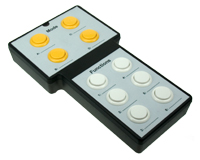
https://www.livingmadeeasy.org.uk/leisure/non_standard-remote-controls-p/domino-infra_red-universal-remote-controller-0106073-1696-information.htm
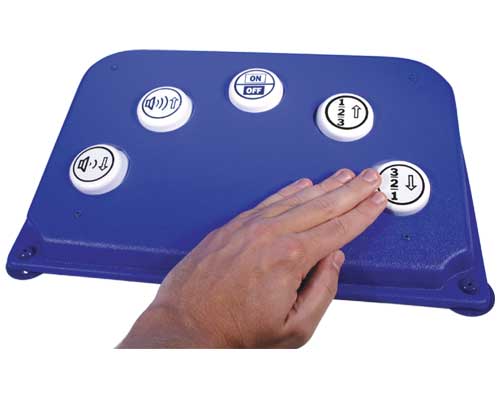
https://www.livingmadeeasy.org.uk/leisure/non_standard-remote-controls-p/wireless-tv-remote-0108406-1696-information.htm
Not cheap but a lot less effort than programming an Arduino etc.
Oh ta, that second looks like the right sort of thing.
Not cheap but not really important if it works.
I've ordered the arduino so will have a play with that - in practice a heath Robinson solution is likely best simply because they'd be extremely pleased it was a built and cobbled solution.
They'd rather I built it and it barely worked than bought it and it was brilliant. That's old engineers for you!
Okay then taking onboard your remote buttons stillbeing to small.
I'd buy a big buttoned remote.
The contacts are normally just bridged by a we conductive bit in the back of the button. Solder each open end to a bigger momentary switch?
Thats real engineering.
If you get a Google Home speaker, can use voice commands to control the Chromecast. ie tell it to play something on YouTube etc. Maybe easier than casting from a tablet?
Also supposed to be a new Chromecast Ultra available soon, which may include some sort of remote control / voice commands.
I think we need clarity here.
Are we trying to control tv, eg freeview or sky.
Or are we trying to view content. Anything that involves sticks or chrome casts is not "watching tv" it requires an account or app for each service you need to search each service individually to find something you want to watch.
While in theory they might achieve something similar its a hellish complicated route to flick up and down the channels.
Solely for broadcast TV.
I've not used a CC or the like so thought it may offer a simple solution but looking at the first few replies it's a non starter in this instance.
Voice is not an option regrettably as the lack of motor control badly impacts on speech. We've tried a Google home and echo for a few odds and sods like bedside lights but 9 times out of 10 they didn't pickup the key phrase or, if they did then just kept asking for clarification.
tbf this is a good shout if you want a minimal-tech solution. Doesn't even have to be a big button remote, ANY all-in-one remote would work as the "donor". Just wire up the channel/volume/power contacts to arcade buttons & fabricate a housing.I’d buy a big buttoned remote.The contacts are normally just bridged by a we conductive bit in the back of the button. Solder each open end to a bigger momentary switch?
If you do want to go down the Arduino route & get stuck give me a shout. Looks dead simple (I've messed around with IR stuff before, there are some good existing libraries so it wouldn't require any difficult stuff done from scratch) and would make a great learning project if you're looking to get into that anyway.
That blue thing with big buttons looks great, but bloody hell 250 quid!!
That blue thing with big buttons looks great, but bloody hell 250 quid
Ha, indeed but if it makes life a bit better day to day its worth 10 times that.
The contacts are normally just bridged by a we conductive bit in the back of the button. Solder each open end to a bigger momentary switch?
May well be the best solution, but I've ordered the arduino kit now anyway so if nothing else I'll give that a try and if I get no further that's Christmas for one of the nephews sorted.
Assuming they have Wi-Fi,
One of these:
https://smile.amazon.co.uk/dp/B07PJV3JPR
> https://smile.amazon.co.uk/dp/B07PJV3JPR <
And one of these:
https://smile.amazon.co.uk/Broadlink-RM4-Universal-Control-Compatible/dp/B07ZSG9Y67
https://smile.amazon.co.uk/Broadlink-RM4-Universal-Control-Compatible/dp/B07ZSG9Y67
"Alexa, turn the TV down."
@dangeourbrain Figured I probably had enough bits in my Box o' Shite™ to attempt this, so had a play around today. It only bloody works!! Got some 40mm arcade buttons from eBay on the way, will 3d print some kind of wheel control for the volume, and a case.
Range isn't amazing right now but I'm sure that can be improved with a bit of tinkering (I know very little about IR, or electronics in general tbh!)
If you do want to try to build your own I can send you the code & otherwise help out (I can send you the whole thing in a jiffy bag if you want)
[url= https://i.postimg.cc/hG2DsXR3/IR.jp g" target="_blank">https://i.postimg.cc/hG2DsXR3/IR.jp g"/> [/img][/url]