Any thoughts on this problem...
I'm trying to change the Page Background (White bit to another colour). Same thing for the Blog pages. I though simple button tweek in the theme editor page..Nope. Unless I'm missinging something obvious.
Main site background colour no problems.
Chat GPT gave me this... but still to no avail 🙁
body.page {
background-color: #f0f0f0; /* Replace with your desired color */
}
body.single-post {
background-color: #f0f0f0; /* Replace with your desired color */
}
The site in question, GF's Printworks:
https://www.jomcallister.co.uk/
Custom CSS so far for other tweaks on the Wordpress Boutique Theme with WooCommerce.
.boutique-primary-navigation {
background: #0000005e !important;
xmargin-left: .874em;
xmargin-right: .874em
}
nav.woocommerce-breadcrumb {
display: none;
}
/*** Disable the Search Box in the Storefront Theme
*/
.site-search form {
display: none;
If i understand you the div you need to change the css to is .site-content .col-full
[img] 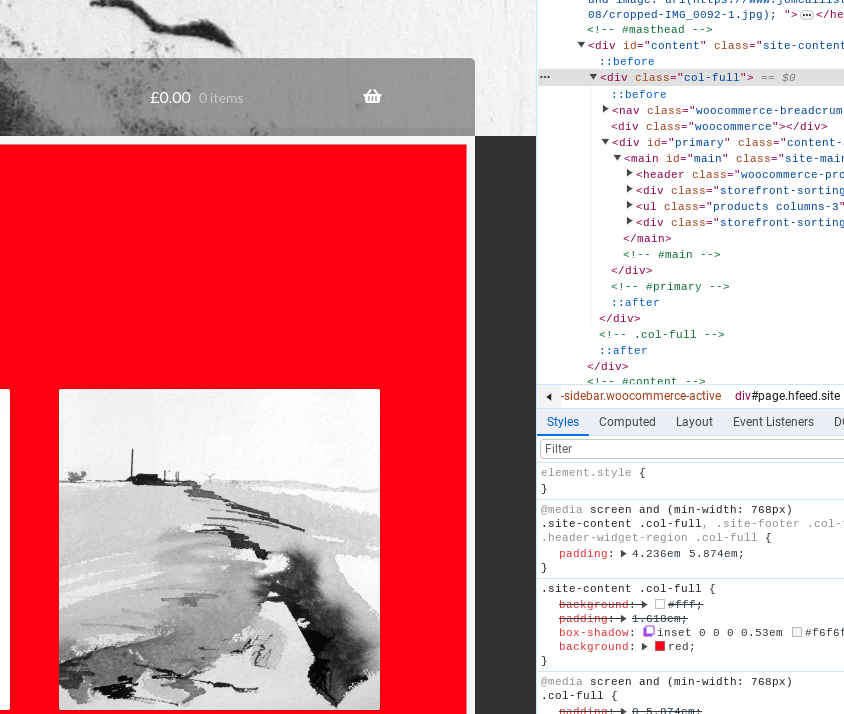 [/img]
@smoky_jo
Thats exactly what I'm trying to do. What would the Additional CSS look like ?
My attempt...but nothing changes.
.site-content.col-full, {
background: #red;
}
.site-content.col-full, {
background: red;
}
or replace the word red with your rgb or hex code of choice
Trying the code now. Fingers crossed.
Just realised i dropped the space between the two divs, it should be
.site-content .col-full {
background: red;
}
Thats works 🙂 Thank you so much. All morning I have been messing around with that 🙂
I'll let the GF pick the colour, what ever I pick will wrong 😉
Note: I had to put your code above the .boutique bit first 🙂
i see you've put it in the html of the shop page, you could add it in the customizer as additional css. In the dashboard got to appearance > Customize then click on additional css and add it in there.
if you only want to change the background colour of the shop and not the rest of the site then your code should be
.woocommerce-shop .site-content .col-full {
background: orange;
}
Many thanks. So happy with this 🙂
Thanks for looking people, Jo-Anne stats are booming :-))))
Don't forget to check out her prints and drawings 🙂
Special STW rates, discounts could be arranged 😉 if your interested 🙂
https://www.jomcallister.co.uk/
PS If you spot any glitches on the site, tip me the nod 🙂