
MegaSack DRAW - This year's winner is user - rgwb
We will be in touch
About every ten seconds, my typing/browsing gets interrupted by some search thing that pops up on the left hand side. I have tried to determine how to shut the stupid function off, but much like RDS on my car radio, I can't find it and it is provoking me, at short intervals, into apoplectic rage.
Please help! How do I make it stop? 🙁
[img] 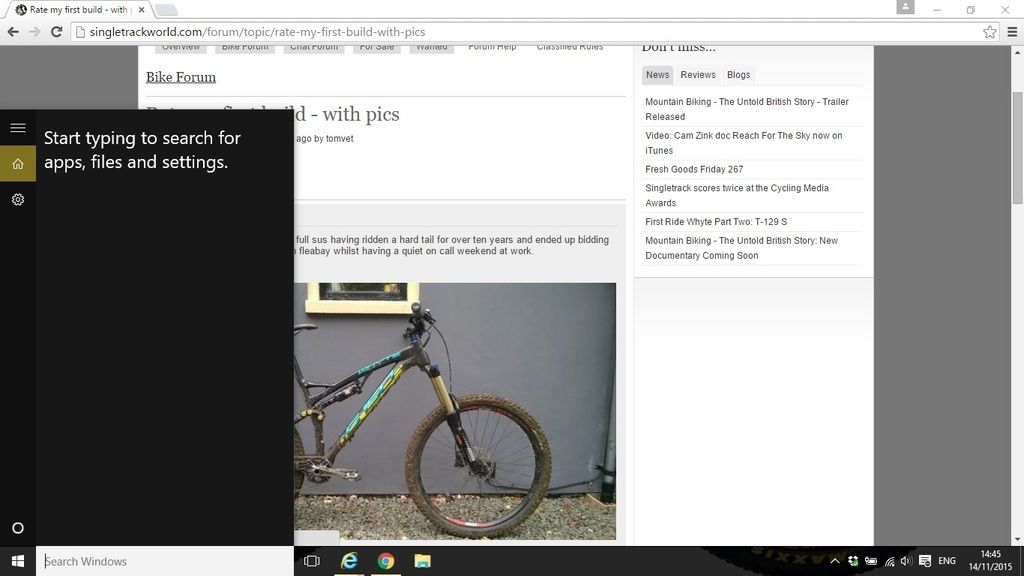 [/img]
Well, I just learnt it's called 'Cortana', but every setting I try will not remove it, or stop it from popping up.
Is your Windows key stuck? Mash the keyboard.
Thanks for that, except that the advice states:
1. Right click on the task bar.
2. Select the "Search" option.
3. You'll now see three new options for what to do. To make it go away altogether hit "Disabled."
4. If you still want to keep it but want more space on the task bar, select "Show search icon" and the box will be replaced by a little magnifying glass icon.
5. To make it all come back again follow the same steps but hit the option to enable the search box.
Yet when I select the 'Search' option, all I get is 'Hidden', 'Show search icon', and 'Show search box'.
No option to 'disable' appears.
Have you tried uninstalling Internet Explorer?
Excellent, thank you sobriety, been bugging me for ages too.
I thought Cortana was voice-activated.
Are you shouting at your PC?
Or perhaps it's picking up on you muttering darkly to yourself as you browse the forum?
I have now tried unpinning it from start menu, but it makes no difference. It just keeps appearing exactly as in the screenshot, about every 30 seconds. 👿
Follow the instructions as before and select "hidden", worked for me, not popped up since
Tried that, rwb61. It worked for a few minutes, but then the box started popping up again.
There's an option under mouse & touchpad to pop up Cortana with a three finger tap, your computer is probably thinking you're doing that.
According to the internet, though I can't find that setting.
The hide just seems to remove it from the taskbar, you can turn cortana off, it is on my system and I don't ever recall making that change.
Odd I have 4 PC's running Win10 at home and have never seen that ever?
Well, we have four PC laptops at home, all running Windows 10, and two out of four of them are experiencing this, exactly as you see it in the screenshot, above.
That would be funny, tails, except that I have been an exclusive Mac user since at least 1993, and still have an iMac desktop as well as an iPhone.
And if there is one thing that has become clear to me in the last number of years, it's that they all brands are shit. Without being in any way a technophobe, I flipping HATE the things.
Is it when typing or when using trackpad or when speaking or when doing nothing?
My work laptop had an uber sensitive trackpad with multi touch things going on - I disabled them as it was causing all sorts of zooming in, menus openin etc etc.
I have found Linux Mint seems to be an ideal solution for relatives laptops who are getting annoyed with Windows 10. If all you do is browse the web, write a few word docs and play a few indie games it's ideal.
Still don't get what you are suffering, if I type anything into the search do daha on any of the 4 machines all I get is what I typed?
All these machines were "upgraded" from Win8 or Win7 though so perhaps its a new on Win10 only problem?
[url= http://www.pcworld.com/article/2949759/windows/killing-cortana-how-to-disable-windows-10s-info-hungry-digital-assistant.html ]http://www.pcworld.com/article/2949759/windows/killing-cortana-how-to-disable-windows-10s-info-hungry-digital-assistant.html[/url]
Yep. It's the three-finger tap shortcut that's doing it?
I suffered from it on the lappy but not the desktop.
is your Mouse a blue tooth one?
You can disable the pad if you are using a blue tooth mouse.
I used to have all sorts of weird things happening, when my fingers went anywhere near the pad.
Buy a Mac?