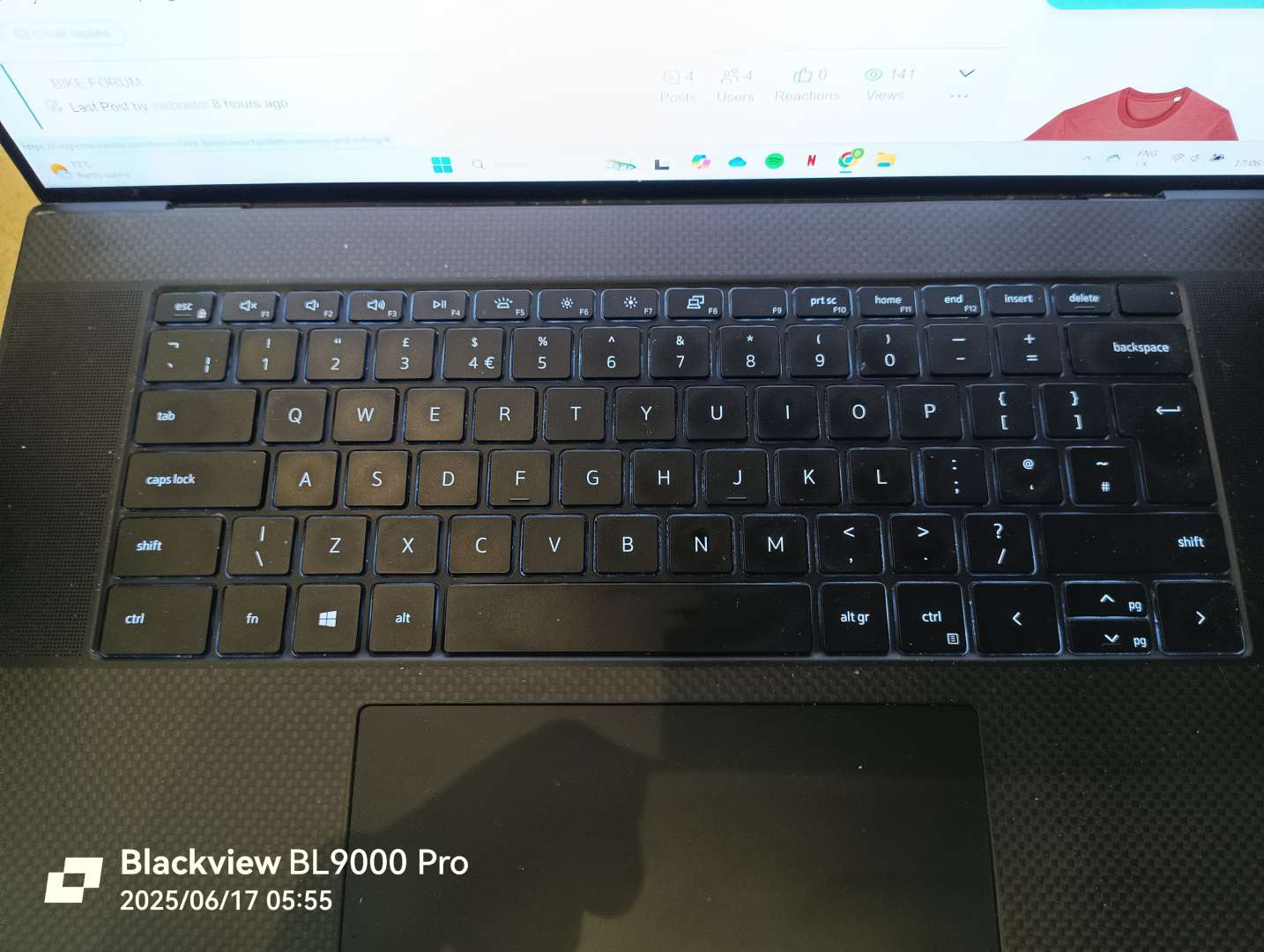
The volume keys (F2/3) used to work on their own, but all of a sudden I have to press the fn key. The arrows no longer move cells in Excel, they scroll the screen across/up/down
Sure there must be other things I haven't noticed.
Guessing a sticky key somewhere, but I haven't spilt anything and none of them appear stuck. If so, which one?
Scrolllock (ScrLk) is usually the culprit for the arrows change in function.
edit - don’t know what laptop you have but some have a fn + function key combo that activates scroll lock, if there’s no dedicated key on the keyboard.
Scrolllock (ScrLk) is usually the culprit for the arrows change in function.
edit - don’t know what laptop you have but some have a fn + function key combo that activates scroll lock, if there’s no dedicated key on the keyboard.
It's a Dell XPS 17 - don't know if the photo is showing now as I edited and it didn't show up straight away
Scrolllock (ScrLk) is usually the culprit for the arrows change in function.
edit - don’t know what laptop you have but some have a fn + function key combo that activates scroll lock, if there’s no dedicated key on the keyboard.
It's a Dell XPS 17 - don't know if the photo is showing now as I edited and it didn't show up straight away
dell is Fn + S, iirc. Haven’t had a dell for a few years now.