
MegaSack DRAW - This year's winner is user - rgwb
We will be in touch
Having replaced the case of my PC after some recent failures, more recent problems indicate that's its quite possibly the GPU overheating.
The problem is the NVIDIA GTS 250 has its cooling fan outlet 70% blocked by any card sitting in the next PCI slots down the mobo. I have a dual TV tuner and a sonud card in there and both form factors cover most of the fan outlet. Is this a common problem or do people have work arounds?
Different case with more vents or take a dremel to the one you have?
Get freestanding fan and aim at the computer
HTH
Which card is it,i.e. make and model?
Have you any spare PCI slots left on the board? If so, move the existing cards so there isn't anything next to the Graphics card?
its not a case fan issue, its the GPU mounted fan.
Only 2 PCI slots below the GPU card slot and they're both taken with the two cards mentioned.
My card is nVIDIA GeForce GTS 250.
it look sthough like theyve redesigned it a bit as all the pix of that model are different to the one I have and have the fan a bit further back clear of lower pic cards.
Have you tried cleaning the fan and replacing the TC on the heat sinks
I don't have anything useful to say, except for this thread seems to have generated an ad for Fish Pedicures!
its a newish card. Its not that the card isnt functioning because teh fan isnt working, its just that the fan outlet is in such a position that any other pci will block it. I was wondering if this was just a silly design flaw or whether Im "doin it rong".
You can use a program like rivatuner to manually increase the speed of the fan.... and noise. If it was me I'd hot glue a decent size fan on that blows in the genral direction of the graphics card, has solved several similar problems for me in the past.
It can't be [i]that[/i] close, or the heatsink/fan would be rubbing on the back of the next PCI card. I guess you have no choice in PCIe slots for the video card.
If it's a normal mintower / tower, and the case cooling is good I wouldn't worry too much - the video card will be the hottest bit and as long as there is cooler circulating air and you're not over clocking it I'd expect it to be OK.
It can't be that close, or the heatsink/fan would be rubbing on the back of the next PCI card. I guess you have no choice in PCIe slots for the video card.
2mm of clerance between the graffix card body and the backside of the next card.
The nVidia is a double width card and it takes up all the space it can, right up to the line of the lower pci slots.
Fortunately my case has loads of big fans. Only problem is I have it in a cupboard so I think that's the limiting thing as well as the GPU fan enclosure. Will "adapt" the cupboard with a holesaw this week and try again.
ta.
Come GPUs are meant to be double-width, aren't they?
New case.
not a case issue. If anything its a mobo one - need a set of pci slots further away from the GFX card slot.
see the GFX slot dark blue, third in from the top left - once the nvidia is in, then you can [i]just[/i] fit a card in the next slot to the left, but it leaves no room for the fan exhaust on the vcard. Only two slots and I have 2x further cards.
[img] 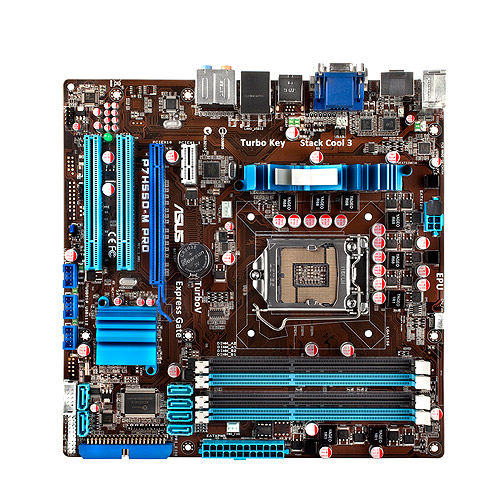 [/img]
Stoner - MemberWill "adapt" the cupboard with a holesaw this week and [s]try[/s] [i]fry[/i] again.
FTFY 🙂
I have often thought a range of furniture with a large slow moving (hence silent) fan in the back would be pretty useful item. And an IR repeater concealed in the front. So you can put your electronics in there and they'll stay cool and the remotes will still work...
Any investors?
Would this help?
http://www.cclonline.com/product/41485/870A-G54/Motherboards/MSI-870A-G54-Socket-Socket-AM3-nbsp-Motherboard/MBD1163/
cant you just take the tv card out for now to see if improving the air cirulation helps fix the problem or not?
TBH, I think that getting it out of the cupboard (even if it's temporarily for testing purposes) is a good first step.
I'm not familiar with the specific GFX card in question, but are you sure that the exhaust is the exhaust? The dual-height cards I've seen vent hot hair out of a duct at rear of the card, the bit that you're blocking is an intake.
Either way; is this HSF assembly on the GPU clear, or is it full of dust?
Do either of the PCI boards generate heat? Is there any value to swapping over the two cards? (I'm thinking the TV turner might get a bit warm...)
cant you just take the tv card out for now to see if improving the air cirulation helps fix the problem or not?
Good point. +1 to this also.
Would this help?
Personally, I'm no fan of Microstar motherboards.
Had the same problem, albeit with a passive card rather than an actively cooled one.
Cured it with two 120mm fans blowing into the case, one of which blows directly into the gap between the cards ensuring cool air gets in there.
Annoyingly had to buy a new case to do this.
other two cards run cool.
No dust. New build.
Im not splashing out on a new mobo unless I absolutley have too.
Can you get a pci slave on a string? you know, plug a connector into a pci slot and at the end of a ribbon have a femal pci port so you can lay the pci card (tuner, say) on a rubber pad at the bottom of the case?
fortunatley got 2 big 120mm fans on the case, will wind them up to 11, drill holes in the cupboard door and run it some more.
ridiculous, fish don't have feet. Fingers, but no feet.Fish Pedicures
On some (or maybe all) cards the fan is just a separate unit bolted on. You can un-bolt it and replace with something else - different shape, or just set up some other arrangement.
Water cooling for the GPU?
+ you could WC everything while your at it, so near silent
- probably more costly than a new MOBO
How are the 2 120mm fans blowing? Best to be blowing air in at the bottom and blowing out at top so you get a proper flow of cooler air
Your graphics card is a dual slot one, hence your are not supposed to use the PCI slot directly underneath the PCI-E one precisely because it won't allow air into the fan intake on the graphics card. So you either ditch one of the PCI expansion cards or ditch the Micro ATX motherboard and get a full sized ATX one - this will have more than 2 PCI slots underneath the PCI-E one which will enable the graphics card to breathe.
Moving it out of the cupboard might help temporarily but its not healthy for the graphics card to have its fan blocked long term. Nvidia cards generally run hotter anyways, I wouldn't like to exacerbate the problem.
Thanks for all the help guys, esp afro, that makes sense. I reckon I can ditch the sound card if the problem persists.
Realised I had the 2x fan controllers hard set to low giving max 33% speed control - now on high. Have also modified the cupboard to increase airflow.
[img]  [/img]
will see how it goes.
Water cooling? Nice and low profile, quiet too.
one chassis fan set to low, the other to mid (both on high is bloody noisy) and the GPU temp seems stable at 58deg.
GTS250 limit is 105deg apparently! 😯
vent holes in cupboard working a treat. Graphics card running at a gentle 50-56degrees. No further issues.
Getting a new case might have been unnecessary but the new one has two massive fans and lots of air movement so has probably contributed to better temp performance.
Nice to have comfort that it wasnt a mobo/graffics card/ram issue.