Right i have my tv and i want to buy a pc tower and link them both together using the tv as a screen, it has hdmi ports spare so could i link the desktop through a hdmi lead to the tv? Ultimately i want to stream videos/tv online in hd thus getting rid of my tv package, (all repeats anyway) what do i need to do this inc spec of the desktop il buy.
just make sure that the PC is specced with HDMI output from the graphics card. If graphics are onboard then you may be limited to DVI & VGA in which case you will need to specify the addition of a graphics card.
So make sure its got hdmi on graphics card and thats pretty much it?? Wiress mouse and keyboard n away i go? Bit easier than i thought, and if i want blu ray i obv get a blu ray drive?
or just buy a WDTV live box? Silent, wifi, HDMI - control it from your idevice - brilliant
Take a look at xbmc to run the media handles everything well. I did the pc tower for ages but now have an xpc shuttle as its small and silent. Depending on what you have for sound check the outputs.
Xbmc also has a free remote app on android.
Wireless keyboard is good and unplug the lights on the case.
IME with an NVIDIA graphics card is it's a bit of a faff.Graphics has a HDMI port hook this up to the TV no problem mess about with the settings on the pc to get the display working then do something with the audio restart the pc and if it.s in the right mood it will all work!
Plus the fan on the pc is noisy, the pc is getting on a bit now so would think the latest ones may well be a different kettle of fish. We now have a laptop with an HDMI port on it and use that for iPlayer, 4od, etc.
IMO the most important thing to consider when using a PC for this purpose would have to be noise. You want it be as quiet as possible so check reviews of all of the components to see what they say about how loud they are. You might also want to look at "silent" cases as they have some sound proofing and will reduce the noise heard.
Our cable TV package became redundant when we got a SmartTV with a Freeview HD tuner built in. Connects wirelessly (or wired) to the PC via your broadband router, for playing films / music / photos etc, straight off the pc. Its as simple as browsing through some TV menus to look at the PC content. If your TV isnt a SmartTV you could just get one of [url= http://www.richersounds.com/product/blu-ray/samsung/bdd8500/sams-bdd8500 ]THESE[/url] & it will give you Blueray & a TV recorder in one go. Much easier (for a non-techie) to use.
That's how I ended up with the shuttle it's got a laptop power supply and w2 small silent fans. Runs silently with a low power chipset.
I have an Acer Revo that's currently hanging on a TV - Small, Totally silent and does all you need
A small wireless trackball keyboard means it's great for sofa surfing too
[img] 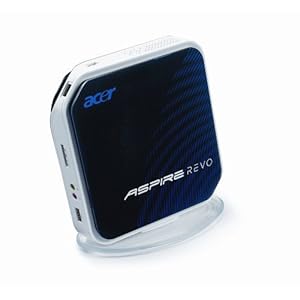 [/img]
A nettop like the Revo above is the way to go if you want a PC. There is a good selection at the link below:
I would also consider getting a PS3 instead. It works well as a Blue Ray player and DLNA client and, unlike most TVs and Blue Ray players, offers support for BBC, ITV, C5 and 4od catch up services. Costs £120 and approx £20 for a remote.
It will also support NetFlix, Lovefilm etc.
I would like it to be able to download movies and stream the likes of i player and 4od yt and able to use fb for the wife and ebay and ob stf!! ; ) ive sin some of the mini pcs but they have reviews that theyre underpowerd for media use or lack a disc drive to install drivers needed ie the sound and visual drivers, it would be inside a cupboard so sound wouldent be too much of a hassle, however i do like the look of that acer, can it do all of above and does it have hdmi ready compatiblity? I alreday have an xbox for gaming duties but would just like to replace the tv package.
If graphics are onboard then you may be limited to DVI & VGA in which case you will need to specify the addition of a graphics card.
DVI is electrically compatible with HDMI, you just need a little adapter dongle and some way of getting the sound out, either a separate cable to an input on the telly (if it has a DVI-aware HDMI input) or a separate sound system or somesuch.
A Raspberry Pi running Raspmbc does the job for me.
Thats the problem with splitting DVIi out to HDMI - if theres no way of separately getting the sound out too.
I run an Xbox as a media extender for my W7. My "TV" is actually an old commerical samsung outdoor display screen. But its not HDMI compatible so I have a magic box that splits the HDMI from the Xbox into phono sound & VGA. Works pretty well.
For the boys room Im planning on getting somethign like this and running an android media streaming client on it to run off the server pc. it will be limited to stored files and iplayer/4od apps though as I dont have an aerial in the boys room and i dont think it can stream from the PC tuner cards.
http://www.morgancomputers.co.uk/?page=product_detail&product=13553
So what all in system would suit me??
however i do like the look of that acer, can it do all of above and does it have hdmi ready compatiblity?
Yes
How do i install the os and do i need to install drivers for sound/audio?? And im guessing these are quiet and able to use mouse/keyboard with this wirelessly?? Muchas
You buy them with the OS pre-installed, mine has Win7 - all drivers needed are obviously included
There's also Linux versions if it suits
I just installed XBMC and left it at that