I'd like to stick my pdf 'how to' guides online somewhere so I can just link to them, rather than having to email them out every time someone wants them.
I'm far from a computer whizzkid, so keep it nice and simple please, and also FREE! 🙂
Sounds like something Google Wave could handle
I'm only guessing though, I really haven't a scooby what Wave does
Dropbox is your friend here.
Open a dropbox account [url= http://www.dropbox.com ]here[/url]. Go through the steps to set it up (it's really easy). Then save all the .pdf files that you want in the folder called public, right click on them one at a time> select dropbox from the menu> select get public link. You can then paste these links (do it for each one) into emails etc.
Job done!
Yeah dropbox is probably a good one: https://www.dropbox.com/
sendspace is alright, but they'll delete the file after 30 days.
Dropbox sounds good. Thanks chaps! 🙂
Google Documents i.e. the google documents service. You can share folders/individual docs and it works with PDF/Word/Excel.
You need a google acct to use it though.
sendspace is alright, but they'll delete the file after 30 days.
Not exactly - they will delete it if no-one has downloaded it in 30 days.
Ahh. Google documents! I have a Googlemail account, so I just uploaded a couple to that. Can't believe I never noticed it before!
Can someone try clicking on this to check you can all see and /or download the document for me please?
Sorry, the page (or document) you have requested is not available.Please check the address and try again.
Hmm. It's up there, I can see it. I wonder if you have to have a googlemail account to see it? Or maybe there's a delay before it's available?
I think you need a googlemail account to see it as well. 🙁
I've got an account and get the same message..
Me too. Is there a share option like Picasa?
btw, I use BT Digital Vault for docs. Very easy to share stuff.
Aww rats.
Time for Plan B - Dropbox.
Peter: in the main Google Docs screen, where it lists your docs, tick the document you want to share and then go to [b]Share/Get Link to Share..[/b]
That will give you the correct URL to share with people. (They don't need google accounts)
Sharing in google docs works well, I've got my Xmas wish list shared 🙂
PP - follow Graham's instructions an it will work, you've pasted the wrong URL above, shared google docs URL's look like
http[i]:[/i]//spreadsheets.google.com/ccc?key=<long string of characters>
on google docs aswell as sharing, you can publish. once you've uploaded a file, click the checkbox next to the file, then more actions, then publish. you'll be given a link where people just see the pdf.
Tried Graham's method, got this
Which looks suspiciosly like the one I posted before though 🙁
on google docs aswell as sharing, you can publish. once you've uploaded a file, click the checkbox next to the file, then more actions, then publish. you'll be given a link where people just see the pdf.
Even better. Do that!
Something wrong there PP. Did it pop up a window with a link in it?
You should get a link like this:
http://spreadsheets.google.com/ccc?key=0Ai9dvO8nev8icF9INW8yU2VwM1BOeFBoQjFDamItRGc&hl=en_GB
CP - I don't get a 'publish' option anywhere. 🙁
Think it's just "share" now. Share > Get the link to share > tick the "Allow anyone with the link to view (no sign-in required)" box and copy the link below in the dialog.
Something wrong there PP. Did it pop up a window with a link in it?
Yep. And it asks me to tick a box to "Allow anyone with the link to view (no sign-in required)"
and I still get this..... Arrrggghh!
the above image was just stored on google docs, and was published by clicking the links as above.
after clicking publish, you are put to another page where you actually hit another button 'publish' then you're given a url to where the doc is stored.
Or just right click on the thing to share and select Publish:
[img] 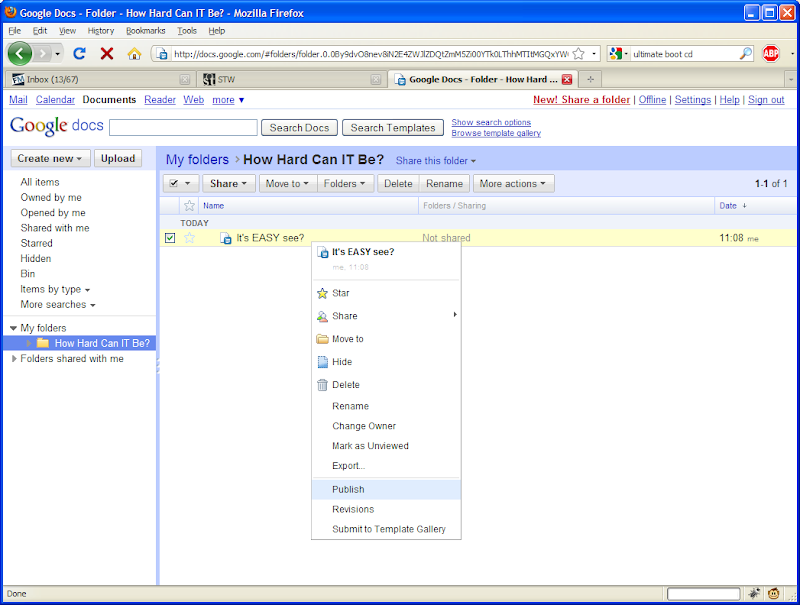 [/img]
ROFL. Great minds cp!
Cp - Nope. Simply not getting the publish option in that menu at all!
can you email me the PDF? address in profile.
I've just changed something in 'settings'
Can someone give this link another shot please?
I _HAVE_ to get this sorted now!! 🙂
Yep! That works!
[img]  [/img]
LOL!
There's some settings deep, deep down........
CP - I did email it to you as well, thanks for the help! 🙂
Works for me too 🙂
nice guide 🙂
FYI, it's this that did it
>Share
>See who has access
>'People with access' tab
>Click change
>Select 'let people view without signing in'
>Save
😀
CP - Cheers, thanks so much for the help as well! 