Forum menu
We've got a 10km off road run at the weekend, which isn't signposted - the organisers said there'd be a GPX file available to help navigate - just wondered if anyone could recommend a simple running/sports app (android) which can open these, plus display your current position etc to help us avoid getting too lost?!
Thanks in advance
Bump! Any Friday runners have any recommendations? Thanks 🙂
Backcountry navigator
Try great britain topo maps app. Good for route, location & mapping.
Komoot
backcountry navigator user here, if you just want it for this one event then I think you should be able to download the free trial version.and still get access to overlay gpx files and full OS maps down to 1:25k (just download onto your phone the OS map area you want to use on the day, so you don't have to worry about phone signal or using data)
OsmAnd. OpenStreetMap is often more useful than OS maps, as you can zoom in further to see the details of paths etc. You can download the maps to use offline.
Thanks everyone, much appreciated - will take a look at these 🙂
OpenStreetMap is often more useful than OS maps, as you can zoom in further to see the details of paths etc.
I know what you refer to, but I know which I'd still rather use despite it being a little blurred when zoomed right in
[img] 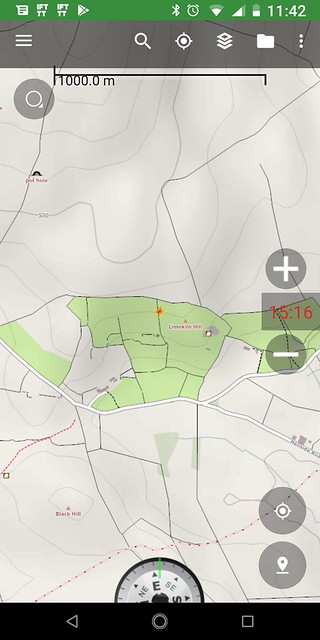 [/img]
[img] 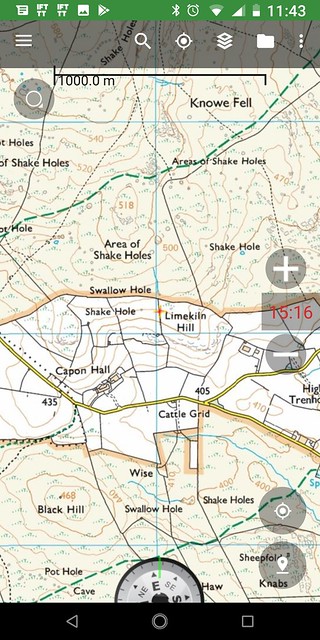 [/img]
That's not zoomed right in, that is still pretty small scale. There's plenty of minor paths that are missing from OS maps, but are on OSM.
Another example.


Nope, still prefer OS to OSM in that example.
In practice I use both, kind of depends what I’m wanting to see. OSM is a bit pish at pointing out crags. OS is a bit pish and updating new paths, especially those that aren’t ROW.
That’s not zoomed right in
Indeed, I was more trying to depict the level of detail that you'd have available, to zoom in on. It's an interesting subject tho, how much detail do you really need?, now that essentially 50% of the navigating job is done for you.
I was trying to remember what the map type is called, vector and raster. Vector maps are a series of points that can scale up and down when you zoom. raster maps are just essentially a pixelated photo.