UPDATE: CLASSIFIEDS section refreshed, redesigned, searchable: Go take a look
It's early days yet. Give it time.
writing games is **** hard
SIMPLE games are not really that hard to do with the right tools.
My daughters both go to Coding Club on Saturday and my 9 year old is often writing (very simple) games in Scratch on a Pi as part of that. Scratch is sprite-based and event-driven so it is well suited for that kind of thing.
@Kryton57, if you don't know much yourself, I recommend looking at Kano for your youngster.
Kryton:
A Microbit might be more appropriate for your son:
https://www.amazon.co.uk/BBC-BBC2546862-micro-bit-go/dp/B01G8X7VM2
They have a small display and integrated things like a compass, accelerometer.
My son quickly built a step counter.
Good fun.
Meanwhile - why is my Raspberry Pi weather station giving errors all the time...
What cooling solutions are people using?
Fan Shim has sold out. Was thinking about getting a 5v PWM Noctua but I haven't got a clue about how to connect it. Could probably solder something together given a list of components and how they connect.
If you just want a fan running constantly then all you need to do is connect it to 5V and Ground GPIO pins. The 2nd & 3rd pins on the top from the left.
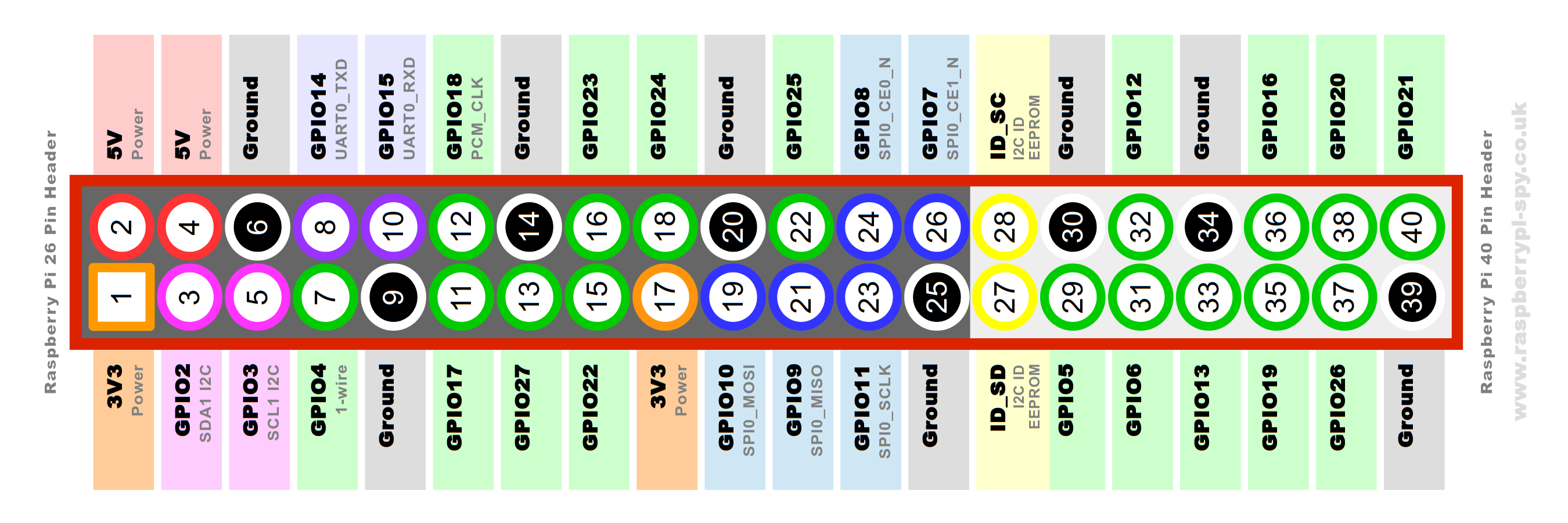
If you want to use PWM as well as other clever stuff i.e. only run the fan when CPU load or temp reaches a certain figure, then that's also pretty simple, you just need to download a script & install it on the Pi.
If you've got access to a 3d printer there are a few designs of cases now for the Pi which include fan mounts. (I'll actually be working on my own later today as there isn't anything yet that ticks all the boxes for me!).
I would definitely recommend the 40mm Noctua, I have one which I took off my 3d printer & have repurposed as a Pi fan - it's totally silent. The cheapo fans I've bought off Amazon/eBay are all audible & probably would not last very long.
I would like PWM but there's no off-the-shelf solutions. I can cope with soldering a 3 pin IR reciver but anything that requires electronic knowledge and I'm lost.
Is the Noctua quiet enough for constant on usage? Wouldn't want to hear it in the quiet moments of a film for example.
The one I've got is 100% silent, yes!
Does it need cooling?
They run a lot hotter and cooling seems recommended, but I've not stress tested for my use case tbh, ie Kodi.
From what I've read it runs a LOT hotter than previous Pis when doing intensive tasks, and will throttle the CPU when it gets too hot, so if you're not going to cool it you might as well just go with a 3B+Does it need cooling?
👍 Cheers.
Wouldn't the heatsink I linked to earlier be a solution for silent cooling?
https://shop.pimoroni.com/products/raspberry-pi-4-heatsink
I skim read this Pimoroni blog post about it which pushed me toward a fan. I have bought their heatsink as well (as per your link).
Wondering if the reason the fan + heatsink didn't perform so well is because with the Pi in the Pibow Coupe 4 case, the heatsink completely blocks airflow to anything other than itself. Maybe it would be worth chopping it down to size a bit to let airflow in? I'm going to mod my Coupe case a little bit anyway.
There's also a firmware update which apparently cools it by 3-5°C https://www.techrepublic.com/article/raspberry-pi-4-running-hot-new-update-will-cool-your-board-down/
Despite the signs that performance throttling has been kicking in during benchmarking, Upton says that in general most users shouldn't need to install third-party cooling on the Pi 4.
PSA / HEADS UP
HomeSeer are currently giving away free licenses for their HomeAutomation system that runs on Pi. Usual price is £99
https://shop.homeseer.com/products/hs3-pi3-free
Here's an overview:

