Forum menu

I want one 🙂
However, it will probably do the same as my other two and sit in a drawer unused for most of it's life 🙁
Usb3 is what I have been waiting for one of my projects. Perfecto.
bentandbroken
...it will probably do the same as my other two and sit in a drawer unused for most of it’s life
As have mine. Good concept, great to play with, but not quite there yet.
Not being one to learn from the past, I've ordered one.
Maybe this time, 🙂
same with mine... till I discovered 3D printing! Would be insta-buy but it seems all the 4gb ones are out of stock already!However, it will probably do the same as my other two and sit in a drawer unused for most of it’s life
Also, cool that they are made in Wales.
for all those spare Pi's I can recommend installing pi-hole on one of them and using that as your default DNS server on your main 'surfing' devices.
Im really excited about this tech, but how do i start with this stuff? Is there a newbie guide and tutorial so i can learn?
thanks
Ian
Also, cool that they are made in Wales.
I've been to the factory, or rather walked past the window on the to somewhere else. It's really cool and incredibly down to earth at the same time. The building is an old Sony Factory, but I think they're largely gone from the site now. It's all black 90s cool, not shabby, just a bit out-dated.
Raspberry at tucked down one of the corridors in amongst a load of other small businesses.
Interestingly I see Pimoroni are already selling an add-on Fan or Heatsink for it. I guess all that extra power means some extra heat too.
https://shop.pimoroni.com/products/fan-shim
https://shop.pimoroni.com/products/raspberry-pi-4-heatsink
Yeah, it's a very useful step up from the 3B+. We've got 18 of them currently hosting the Raspberry Pi website, which is quite busy today. We use PoE hats with fans on them, as we do for the 3B+, packed pretty densely into a rack.
https://blog.mythic-beasts.com/2019/06/22/raspberry-pi-on-raspberry-pi/
However, it will probably do the same as my other two and sit in a drawer unused for most of it’s life
Really? Shame.
I've just counted up and I've got 7 running over two houses. They mostly monitor room and water temperatures, switch lights on and off (according to sunset times), [google print]er sharing, upload PV production data and control the heating. Just started playing with monitoring human presence using wifi and bluetooth scanning which may, in turn, affect the lighting and heating.
Not sure I can see any advantage in the new version for me as my uses are fairly low-demand, and the most useful Pi for me so far is the Zero W - but it would certainly be good for some people.
DM52
Member
for all those spare Pi’s I can recommend installing pi-hole on one of them and using that as your default DNS server on your main ‘surfing’ devices.
Yes, this. Superb bit of software even on much older Pis. I've got it on a 512MB model B and it flies.
Holy moly just seen it's got hardware h265 accel now! With that and gig-e, it's gonna be a dream Kodi box.
yup, also gonna be great for anyone who's built their own arcade thingy running PiCade! Think I've just talked myself into ordering at least 3 now 😂Holy moly just seen it’s got hardware h265 accel now! With that and gig-e, it’s gonna be a dream Kodi box.
I've been using mine as a Kodi thing for the past five or six years.
Rockhopper
Member
I’ve been using mine as a Kodi thing for the past five or six years.
Yeah but now you can do so with 4K h265. No mention of 10 bit support so I guess it lacks that. Still good though.
I have just managed to order a 4Gb one from Okdo (hopefully not dodgy as mentioned on RS website). 😎 1 per customer though!
I want one 🙂
However, it will probably do the same as my other two and sit in a drawer unused for most of it’s life 🙁
My thoughts exactly...!
This is actually a big deal for work though, we're using them for network testing and that requires dual NICs. So we've got the in-built Gigabit Ethernet port obviously, along with a second plug-in Gigabit Ethernet dongle... all being presented to the SoC over a USB 2.0 bus. It works but the speed isn't great, this will be a game changer for us.
Oh this does look good! I still don't think GoldenEye will run well on it though.
Will be checking out Pi-Hole, I didn't know about it.
What is everyone using their Pi's for?
3B+ - RetroPie
3B - OctoPi
3x4 - PiCorePlayer
Do Any mere mortals understand any of this?
no, but i want to!
Ah guess this is the thread referred to in the 'real raspberries' thread. Anyway, just ordered one. For OSMC. Went to show some family videos to family the other day on the Pi 3, they were only 1080p60 but setup couldn't handle it, hopefully this will sort it, either that or I need to fiddle with NAS/Debian/Samba setup.
Does anyone know much about the Pi cameras? Thinking about using an old one for baby monitor. Can you have both the night & day cameras connected to the same Pi or do you need two Pis for that?
either that or I need to fiddle with NAS/Debian/Samba setup.
Could be Samba that, try setting up your shares with NFS
I’m got Kodi on 4 or 5 Pi 2/3.
I use old single core ones for various things including Wi-fi hotspots and burglar alarm monitoring.
I'm always surprised how many people use Pi's for very simple tasks that I would have expected a much simpler single-board computer or microprocessor to handle.
I guess it speaks a lot about the versatility of the Pi.
they are good but not great quality-wise, although v small & cheap. Perfect for monitoring IMO (use mine with a 3D printer). Connects directly to the camera port so you can only use 1 per Pi. Nothing to stop you plugging in a normal USB webcam as well though.Does anyone know much about the Pi cameras?
I guess it speaks a lot about the versatility of the Pi.
I guess it's because they can do so many things fairly well.... I'd like to think that people buy one and start off on simple stuff but can then progress onto other things utilising the same board (often simultanuously).
I’m always surprised how many people use Pi’s for very simple tasks
Agreed. For simple up stuff I find Arduino so much easier.
Esp32 is brilliant as well so much good IO but it is less newby friendly although the documentation is still very good.
I guess it speaks a lot about the versatility of the Pi.
And that they're cheap enough and small enough to not need to optimise further for most applications. You could save a few quid with something simpler, but why bother when you can have something running Linux with network, wifi, screen, keyboard and USB?
The great thing about the Pi isn't that it's a cheap decent singleboard computer. There's plenty others.
What marks it out is that it has an ecosystem, so just about anything you want to do with it has been done, and the info is out there, and usually in a form that almost anyone can do it.
ie it works out of the box, much as that used to be the USP of Apple back in MSDOS and early Win days, but without the Cool Tax.
It's been mentioned a few times in this thread and I don't really want to derail it but, can anybody link me to (or describe) the best way to use a Pi as a 8 and 16 bit games emulator.
My OH bought me the last board in a kit thing for christmas and I just want it to turn on, select a console / game system and play the games.
Have put Retropie on and got it to work of a fashion but I just can't be bothered messing with codes and shortcuts and crap just to play 10 minutes of Uridium 🙂
Just looking to play it out through hdmi into the TV - but the damn thing even lacks an o/off button.
I've got a 3b that runs loads of stuff
- pi-hole
- transmission (nice web interface for downloading torrents)
- samba network drive, has an old hdd plugged in for media/backing up. Can access from iPads/phones too
- openvpn for connecting to home network from anywhere (means my phone can use pi-hole too)
- plex client for media
+ some other stuff i've forgotten
The VPN is also useful for checking webcams on the home network without opening them up to the world
this is how it works (or should). You may have to set up the controls for each game, but this would only be a one-time thing. What specific problem are you having? I just downloaded the pre-made image from the official site and followed their instructions, really easy. https://retropie.org.uk/download/My OH bought me the last board in a kit thing for christmas and I just want it to turn on, select a console / game system and play the games.
https://retropie.org.uk/docs/First-Installation/
it should work via hdmi by default. No, there’s no power button. It turns on & auto boots into Retropie when you power it up. You should always turn it off via the menu, not just yank the plug as this can corrupt the SD card. It’s possible to connect a safe-shutdown button, this involves wiring up a physical button and installing a script but is very simple.Just looking to play it out through hdmi into the TV – but the damn thing even lacks an o/off button
https://www.raspberrypi-spy.co.uk/2018/03/raspberry-pi-retropie-shutdown-button/
Twonks, Google ArcadePunks. You can download a RetroPie image that "just works" for the 10 minutes you intend to use it. It is better to create your own, but I have found it can take hours uploading the ROMS, configuring shaders/overlays, controllers, etc.. When all you wanna do is start a retro game and after 5 minutes think to yourself "damn this is much worse than I ever remember". For this reason ArcadePunks image may be the solution.
That was quick. Looks like I won't be fitting mudguards tonight...
[url= https://live.staticflickr.com/65535/48131655521_d98e760c37_o.jp g" target="_blank">https://live.staticflickr.com/65535/48131655521_d98e760c37_o.jp g"/> [/img][/url]
nice - didn't manage to get the 4gb before they were sold out 🙁
Not sure I'd really need the extra 2GB but I can't really justify buying the lower spec'd one
I don’t know my about this at all, but would one of these work for a 10yo’s Christmas present? I have tested this verbally and he says “cool, yes I could make robots and code my own games” but am wondering if I’m reality this takes adult levels of patience and would end up stuck in a drawer...?
I’d welcome your thoughts...
I keep thinking that I'd like to learn Python and have a play with something like this.
I can't see a SIM socket (so I'm assuming it doesn't have one). It would be handy to be able to make a 4G internet connection then you could make a nifty remotely monitored wildlife camera or a fab bike computer (well I clearly couldn't but I'm sure someone could).
provided he's enthusiastic, willing to learn and you get him a complete kit with step by step instructions & all the parts he needs (have a look on Pimoroni/Pi hut etc), why not. I'd definitely focus on robots though, writing games is ****ing hard (besides which, a Pi won't particularly help, you can get started using any PC/laptop etc)don’t know my about this at all, but would one of these work for a 10yo’s Christmas present? I have tested this verbally and he says “cool, yes I could make robots and code my own games”
Might be worth looking at something like this too which uses an Arduino rather than a Pi (this is a Chinese brand but a good one, they do lots of different electronics projects kits)
https://www.amazon.co.uk/Tracking-Ultrasonic-Bluetooth-Intelligent-Educational/dp/B01M6YHRJ4/ref=sr_1_2_sspa?keywords=elegoo+robot+kit&qid=1561630077&s=gateway&sr=8-2-spons&psc=1
Just do a search for GSM pi hat. I am sure they are out there.
They definitely are (although not particularly cheap!)
Or just plug a 4G dongle into the USB socket. Plenty of cheap options.
There are a few projects for making wildlife cameras. The main issue is battery life. Unless you have a big battery pack, probably won't last much more than a day. And a GSM connection will use even more.
A Pi Zero may be good enough for this, and help save power.
https://mynaturewatch.net/
or integrate some solar panels into the project as well like this guy did! https://www.raspberrypi.org/blog/solar-powered-nature-camera/
After looking at OS support for the Pi 4 looks like I was a little premature in rushing to get one delivered for my use. 1080p playback is "almost" on par with the Pi 3 according to LibreELEC, and OSMC and/or Kodi say they're not expecting 4k playback until end of 2020 (not that I need 4k but that's not the point!) My current Pi 3 works pretty well (other than the aforementioned problem playing 1080p60fps media stored on the NAS), I've got a IR receiver soldered to a high quality analgoue audio hat so can use any old generic TV remote (after setting it up) and decent audio for playing music through hifi. Not too sure what I'm actually going to do with the Pi 4 now.
It's early days yet. Give it time.
writing games is **** hard
SIMPLE games are not really that hard to do with the right tools.
My daughters both go to Coding Club on Saturday and my 9 year old is often writing (very simple) games in Scratch on a Pi as part of that. Scratch is sprite-based and event-driven so it is well suited for that kind of thing.
@Kryton57, if you don't know much yourself, I recommend looking at Kano for your youngster.
Kryton:
A Microbit might be more appropriate for your son:
https://www.amazon.co.uk/BBC-BBC2546862-micro-bit-go/dp/B01G8X7VM2
They have a small display and integrated things like a compass, accelerometer.
My son quickly built a step counter.
Good fun.
Meanwhile - why is my Raspberry Pi weather station giving errors all the time...
What cooling solutions are people using?
Fan Shim has sold out. Was thinking about getting a 5v PWM Noctua but I haven't got a clue about how to connect it. Could probably solder something together given a list of components and how they connect.
If you just want a fan running constantly then all you need to do is connect it to 5V and Ground GPIO pins. The 2nd & 3rd pins on the top from the left.
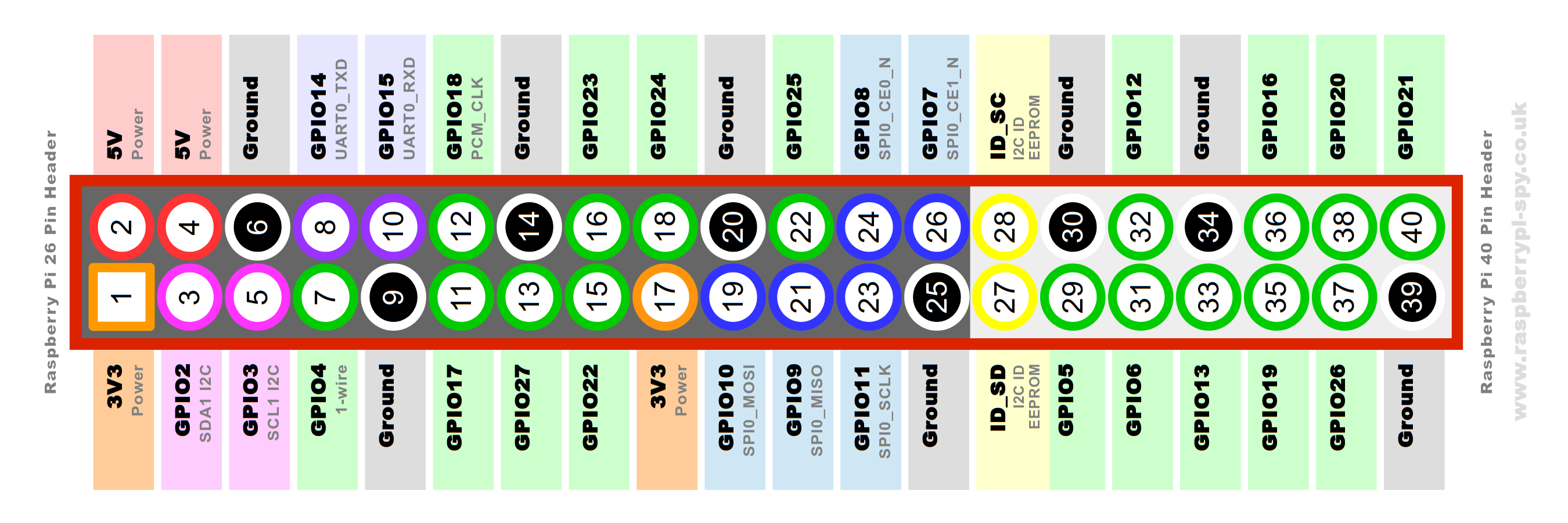
If you want to use PWM as well as other clever stuff i.e. only run the fan when CPU load or temp reaches a certain figure, then that's also pretty simple, you just need to download a script & install it on the Pi.
If you've got access to a 3d printer there are a few designs of cases now for the Pi which include fan mounts. (I'll actually be working on my own later today as there isn't anything yet that ticks all the boxes for me!).
I would definitely recommend the 40mm Noctua, I have one which I took off my 3d printer & have repurposed as a Pi fan - it's totally silent. The cheapo fans I've bought off Amazon/eBay are all audible & probably would not last very long.
I would like PWM but there's no off-the-shelf solutions. I can cope with soldering a 3 pin IR reciver but anything that requires electronic knowledge and I'm lost.
Is the Noctua quiet enough for constant on usage? Wouldn't want to hear it in the quiet moments of a film for example.
The one I've got is 100% silent, yes!
Does it need cooling?
They run a lot hotter and cooling seems recommended, but I've not stress tested for my use case tbh, ie Kodi.
From what I've read it runs a LOT hotter than previous Pis when doing intensive tasks, and will throttle the CPU when it gets too hot, so if you're not going to cool it you might as well just go with a 3B+Does it need cooling?
👍 Cheers.
Wouldn't the heatsink I linked to earlier be a solution for silent cooling?
https://shop.pimoroni.com/products/raspberry-pi-4-heatsink
I skim read this Pimoroni blog post about it which pushed me toward a fan. I have bought their heatsink as well (as per your link).
Wondering if the reason the fan + heatsink didn't perform so well is because with the Pi in the Pibow Coupe 4 case, the heatsink completely blocks airflow to anything other than itself. Maybe it would be worth chopping it down to size a bit to let airflow in? I'm going to mod my Coupe case a little bit anyway.
There's also a firmware update which apparently cools it by 3-5°C https://www.techrepublic.com/article/raspberry-pi-4-running-hot-new-update-will-cool-your-board-down/
Despite the signs that performance throttling has been kicking in during benchmarking, Upton says that in general most users shouldn't need to install third-party cooling on the Pi 4.
PSA / HEADS UP
HomeSeer are currently giving away free licenses for their HomeAutomation system that runs on Pi. Usual price is £99
https://shop.homeseer.com/products/hs3-pi3-free
Here's an overview: