Please can someone explain in non IT terminology what the difference is. Thanks
I thought it was just what different companies called the same thing
[url= http://tinyurl.com/6d4cq2w ]HP[/url]
[url= http://tinyurl.com/5tjs6jl ]Dell[/url]
same thing, to my knowledge.
Not quite. Port replicators can be portable(ish) things that you plug into via USB and have several outputs - vga, usb etc.
Docking stations are usually much larger desk bound things that you "dock" your laptop onto and can have extra expansion cards or dvd drives etc.
But yes, some companies use the name interchangeably.
port replicator is attached to the laptop via usb and has all the ports attached usb/vga etc [img]  [/img]
docking staiton the laptop physically clicks into it. [img]  [/img]
different companies do mix the name sup though!
Cheers Guys. - Presumably only certain lap tops are compatible with a docking station, but all /most can be used with a port replicator. It's a docking station I (think) I want, so may well be limited to certain lap tops.
I thought i'd heard the term port replicator pre-usb era? maybe not. your explanation makes sense though.
Presumably only certain lap tops are compatible with a docking station,
They'll be proprietary. So, eg, a Dell Latitude will require a Dell Latitude dock. Whether or not a docking station is available for a given model will wholly depend on the laptop manufacturer making one.
I thought i'd heard the term port replicator pre-usb era? maybe not.
No, I'm pretty sure you're right, it predates USB by quite a long way IIRC.
A USB port replicator would presumably be fairly generic, but there are still model-specific ones that are essentially small docking stations.
Yeah I think the differences have become muddled over the years, it used to be (at least in Dell terms) that port replicators were dumb devices that just provided expansion ports (but could require the laptop is still docked to it, the last picture in monkey boy's post for example looks like an older model port replicator to me...) and a docking station had more logic to it and could take proper expansion cards (e.g. PCI) so was like an external backplane for the laptop. Not really sure if there's any need for the old style docking stations anymore though given the shift away from expansion cards in general and that most peripherals run on a USB interface.
laptops that are compatable with docking stations have the long connect on the underside that can be seen in this pic;
[img] 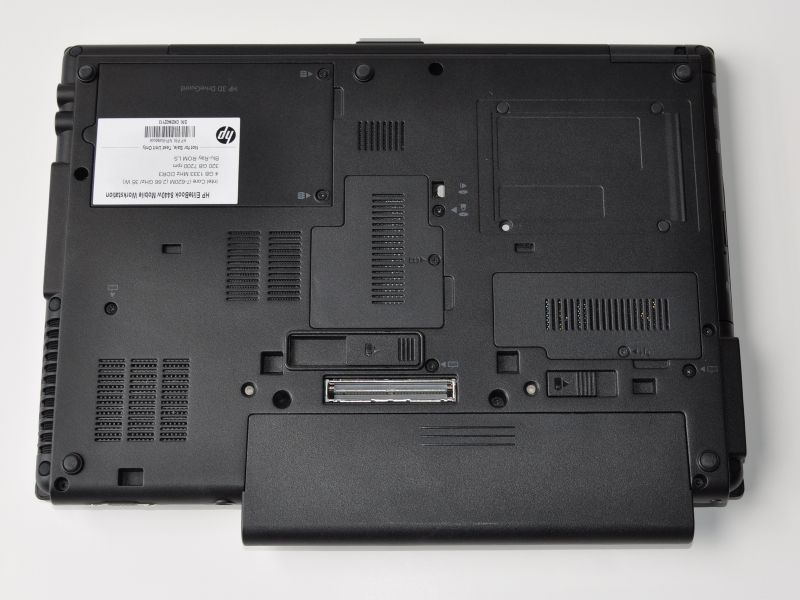 [/img]
I've got a HP Elitebook for work which spends 80pc of its time docked to a docking station so i can use a normal keyboard, monitor and mouse.
Not really sure if there's any need for the old style docking stations anymore though given the shift away from expansion cards in general and that most peripherals run on a USB interface.
<nods> that's a very good point actually. You've no need for PS/2 ports, serial / parallel ports, PCMCIA network cards, modems etc etc these days.
So your modern "docking station" is essentially a USB hub with maybe a breakout for an external display (and maybe speakers at a pinch). All the legacy devices are now on USB (which is, after all, what it was designed for) or wireless (WiFi / Bluetooth).
Thinking about it, what would be nice is if you could get a docking station with a regular PCI-E slot in it. Then you could drop in a nice fast graphics card for gaming. Whether that sort of technology exists (or if it's even technically feasible to expose the bus in that manner) I've no idea. It'd kick arse if it did, though.
laptops that are compatable with docking stations have the long connect on the underside that can be seen in this pic;
Or on the rear. There's a boatload of different designs.
IBM used to do both for the same ranges of Thinkpads.
Port replicator had a few USB ports, mouse, keyboard (when they were PS/2) video .. 99% of what people needed.
Docking stations had PCI slots (for better docked video), even a HDD slot in some cases, heavier duty power supply etc. Wish they still did this sort of thing as a docker with a decent video card might make games possible 🙂
I had a quick Google.
Seems there's been half-hearted attempts to do modern versions, but they've been hacks that offer up full-sized PCI-E card slots... at x1 speeds using the ExpressCard slot.
I'm not a chipset designer but I can't offhand see why you couldn't just expose the bus (unless there's hotswap issues, I guess). Maybe the industry's just waiting for Thunderbolt to really take off, and then we'll start seeing external PCI-E cards? Who knows.
I was looking on the Dell and lenovo UK sites last night and just seemed to be going around in circles. I was struggling enough trying to work out which of the thousand combinations and permitations of lap top specs would be best only to be even more confused when trying to work out if I could 'dock it' - Essentially it will be on my desk for 80% of the time and I want to use a 'normal' mouse, screen and keboard. Am i right in thinking a proper docking station will also power the lap top.
If that's all, then personally I'd forget the docking station and just get something like [url= http://www.logitech.com/en-gb/keyboards/keyboard-mice-combos/devices/7305 ]this[/url] or [url= http://www.logitech.com/en-gb/keyboards/keyboard-mice-combos/devices/6541 ]this[/url]. They use a Nano receiver which is tiny so you just leave it plugged in permanently. I've got an old mouse-only variant and it's brilliant.
Only thing you need to connect when you 'dock' then is an external display. Well, and power, of course.
(If it's going to be plugged in most of the time on a desk with full-sized peripherals, is what you really need not a desktop?)
The docking station will power the laptop, I've just gone through the process for a Lenovo T series...it was not easy to work out exactly what to buy. They are pretty expensive, but the Lenovo one comes with a meaty PSU and works pretty well w/external monitor ect. Glad I bought it, but it seemed like a lot of money at the time.
I think I got about as far as the T520 last night and thought I must be missing something as surely you can buy something that docks for less money
If I remember correctly, the T520's bigger screen means the cheaper dock won't work. Think you can get them for about £200 from Lenovo direct w/promo code.