With half an eye on Black Friday deals, I’m thinking about Mesh systems.
We live in a 3 bed mid terraced Yorkshire stone house over four levels (cellar to attic). The Plusnet router is doing a reasonable job, but signal can be a little patchy in the cellar and far end of attic. It doesn’t however reach the garage which is 15m across the lane from the house with the garden behind that.
I’d like to be able to extend the WiFi in to the garden and garage.
So what would we need? 3 units in house, plus 1 in garage and an external unit mounted at the back of the garage to cover the garden or is this overkill?
I’ve used Tp Link products in the past and they look reasonable prices. Presumably go for wifi6? I’d prefer to keep away from a subscription service. I’m happy for the system to replace the router.
We’re on 500/75mb connection.
thanks 😊
We use a 3-node TP link deco setup in our stone barn heap. It really needs a physical backhaul to make the most of it. Wifi simply doesn't go through stone walls, especially if you've lined the inside with kingspan and built a faraday cage.
Deco here, it just works. 3x X50(?) pods, which is the core network; I then added on some M4s, which don't work quite as seamlessly, but still do a great job.
As hot_fiat says, ideally you want the Decos hardwired together for the backhaul; and I'd definitely want to have a cable to the garage ideally.
I can't comment on Wifi 6 as I don't actually know about it; I know none of our home devices use it, but perhaps it allows you to use WiFi 6 for the backhaul and 2.4/5Ghz for devices to connect to?
TP Link Deco here too in a stone-walled cottage and annexe.
It really needs a physical backhaul to make the most of it.
Indeed. Two of the units in the house are connected by a powerline adaptor socket things that I found in a charity shop
Main mesh unit in lounge -> powerline adaptor -> powerline adaptor -> Dining Room mesh unit -> wifi -> Stable mesh unit -> wifi -> Annex mesh unit -> our work laptops
Also have a mesh unit upstairs in the house which connects via wifi to the main one (there's just floorboards between them).
I keep meaning to run an ethernet cable out to the annex to give a physical connection, but it all works pretty much okay, and that's with only a meagre 12mb coming through the broadband pipe anyway.
plus 1 in garage and an external unit mounted at the back of the garage to cover the garden or is this overkill?
The one in the garage will probably be fine to cover the garden (assuming it's just a brick garage)
Deco is easy to set up and works well, added advantage is if/when you change broadband provider and get a new router, you don't need to reconnect all of your Wi-Fi devices as they are already connected to Deco, not your router.
Can't comment on stone wall issue though
Thanks. We have got a couple of powerline adapters that I could try running over to the garage, though the electrics are odd in this house, it can randomly trip half the house with no obvious cause
I couldn't get mesh/extenders to work well between house and shed, and it's less than 10m. Gap was too big with no relay in the middle, even with the router right up against a single glazed window.
Now the BB fibre box goes to a 1:4 switch, with cables to office upstairs (to PC and wifi which serves the house) out to the shed and to the telly in the living room.
Fast, stable connection. Meant I could save a bit of money on BB package, because I wasn't paying for extra speed to overcome signal issues (which doesn't really work anyway). Bit of faff, but well worth it.
If the standard mesh access points don't stretch from house to garage you can use something like the bridge below to link two of the mesh access points rather than needing to run a cable between the two.
https://www.amazon.co.uk/TP-Link-EAP211-BRIDGE-bridge-repeater-Network-white/dp/B0D4H6XRNM
This is what we've done at our new place as it wasn't going to be easy to get a new cable in. Despite some fairly dense foliage in the line of sight for the bridge it's all working without issue. Still can't get on the Wi-Fi mesh in the middle of the garden but around the house and the garage (where the access points are) everything just works.
For our similar stone house (long rather than tall, but similar issues) a few months ago I bought and installed these: https://www.amazon.co.uk/dp/B0B2RQR96Y with wired connections along the upper floor of our house to replace the increasingly iffy TP powerline adaptors we'd been using and they have been 99.9% great with good signal across the whole house. (The 0.1% was a few weeks ago when my PC decided that somehow it was on a wired connection one of the nodes rather than wifi. A reset cured it and it's not happened again.)
I was then able to place the TP extender/repeater which previously had just managed to get a signal across 20-odd meters of the garden to the garage (so long as you stood in the garage window) into the garage itself, where it picks up the mesh system signal just fine and repeats it across the garage and surroundings without wiring back to the house or having to buy another node (although i dare say that would be better).
Definitely recommend doing it.
TP Link Deco here too in a stone-walled cottage and annexe.
It really needs a physical backhaul to make the most of it.
Indeed. Two of the units in the house are connected by a powerline adaptor socket things that I found in a charity shop
Main mesh unit in lounge -> powerline adaptor -> powerline adaptor -> Dining Room mesh unit -> wifi -> Stable mesh unit -> wifi -> Annex mesh unit -> our work laptops
Also have a mesh unit upstairs in the house which connects via wifi to the main one (there's just floorboards between them).
I keep meaning to run an ethernet cable out to the annex to give a physical connection, but it all works pretty much okay, and that's with only a meagre 12mb coming through the broadband pipe anyway.
plus 1 in garage and an external unit mounted at the back of the garage to cover the garden or is this overkill?
The one in the garage will probably be fine to cover the garden (assuming it's just a brick garage)
Update!
The powerline adapters work and reach the garage. So the above combination of powerline and mesh sounds ideal.
I might try just the indoor units and see if the garage one reaches in to the garden to start with and add the external unit if it’s not strong enough
In looking at the options, I’ve just discovered that Tp link do a hybrid mesh system. Using powerline and mesh in the same units! Could be the solution
https://www.tp-link.com/uk/home-networking/deco/deco-p9/
Just upgraded from 3x Dlink Covr x1850 (Wifi 6) to 3x Eero Pro 7 (wifi 7 and soon to be wired backhaul). My RSP had an offer on so I upgraded. 1000/100 connection. Flies. Very happy with it.
Update!
I've installed the Mesh system, it works but the speed doesn’t seem right.
We've got 3 Deco X50 and 2 powerline adapters. Set up as follows:
Plusnet Router plugged in to Deco (1) in lounge. This Deco also has the powerline adapter and an Ethernet splitter plugged in to it. It achieves the same speed as the router of 505/75
Deco 2 is upstairs in the study, no powerline adapter and gets 130/65
Deco 3 is in the garage across the lane and has the powerline adapter. This runs at 40/60, without the powerline adapter it runs 4/2!!! It does give full strength WiFi signal across the garden.
Current mesh map in the TPLINK app shows the garage daisychaining off the study.
I’m surprised at the drop off in speed tbh. I’m in the kitchen typing this, the study is above me and the lounge in behind me and it’s defaulting to Deco 2 in the study giving lower speeds 160/65. If I connect to the Plusnet I get 400/70.
Does this sound normal or am I missing something?
I could move the Deco3 in the garage closer to the house and see if that improves the garden speeds.
I think the Deco X50 could just replace the Plusnet router if that would help.
Or plug the powerline in to the Plusnet router??
What modes do you have the Plusnet and Deco in? Options would be Plusnet in bridge (modem only) mode, Deco in router mode; or Plusnet in router mode and Deco in Access Point mode.
Any other combo won't work, or won't work very well.
After that, it's worth trying the Network Optimization option in the Deco app; in theory it'll check for interference from other wifi networks and adjust settings accordingly.
If the garage is daisychaining off the study it'll obviously max out at some fraction of the study speed. You shoul be able in the Deco app to force the garage to connect to Deco 1 once it's hooked up to the powerline adapter - but I'm not sure I understand how it's connecting to the study if the study has no powerline adapter.
There's also an option in the Deco app for Wireless Network Mode, which I believe switches to only allowing devices to connect on one range (2.4 or 5GHz), and uses the other for backhaul - default is to allow devices to connect to either 2.4 or 5GHz, which then slows down Decos that aren't hardwired/ powerline adapted in, as they're mixing "connecting to devices" and "connecting to the main Deco" signals
Oh, and
>Or plug the powerline in to the Plusnet router??
Depends on the Plusnet and Deco modes. If Plusnet is in router mode, the Decos should be in Access Point mode; and yes, you could move Deco 1 further from the Plusnet router and plug the powerline into the Plusnet. It'll increase your coverage.
If Plusnet is in bridge/ modem-only mode, the Deco should be in router mode, with Deco 1 acting as the main router. It'll benefit from having the best connection (ie ethernet) to the modem, not powerline.
Thanks! I’ll try and get my head around that and have a look at the settings. Tbh I took it out the box and connected them, I haven’t played with the settings. I set the mesh first, then added the powerline adapters afterwards. The app has updated which shows the garage is now running off the powerline, though no change in speed.
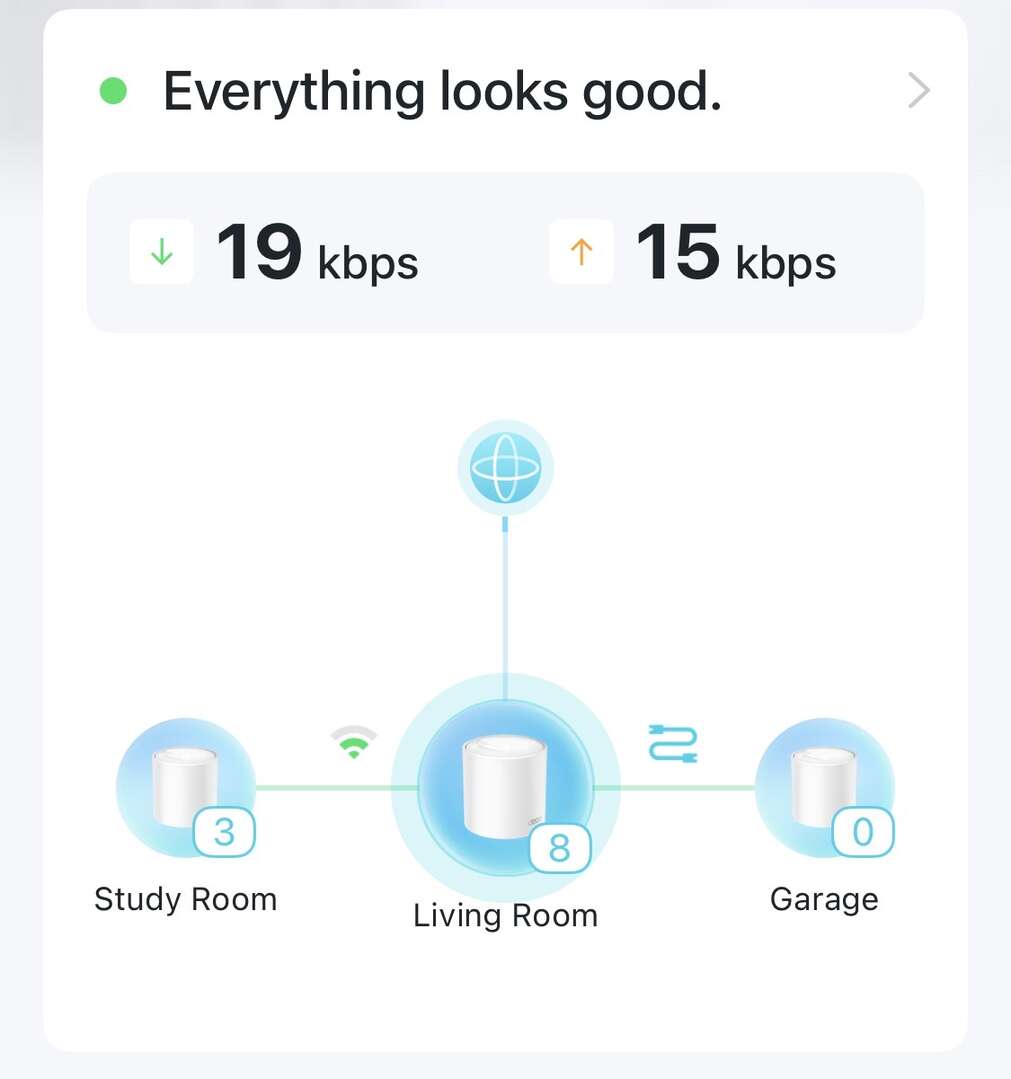
Ohhh, you're working off that speed, I didn't realise. I wouldn't worry about that too much - that's more "how much data is it actually being asked to send", not "how fast could it really go if required". For the latter, you'd want to go and connect to each Deco in turn, then use fast.com or similar for a speed test. Or just wait til someone in the house complains that the wifi is too slow! 😀
How is your Internet connection presented? Do you need the Plusnet router at all?
How is your Internet connection presented? Do you need the Plusnet router at all?
Fibre into Plusnet router, Ethernet cable to deco.
Im looking in to router and access point settings
Fibre into Plusnet router, Ethernet cable to deco.
Wait what? You have optic fibre going directly into a domestic router?
Apologies for not knowing the technical terms 😂
Openreach fibre cable to house. The open reach boxes (grey outside, white inside) to Plusnet router. PN router with Ethernet cable to Deco mesh.
To add to the problems, speed has dropped last night to 100 instead of 500! I’m on to Plusnet about that part.
I put the mesh in to access point mode as suggested above. I also got the mesh to scan for potential conflicts and it sorted itself automatically. Speeds after this were 100 at router/deco in lounge and 60 in the garden. If it’s that percentage drop, that’s fine, but obviously need to wait and see once the speed is back up to 500.
There's also an option in the Deco app for Wireless Network Mode, which I believe switches to only allowing devices to connect on one range (2.4 or 5GHz), and uses the other for backhaulThat was one thing i looked for, mine (well, all but one older node) have a dedicated wireless backhaul, so i get 2.4 and 5GHz then there's an extra network (5GHz) running for the backhaul.
Wait what? You have optic fibre going directly into a domestic router?It's about how 75% of the population describe it.
Hell, 75% of the planet can''t distinguish between their ISP internet connection and their WiFi or 5GHz and 5G.
Plusnet have said the router is bust and a new one is on the way. Hopefully that combined with the mesh in access point mode resolves this!
Thanks everyone
The open reach boxes (grey outside, white inside) to Plusnet router.
How? Is your "white box" connected to the Plusnet router with an Ethernet cable?
It's about how 75% of the population describe it.
Well, so what? I'm trying to get a handle on what the setup actually is rather than everyone guessing. 75% of the population could call it a tuna sandwich, that doesn't matter if we can establish whether that sandwich has "CAT6" printed on it.
Where I'm going with this is, the OP probably doesn't need the Plusnet router, at all. If the "white box" is a fibre ONT and the internal presentation to the router is Ethernet then it's just an extra complication which can be disposed of. If you've got two devices which both think they're an Internet router then it's never going to work properly.
If it's something else then we need a rethink. But always remember the Four Fs.
Plusnet have said the router is bust and a new one is on the way.
Plusnet has just lied to you.

