
Subscribe now and choose from over 30 free gifts worth up to £49 - Plus get £25 to spend in our shop
Saying I have two (Windows) directories, A & B:
Directory A contains 100 files with vaious names
Directory B also contains 100 files but are named 000001., 000002. etc.
Anybody know of a simple way to rename the files in directory B with the filenames from directory A?
I have 14 directories to carry this out on. I'm thinking of using DIR to create a file list for A then creating a batch file (REN) from that to carry out the name change. Better methods?
I'd say you have it right. I'd use excel on directory listsings to fettle the sort order and construct the batch file.
Linux
I'd put money on retro83 saying something predictable like:
how do you know which file in dir A maps to each file in dir B ? Sounds like it should be fairly trivial in Powershell
edit: 😉
I've used a bit of (free) software called [url= http://www.herve-thouzard.com/the-rename#t5 ]THERename[/url] to do similar, if you fancy a GUI for it.
How do you know which file from dir A maps to from dir B?
edit:
stevehine - Memberhow do you know which file in dir A maps to each file in dir B ? Sounds like it should be fairly trivial in Powershell
What the heck? You nicked my post and posted it before me? Mind reader? 😆
I'd say you have it right. I'd use excel on directory listsings to fettle the sort order and construct the batch file.
I'd do that to.
Do dir *.* > file.txt
Open file.txt in excel, edit it to include some rename or copy statements and save as rename.bat.
Run rename.bat.
stevehine - Member@retro83 - have you checked for key loggers recently
/me fires up MalwareBytes... 😉
It is well worth learning some kind of simple scripting language for things like this, rather than messing with Excel and batch files, this would be a five minute job in perl or python, whereas you're going to have to load up each dir listing in Excel and it will take ages.
I'd use python personally, it is easier and less disgusting than perl.
[img] 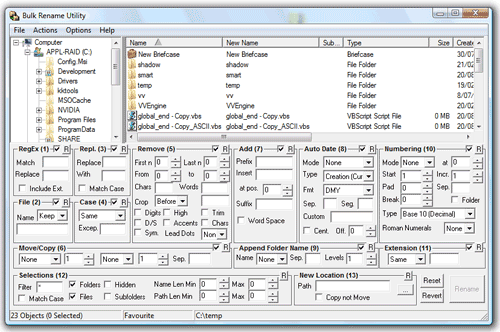 [/img]
http://www.bulkrenameutility.co.uk - the daddy for this kind of thing.
Incidentally, it would be a slight pain, but I think in batch files, you can do very basic arithmetic using set, you could combine that with a for statement (to list the file names) to do the whole thing in a batch file. It would be gross, but it should work, and would probably take less time than messing in Excel.
How do you know which file from dir A maps to from dir B?
Becuase they do! Basically it's for about 1000 images that have been imported then exported from some other software. They were imported in alphabetical order and then exported as 00001, 00002, etc. So the first file in A is the first in B, the second file in A is the second in B and so on.
I'll proceed with the batch file approach, I should be able to automate most of bat file creation.
@GrahamS that is the most wrong UI I've seen in a while! so many controls...
I use GrahamS's solution for this sort of thing. I think I've only ever used about half a dozen of the options available though.
EDIT: It does look horrible and more than a little intimidating but it's actually surprisingly easy to use.
GrahamS that is the most wrong UI I've seen in a while! so many controls...
With great power comes hideous UI. 😀
I'd do that to.Do dir *.* > file.txt
Open file.txt in excel, edit it to include some rename or copy statements and save as rename.bat.
Run rename.bat.
dir *.* [b]\b[/b] > filelist.txt
would be better - it will give you just the list of file names, rather than a full directory listing.
I'd use python personally
Snap! Might even be able to do it from the command line without a script that way, I'm no expert in using python on the command line though so not sure..
To expand on that up there a bit, create a file called [i]rename.sh[/i]:
[i]#!/bin/bash
fnames1=( $(ls $1) )
fnames2=( $(ls $2) )
for ((i=0; i<${#fnames1[@]}; i++))
do
mv $2/${fnames2[i]} $2/${fnames1[i]}
done[/i]
Usage: [i]rename.sh <dir1> <dir2>[/i] where [i]dir1[/i] is the path to the names and [i]dir2[/i] is the path to the files which need renaming.
You can get cygwin to run on windows platforms - have just checked that code on my cygwin install.
Of course you could actually do all that on the command line if you wanted, but given multiple directories easier that way.
I'm liking the /B flag, saves a bit of time.
Ahhh, cock..... it's listing the files in a different order than they are in explorer (different types of alphabetical!)
Bored, so the below is a batch file that does the magic for one directory with no pissing around generating intermediate batch files. Obviously set the fromdir, todir to your two directories (fromdir = directory with the filenames, todir = the directory with the files to rename)
Run it using cmd /v /c renamefiles.bat
[code]
[b]renamefiles.bat[/b]
@echo off
set fromdir=c:\temp
set todir=c:\target\
cd %fromdir%
set /a C=0
for %%A in ("*.*") do (
set /a C=!C!+1
set /a Z=!C!
if !Z! LSS 10 set Z=0!Z!
if !Z! LSS 100 set Z=0!Z!
if !Z! LSS 100 set Z=0!Z!
if !Z! LSS 1000 set Z=0!Z!
if !Z! LSS 10000 set Z=0!Z!
echo %todir%!Z!.jpg %%A )
[/code]
Thanks for reminding me why bash is better, joe 😉
Oops, I forgot to sort the file names:
[code]@echo off
set fromdir=c:\temp
set todir=c:\target\
cd %fromdir%
set /a C=0
for /F %%A in ('"dir /b /on"') do (
set /a C=!C!+1
set /a Z=!C!
if !Z! LSS 10 set Z=0!Z!
if !Z! LSS 100 set Z=0!Z!
if !Z! LSS 100 set Z=0!Z!
if !Z! LSS 1000 set Z=0!Z!
if !Z! LSS 10000 set Z=0!Z!
echo %todir%!Z!.jpg %%A
)
[/code]
haha, sorted it. All the files are named with street addresses, such as 1 Chester Street, 2 Bolivia Square, etc. and when you specify files to be displayed in name order windows explorer is using a combination of both the house number and the first word, but when you specifiy alphabetical sort order in DIR it only uses the house number - so the order in which the files are listed is different to how it looks in Explorer.
So for those that are bored here's my solution.
[*]Create a list of filenames (either with command line or using free app called 'copyfilenames' which is pretty slick)
Import this list into a Filemaker database which splits the address into the house number [[i]LeftWords ( address; 1)[/i]] and the first word of the street [[i]MiddleWords ( address; 2; 1)[/i]]
The records are then sorted using a combination of the house number and first line of the street - this puts the records in the same order as in Explorer
Add the 00001, 00002, etc filenames to another field (tiffname)
Export the contents of another field which has automatically created the command line to change the filename [[i]"ren " & tiff name & ".TIF "& address[/i]]
[/*]
That 'should' do it. 🙂
Thanks for the help.
edit: Yes it does........ yay!