I'm having some issues connecting my laptop to my TV and I'm stuck.
I bought one of these cables:
http://cgi.ebay.co.uk/ws/eBayISAPI.dll?ViewItem&item=300425031377&ssPageName=STRK:MEWNX:IT
I have this TV:
http://reviews.cnet.co.uk/televisions/0,39030217,49262427,00.htm
and I have this laptop:
http://reviews.cnet.com/laptops/dell-latitude-d630-notebook/1707-3121_7-32445398.html
I've plugged the cable in and changed my TV to the right mode and nothing.
I've changed my laptop to projector mode and nothing.
What am I doing wrong?
Thanks
which OS are you running?
Alt F8 perhaps
Running XP Version 2002 SP3
Alt F8 did nothing.
Fn F8 is the key which switches my display modes (CRT/LCD) but that doesn't work either.
Can't help with the problem with the picture but that cable doesn't have any sound. You'll also need an audio cable from the laptop to the tv.
Did you do the right click / graphics properties / extend my desktop thing?
Or random f keys.
The only RGB input I can see listed for that TV is via the Scart
so you'll need one of these
[img] 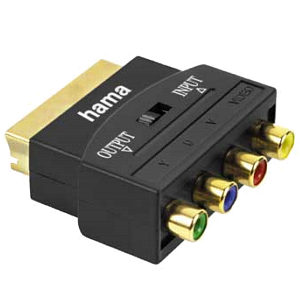 [/img]
Doesn't the TV have a VGA socket? I've got the 32WL66 and it does.
You might be better off with a vga to hdmi cable. Have you tried plugging in, switching the tele then booting the laptop. Mine isn't keen on plugging in once it is on. Finally the fn F8 thing is often very slow; press it once then wait ages before pressing again.
Tried right click Display. No joy.
Maybe I do need a scart adapter, but the back has component video input with green, blue and red coloured sockets. Mmmmm.
component video input with green, blue and red
component [CVBS] is a single yellow phono socket, usually accompanied with a pair of audio sockets [red & white]
If it's marked component & has green, blue and red coloured sockets - it's weird