Recently got a new phone, a Moto G5.
When I take a panorama photo it now always does this photosphere thing. You get a little swirling arrow slap bang centre of picture and when you click it, you get a hideous dizzy curved moving picture.
Also, uploading a panorama to Facebook now produces one of these photos you click into and then pan from side to side. Horrible.
I want to enjoy my panorama pictures as panoramas, not as if I'm sitting in a frikkin photographic barrel and giving it a spin.
Anyone know how you stop this madness?
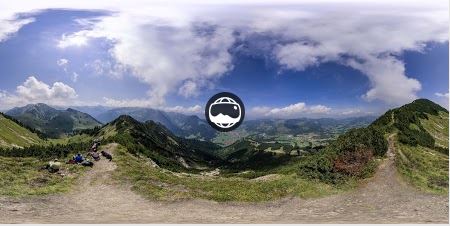
If it's the Google camera app then simply choose the Panorama option in the menu rather than the photosphere option.
There's no photosphere option, only panorama, but it always shows as this photosphere thing.
I got the opposite, I want it back 🙂 How do I add it?
You don't have to do a whole sphere, you can just do 3x1 to get a panorama, or 2x2 to increase what you can fit into the shot.
It makes no odds how many degrees I pan seemingly, it still does it.
Yeah, I'm not panning 360 degrees, more like 90 odd. Holding the phone in portrait.
The above photograph is an equirectangular projection and when it was created with the MotoG5 the app used has added a meta data tag stating the projection used.
If you want to view the projection as above in Facebook or Google then strip out the tag infoin Exiftool or some other program. Or screengrab and upload that image.
Not all phones have 360 ability only ones with a gyroscope.
The MotoG5, when using the Google camera app also has a panarama otption as well as the Photosphere option.
Sorry for the typos..the keyboard is so slow.
I'm on an iPhone and Facebook seems to randomly make some of my panoramas into the panning type but leaves others as big photos.
Not sure how it makes that decision, but suggests it isn't directly linked to Google Photosphere (as I don't use that).
The MotoG5, when using the Google camera app also has a panarama otption as well as the Photosphere option
I don't have a photosphere option in my Google camera app, only a panorama option. Using that turns it into the horrible swipey pan thing no matter how short my pan is.
I asked on the Google photos help forum.
Hi there,
Welcome to the Google Photos Help Forum.Unfortunately, it is not possible to stop photosphere to view through Google Photos. That being said, if you would like to see this feature implemented in the future, I recommend leaving feedback about it through the following steps:
- Open Google Photos
- Click on Menu
- Select Send feedback
- Click on Send
The product team reviews the feedback regularly and uses it to better improve the product overtime.
Sounds like I can't do anything about it.
Yay Google! You've basically knackered a type of photo I love to take. :-/
This is weird because I use Google photos to view images, but don't have a photosphere option anywhere that I can see.
There are loads of other camera apps out there. Can't you just download one that allows you to take straightforward panoramas?
Tries to drag OP's pic of mountains. Is disappointed.
@Kayak23 In your last post you mentioned "Google Photos", does it do the same if you use a different photo viewing app? There's usually one called Gallery or Album included with most Android phones.
I don't have either 'Album' or 'Gallery' as an alternative. Only 'Photos' which is the Google Photos app I presume.
My old phone, a Moto g3 had 'Gallery' and was perfect really. This new one, moto g5 uses this Google photos thing I think and is a pita.
It also shows albums that I uploaded to Picasa years ago. Picasa has now been pulled I believe, replaced by Google Photos and I can't yet work out/be arsed to figure out how to stop seeing them.
That photo of mountains isn't mine by the way... It's just generic mountainage.
I suppose I could try using another photo app but it seems a bit knobbish considering Google is supposed to be all customisable.
Have you downloaded the actual image that was taken?
Downloaded? I've taken images and uploaded them to Facebook. All panorama photos appear as photosphere jobs...
This is what my gallery looks like. You can see that all the images that were taken as panoramas(no matter how short the pan) have that photosphere symbol on them.
[url= https://farm5.staticflickr.com/4760/26529140228_504881d181_h.jp g" target="_blank">https://farm5.staticflickr.com/4760/26529140228_504881d181_h.jp g"/> [/img][/url][url= https://flic.kr/p/GqhM8s ]Untitled[/url] by [url= https://www.flickr.com/photos/79912681@N06/ ]kayak23[/url], on Flickr
I’m on an iPhone and Facebook seems to randomly make some of my panoramas into the panning type but leaves others as big photos.
Not sure how it makes that decision
After selecting the panoramic photo, if you click the little sphere in the bottom right hand corner before posting you can toggle between posting it as a sphere or panorama. I think.
Don't have that option in Android as far as I can see.