
MegaSack DRAW - This year's winner is user - rgwb
We will be in touch
I have measured out the Big Bike Bash venue and camp site and want to draw a large scale plan so we can place the different trade stands, the beer tent, the food tent, the competition arenas etc. Anyone suggest something better than MS Paint that is free?
I can tell you that the camp site is 17,000 square metres and the main arena, not including the spectator hill and stage area is 15,500 metres.
Ideally the drawing tool would let me put a square metre grid over the top of the site plan.
Does google sketchup work well in 2D?
SketchUp might do the job for you.
Graph paper, straight edge, a pencil and an eraser is what I would use, but then I'm an architect.
aP - They only let me use crayons in here 🙁
Well, you know what the answer is then?
Bigger graph paper.
aP - Surely an architect would just tell the client they need to commission a full topo survey then bill them 10% on top of the surveyor's fee?
You could do a plan on pro map for about £50 I would of though.
The trouble with paying Pro-Map £50 is that it isn't free. This is a charity event so we are trying to save money.
One thing we won't be scrimping on is the toilets though. Toilets seem to be the most important/complained about things at bike events.
There used to be free or trial versions of Turbocad which would do the trick. Google it.
This might work?
http://usa.autodesk.com/adsk/servlet/index?id=12423405&siteID=123112&CMP=ILC-GN9219645015
Well, if you want quality then yes, it would require a full topo, which will include for mark up, however this is more of a boshboshjob - so graph paper, pencil, eraser and scale rule works for me.
Why make things any more complicated than they need to be?
aP - I agree about pen and paper. That is how I got the basic plan, just need to email it abut a bit now and try different ideas without too much duplication. Sketchup seems to be working.
Power Point is the way forward, as can be seen in the Hit the North site plan.
[IMG] 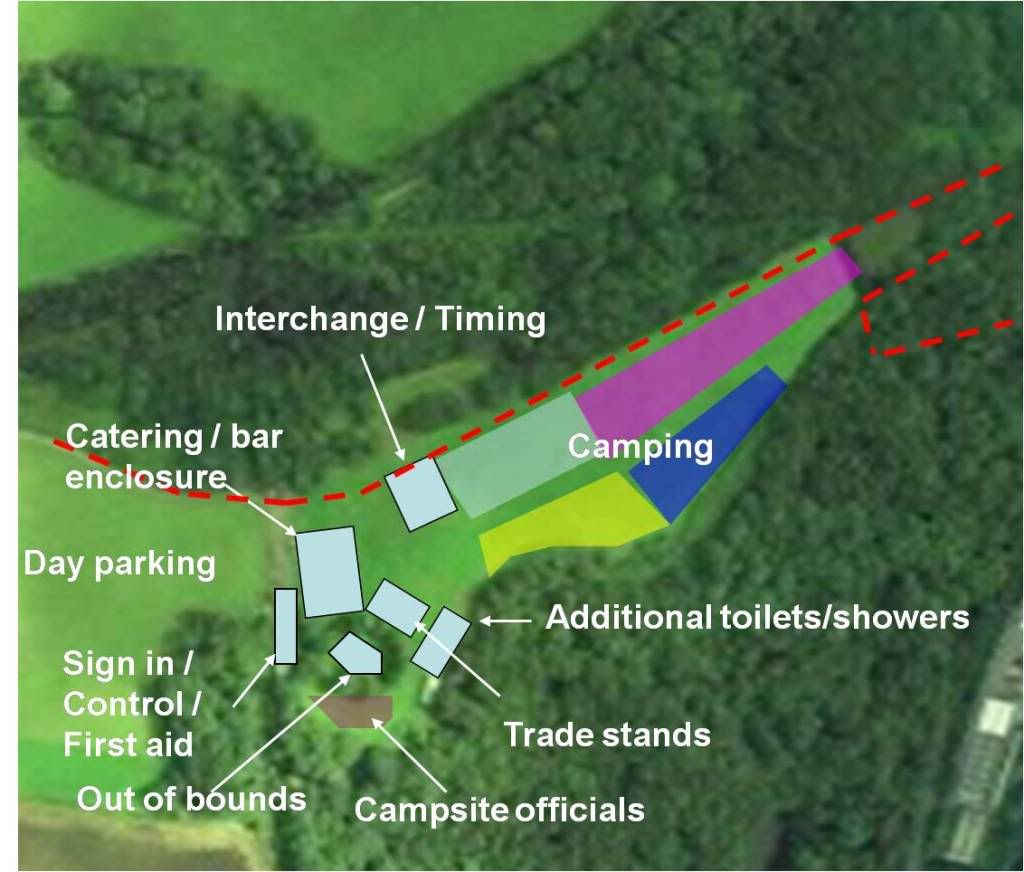 [/IMG]
Don't spend too much time worrying, because people will camp where they want to and the biblically bad weather will turn the car park field into an inaccessible bog. 😉
Looks good. We have done a mock up a bit like that from google maps but i thought I'd try something a bit more detailed as there are about 30-40 competitions going on rather than just a simple race.
Do you reckon you could scrape a team of 4 to enter the BBB? HTN hits the south sort of thing? It would be great to meet up as your event sort of inspired this one. Blast your mailing list, see who can make the trip south.
I used Tigercad to draw my new conservatory plan, that works well and is free.
Camping isn't a problem as we have loads of space and there is a slight slope. Anyway, it is in the south, the only rain we have down here is imported sparkling rain to make the flowers look pretty and we don't use that at weekends.
You could use something like this?
(Also the link on http://www.bigbikebash.co.uk/location.php to the site plan 404's).
In fact that Avontyrrell has some awesome content. The risk assessment for the mountain biking has:
Projectiles in air caused by nearby archery range (1).
and
Coming across animals such as horses, pony and cows. - Instructors will encourage animals to move if necessary.
You dont get shot at or animal action on the Glentress Red... 😉
Thanks for the invite, but the missus will be 8 months pregnant so a weekend away may be a problem!
Stick it in Sketchup and draw away, the benefit being that you can edit it as many times as you like. The only downside is that SU free has a limited resolution output. [b]aP[/b] doesn’t like it because the Part 1 Girl can use it and he cant. 😈
mtt - how true, how true! 😳
I'm mostly winning the work to employ the Part 1 girl to do Sketchup which I can't do. 😛
How's things?
Can you ask Part 1 Girl how to put a 2M square grid over my plan please.
WCA - in a separate bit of the drawing/new layer/component draw a line along one of the axes that's long enough to span your site. Use the Move tool to copy it 2m perpendicular, then use the repeat option (* 100) or whatever to duplicate that enough times to cover the site(see Linear Arrays in the help). Select all those lines (easier if you were smart do it in a component/different layer/differnet bit of drawing), use the rotate tool to make a copy spun by 90 degrees and that's pretty much job done apart from dropping it onto the site.
Or send it to me (or Part 1 girl)
WCA - Even quicker, go to window/preferences and select the sandbox option. A tool bar will appear, select the 'from scratch' icon, the rest is self explanatory. Group it to finish by right-clicking/group with everything selected.
aP - Making the most of the time off, keeping my CV ticking over by setting up a sole-trader architectural business (domestic) and a web-design business (which has proven infinitely cheaper, more productive given the climate, and easier). How are you fairing? any signs of things picking up?
Cheers I will try it in the morning. Just fired up the BBQ
Great! I'll do the colouring in then.aP - They only let me use crayons in here
Is there going to be a stand to post on the STW Forum for nerds like me?