
MegaSack DRAW - This year's winner is user - rgwb
We will be in touch
Can I pick the great and wonderful STW mind?
I am confused.
I was reading about getting a betterer ethernet cable and was looking at the spaghetti of cables and wiring it goes through and how that can affect the quality of the signal etc etc etc.
Then I realised that the cable from the wall to the box thangamabob goes through the same melange of wires and looks decidedly skinnier than my ethernet cable.
So I was wondering if that cable might be worth an upgrade?
Then it gets complimicated. (For me)
If it is worth doing, am I looking for a DSL or ADSL cable?
I see the phrase ADSL and DSL sort of interchangeable.
So, if you are still reading, I have a Plusnet box. On the back, where the cable from the hole on the wall goes in, it states 'broadband' and 'DSL'.
Although, when I look up Plusnet stuff online, it refers to ASDL as 'standard broadband'.
What other info would I need to work out what cable to get please and is it worth it?
DSL is digital subscriber line. The added A is asynchronous meaning that the speed up and down are different. Data speed is a lot lower than network so cable not as critical. Reducing the number of connections (remove extensions) would have more effect.
OK, cheers.
So where it says DSL, it is actually ADSL?
I don't have any extensions.
So the data from the wall to the box isn't affected by interference from power leads and data cables?
Then it goes into the box and then the ethernet cable IS affected by such things?
So, everything changes at the box then.
It is very unlikely that either of these cables are effected by being tangled up with others. Get shielded ethernet cable if you want but it only really gets effected by running along side power cables.
OK. Well, currently they both run along and around seven power cables.
Plus an HDMI, a scart lead, an HDMI a couple of usb, speaker cables an aerial (that is split) and a telephone cable.
So, to be clear, we are saying that the dsl/asdl is not affected by any of these?
In which case not worth upgrading at all?
If the (A)DSL cable runs alongside the power cables then it *may* be affected, depends on the shielding. Just pulling the cables apart by a few cm will be enough to reduce any effect. There won't be any interference from data cables - I've run several tens of data cables (ethernet, co-ax, etc.) bundled together and held together with zip ties without problem.
From your description it might be worth sorting the mess of cables out anyway.
Yes, i was just coming to the same conclusion.
Glad I asked this.
I wouldn't have thought to separate power from data cables.
I doubt anything is shielded. I have never put any thought into this before.
Appreciate the 'few cm' comment, you pre-empted my next question 🙂
Thanks.
Cable from socket to box is an RJ11 phone cable typically. They're twisted pair cables, or at least should be …
Keep this cable as short as possible. Box close as possible to the socket. Your broadband signal quality and the data rate it will lock on to is based on the length from exchange or the nearest cabinet (if fibre to cabinet) to the box.
Good ADSL faceplate with filtering and shielding and split between voice and DSL. Extensions wired in properly or no extensions better.
Box being near the socket however may mean WiFi signal is going to be poor as often phone sockets are in the corner of the building. There are solutions to improve/relocate your WiFi without moving the router box.
Ethernet cables can run long lengths around the house from the box without issue.
Right, stop.
Ethernet cables are the ones between your router and other devices such as your PC. Unless your computer desk is next to a lathe there is zero point in "upgrading" these. If anyone tells you you need CAT6 or some other nonsense then they need flogging to death with a cat5-o-nine-tails.
ADSL is a type of DSL, in the same way that a Ford Fiesta is a type of Ford. This is the cable between your router and the wall (and as you say, is typically thinner than the Ethernet cable, with a smaller plug). You could have ADSL, VDSL or something else but for the purposes of this exercise it's irrelevant, it's all DSL.
Good quality DSL cables are twisted pair, this can generally be identified by dint of the cable being round rather than flat. If you have a particularly (electrically) noisy environment then there may be merit to upgrading this but the difference will probably be nominal if any.
What is important is what's at the other end of this cable. Do you plug directly into the master socket? Is the cable half a mile long? Do you have other telephone extensions running off it?
No lathe unfortunately 🙁
I have a bunch of appliances (6) all in the same area so power and data cables all cross over.
That sounds like it isn't (?) a noisy environment?
OK, I thought the ethernet one was likely to be of help.
The DSL (He says confidently) cable is flat.
It isn't hugely long.
I have no telephone extensions.
I have explored a little. It goes:
DSL cable to socket (through my jungle of cables and wires) which is Openreach MK3.
(It has a telephone socket at the bottome and DSL at the top.)
From there it goes 8 metres through another cable to a small BT box.
That then runs another three metres (interestingly, right past my fuse box and mains cable) into a GPO stamped little box.
That then has a thicker cable that disappears down through concrete and has clearly not been touched for years.
That's weird. What's the BT box? A photo might help. The NTE5 (your Openreach socket) should normally just go directly to the phone system, it sounds to me like it's maybe been bodged at some point.
If you still have a GPO box, I'd be half tempted to see if you can get Openreach out to replace it. If you're having issues with intermittent voice quality / crackling on the line then they're more likely to do something about it as I understand it. Worth asking the question, at any rate.
Ideally you want your router as close as possible to the NTE - if you need to do long cable runs, use Ethernet cables from the router to your devices rather than stringing out the DSL connection.
GPO stamped box?! You mean like one of these ...

We had one of those, I replaced it (naughty, naughty) with the current BT master socket (NTE5) which looks similar to this ...
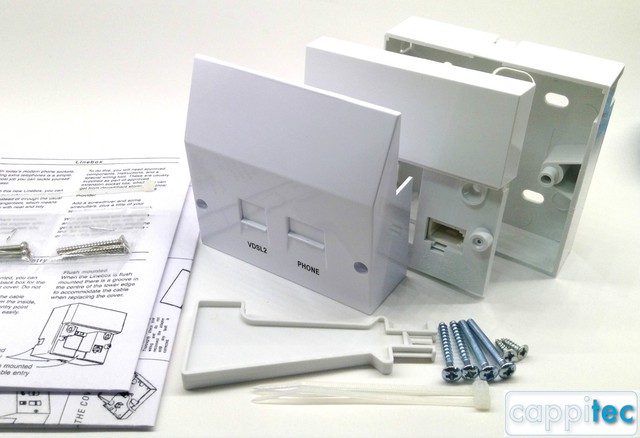
When you take the cover off there's a top and bottom half: the top half is BT/Openreach property, the bottom half is yours. In theory only BT engineers should touch the top half but there's only four wires and it's easy to find the wiring layout online. My work was far neater than what I was replacing!
If your terminal block is that old there's a good chance that the wiring leading to it (the drop line) is very old as well. Might be worth asking to have it checked. The master socket should be the first bit of equipment as the line comes in to your property.
I don't particularly have a problem, I am just hoping to make the most of what I have (Chuckle).
The DSL cable to the NTE5 is about 3 metres long.
I put the router as far away as the cable could reach as my son uses the Wi-Fi upstairs and I was under the impression it would be better if the signal didn't have to get through my pc, tv, hi-fi etc etc.
What is weird? the GPO box? I have to admit to a little wry chuckle when I saw that.
Not seen GPO on anything for a while.
It is a rental property, so most everything has been bodged regularly.
So, all of the cable from the NTE is round.
I am running out of time today, I shall grab a camera tomorrow.
All pretty interesting stuff.
Well think how long ago our telephone system was handled by the GPO.
Put the router next to the NTE5 (assuming in the same room), shouldn't make any difference to the Wi-Fi, uses different frequency band to your other kit so they won't interfere.
What is weird? the GPO box?
All of it really, but more the BT box, I can't fathom what that might be for. Even if Openreach decided to leave the GPO junction box in situ for some ungodly reason, there shouldn't be anything else between that and the NTE. (That GPO box is at least 40 years old, incidentally.)
I'm half wondering whether the landlord has (probably illegally) DIYed it himself, now you've said it's a rental property.
Sounds like that to me @Cougar - it's how our house was wired up when we moved in (this was several years before Broadband so was just a standard BT terminal box not the NTE5).
The GPO lozenge is GPO/BT/Openreach property and according to some act from the 19XXs it's illegal to open or otherwise tamper with it. As noted above I swapped ours out myself. When we had Openreach round investigating a fault on the line, the engineer's comment about the drop line (the cable between the last pole and your property) was: "I've worked for BT for thirty years and have never seen that type of cable before!" so they replaced it. Not a mention about the terminal box so presumably I did a decent enough job.
Even if it's a rented property if you pay the bills then you've the right to request fixes/updates.
Thanks for all this info.
It is not anything I had thought about before.
Learning stuff as we go.
My last bit of learning was how important a PSU is.
That is a strange mix of interesting and incredibly dry as a topic to try and learn when trying to choose one.
Our broadband is slow because we are a long way from the exchange on copper. In our house we previously had 1.8Mbps. I tried better DSL cables and the master socket and everything, made little difference. What did was opening the master socket and re-seating the push in wires from outside, we then jumped to 3.5Mbps.
OP, you are over thinking it. The 'speed restriction' will always be the speed of your 'fibre' or broadband connection.
Very unlikely anything in the house will affect it. You'll be limited by the distance from the BT cabinet in the road.
I get very close on the maximum for my Infinity 2, about 72mbps, which is what it should be. The wifi or ethernet connections aren't the slowing factor as they are all rated faster than the fibre connection.
My router is a couple of feet away from the BT socket - the cable is wrapped round about 4 ethernet cables and a couple of power cables - doesn't affect anything.
Not true.
The speed limit will always be the slowest part of your link, which could be anywhere. If you have a three lane motorway which goes down to one lane, that will be your bottleneck regardless of whether it's at the start or end of your journey.
Shonky home wiring can have a massive effect on DSL quailty. Telephone cabline is unshielded - it was never designed for high-speed data connections - and can readily introduce a shedload of interference into the system. Ripping out pointless unused extensions can make a big difference, they're essentially a dirty great big antenna for noise.
(And wrapping DSL cables around power cables will likely be less problematic than parallel runs.)
The OP could go spending money on stuff he doesn't need, and notice no speed change. If the wall socket is OK, he's best just making sure the router is near by, and away from other wires/devices/obstructions.
If he get's a speed increase then fine, if not, other than replacing the wall box, there isn't much more he can do.
From personal experience, the only change in our house was the wall box was 'updated' when we got fibre - BT just changed the faceplate. We don't have any other 'extensions' as the house phone is wireless. My router isn't in an 'ideal spot' (far corner of the house) but it gives full coverage through the house (even to the opposite corner a floor up). We only lose signal to our detatched garage and summer house, which was fixed by a powerline wifi extender in the garage, but I've just upgraded to BT Whole House Wifi with 2 wifi mesh repeaters.
1 option would be to run speedtest using a short network cable next to the router, then compare it to anywhere else in the house, cabled or wifi.
He could then ascertain if there is an issue.
There is a danger the OP could lay out cash for nothing. He's best doing the simple 'free' checks first.
I don't disagree with any of that, but you're working from a sample set of "one." You had a pretty optimal setup to start with, by the sounds of it.
If the OP asks Openreach to come and move sockets around then he'll likely be stung for a bill in the region of £150. If he reports it as a fault however, eg noise on the line as I said earlier, they should come and rectify it for free. That ancient wiring needs ripping out and replacing with a new drop cable.
All the "ultra-fast fibre optic broadband" in the world ain't gonna make a jot of difference if the 'last mile' is two tin cans and a bit of wet knicker elastic.
I appreciate your input and concerns.
I shan't be spending much money either way.
I am pretty darn interested to see the options though.
OK, right.
Here we go. Here is the set up:
Router.
- 3m Cheap (flat not round) dsl cable.
- OpenReach MK3 socket.
- This goes to a round lead that the original box fitter fitted.
I guess this is dsl cable? If it is, I have plenty of it if rerouting might be needed.. It runs 8m up over a window and door.
I am curious, would that be shielded?
He ran it from a little BT box.
-A little BT box.
[url= https://farm8.staticflickr.com/7846/32377657507_2213fb59e4_n.jp g" target="_blank">https://farm8.staticflickr.com/7846/32377657507_2213fb59e4_n.jp g"/> [/img][/url]
[url= https://farm8.staticflickr.com/7898/40354469943_d53e2d2d2f_n.jp g" target="_blank">https://farm8.staticflickr.com/7898/40354469943_d53e2d2d2f_n.jp g"/> [/img][/url]
- Which then goes through the wall out to the porch.
- Where, interestingly, it runs along the main power cable into the house from the fuse box.
It is right underneath the trunking. (You see my interest as to whether it would be shielded?)
It runs along this for over a metre.
[url= https://farm8.staticflickr.com/7810/32377657147_44b732d79e_n.jp g" target="_blank">https://farm8.staticflickr.com/7810/32377657147_44b732d79e_n.jp g"/> [/img][/url]
- Cable then diverts from that until it is stapled tightly and runs straight past the main fuse box in the porch and off to the outside meter cupboard.
[url= https://farm8.staticflickr.com/7883/40354469283_7fd7851e08_n.jp g" target="_blank">https://farm8.staticflickr.com/7883/40354469283_7fd7851e08_n.jp g"/> [/img][/url]
- Outside meter cupboard. The following photos are taken from the outside world.
As you can see, it comes from past the fuse box to the GPO thingy.
From the GPO thingy is the sort of browny grey thick cable that disappears into the concrete.
[url= https://farm8.staticflickr.com/7886/32377656797_82a5955c31_n.jp g" target="_blank">https://farm8.staticflickr.com/7886/32377656797_82a5955c31_n.jp g"/> [/img][/url]
Here is the GPO box.
[url= https://farm8.staticflickr.com/7833/46404647065_81dd8db805_n.jp g" target="_blank">https://farm8.staticflickr.com/7833/46404647065_81dd8db805_n.jp g"/> [/img][/url]
[url= https://farm8.staticflickr.com/7891/32377656187_9aa23a4813_n.jp g" target="_blank">https://farm8.staticflickr.com/7891/32377656187_9aa23a4813_n.jp g"/> [/img][/url]
Pretty sure it was BT engineer that came when I was here.
He put the cable from the 'little BT box' round the window and door and fitted the new Openreach box. Nothing was done outside by the looks of it.
I wish I had know this info before then, could have had a chat about it with him.
As I say, I might be able to reroute some of this stuff.
In an ideal world It sounds like it would come through the wall straight from their cable into the Openreach socket in the corner of the lounge rather than coming in through the porch and going all round the houses.
I would then attach the router with a short (round) DSL cable and then run it round the house with Ethernet cables.
Holy shit!
I'm intrigued by what looks like either bare wire or brown wire going into that GPO box. It looks like it comes out of the floor along with the grey cable? Is it connected to anything in the junction box?
The rest of that is going to take me a minute to unpick and process...!
Christ! That wiring inside those junction boxes is appalling! What the hell's a chocolate block doing in the first one?
If that was my house I'd be getting a new installation. I'm surprised that the Openreach engineer didn't move things, utility companies tend not to want to share infrastructure since privatisation.
If that was my house I’d be getting a new installation.
+lots. That needs ripping out and putting in properly from scratch. I'd be wanting it replacing at least back to the nearest telegraph pole.
Far as I can see, both of those junction boxes serve the same purpose, to join wire. So at least one of them is redundant, that's just lazy. The GPO box joins the voice pair from the supply to a length of BT phone cable, then the BT box splices this into... Christ knows what that stuff is actually, which then runs off to the NTE.
There is no reason whatsoever that I can think of why this couldn't - and shouldn't - be a single cable run from pole to NTE.
Ha ha.
When I actually started investigating, I thought you would find it interesting.
That's shocking - I'd be onto BT. As said above, cable straight in to the NTE, none of that spaghetti.
That's probably where your problems may be - not after the NTE, but getting there.
Ok, so, questions.
This is the only scenario I have looked at other than one I had put in once that came straight to the house, dug up the ground, through the wall. That was it.
I understand that each junction is a negative.
1) Is the round DSL cable likely to be shielded?
2) What is the cable that comes to the house from outside?
3) Is it the same as I have that comes into the GPO box or is it DSL?
4) The longer the cable is internally, the worse it is, right?
5) Is the fact that it runs near the electricity mains along the trunking there a negative?
6) I am now with Plusnet. They just provide the router don't they?
What is BT responsible for? The line up to? Or into and round the house?
7) I know where would make sense for the cable to enter the property, but can I insist they do that? If it has to come from where it appears out of the concrete in the meter cupboard outside, it would need to be run along the outside wall first.
1) No.
2) Ummm... cable?
3) It's carrying voice and data. Not sure what you mean here.
4) Very simplistically speaking, yes.
5) "It could be." Hard to give a definitive answer to this.
6) And your DSL services. Who provides your phone line (ie, who do you pay 'line rental' to)? That tells you who's responsible for it. It's probably BT unless you've novated the line to TT.
7) I'm not sure. I don't think you can insist per se, but you can ply the Openreach engineer with tea and biscuits. If they're replacing the cable then it shouldn't make much odds, so long as it's physically possible to get the cable there.
Its not shocking, you are all a load of drama queens.
I'd love to hear the conversation when you try and convince the engineer that despite the buried cable testing fine, you want a civils team round to install duct from your house to the nearest network. The bare wires in the GPO box could be an earth if the phone line was a party line back in the good old days, or they could be part of the armouring of an armoured cable.
The second block terminal is not needed but its fine, its not a chocolate block in there, its two jelly filled crimps (also the case in the GPO box). There are hundreds of crimps between you and the exchange so don't worry about it. The only issue in that box is the spare wires are coiled up in the centre, best to straighten them all out and fold them (don't twist).
I doubt the vicinity of the electric is causing any issues, if you had REIN then the broadband would have obvious problems.
Forget about "DSL cable", there's the Openreach cable from the exchange/cabinet to your property. That terminates at the NTE (that stands for Network Termination Equipment) which is where Openreach's responsibility ends. That cable carries voice and data*. From that point it's your wiring and equipment.
From the NTE you want a short cable (with RJ11 connectors at either end) to your router/Wi-Fi hub. Like any chain, the fewer links in it the less there is to go wrong.
There's always a bit of teflon shoulders when you don't get your broadband via BT/Openreach: your internet provider says the cable is Openreach's responsibility; Openreach say it's your internet provider's. It's actually Openreach's equipment.
There are regulations about where Openreach, or anyone, can route cabling. Even in a private yard our wire had to be 4.5m (may be wrong on this but it's somewhere in that region) above the ground. They won't fix to a chimney stack these days - one fell down on someone because of the strain - so what you think is best might not be possible.
* It can do this because the human voice generally uses frequencies below 20kHz so that range is reserved for voice. Then there's a range of frequencies that's a buffer then you get the data carrying frequencies, broadband tends to call these channels.
There's a physical limit to how far (in km of cable not actual walking/driving distance) you can be for a given data speed due to the carrier frequencies used. Think of the difference between the sound of nearby lightning and distant thunder, that nearby is a crack whereas the distant strike is a low frequency rumble - the high frequency sounds have been filtered out.
[i]There’s always a bit of teflon shoulders when you don’t get your broadband via BT/Openreach: your internet provider says the cable is Openreach’s responsibility; Openreach say it’s your internet provider’s. It’s actually Openreach’s equipment[/i]
Whitestone, its not really that clear cut although I do hear all the time of customers being passed off between the CP and Openreach (and also CPs booking the wrong type of appointment to avoid paying for an engineer, but of course they would never admit that to you when you phone up to complain the engineer never visited your house and you still have problems)
The CP normally owns/provides the router, and also has their own kit in the exchange. If the line is testing OK then there are various issues that the engineer may advise the CP to do to fix the problem (often ignored). Also the CPs can send their own engineers around to sort out certain problems within the home, they do not have to use Openreach.
Getting your broadband from BT does not avoid this, they communicate with Openreach in the same way all the other CPs do, you are just reliant on the quality of help you get from them when you call up.
OK, thanks Cougar.
2) Ummm… cable?
3) It’s carrying voice and data. Not sure what you mean here.
I guess I am just trying to work out what to do. If anything.
I think the question is this:
I have a cable coming out of the concrete.
If they were to continue a cable along the front of the house to where it would make sense to enter the property, would that be a continuation of what comes out of the concrete or more like the round cable I have loads of running around inside.
I guess the point being if it is just the thin stuff, I might as well just reroute the stuff I have internally.
Forget about “DSL cable”, there’s the Openreach cable from the exchange/cabinet to your property. That terminates at the NTE (that stands for Network Termination Equipment) which is where Openreach’s responsibility ends.
Ah, ok.
So the cable from my meter cupboard through the house to the NTE is all 'Openreach cable'?
I got confused. I thought because it was round it was DSL cable because better DSL cable is round.
Always the fun with a new topic eh? Working out the terminology.
There’s always a bit of teflon shoulders when you don’t get your broadband via BT/Openreach: your internet provider says the cable is Openreach’s responsibility; Openreach say it’s your internet provider’s. It’s actually Openreach’s equipment.
I can understand that.
I initially had BT broadband installed.
They were the people that first put it in.
I’d love to hear the conversation when you try and convince the engineer that despite the buried cable testing fine, you want a civils team round to install duct from your house to the nearest network.
"Dear whoever I pay my line rental to, I have intermittent crackling and noise on my phone line. Could you send someone round to sort it out please? Love and kisses, the OP."
The only issue in that box is the spare wires are coiled up in the centre, best to straighten them all out and fold them (don’t twist).
Better yet, cut them off.
Better better yet, get Openreach to rip it all out and install something fit for purpose that isn't 40+ years old. There's a GPO box in there, for Busby's sake. It needs killing with fire.
here’s always a bit of teflon shoulders when you don’t get your broadband via BT/Openreach: your internet provider says the cable is Openreach’s responsibility; Openreach say it’s your internet provider’s. It’s actually Openreach’s equipment.
It's nothing to to with your broadband provider. Here be expensive dragons. Forget broadband, look at voice.
Line quality is the responsibility of whoever you pay your line rental to, which most of the time is BT unless you've novated your line to your ISP to save costs. In either case, you report faults to them and they then invoke Openreach.
It's a bit like consumer rights. Your broken toaster might need to go back to Russell Hobbs, but it's the responsibility of Curry's to deal with that, you have no relationship with RH themselves.
Pull your cable a few times a day and report sync drops and they should investigate a little deeper perhaps?
@Cougar - I didn't say it (consumer line) was, just that if you've a problem with your broadband you naturally contact your ISP. We had the runaround twice with different ISPs.
for Busby’s sake
Like 👏
OP, there's no reason why a new cable has to enter your property via the same route as the existing one. There are both technical and legal restraints on where they can route the cable over public property and yours but apart from those it's basically down to a chat (and tea and biscuits) with the engineer.
@spooky - that wiring is shocking. If that was a new install would you say the same? I wouldn't expect a first week apprentice to do such shoddy work.
I think if you have problems it’s likely to be in the junction boxes, not anywhere else in your installation. You don’t need to shield twisted pair cables in normal circumstances, and if it worked fine in the past running next to power cables it’s unlikely to have changed.
I’d consider changing the flat cable from the master socket to your router to a twisted pair Ethernet cable (they’re cheap on Amazon, just needs RJ11 on one end). Replacement NTE5s are available on eBay, or if you ask an Openreach engineer nicely they might give you one from the van.
Do you experience any crackling on voice calls? That’s usually the sign of faulty joints.
just needs RJ11 on one end
Both ends.
just that if you’ve a problem with your broadband you naturally contact your ISP
You do, which is exactly why
We had the runaround twice with different ISPs.
Getting DSL issues fixed can be complicated because there's so many variables; getting voice issues resolved is easier as they've had several decades' more practice.
just needs RJ11 on one end
Both ends.
NTE5 sockets from the 21st century accept an RJ45 or an RJ11 into the unfiltered side.
Ah, good point. I knew that (I came across one the other day through work and was horribly confused for a minute).
With PlusNet, go onto their community support forum and post your issue. Tech guys there are very good at escalating cases with BT and able to tweak stuff quickly on your account that may take longer going via official support route.
for Busby’s sake
Ha ha, Oh dear, I only just got that one.
Right, time to sort this out.
Have been disappointingly ill.
Hmmm, where have my photos gone?
Photos sorted.
I got confused before.
I realise I was getting the terminology wrong a bit.
Also, I am just looking to see if I can improve on what I have and remove any bottle necks.
So, I spoke online chat to my ISP.
- They provide 'fibre' broadband.
But that is only as far as the junction box (which I now know what that means).
- After that it is copper cable to my house, then 20 metres (or something) of mess.
- The system estimates that the junction box is 1,322 metres from my junction box to my pc. But that is based on signal strength. I am wondering a) how to find my junction box and b) if it is based on an estimate using signal strength, if I have a bottleneck, would that show me a longer distance?
- The sales guys tell me I should get 19-28Mbps. I tested it and I get 17.
The tech lady then said I get 16-25. (funny that) Guaranteed 14.5Mbps. She was saying that mine is pretty low and that was due to distance from the cabinet. But she said that nothing else in the house would affect the speed at all.
Have I got this right?
- Plusnet provide cable to the junction box.
- Openreach are then responsible for the copper cable from the junction box to about a foot into my house and the 35 year old GPO box.
- The rest is down to me? including the 20 metres of mess the engineers put in over the decades from the gpo box to the Master Socket. (What are we calling the copper cable from the GPO box to the Master socket again? The round stuff)
- After the master socket is a flat cable to the router. What are we calling that again please?).
– Plusnet provide cable to the junction box.
Probably. This doesn't really matter to you anyway.
– Openreach are then responsible for the copper cable from the junction box to about a foot into my house and the 35 year old GPO box.
Yes.
– The rest is down to me? including the 20 metres of mess the engineers put in over the decades from the gpo box to the Master Socket. (What are we calling the copper cable from the GPO box to the Master socket again? The round stuff)
Shit.
Responsibility here is difficult to say with certainty as both the GPO box and the NTE5 are demarcation points between you and BT. I'll come back to this.
– After the master socket is a flat cable to the router. What are we calling that again please?).
DSL cable, for want of anything better.
So, the 20m of shit is a problem. Either a BT engineer bodged it at some point, or the previous owner got themselves an NTE5 off the Internet. I'm only guessing but I'm tending towards the latter, for all that BT are a shower of a company their old-school cabling guys are some of the best in the business, it's hard to see them doing that sort of Friday Night Special (but not unheard of).
What I'd do is this. Get on to BT, tell them you have intermittent problems with voice calls, crackling on the line and suchlike. Don't mention DSL. They should send an Openreach engineer round for free to resolve this (whereas they'll likely charge you if it's a DSL callout).
Openreach are instructed to put the master socket wherever is easiest for them. When the engineer turns up, be nice, ply them with tea and biscuits, and have a chat about where you'd ideally like the NTE5 to be located and with a bit of luck they'll do you a favour and shift it. You may be limited by practicality of course, they can't put it somewhere impossible, but they should take one look at that car crash and rip the lot out.
Thanks loads for this.
I really appreciate it.
The NTE5 was put in by the BT engineer when I moved in here 4 years ago.
I didn't know any better, thinking he knew best.
So, yes, the mess at my end is likely to be the worst bit.
Even though the 'tech' person said no at plusnet.
In an ideal world, from what you said before, have I got it right thinking I would be best off putting the NTE5 as close to where it hits the house as possible then running ethernet cable from there?
Hmm, it is in a porch though, so, also run a round (not flat) dsl cable in from the porch (not far) to the router then ethernet from there on.
Oh, bugger, and I am so rubbish at lying.
Am I allowed to move the NTE5? Or would I get told off?
Or is it there something that means I shouldn't?
(Obviously as long as I remember what cable goes where)
Right, so it sounds as though Openreach has taken responsibility for that cable run and the NTE5 is the demarcation point. In which case, technically no, you can't move it yourself, it's classed as tampering with the phone system and illegal. In practice, given the shambles it's currently in, who would know? (Personally I wouldn't, as above I'd be kicking it back to BT to sort their mess out.)
I suppose ideally you want the NTE presented as close as possible to where you want your router, though running CAT5e from NTE to router would be an improvement over the regular DSL cable. You'd need something custom-made though, as a patch cable will have the wrong plug on the end.
Is the voice side of things genuinely perfect?
What issue do you have, with the service ,Slow speed or intermitant droping out? Is it noisy?
The main cable to the old gpo box in the meter box is an amoured cable, which is direct in the ground, ie not ducted, so cant be moved.The twisted cable from the gpo box to nte is not ideal(better run around outside of house if possible to nte).It has been connected using idc crimps in the various small connection boxes,which are what is used by O.R It would be better to be one length all the way.
Has your provider said there is an issue with the line? You can push them for an sfi fault to be raised, but if your speed is within parameters and no issue with connection dropping out, they probally will refuse(it costs them)
Various sfi type faults can be raised, from just checking speed and line quality,to engineer going from exchange to nte checking all connections and upgrading if required(can take days in bad cases)
Right, turns out the internet has been cutting out most days as well for the last couple of weeks. (I don't use it as much as others in the house.)
I contacted them to say this and my phone line didn't sound right.
Yes, apparently, I am getting 17 Mbps and the range is 16-25Mbps. (although the sales guy said 19-28Mbps)
Apparently they guarantee 14.5 Mbps.
Would be nice to get better if possible eh?
Just frustrating to not be allowed to just use the existing 10-15m of cable and bypass shit. Rewire that into the gpo box and bypass the extra box and the power cable and the old cable that has been very tightly stapled to the skirting. Just to see if that makes any difference.
As you say, esp as they have messed it about, not me.
So, they are doing a 48 hour monitor test on my signal through the test socket.
Complicated load of old Codswallop isn't it?
It is, can be like faulting fog,sometimes obvious, other times its just utter witchcraft why it doesn’t work.
Hopefully they can spot drops in connection,& pass to OR for a good seeing too👍🏼
Well, they monitored it for three days.
Takes a chunk of your life chasing up these people doesn;t it?
Funnily enough we had no drop outs in that time.
So, the guy said there is no fault.
So we have to raise a fault with the faults team.
Apparently it looks like there's a 'fault located within the connection profile settings'
Just need to wait 3-5 (working) days to see what that means.
In the meantime, I had a cunning plan.
I spoke with my neighbour who has a business up the road and has half an idea of stuff like this.
Turns out he gets 17Mbps as well (He knew it off the top of his head) reckons it is about as good as we will get due to the distance from the cabinet.
For what it's worth;
When we moved in our speeds were much worse than expected (<10Mbps). Especially as we had newly laid fibre to the cabinet, which sits across the road from our house (so like 30ft away). BT swore blind no issue with the line, tested, run diagnostics etc. We switched ISP to Zen and they raised a ticket and we got a free Openreach visit to sort it out. Turns out where it entered the house was bodged by the previous owner when they extended the house - the housing/connector was full of water for one thing. New master socket installed and we went straight to 35-40Mbps.
I'd be pushing for an Openreach engineer if you can. The chap who came to us was really good - I suspect the copious plying with tea and biscuits helped.
Well, I thought I was heading down the route of getting a visit with my cutting out issue (and a hissing phone line as a side issue)
They have bounced me about and cost me hours and hours of my time and I appear to have got nowhere.
Although, saying that my broadband seems to have stopped cutting out.
So maybe someone has done something even though "there is nothing wrong". (Constantly)
Ah, apparently, it is not considered a fault unless signal drops three times a day.
My contract ends soon. But I doubt any other ISP would be any better.
Do you think?
I see Virgin run fibre to your master socket.
As opposed to my fibre which runs to the cabinet which is nearly a mile away.
Virgin are not in my area.
Is there any merit in contacting OpenReach?
I keep getting told that there is no fault and I am getting above minimum level of broadband speed. (Just)
Originally, I was wondering if that could be improved, but it maybe seems not.
Ring.
BT.
Not.
Your.
ISP.
I did say this is exactly what would happen otherwise. The hissing on the line is the fault you need to report.
If plusnet are your ip, you need to go through them, you are their customer, as plusnet are a customer of openreach.The hissing if constant and sounds like a blowlamp in the background could be poor filtering, if intermittant defo a cable fault,possibly a hr(highresistance) joint or a rectified loop, acts as diode between both legs of your cable pair.Both faults can be missed on remote line tests.
The armoured cable that feeds into the meter box , are notorious for rectified loops(age/possibly been disturbed as some point)You need an O/R engineer to do a pqt (pair quality test) from your nte, this will highlight any faults, that cant be seen remotely. Keep pushing them, plusnet usually are pretty good.
If plusnet are your ip, you need to go through them, you are their customer
Who would you ring if you didn't have an Internet service at all?
You're reporting a line fault, this is the responsibility of whoever you pay your monthly line rental to. This may well be your ISP (if you've novated your line across to them as part of the DSL deal say, I did with my Sky package) but is usually BT.
Indeed,if you have a problem with the voice, side of your sevice you contact whoever you pay for the voice service, but most people have both voice and adsl from the same supplier.( usually cheaper ain’t it?)
There are a hell of alot of people who dont have a phone or use a land line,even though its paid for,free calls on mobile contracts why would you?
On the other hand, theres a few older folk, who pay for adsl even a fibre service, who never use it, nor have router plugged in ,usually misold.
Yes an engineer could visit and if the line is noisy,and he sorts it out,that may not improve bb quality,because the adsl connection is not tested for errors, as would be on a SFI fault report. He could also turn up do a PQT test all passes and there is no noise on the line at the time of his visit, This is the cheap option for SP’s, hoping its an obvious fault and rectified easily.
Its the favourite trick of certain SP to report a noisy line, OR engineer visits, asks User and they say no its an Adsl problem I dont even own a home phone, I reported my bb connection.
Also if the Op’s main problem is his bb, Push for sp for this to be fixed, more products offered by OR to get it sorted with sfi fault reports.Been a product the sp has to pay OR to attend, and somtimes they go for the cheap options first, make it seem frustrating for the end user. And when somebody has had multiple engineer visits, and not got it sorted, thats because the engineer is instructed to do certain tests,and no more that is all the sp has paid for
You have to remember OR is a buisness.