Ran out of space on my laptop HD so I bought a new 500GB Crucial SSD. Ready to clone it over but when I plug the new SSD in via a USB connected external caddy I can't see the disk drive to select it as the destination disk? Done this a few times before on other laptops and don't recall this issue. Have tried a rescan in disk management and it's not showing up in there either - is there anything I can try? Win 10 btw.
Also any recommendations for the best current free disk migration tool? Usually use EASEUS as that was recommended but not sure if there's anything better, it keeps wanting me to subscribe (not surprising I guess).
Cheers for any help.
Easy to clone if using Linux - dd command
Crucial have free cloning software
No idea why the drive isn't being recognised, I've never had that problem before on W10
Had to do similar recently.
Used Macrium Reflect . They have 30 day free trial.
Any compellng to clone it rather than just reinstall?
Clonezilla has worked well for me in the past.
The only one I could get to work was the Seagate free software. All the other recommendations required payment. Didn't try the crucial one though.
As for reinstall Vs clone I could have but cloning was quicker and save a fair bit of time trying to remember settings for OBS etc Vs just being up and running. Pc only used for zwift so not polluted.
Any compellng to clone it rather than just reinstall?
Yep - laziness. Got various programs on there, lots of doom related wad editing tools, textures, custom stuff etc. Is there a compelling argument to not clone?
I've tested out my external caddy with the old HD's I cloned previously and they come up straight away. Maybe something is up with this SSD?
you might have to format the SSD first before it shows up. Then one of these freeware or demos folk are mentioning
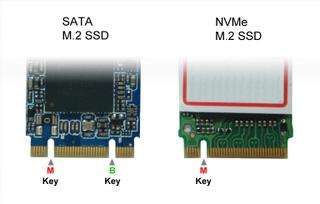
Iirc there are two sorts of M2 SSD (Sata and NVMe)and your caddy might only recognise the older one. Been caught with that before
Windows?
Check the device manager. As folks have already said the disk might not show up if it is not formatted.
My cloning experience is Mac-based so I had a google and this turned up.
https://www.ubackup.com/articles/carbon-copy-cloner-windows-alternative-4125.amp.html
Good luck!
If it's a brand new disc then it won't show up as a drive as it is likely unpartitioned. It should show up in disc manager though. You shouldn't need to partition and format to clone as they will be done as part on the clone process.
If a drive isn't appearing in Disk Management then there is a physical issue and no "tools" will help you. Is the caddy a Known Good? Does it have power? Does it work with another drive? Does it work on another PC?
Is there a compelling argument to not clone?
The existence of this thread?
Whilst I reject the 'established wisdom' that computers get slower over time, these days I'd take a hard drive swap as an opportunity/excuse to get rid of years' worth of shite and start afresh.
I'm just doing exactly that - swapping from a 100 to a 500GB drive in my "zwift" PC to allow some additional games etc to be installed for when the kids visit.
I've only just freshly re-installed the 100 drive before deciding to upgrade, so a clone is quicker and means I don't have to spend several hours waiting for Fortnite to download again.
I'm using AMOEI partition manager on a different PC which is free. All seems good except the computer I'm upgrading doesn't want to recognise the new cloned drive as bootable - by the time I'm done figuring that out it would have been just as quick to re-install but I will (hopefully) have learned something.
And I've given up and just re-installed. Not worth the messing about.
If a drive isn’t appearing in Disk Management then there is a physical issue and no “tools” will help you. Is the caddy a Known Good? Does it have power? Does it work with another drive? Does it work on another PC?
As above, tested with another disk drive and it works okay, light on etc. With this one the light is on but nothing =, nada, zilch shows up in any utility program at all - no chance to initialise it, format it or anything the external drive just doesn't show up with this ssd fitted.
I think if I tried to swap it and do a fresh install it wouldn't be recognised either,
I think if I tried to swap it and do a fresh install it wouldn’t be recognised either,
More than likely
In the meantime, it's well worth just downloading Jam Treesize to see where all your space has gone, I've just recovered a load of space on my drive, for me Apple itunes old (obsolete) backups and iOS updates downloaded and never deleted, were happily filling it to death.
Easy to clone if using Linux – dd command
Easy if you know how, easy to overwrite important data if you don't.
As above, tested with another disk drive and it works okay, light on etc. With this one the light is on but nothing =, nada, zilch shows up in any utility program at all – no chance to initialise it, format it or anything the external drive just doesn’t show up with this ssd fitted.
I think if I tried to swap it and do a fresh install it wouldn’t be recognised either,
Sounds broken but, USB caddies are temperamental. I'd try it internally ahead of returning it.
If this is a card type SSD are you sure you don't have an NVMe SSD and the other ones are all SATA? It might be your caddy doesn't recognise it because it is the wrong type
M.2 (of which NVMe is a flavor of) drives are a different form factor to 2.5" SATA drives, they won't plug into caddy for 2.5" SATA drives, unless the caddy has additional sockets which is unlikely.
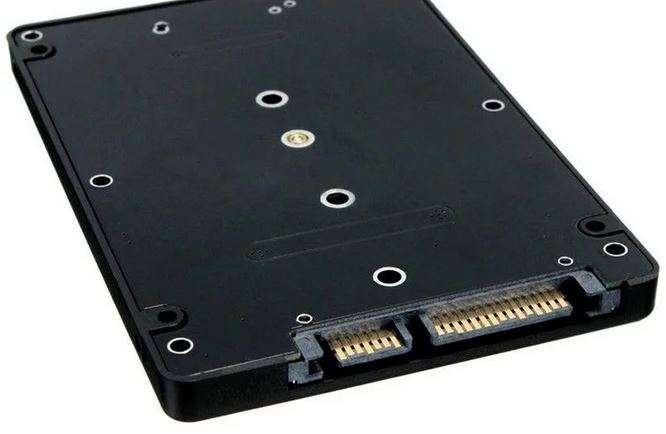
2.5" Sata drives require a SATA data connection, and a SATA power connection, with M.2 its all on one connection.
2.5" sata drive
Went through this with a Zenbook at Xmas. Used crucial's compatibility checker and 'their' cloning SW. This rendered the SSD unreadable by the target machine other than in the cloning SW. Could be seen on another laptop. Wasted best part of a day on it and ended up doing a fresh install.
I always just use the free version of Macrium reflect, super easy interface and it just works.
M.2 (of which NVMe is a flavor of) drives are a different form factor to 2.5″ SATA drives
Agreed. If it is a 2.5 SATA drive then there is no problem. However if it is M.2 then both types can plug into some caddies even though the caddy can't handle NVMe. I couldn't tell if it was a 2.5 drive so I thought I had better check
All seems good except the computer I’m upgrading doesn’t want to recognise the new cloned drive as bootable
Mine did something like that after the clone however it was because I was cloning using the internal sata ports and unplugged the original drive. In it's wisdom the bios had decided to ignore that the new drive was bootable and tried to boot from network or usb drive. Had to manually add the new drive as step one if the boot order.