I have set up a Team in MS Teams. I now want to have a meeting wth some members of that team and send a calendar invite. Just how do you invite these people without having to laboriously type in their names AGAIN to search for them in the directory.
They are already in the f'ing team, why can't I just select them from a list. Google ain't helping, I can't see anything obvious, can someone please help before I throw my laptop ot of the window?
Ta,
S
@Team for the whole team
@ will bring up the list of individuals you're after
You owe me 🙂
That's @mentions in chat, he wants to be able to invite some people in the team to a calendar meeting, by not typing in their name, somehow...
OP - in the 'invite people' box, just start typing their name, it will automatically filter the list where you can click their name. Unless you have 10's of people, shouldn't take long.
[img] 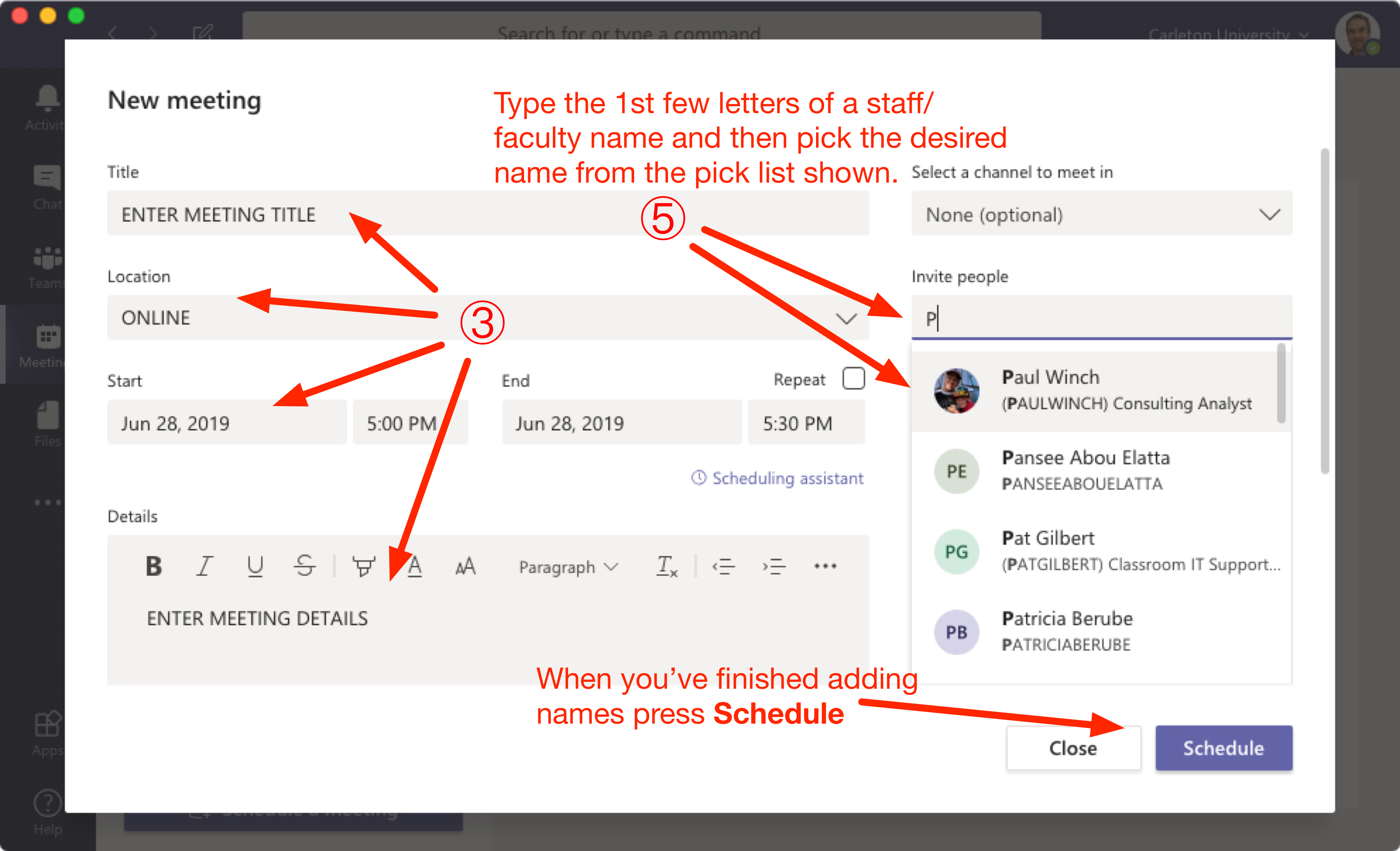 [/img]
You can also set a meeting for a channel (top right) and anyone in that channel will be able to see and join the meeting, if you want certain people to specifically be invited, add their name to the invitees too.
Thanks, it is a list of 30 odd students and I don't know all of their names without looking at a list. The same list I used to add them to Teams in the first place. It seems an odd omission in functionality unless I'm missing something about how it is meant to be used.
I thought about trying the channel thing too but again you have to re-enter everybodys details to create the team rather than selecting from the existing TEAM members ffs.
I assumed that a program named TEAMs would allow you to easily communicate with members of a TEAM. More fool me.
I've done it now from outlook just copying from an old distribution email. Feels like a bodge but at least it works.
I would say a channel meeting would be best in that case. You have set up channels within the MS teams team, right?
Also, docs.microsoft.com is your friend. https://docs.microsoft.com/en-us/microsoftteams/teams-overview
Edit: Yeah, if you want to invite specific people, you sort of need to know the names of the people you want to invite, that's not changed in outlook or teams for a long time. If they're external (not by the sounds of it) then it's full email address.
You can, however, invite a distribution group as that is just an email address with a bunch of users. If you DG is on Office 365 of course.
Or third option, channel invite which will allow anyone in the that channel to join.
You want to have a meeting with just some of the members of the Team? How many people are you talking about here?
-
You can set up a private channel within that team and add the members you want
Or go to the Chat panel and create a new conversation with these people, then start a meeting in that conversation
Or just set up the meeting in Outlook and make it a Teams meeting (by clicking the Teams Meeting button in Outlook)
Using @Teams will just notify everyone in the Team
There's some good resources on the Microsoft
https://docs.microsoft.com/en-us/MicrosoftTeams/Microsoft-Teams#pivot=home&panel=home-all
30-odd people participating / doing the same thing is a Team. There's this cool product called Teams that allows people to collaborate as a Team in various ways including calls.
Sorry for the sarcasm, seems you're massively missing the point despite the clue being in the name.
Yeah, it could definitely be easier.
There's the concept of "channel meetings" where anyone in that channel gets access even if you add them later, and they lose it if they leave. Keeps any recording, meeting notes, etc in the channel too. When you create the meeting, where it says "Add Channel", just add the channel(s) you want.
However it doesn't add it to anyone's calendar unless you explicitly invited them by name, or they go into the details and hit "add to calendar". It's a very different concept to old-style Outlook meetings - can be good though for regular things (like a weekly meeting) where members may often come and go.
Not sure if it is just a feature of a reasonable quality on ear stereo headset but, has anybody else noticed how clear and slightly unnerving the audio quality is on teams calls.
One to one calls are the more noticeable for me. Seems to have a very low noise floor and I can hear voices and breathing so clear it is a bit spooky. Not too loud either, just very clear.
Anyone played with the background blur button? Pretty impressive IMO.
The sort of whole point of Teams is that you can do away with the traditional 'meeting' as you can chat in numerous different ways within channels/teams/one to one/any number of people in a private group chat, and share documents, files, information and so on.
It's a collaboration tool which really makes old style meetings fairly redundant.
As @son-of-mike said above, if you get a chat going with x amount of people, you can just start a video or voice call with a single button, screenshare and so on.
We use Teams (in IT) massively as our main messaging/information/sharing/collab tool, it's not far from replacing emails. And the only times we have actual meetings is for big stuff, like Covid updates for the entire IT team of 250+, which runs perfectly...
We also have Microsoft Teams Rooms, which are physical meeting rooms with a small control panel and camera, which is linked directly into MS teams. It's bloody brilliant - 3 or 4 cross site meetings with a mix of Teams rooms + people at their desks + people on mobiles + external dial ins...
.... And the fall down of teams is it isn't a traditional meeting.
IMO, it can be 'hijacked' by insensitive colleagues, becomes a stream of half messages, back channel chats and 'don't you remember the random sentence hidden within 300 messages last week?'.
It's a tool that encourages business to look inwards, not out at customers.
And it's like putting the brakes on any machine running it.
Then any IT person tells me I should read the documents hidden on an MS site, learn the work around and hacks to get it to work - rather than it being intuitive.
One to one calls are the more noticeable for me. Seems to have a very low noise floor and I can hear voices and breathing so clear it is a bit spooky.
Not on our damp string ADSL connection (rural Suffolk). No doubt if you're on fibre it works well on our sub-7Mbs 'broadband' it struggles.
@Shackleton, from your posts I'm guessing you're in education? Me too and Teams has totally changed the way I work. For my sins I'm also an MIE (not that that takes much TBH) and one of my school's Microsoft Digital Champions. By all means hit me up on PM if you have any specific questions.
@scuttler Yeah, I love the background blur, no one knows I'm in the caves of Tora Bora when I'm meant to be working from home 🙂
@twonks I was just thinking that today, like they're sitting behind me whispering in my ear, very spooky.
The Stream recordings are useful if you have people who can't make the meeting or if you want to listen back to it. You can then create a Stream channel and link into your Team using the "add a tab" feature, then all the Teams meeting videos are located in the same Teams space.
@matt_outandabout Sounds like you've had a bad experience moving to Teams? We've had the opposite, lots of positive comments, people taking to it intuitively (who are not IT people). I think a lot of the features are things you would see in modern life, outside of the office, like in WhatsApp or Slack or Trello. The MS docs are, for the most part, easy to read and aimed at driving people onto the tool. Yes, primarily we use it for internal teams but we have plenty of Teams who interact with federated and guest accounts or who share content externally with agenices & 3rd parties. As long as you have it set up properly and have someone to explain it I reckon it's a really powerful tool that will change the way our business (global company, 7000+ people) works forever.
Forced to start using it this week. It’s an unintuitive sack of shit in my opinion. I thought Sage 50 couldn’t be beaten, but Teams could I reckon. Smash the computer OP, it’s the only way.
As long as you have it set up properly and have someone to explain it I reckon it’s a really powerful tool that will change the way our business (global company, 7000+ people) works forever.
This may be the reason.
I'm stuck with an "award winning" IT company that is so good another one just bought them... Yet a roll out of SharePoint/OneDrive/365, a new VoIP phone systems and Teams came with zero training, zero documentation, zero on site support and seemingly three different ways of setting it all up.
And they were the 'good' IT company, who came very recommended.
And then the bill. F'me I'm in the wrong business.
User training for Teams:
https://support.office.com/en-gb/teams
How to schedule meetings - click the calendar icon in the left hand bar. Select "Schedule a meeting" top right.
Don't invite individuals, note it says "optional" by that box. Instead look a bit further down where you can select a channel. Pick the "General" channel for the relevant team to invite everyone in the team.
On the periphery of a team dabbling with it, bloody horrible.
The way our company has it set up when you create a meeting in outlook there is a Teams button to create a link to the meeting. Not used that yet, I've either created a chat group with everyone on it and used that to start the meeting and call them or start it in the teams/channel and then they have joined.
@Shackleton
I'm a teacher too and I have been using Teams for live teaching - very quick to set up. If you want me to walk you through, email me and I will send you my phone number. I can also show you how to have an audio only conversation with them while sharing your iPad screen (which means you can use any Apps you want and they can follow along). My students finished lessons yesterday (independent school) so I am pretty much free today barring bike ride.
I’m stuck with an “award winning” IT company that is so good another one just bought them… Yet a roll out of SharePoint/OneDrive/365, a new VoIP phone systems and Teams came with zero training, zero documentation, zero on site support and seemingly three different ways of setting it all up.
And they were the ‘good’ IT company, who came very recommended.
Kinda depends what they were contracted to provide? I work for an IT service company and we implement IT, we specifically don't offer end user training as part of that, that's up to the customer to arrange (hopefully with a company that specialises in it rather than a bunch of IT nerds trying to hide their inner rage from an end user that doesn't know how to double-click a mouse button...). Ofc we try and be helpful and often handhold the system 'champions' on the customer side but that's about it.
End user training on IT systems is very different to implementing them, also don't assume the people implementing the systems actually use them much. For example, you can get someone to install MS Office via an automated script on 1000 desktops for you but ask the same guy about pivot tables in Excel that he's just installed for you and he won't have a clue.
Isn't Teams the son of Skype? Microsoft having bought that and then ripped the guts out of it to turn it into Teams?
The main issue for me is it going dalek on important calls and behaving perfectly on routine ones...
I have a teams question! I am trying to share a notebook on channel (to a guest) but can't find how to manage this. Is it a SharePoint issue?
Sorry OP.
Isn’t Teams the son of Skype
They used some Skype technology but actually got it to work well. it's much more than just Skype as well,
Kinda depends what they were contracted to provide? I work for an IT service company and we implement IT, we specifically don’t offer end user training as part of that, that’s up to the customer to arrange (hopefully with a company that specialises in it rather than a bunch of IT nerds trying to hide their inner rage from an end user that doesn’t know how to double-click a mouse button…). Ofc we try and be helpful and often handhold the system ‘champions’ on the customer side but that’s about it.
End user training on IT systems is very different to implementing them, also don’t assume the people implementing the systems actually use them much. For example, you can get someone to install MS Office via an automated script on 1000 desktops for you but ask the same guy about pivot tables in Excel that he’s just installed for you and he won’t have a clue.
Do you work for my IT company?
The contract was install, support, documentation and "some training".
The "some training" was someone speaking gobbledygook at us from a web can recorded corner of an office.
IMO there's a market for an IT company who can train as well as install.
Thanks for the helpful comments, I got to grips with it all fairly fast but there just seems to be a major function missing.
Essentially, what is the point of entering names to set up a team when you have to re-enter them whenever you want to do anything rather than being able to just click on people in the list of names that you have already answered.
The team is all of the people involved in a lecture course; 30 odd students, 7 lecturers, 1 TA and one admin support. To deliver my lectures I only need to invite the students but there is no easy way to do this without having to enter all of their names individually again and this would have to be repeated for every lecturer! Just seems bonkers.
It's has its comedy moments.
"You do not have permission to upload this file" wtf? A file I wrote in office 365 under my login on this computer saved to my OneDrive which is linked to this team that I set up and I don't have permission.
I had to go and hang some washing out to save the laptop from utter destruction.
Teams is great.
I work in a global team and it's introduction has made collaborating with my team so much more effective. Gone 'full retard' with it now and activated external calling so no desk phone.
See how good that is when my laptop inevitably sh*ts itself 😛
IMO there’s a market for an IT company who can train as well as install.
Companies will do it if the customer is willing to pay for it.
Been using it internally and externally for months, but pretty much full time over the last two weeks. In fact I’m now the defacto work-up-top-pajamas-down-below meme.
My only issue is the sheer number of teams I keep being invited to, I can’t keep track and need to work out if I can order them so the important 2 or 3 are at the top left.
The team is all of the people involved in a lecture course; 30 odd students, 7 lecturers, 1 TA and one admin support. To deliver my lectures I only need to invite the students but there is no easy way to do this without having to enter all of their names individually again and this would have to be repeated for every lecturer! Just seems bonkers.
Set up a separate channel called "Lectures", making it a private channel.
Add only the students.
Create a meeting and invite the "Lectures" channel as I mentioned above.
And for new users, I recommend this page - lots of little videos on different topics. I apologise for the voices on the video, we're an American company!
It's microsoft Lync server, which randomly got re-branded as Skype for Business one day (despite having nothing at all to do with the underlying skype technology) and has now been squidged into a bit of SharePoint, OneNote and TFS then thrown out the door as Teams. Presumably after one of the dev guys looked at Slack and said "that looks great, can we not quite make that?"
@Kryton57 , you can reorder the teams on the left hand side by dragging them around.
After a while, teams you don't use will go into a "Hidden" area. You can also hide teams manually (right click on team, hide team, I think).
For chats, you can pin favourites to the top. I have my ongoing team chat, my boss and a couple of close colleagues as pinned chats. You can also name a chat group if you started the chat.
It’s microsoft Lync server, which randomly got re-branded as Skype for Business one day (despite having nothing at all to do with the underlying skype technology) and has now been squidged into a bit of SharePoint, OneNote and TFS then thrown out the door as Teams.
Nope.
Teams was based on some of the consumer Skype tech. Completely new backend. It uses SharePoint in the background for storage, and uses Office Groups underneath to manage memberships - each new team create a new Office Group, and a SharePoint site (probably a Planner too). You can create a new team from an existing Office Group.
Skype for Business was based on Lync which was based on OCS!
Its a brilliant product but forces a different way of working. 2 small issues we have (1 of which we overcame)
1: when searching for a file and opening it there is no (easy) way of seeing where that file is stored (which Team, channel or folder etc) The Search function is fantastic
2: MS wants the world to share all data which in the real world isnt practical. We have a smaller number of Teams and a large number of channels and set granular rights per channel.
Overall though its very good.
Set up a separate channel called “Lectures”, making it a private channel.
Add only the students.
Creating Teams channels
Create a meeting and invite the “Lectures” channel as I mentioned above.
Yes I know, but you still have to repeat the work of manually entering every person each time from the full university directory for every channel, chat, etc. Surely the point of a team is that it is a limited number of people. Why, when you have a team, is it impossible to easily select a subset of the team to interact with? This is particularly important if you are working in a team where you may not know everybody very well so searching the directory requires constant referral to a separate list or memorising the list do that you can laboriously enter them again one by one. You can't even paste a list of addresses in, you have to do it one by time wasting one.
I still think I must be missing something as no one else seems bothered by the apparent waste of time and effort involved in repeatedly entering the same things over and over again.
Ah, I get you.
Yeh, there's no list option... however, you can add a distribution list to a team. Or, each team creates an email distribution list with the same name as the team.
So - if you're trying to set up a Teams meeting for a subset of your team, you could:
Create a new meeting in Outlook
Type the name of the Team in the To field, it should find the associated distribution list
Expand the distribution list
Delete the people you don't want
Set it as a Teams meeting (I've got a button on my new meeting box in outlook)
Send.
Does that make sense? Behind every team is an Office 365 Group, and every Office 365 Group has an email distribution list. This method uses the DL to set up the meeting request from Outlook.
(Edit - on the repeatedly adding people, it's a pain but you'd only have to do it once when you set up a new private channel. I'll have a hunt around to see if I can find another way of doing ths)
In all honesty, I never create my Teams meeting from within Teams itself. I just use Outlook.
Calendar, New Teams Meeting button, set date/time, add people to the To field as I would for an email (so you can paste in a list, or add a DL etc)
^^ this. It didn't even occur to me that I could do it in Teams, I've always just used Outlook.
Am I alone in thinking it needs a virtual toilet break flag?
Sitting on long calls all day makes it really hard to take a leak mid-call. If I was in the room, I'd just get up with the requisite nod.
Doesn't really work online in a Teams meeting without video. But if no-one knows that you are away from your desk you can still get asked a question, to which there is a tumbleweed moment followed by the inevitable chorus of 'You're on mute' 'Are you still there?' 'We can't hear you' etc etc etc
Maybe I should just use a bottle under the desk... But a little 'Away' flag would be way more civilised, and better than dialling off and dialling back in again.
Am I alone in thinking it needs a virtual toilet break flag?
There’s a Back Soon (I cant remember the exact words I’m down stairs on my lunch break) yellow light status option which I use.
But if no-one knows that you are away from your desk you can still get asked a question
But conversely no one would know if you’re on the throne either.
Stick "going for a poo" in the (text) chat window.
That's what the meeting chat window is there for.
"Just popping for a shit comfort break. BRB"
Cougar knows the game.
Take your mobile device with you and ensure you are mic on for full straining sounds?
Wireless headset for the win or use phone for audio anyway. As long as you remember to close the mic when doing the business.
For sure Teams has it's infuriating features and it will always be less slick than Slack but it has been changing the communication more than most other tools. Teams client has improved over last 6 months quite a bit, memory usage seems reasonable these days - at least compared to modern browsers - and features seem to improve. Just would hope that they would fix UI to make easier to reply to thread vs reply to channel.
Just would hope that they would fix UI to make easier to reply to thread vs reply to channel.
It's coming, it's coming...
Microsoft people also get this wrong quite a bit too.
I have a teams question! I am trying to share a notebook on channel (to a guest) but can’t find how to manage this. Is it a SharePoint issue?
@TheBrick Assuming the guest is a member of the Team, in your channel, click the + icon at the top of the page (add a tab), choose the OneNote option, it'll head off to find a list of your OneNote notebooks, choose the particular notebook, section or even page from the notebook. This will add the notebook into the channel. Anyone in the Team will be able to see it.
If the guest is not part of the Team then what I typed won't work. You could maybe share the notebook directly with them by sending them a sharing link from OneNote, you would be collaborating on it, just not within the Team space. HTH.
It’s coming, it’s coming…
Can't come soon enough, this really hacks me off. #firstworldproblems etc
Re the Outlook calendar entries; we have Skype installed although choose not to use it and that’s the default and only option to add a internet call directly into outlook - although you can use the Teams diary to add a Teams call.
How can I change the button/default in Outlook to be Teams not Skype for Business without uninstalling Skype - because my work policy doesn’t allow the latter? This on a MacBook Pro so Office for Mac.
Yeah, it's [probably | should be] managed via Group Policy. When we switched from S4B to Teams, it all just switched over invisibly from the end user's perspective. Trying to run the S4B client, it tells me to jog on and use Teams. Your "work policy" is what needs changing.
Though how much of that applies in the Mac world I've no idea.
Can I add a team someone to a Team via a non MS email. I have had a students locked out of their college MS accounts. Currently they send me evidence of work by email but I'd like to move that to Teams. Is that possible from say a gmail email account?
I'm sure my question shows huge gaps in my knowledge
PS I can add people to the team if they are already in our instituition
As I understand it, and I could be totally wrong,
What you're describing there is Federation. A SIP client (Teams / S4B / Lync / OCS / etc etc) in an organisation can talk to another SIP client in a different organisation so long as the respective servers allow Federation. I very much doubt that individual Gmail accounts fall into this category. Might work with G Suite subscribers via Hangouts(?) but I'd be shocked if it worked for personal accounts, there isn't a global Google SIP server farm to my knowledge.
@ampthill If you just need them to upload their assignment (i.e. you don't need them to use the chat & meetings features of Teams) then the external user can be granted access to a specific folder via Sharepoint (FYI, Sharepoint is the file storage for your Teams content).
Let's assume you have a channel (& therefore a Sharepoint folder) already set up for the purpose of holding the uploaded assignments, open this folder in Sharepoint (you should have an "open in Sharepoint" button in Teams), then click to highlight the specific folder in Sharepoint and click the share icon to share the folder, enter the user's email address, it may default to Read Only, type in a comment if you like and send the invitation to the user. They will probably be asked to prove they are who they say they are by an authentication link being sent to their email.
All this assumes your Admin has turned on external sharing on the Team/Group. There are other settings to control what the user can do, i.e. disable downloads. But this might work if you just want to give them a place to upload files. Once uploaded you can use the "move to" feature to put the file into a different folder.
We also use Guest accounts, basically we allow users with external email addresses to be added to a Team, there's a policy and agreement they need to sign up to but I'm not too sure how it works in detail I'm afraid.
Thanks for the detailed reply. I'll have a play. I suspect if I have a few locked out I'll just deal with them by email. But it's useful to know they can't be a full member
We paid a external company called "cloud box design" to take the data from our database and create teams set up SharePoint etc. Although I can add existing students I suspect they'll have locked out guests. But I'll have more confidence asking them now how they set it up
Can I add a team someone to a Team via a non MS email.
Yes, provided your admin has enabled guest access overall. You need to be an owner of the particular team to add a guest.