
It appears that mrs aracer is getting a shiny new one from work, so I'd better put my scepticism on hold for a bit. But what can you actually do with one apart from browse the web? What apps are worth getting? Presumably downloading photos from cameras is a hassle as you need to get add-on bits?
Swear at it
Everything I need to.
Itap RDP even let's me remote into work servers.
Draw high quality images on Draw Something.
E-Bay, Surfing, Free books, Crackle(free films), Games(GTA III 10th anniversary atm) Mental workout apps(mainly because im shite at maths & trying to get better) Chess apps(because im sad) Reading Singletrack & watching midweek mini movies.e-mail. The girelfriend is addicted to U-Tube.
I will never buy another PC ever again.
Surfing, eBay, faceache, 4OD, Iplayer, Sky (+, go & news), iBooks, sudoku (joy) & angry birds have been my main use so far. Have downloads lots of bits & piece too but those above are getting used regularly ATM*
Looking into stream my media but am skint so don't want to pay for any apps to do it till I've throughly investigated them
*still early days for me though, but it saved electric as my pc hardly been on since getting it
Looking into stream my media but am skint so don't want to pay for any apps to do it till I've throughly investigated them
If you're looking at streaming/downloading video from a DLNA NAS or similar, then I can recommend GoodPlayer. NB: I'm only currently using this on iPhone, but it's also designed for iPad.
Haven't tried/needed it for audio (as I've got Spotify) but I think that it can do that ok.
Taff - Member
Draw high quality images on Draw Something.
Draw Something is crap - EPYC is what you need.
Angry Birds, World Cup Cricket and XNXX (Don't google the latter at work).
If you're looking at streaming/downloading video from a DLNA NAS or similar, then I can recommend GoodPlayer. NB: I'm only currently using this on iPhone
Or AcePlayer (also just £1.99)
No idea which is better but both seem to do a similar thing.
A good feature of AcePlayer is that it can appear as a webpage in your browser to let you manage your files from the desktop.
If you have kids they are brilliant at story time as you can download interactive books, I was sceptical like you but I'm now a convert they are great!
To add to the above, i love mine for giving presentations, also showing off "media" (web/text/ppt/video/pics) for work or personal purposes.
Draw Something is crap - EPYC is what you need.
What's EPYC? Google would suggest the Eastern Pacific Yacht Club, I'm guessing that's not what you're referring to.
well it comes up in the app store as "EYPC", nothing else, developed by Sam Williams
LOL from app store:
Description: Its the classic game of picture telephone (sometimes known as [u]Eat Poop You Cat[/u])
😉
We've had ours for a couple of weeks now as a gift from someone and I think it's pants.
I'm probably not the target demographic to be honest, I love my iPhone but the pad seems to be neither one thing nor the other.
I love my iPhone but the pad seems to be neither one thing nor the other.
Confused by that. If you love the iPhone then why do you not get on with a "bigger iPhone" - particularly if it was free!
I use it to listen to the radio at work, that's all now, bored with it.
"MY Horse" - addictive as hell. Got it for my wife for her iPad (she likes horses) and ended up getting trapped into the level-up mindset. I now have a level 59 horse called Darth Pony.
Other apps that get used a lot are Flipboard (awesome thing), iPlayer, 4OD, Demand5, ITV player... You get the idea.
The kindle thing is good though.
We needed to watch the first Silent witness the other night as we missed it - streamed the whole program from iPlayer to our plasma via the AppleTV flawlessly.
iPads are just brilliant.
I think my primary problem with it is that my laptop is bigger, stands it's screen up on it's own, has a keyboard and is more powerful in every way.
Just seems to be a big phone without the phone or the mobile internet connectivity via a network which is it's biggest failing as it would be a nice light, portable "holiday" computer otherwise.
I'm sorely tempted to buy one for myself, but just can't bring myself to spend that sort of money when I could get one of these ([url= http://www.shop.bt.com/products/storage-options-scroll-excell-7--capacitive-touchscreen-tablet-pc----android-2-3--hd---3d-output-7T0M.html?utm_source=broadband+email&utm_medium=email020412&utm_campaign=broadband+email&utm_content=XJ00 ]Scroll Excell[/url] for a ton. Pretty much kindle territory, but the ability to play video and games too.
use it extensively for work, all brochures, catalogues are on it, we have work apps that make quotes simple.
it has transformed the way I work if I am honest a fantastic piece of equipment
joolsburger: If you've not got a 3G iPad then can't you just tether it to your iPhone and get [i]"mobile internet connectivity"[/i] that way?
(genuinely interested in your position by the way as I do have an iPhone, don't yet have an iPad, but I am currently planning to get one soon based on the fact that I like the iPhone)
Magic:
I could do that if I knew how and I will now go and find out how. If i can do that then I take it all back and it becomes a uber useful portable computer! Cheap bastard should have bought us the 3g one!
I could do that if I knew how and I will now go and find out how.
iPhone: [b]Settings -> General -> Network ->Personal Hotspot[/b]
http://support.apple.com/kb/HT4517
see increasing number of people with bluetooth keypads and stands so it looks just like erm a laptop..
perhaps time for a touch screen macbook air?
I take it all back it's the ideal holiday and travel 'umputer.
I take it all back it's the ideal holiday and travel 'umputer.
Apart from the fact that using mobile data abroad will cost you a fortune! 😀
Still think they should have put a bloody stand of some sort in the box!
Still think they should have put a bloody stand of some sort in the box!
You could always get something like this:
[img] 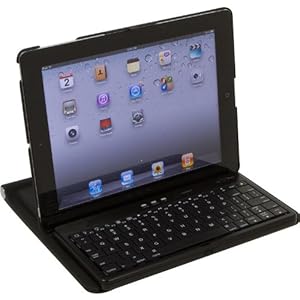 [/img]
[img] 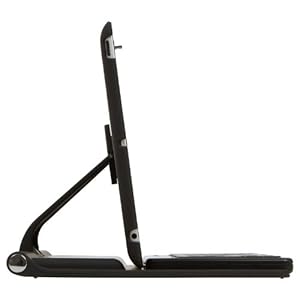 [/img]
http://www.amazon.co.uk/dp/B0055WZD5U
I got one for the father-in-law for chrimbo.
It's a stand plus removable bluetooth keyboard.
Don't see the point myself. If you want that form-factor then use a laptop - but each to their own.
Djay is amazing if you like that sort of thing. Often takes up a couple of hours of my time.
A workmate is also a musician, plays guitar, has various MIDI bits, and I sent him a boingboing review of a MOOG synth app, and a classic sequencer, both of which he bought, about a fiver each. Both are identical in every way to the originals in function, controls and sound, and he literally spends hours using it, three of his mates bought the apps when they saw them, and several others promptly bought or started to save up for iPads, just for music creation.
Orbital have a bunch of iPads set up on frames for live performances now, as well.
If you like sketching, Paper is the app to get, very simple to use, but very good results. I have seen a painting done using Brushes on an iPad, printed off in strips and mounted, it was approx. 3x4 metres in size, and in another room 52 iPad paintings of Yorkshire through the seasons, each one about 2.5' x 3'. You may have heard of David Hockney...
http://www.bbc.co.uk/news/technology-11666162
Cook book?
Makes a great cook book, apparently, nice wipe clean screen. It's worth finding the new multi gestures too; a four-finger swipe does the same as a double-tap on the home button, which is much quicker for swapping between open apps.
http://gigaom.com/apple/how-to-use-ipad-multitasking-gestures-and-why-you-should/
I installed Crackle after reading this and I can see a load of films but when I try to play them I just get an advert and the film never starts. Any ideas?
For any golfers the official Masters 2012 free app is excellent.
For any app developers, the way the media content fits together is very slick.
Few months ago was in a bar in Chester and the bloke playing the piano had one on his piano with all his sheet music on. Thought that was clever.
Well I've just realised something it won't do - allow mini-aracer to play Cbeebies games (which is what he usually wants to borrow the laptop for). I'm becoming a sceptic again already, and mrs-aracer hasn't even got it yet 🙁
Well I've just realised something it won't do - allow mini-aracer to play Cbeebies games
Yep. No Flash see?
Bit annoying really - but to be fair, I doubt most of the CBeebies games would work properly on a touch screen anyway, they are just not designed for it (i.e. using keys to navigate, clicking and dragging on objects etc)
you could also do this with your ipad
One of my favourite bands Moe, play a track on massed ipads.
Apps - Profanisaurus 😯
Our PA at work was telling us that one of the manager's kids is so used to the iPad that he gets frustrated when a real, paper magazine won't make the pictures bigger or smaller using the pinch gesture.
He's two I think. Maybe younger.
Well I've just realised something it won't do - allow mini-aracer to play Cbeebies games (which is what he usually wants to borrow the laptop for). I'm becoming a sceptic again already, and mrs-aracer hasn't even got it yet
Flash just isn't designed for touch screens, I mean, how are you supposed to do a mouse-hover with a touch-screen?
Even Adobe have finally, and belatedly understood this simple fact and are developing in HTML5. There's plenty of stuff aimed at kids on the Pad/Touch that's free I really fail to see how one silly game could be a deal-breaker. I don't use Flash on my main computer, apart from very rare occasions and then I use Chrome. Flash and Java have big security issues and I don't have either installed.
Sadly, the Beeb are fixated on requiring bloody Flash on their site, which is what I have Chrome for.
I really fail to see how one silly game could be a deal-breaker.
Unless of course they're the ones your kid wants to play.
I should point out that I deeply dislike Flash, and am actually quite pleased that Apple's stance might make it go away, but in this case that's beside the point.
Give the kids the laptop and play on the iPad yourself?
Or download some good kids apps? Our little one likes the Peppa Pig ones.
Or angry birds.
angry birds? Yawn. I am, like, so over that.
Just spent a most entertaining evening playing Infinity Blade on my new iPad. 😀
(typing on my new pad)
I would say that, is time has gone by, my computing power requirements have gone dramatically downhill... That is to say, I no longer play pc games, rarely do hardcore photo editing, and video editing just isn't a feature anymore.
I had (and still have) a net book, which was a simple, low power, small machine that would fill my needs. Then that became a bit cumbersome and slow, so I thought about tablets.
I'm an android fan, but tbh, I was never massively impressed with the android tablets (transformer prime being the one I've used) as it seemed a Bit...clunky....
I got my wife an iPad, then very shortly got myself one as it was just 'very good'.
I'm sure the storage restrictions, and file transfer limitations will annoy me, but there's bound to be a route/hack for that.
What is great Is how good the !simple stuff' is:
Web browsing, YouTube, I player, mail -basically what I used the laptop for.
The battery life is great, the fact that it' immediately on when I open the smart cover means that checking my mail/stw takes half the time!
I can touch type on the onscreen keyboard as fast as I can with a standard one (I may say, faster).
I love how, if you're watching an embedded video in stw, if you 'stretch it' it goes full screen, then you can shrink it again and you're back in stw -no need to 'transfer' to the YouTube website at all.....
I'm just playing about with iPhoto, and will probably get the office suite stuff too as this will be my 'presentation aid'.
iBooks is cool -can dl the stw PDFs into it and have the whole back catalogue in your bag! Also useful for NICE guideline PDFs too ( work related).
I'm going to try to get some visuals on it, and a little drawing app, so I can use it with patients to explain their problems too.......
All in all, it's a toy with a lot of cool uses (and plenty of unnecessary but cool uses too!)
DrP