UPDATE: CLASSIFIEDS section refreshed, redesigned, searchable: Go take a look
Snow is actually a bit blue in daylight (reflects blue light from the sky) - see glaciers etc.
But if the whole scene has a blue cast then your White Balance is wrong. Try either setting it to "Cloudy", setting a custom white balance (usually by pointing at something white), or shoot RAW and correct it later.
Its just the snow, not the whole scene,but it can be quite dark blue and the whole picture can be really dark, so probably a combination of white balance and exposure.
All about experimenting really isnt it?
I know on the E520 there is a SCENES option on the dial. When this is selected there is a range of different preset options - one of which is BEACH/SNOW which may help you with a starting point for changing the settings manually to get the picture that you are after.
Sometimes I think the dark snow thing can look quite nice:
[img]  [/img]
[size=1]Whistler, Canada (Nikon D80, 10mm at f11, 1/80s, ISO100)[/size]
Lets try to keep things simple.
Your camera is just a machine, it thinks the world is mid grey and tries to make all the pictures it takes mid grey, so snow comes out mid grey and looks terrible, it would do the same thing with a black cat sat on some coal.
The best way to get round this is to set the exposure yourself manually by reading how much light is falling on to your subject. Point the camera at the palm of your hand and fill the frame, it does not have to be in focus (your palm should be in the same light as your subject), your palm is usually a little bit lighter than the mid grey the camera thinks the world is, whatever reading the camera gives you set it on the camera in manual mode, you will probably have to give it a little bit more exposure, so open the aperture by a click or two toward a smaller number or open the shutter by a click or two, again toward a smaller number,your camera will usually have three clicks for each f-stop, take a picture and have a look, if the picture is too dark open up a bit - smaller numbers, if its to light close down a bit - bigger numbers.
As a general rule dont let your shutter speed go lower than the length of your lens, if youre on a 28mm dont go below a 30th of a second, a 200mm dont go below a 200th etc, this helps prevent camera shake.
If your subject is moving try not to go below a 500th of a second, a 1000th if possible.
If you are doing a landscape try to use a higher number aperture as you can, this helps with depth of field, the bigger the number the better the depth of field.
Of course all of this is dependent on how much light is around etc but youll soon get the hang of it.
Remember 99% of photography is what you put in the box and when you push the button. Happy shooting.
Never really seen the point in manual mode for every day shots. The only time I really use it is for long (bulb) exposures or for stitched panoramas.
Each to his own, I just like to have full control over things, sticking it in Av or Tv always results in me seeing the camera doing it's thing but me wanting to change it as that's not producing what I want - I don't always like to expose as the meter would like, and instead of faffing with EC I just keep it in M and faff with that 🙂
As a general rule dont let your shutter speed go lower than the length of your lens, if youre on a 28mm dont go below a 30th of a second, a 200mm dont go below a 200th etc, this helps prevent camera shake.
IIRC that was the old rule for film cameras, most digitals (obviously not full-frame cameras) use a 1.6 multiplication factor on that, certainly from my experience using a 50mm, 1/50th is too slow to avoid shake.
instead of faffing with EC I just keep it in M and faff with that
Yeah that's the bit I don't get: does using M actually gain you anything or just change which button/dial you faff with?
Yeah that's the bit I don't get: does using M actually gain you anything or just change which button/dial you faff with?
Just changes the way I think about it, it's effectively the same as using EC - auto is pretty poor in most situations so everyone has to sit in some manual mode (we agree Av with EC is essentially teh same as M), it's just a choice of which one from that point.
CC thats quite fair actually Ill usually use it at a 320th on a 200mm unless the IS is on or the light is low that is, wide angles you can get away with quite a bit if you can be steady, as needs must and all that cal.
So - how do you use the camera to take a 'reading' and how do you set a benchmark from which you can deviate using M?
You should see an bar in the viewfinder that shows the exposure. You want it in the middle. Adjust the dial to change shutter or aperture until the meter is in the middle (or +2 for snow) and away you go. No different to dialling in +2 ev, except you have to do it for every photo in M.
[i]You should see an bar in the viewfinder that shows the exposure. You want it in the middle. Adjust the dial to change shutter or aperture until the meter is in the middle (or +2 for snow) and away you go. No different to dialling in +2 ev, except you have to do it for every photo in M. [/i]
Ahhhhhhhh.....now I see!
Don't "those numbers" pretty much define everything about the image, apart from the actual composition itself? (depth of field, bokeh, contrast, brightness, colour, grain, sharpness)
only slightly, contrast and colour are scene dependent, bokeh a bit of a wild card, and I'm not clear on the difference between sharpness and depth of field
Checking the histogram gets you to the right result quicker, without checking through god knows how many images once you've down loaded them all
I'd rather do that checking at leisure...
You should see an bar in the viewfinder that shows the exposure. You want it in the middle.
If that's the case, use the bloody thing in auto 😉
[url= http://www.amazon.co.uk/Nude-Photography-Craft-Pascal-Baetens/dp/1405322187/ref=sr_1_2?ie=UTF8&s=books&qid=1262868389&sr=1-2 ]Pascal Baetens[/url] told me - "just put the camera on P, for Professional mode". Seems to work for him 🙂
I'm too slow at the mo to set the camera up for the shot and end up forgetting one (or seven!) of the the settings or features that would make the shot.
Sat here thinking I realise that I had spot metered on the kids AND compensated for the snow all around them so have OVER compensated = blown highlights (yes?).
Histogram look-see after first shot would have shown this up. Did I look? Will I remember to look next time?
I'm not watching the shutter speed either! ISO adjustment probably needed.
Must... resist... full... auto....
This is shot on program with no adjustment and the exposure looks correct to me:
[url= http://i47.tinypic.com/xayq2e.jp g" target="_blank"> http://i47.tinypic.com/xayq2e.jp g"/> [/IMG][/url]
Pen-y-Ghent today - Nikon D300
Yep, looks fine. Lots of shadow areas though which help.
This one didn't need tweaking in PP (looks OK to me):
[img] 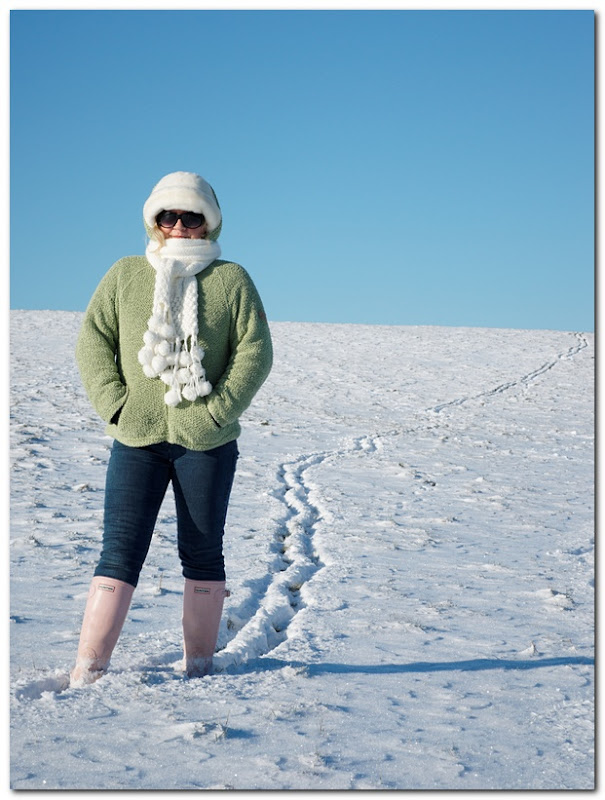 [/img]
+.7EV
Yep, looks fine Simon, but I don't think it suffers for being a little brighter and having more contrast either:
[img] 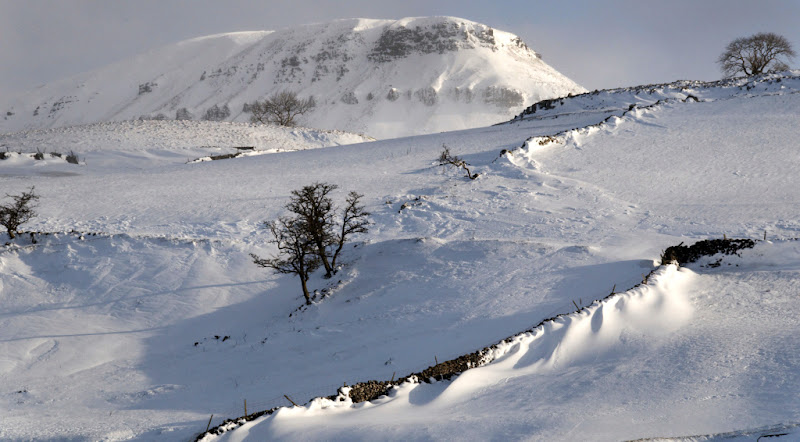 [/img]
It just depends what look you're after I guess.
(Apologies for hacking up your image, but just trying to illustrate the point).
OK here is a question, some thing I have not worked out with digital yet.
Back in the days of 35mm I used to push the film.
So if shooting with Kodachrome 64, I would set the ASA as 80,
if shooting with 100 ASA, set as 125 ASA. This was slide not negative,
which seemed to give a deeper colour.
I can't see the question.
To 'push' adjust the ISO setting.
but I don't think it suffers for being a little brighter and having more contrast either:
of course, but the exposure was still pretty much correct without intervention
grahamh: I think what you're talking about now comes down to a combination of saturation and level controls during post-processing.
of course, but the exposure was still pretty much correct without intervention
Agreed, I only increased the exposure around +0.3EV, but in this happy scene, 18% mid-grey corresponded quite nicely with the correct exposure. If you'd had 5thElefant's missus standing in front of it then it would probably have been a little dark.
my camera likes the snow. its survived being dropped in it twice ( along with flashgun and sigma 10-20) and i have to say i'm quite surprised as these were proper dunkings.
my snow shoot strategy is to shoot manual.. I don't use my DSLR in many other modes. i have my compact for everyday shots.
OK here is a question, some thing I have not worked out with digital yet.
Back in the days of 35mm I used to push the film.
So if shooting with Kodachrome 64, I would set the ASA as 80,
if shooting with 100 ASA, set as 125 ASA. This was slide not negative,
which seemed to give a deeper colour.
eee, the good old days, still have a couple of rolls of Velvia kicking around, must be long past their best but I really should shoot them to see what comes back.....
Back to your point - i think, as I can't 'see' the question...
Rating at 80 as opposed to the 'correct' 64 was underexposing your shots which served to boost saturation.
Digitally think the same way - i.e. whatever the meter tells set your exposure compensation to underexpose a touch for the same effect. Hope that makes sense....
edit - though, as Grahams says, you can tweak these things after the event in digital... 😉
my snow shoot strategy is to shoot manual..
As mentioned above though, shooting manual is pretty much exactly the same as shooting in A or S and using exposure compensation as required.
Just different ways to achieve the same thing.
I disagree.. av and shutter priority are still dependent on the camera's meter and not my handheld ambient light meter 😉
also i find manual is no extra effort on the 30d body though as you have the two control dials and no toggling to have to switch aperture / shutter.
Blimey - do people still use separate light meters?
Do you find you gain much by doing that? Can you just taking a normal exposure reading from the light meter then or do you still have to adjust for the brightness of the snow?
What's wrong with the light meter in the camera?
OK here is a question, some thing I have not worked out with digital yet.
Back in the days of 35mm I used to push the film.
So if shooting with Kodachrome 64, I would set the ASA as 80,
if shooting with 100 ASA, set as 125 ASA. This was slide not negative,
which seemed to give a deeper colour.
To be pedantic - doesn't "pushing" film refer to processing underexposed film diffrently, rather than just preferring an underexposed shot ??
To be pedantic - doesn't "pushing" film refer to processing underexposed film diffrently, rather than just preferring an underexposed shot ??
Correct, but lets no go there - that's a whole other can of worms - especially in the world of the true black and white film exponents - there's a whole world of exposure -v- development times and temperature.. 😉
@Graham i still use medium format film and my body for which (Bronica SqAi) has no meter, even if it did i wouldnt trust it as my previous metering prism for that camera was abysmal.
@duncan: but do you actually use the meter for the 30d body, and if so what do you gain over the camera's meter?
Separate meter!
Back in the day, used an incident light meter when shooting on snow, measure light falling on the subject rather than reflected from the subject. Ok for group photos and portraits, not to good for action and landscape.

