UPDATE: CLASSIFIEDS section refreshed, redesigned, searchable: Go take a look
people still use Vodaphone? Crikey. I thought they'd died on the sword of their own incompetence...
No, still around for me they saved me over £25 a month and have been absolutely fine to deal with.
Asus set up here sand pretty faultless. Kicking out over 400mb deep into the garden and all over the house.
Using a RT-AC68U as the router (plugged into my virgin hub in modem mode), and two zenwifi AX units.
pretty easy to set up using the Asus app (although I needed to use a laptop to set up the router (firmware upgrade needed etc).
Do you have to turn the wifi on your router off? Is there a performance adavantage on the mesh network by doing that?
You don’t have to. I’ve gave the new one a different name and gradually moved stuff across before switching it off. They’ll likely be different subnets so devices on one may not be able to see devices on the other.
I’ve finally resolved the issues I was having with mine. The link to my workshop/office is over powerlines. It really didn’t like having a node connected that way so that’s now separate from the mesh and behaving.
If you do keep the old WiFi network on you probably want to make sure it's not on the same channel as the mesh WiFi, I can't really see the point though unless you have dozens of devices and it's too much hassle to change them over in one go.
When I set up my mesh network , I turned off the router WiFi first, then created the mesh Wi-fi.
I gave the new network exactly the same name and password as the old one.
All devices just re-connected without any additional input from me.
Be gentle with me: we've got a Plusnet router and need a little help getting better quality wifi around the house.
What is the simplest reliable way to do this?
Check you have the log-in credentials for your current router (if you don't have these you won't be able to set it up correctly). These may be on the base of the current router.
Buy a mesh system.
Log-in to your current router dashboard by typing 192.168. 1.254 (the most common IP for Plusnet routers) into a browser which should give you the Plusnet dasboard (which you will need to log-in to using the above credentials).
Set the current router to 'modem' mode.
Plug in the mesh hub to the Plusnet router using a Cat5 cable.
Pop the other mesh access points around the house.
Install the mesh app on your phone.
Follow the instructions to set it up.
(Well it will be something like that, perhaps not exactly that as the mesh system you get may have specific instructions).
thanks
What's the mesh system of choice on here nowadays?
What’s the mesh system of choice on here nowadays?
Most people get on with the Tenda stuff - I’ve got the MW6 ones. @Cougar didn’t though.
I have a TP-Deco and have been very happy with it. I now get reliable speeds throughout the house irrespective of how many devices are online.
Most people get on with the Tenda stuff – I’ve got the MW6 ones. @Cougar didn’t though.
Indeed. I had the supposedly top-of-the-range MW12s. They were beyond terrible. They went back. I replaced them with one big dead-spider router in the middle of the house and never looked back.
How they compare to the more popular MW6 et al, I couldn't say.
Our Plusnet router is upstairs (can't be moved easily) and I have my work laptop and IP telephone connected directly to it.
The idea is to add a magic WiFi box to improve the WiFi downstairs and maybe in the garden too.
I've got TWO plusnet routers. I also have a cat5 network through the whole house: the previous owner was an IT consultant who worked from home a lot and had his office up in the attic. The main router is plugged into the master socket in the attic workroom, and the second was set up as a wifi repeater downstairs, connect via the cat5 network
I recently bought a 3-pack of the tenda MW3 nodes. I removed the slave router and as above, I turned off wifi on the main router. I have one node in a bedroom and one in the living room (both connected via the cat5 network admittedly) and with just the two nodes I have better coverage and faster connection speeds than when I was using the routers.
A tip for when you install a mesh system after putting your router into modem mode = change the name and password of your mesh system to match what the router is/was. Then everything will automatically connect to the "new" wifi and it all just works. No having to change passwords on everything. Netgear Orbi system here with gigabit fibre. Not cheap but amazingly fast all around the house.
@ndt - thanks. We're just on ~40Mbps plusnet (ex-BT) connection and don't have CAT5 cabling in the house despite it being a reasonably new home.
Does your Plusnet router look like this?
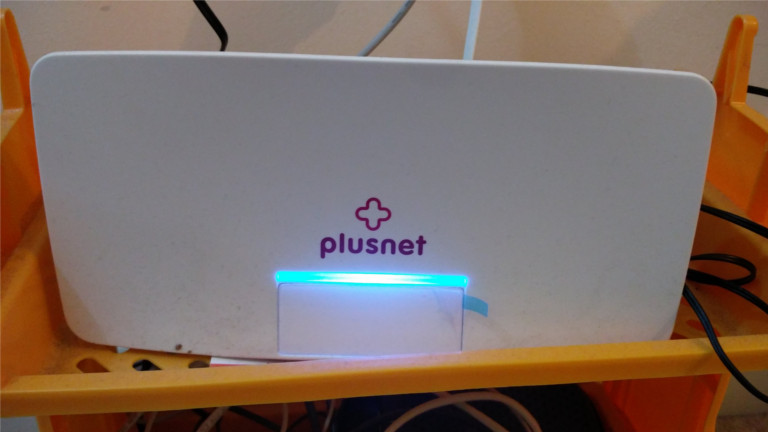
If so, replace it with a new BT Home Hub off of eBay. Cost you about £40 and they're so much better. Assuming you don't live in a castle it'll solve all your problems.
Sky routers have difficulties in being put into modem mode
Don’t do that then?
An Ethernet port is an Ethernet port, it’s a standard. If you’ve got an arsey ISP-supplied router then switch off all the DHCP etc cleverness that might be on the mesh routers and just extend out from that point.
I have SkyQ and found it easy to turn the WiFi off and set up my TP Link Deco - works miles better than the sky wifi and I have now hidden the huge sky router away.
A tip for when you install a mesh system after putting your router into modem mode = change the name and password of your mesh system to match what the router is/was. Then everything will automatically connect to the “new” wifi and it all just works. No having to change passwords on everything.
A tip for you if you haven't changed the password on your original router from the default one is to NOT follow the above advice as some routers (especially older ones) have shockingly simple default passwords.
@ElShalimo same as me. I actually get about 30mb on a good day, using the router pictured above and a cat 5 cable. Using the router wifi I'd get maybe 12-15mb. Using mesh, i'm getting the same rate as a wired connection. You might notice a small lag / drop in speed if you just run everything wireless and maybe need all 3 nodes (perhaps even 4 if you have a big area to cover) but you'll definitely see an improvement
A tip for you if you haven’t changed the password on your original router from the default one is to NOT follow the above advice as some routers (especially older ones) have shockingly simple default passwords.
I suspect you're thinking admin passwords. From the routers I've had, the default WiFi password is normally really complex (and it doesn't matter so much) - but the admin password is something like Admin1234.
On my TP link deco M4 mesh, with the 2 main nodes connected by ethernet backhaul, I get 500mbps from them. The third node is wireless but I still get 200mbps from that one.
Wired speed from the router is 800mbps+.
It's fair to say that even a lowish priced mesh will be fast enough for most of people, can't say I really need 800mbps download speed on my phone... And tbh nothing outside file downloads or speed tests can max out my connection currently.
^ True.
#fail 🙂
I've been looking at getting a mesh system for the house. We have the Plusnet router pictured above.
Our wire comes into the corner of the house, so the router is in that room (dining room).
I have been wondering if it's sensible to get the wire moved/extended to the centre of the house (hallway downstairs) but would want it done neatly (channelling into the wall, rather than tacking around the walls.
Or would it just be better to keep the wire (and router) where it is & stick a mesh node in the hallway downstairs instead, then add another one upstairs? I suspect I know the answer, as moving/extending the cable will probably be a) a ballache & b) expensive.
Also - how would I plug my NAS drive into the network, once I got a mesh thingy set-up? Would it stay connected to the router (presumably switched to modem mode) or into the mesh boxes. I notice that most of them only seem to have a single ethernet port.
Ta.
O.P. said they want better WiFi, not a lecture in wifi security. The default passwords to get on the wifi network are usually pretty decent, not so much the admin password for the ISP supplied router, which if it's in Modem mode you would need to be hard wired to anyway.
would it just be better to keep the wire (and router) where it is & stick a mesh node in the hallway downstairs instead, then add another one upstairs
Yes. One node attached to router, one in hall way, one upstairs.
how would I plug my NAS drive into the network, once I got a mesh thingy set-up? Would it stay connected to the router
I'd keep the NAS attached to the router, it should work fine
edit - maybe not, the mesh wil be on a different subnet to the router. Someone else wil be able to confirm, I'm not a network guyy
From the routers I’ve had, the default WiFi password is normally really complex
But potentially procedurally generated. The Sky ones definitely used to be.
how would I plug my NAS drive into the network, once I got a mesh thingy set-up? Would it stay connected to the router (presumably switched to modem mode) or into the mesh boxes.
I don't know if it's representative of other providers, but with my Virgin 'hub' in Modem mode all bar one of the Ethernet ports is shut down
My big mesh-capable router has our or five ports. If yours only has one you could add a switch.
Also – how would I plug my NAS drive into the network, once I got a mesh thingy set-up? Would it stay connected to the router (presumably switched to modem mode) or into the mesh boxes. I notice that most of them only seem to have a single ethernet port.
if the NAS is plugged into the router rather than a port on of the mesh nodes, it would likely be on different subnet to the mesh system. I had real issues with this and getting discovery services like airplay to work consistently, in the end I brought everything into the mesh system and its just worked ever since.
MW3's by the way, amazon were doing four for £40 on black friday.
In the tradition of recommending what you’ve got, I’m very happy with the ASUS ZenWifi XT8[1] system I’ve just put in. Two identical units in the package, either can be the router or the node. Typical 1930s three bed semi with solid walls, BT FTTP 900, and I’m getting 888Mbps wired, 800Mbps wireless in the same room as the router at the front of the house, 700Mbps in the same room as the node, which is in a back bedroom. No less than 650Mbps wireless in any other room.
Plugged directly into the fibre ONT, so the BT router is back in its box where it belongs.
It did take a little fiddling to set up nicely, so probably best aimed at someone with a little understanding of networking, and Sky Q decided to be a bit of a pain and needed me to reactivate the mini boxes.
[1] It was £307 when I bought it.
Q: I have VF router and TP mesh. I never put the router into any other mode (modem mode) - will I be losing speed?
Just fitted Tp link Deco S4, 3 units, one master connected into router and then two other basestations.
Working brilliantly so far!
I’ve just set up a pair of MW3 to act as mesh access points and had a nightmare getting them to act in bridge mode. They kept assigning IP address on a different subnet exactly as you described (shouldn’t be DHCP serving at all).
I managed to sort it by having the primary MW3 connected through its LAN port instead of the LAN/WAN port to my ISP router, so everything is on one subnet including all of my physically connected devices.
I've never bothered putting my router (TP Link Archer VR90) into modem mode either. Seems to work ok with the MW3s.
Netgear Orbi here. Master + 2 remotes covers a largish 4 bed plus the garden.
Master hard wired into the Vodafone fttc router.
60Mb wifi (limited by the fttc) all over the house.
They install themselves pretty much.
I bought the tenda mw5c with 2 nodes and I'm happy with it. The hub which connects to the router is better than the talk talk router, I then only turn on the nodes when necessary as my house ain't that big but the internal walls are brick.
Has anyone got a Tenda MW6 system with 5 or 6 units happily working? I need to get something fairly cheap for an old house (3 floors and thick internal walls) so I can't see a 3-unit pack cutting it (although will try that first). Assuming I do need to buy a second 3-pack I just want to be sure it will play nicely (it seems that up to 9 are supported but most people only seem to run a max of 3 or 4).
Also - are you better off setting them all up next to the unit connected to the ISPs router (and then moving them to where you need them) or trying to set them up in situ (I'm assuming they're intelligent enough to relearn what their closest neighbour is rather than trying to keep connecting to whatever it connected with if set up with them all in close proximity to each other).
Just today received a twin pack of Deco M4, put my Virgin Router in Modem mode, downloaded TP Link app and ran through the wizard, must of took around 10 minutes from start to finish.
Ditched my old Powerline adapters, works a treat and been great all day. Only time will tell but happy so far. I found with the Powerline adapters they worked fine for around 30 hours, then I'd have to reboot them.
@FuzzyWuzzy
I have 5 Tenda units working fine - but they're MW3s & 5s. Added the 2x MW5s without a hitch. Set them up in situ too - with one in a cold damp garage for Zwifting duties.
@fuzzywuzzy I gave up on 4 tenda MW6s in our victorian house - the ground floor suffered because there was 3 in the chain so the end was quite slow / unreliable (alexa wasn't happy enough to stream 6 music)
Swapped to TP link x20 with only 3 units and wifi now much improved across the house
StuF
Full Member@fuzzywuzzy I gave up on 4 tenda MW6s in our victorian house – the ground floor suffered because there was 3 in the chain so the end was quite slow / unreliable (alexa wasn’t happy enough to stream 6 music)
Swapped to TP link x20 with only 3 units and wifi now much improved across the house
I had similar, I used a powerline adapter and let them do wired backhaul instead of multiple hops over wireless. Works pretty well.
Interesting - I was looking at hybrid powerline/mesh but a lot of reviews are pretty negative. Not sure if it was the TP-Link ones but a few people were complaining you couldn't specify to use powerline for the backhaul so there's kept switching to trying to use the mesh and that led to drop outs.
After some recent wi-fi cut-outs in my garage, I figure I should finally get round to buying a mesh system.
I could do with some help/advice on exactly what I need!
Current set-up is a Plusnet Hub One which is a combined modem-router I believe.
I've got a powerline adaptor plugged into that, which runs to the upstairs office and my work computer is plugged in via ethernet to that. That is generally rock-solid.
I've also got a wi-fi extender plugged in under the stairs on the wall adjacent to the garage which I connect to when Zwifting in the garage. But, that has recently been a bit crap.
Most set-up guides say to put your ISP provided device into modem mode but looking online, it appears that I can't set my router up in modem only mode, although I can turn off both wi-fi channels.
From what I have seen, plenty of people have still been able to get this working with mesh boxes like the TP-Link S4/M4 etc. but does that mean there is some lost functionality from the mesh boxes themselves like parental controls, setting up guest networks etc.
The more I look into it, the more confusing it seems to get. I could buy something, try it & return it if it's not correct. But, i'd rather get it right from the start.
If it means spending a bit more & buying a router at the same time (presumably I could get the details needed from Plusnet to set this up) to gain the full functionality I would rather do that.
Or would I be better going for a system that has built in modem functionality & ditching the separate router entirely (whether Plusnet or A N Other).
I'm probably over-thinking it and making it more complicated than it needs to be, but I don't really understand any of this networking stuff. Modem, router, bridge, access point - I hear the words, but don't really know what they mean and how they affect what I'm trying to do.
Ta in advance!
Current set-up is a Plusnet Hub One which is a combined modem-router I believe.
Correct.
But, that has recently been a bit crap.
This is the main problem with domestic Wifi kit, it doesn't tell you what is actually happening so you can't easily fix it. Eg has it lost signal to your Plusnex box or is it struggling to connect to your garage? Had a neighbours system changed channel and now causing interference etc.
Without knowing what is happening under the hood, it's very hard to suggest a fix.
Although I did notice that the Plusnet box (which we have) has a weaker wifi signal than the previous Virgin media box. I fixed our coverege problems by just moving it to a more prominent position...
Also, everytime I take up floorboards etc I run cat-5 to the room so I can just plug things in direct in the furure, or plug another Access Point in.
I've got the same router and I've just turned off wifi. I'm only running 2 mesh nodes, both are hardwired into the router, everything currently connects via the mesh nodes - nodes have 2 cable sockets so you can plug e.g. your NAS, TV box or PC etc into mesh node via a cable, even when that mesh node is connected to cable. what I think you CAN'T do is connect nodes via powerline extensions so you would need to either have a node near your PC and wire it in, or get a wifi card for your PC

