[url= http://singletrackworld.com/forum/topic/ssd-talk-to-me ]this thread[/url] reminded me I wanted to seek the STW hive mind for a recommendation.
I have a Mac with a Buffalo external HDD attached for Time Machine backups. The drive sits on my desk and is very noisy whilst it's backing up, which can be a few times a day. Moreover I think it's on its way out.
So, can anyone recommend a 2Tb external SSD drive that will only be used for Time Machine backups so doesn't need to be portable. It does need to be quiet, so I thought SSDs might be the best bet, but a spinning platter is OK if quiet enough.
thanks
Do you need 2tb? That's still pretty expensive for an ssd. Can you set up a smaller a drive to do a live back up then just do occasional full back ups? Surely most of that 2tb never changes.
2tb ssd cost a fortune. My £50 1TB Samsung usb spinner is pretty quiet and been working well in the 2.5yrs I have had it, connected permanently as Time Machine
Existing drive making noises is definitely a bad sign although the old ones where always more noisy.
I've got a Lacie 2TB spinning hard drive. It's not silent, but I sit next to it all day and it's only slightly noticeable.
[url= http://www.lacie.com/gb/en/professional/d2/d2-qudra-usb-3/ ]LaCie Quadra[/url]
[img] 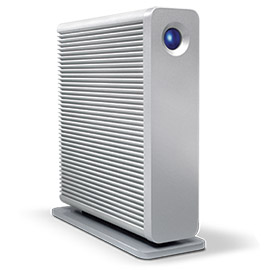 [/img]
very noisy whilst it's backing up, which can be a few times a day.
Is that really nessesary? I'd back up once a month or something, noise aside if it's doing daily backups it will lead to the drive expiring early, which you don't want with an expensive SSD.
WD "Green" series perhaps?
^^ what happens when you create a document then delete it but realise you'd like it back. All within a month.
I think my Time Machine does hourly backups.
Get a longer cable, then put the hard drive further away so you can't hear it. Or get a NAS, then you can put it in another room or in a cupboard.
I use cloud storage for current stuff. No need to back up everything you've ever downloaded at hourly intervals.what happens when you create a document then delete it but realise you'd like it back. All within a month.
As it's a Mac, Time Machine backs up every hour. There's no way of altering that.
As I said nick my backups aren't for really downloads, they are for original content what I created !
Ah yes as fanatic says 😳
what happens when you create a document then delete it but realise you'd like it back
Do macs not have an equivalent of a recycle bin, so you can still recover 'deleted' items.
Then just empty it periodically.
Daily full backups sounds a bit extreme for most people, and a bit limiting if you want to preserve drive life.
I use a Mac Time Capsule it sits behind my TV silently and also serves as my router a 3gb can be had from CEX for £200 much cheaper than a ssd and being Apple just works.
@matty yes they do, so you could get it that way too
Thanks all. £200 is waaaayyyy too much money, so looks like an old-fashioned spinning disk is for me. I still need a new one, but had hoped to be the right side of £100. Amazon seem to have quite a few at and below that budget.
Anything I should be wary of?
Completely off topic, but I was amazed to pick up a 126GB USB stick for £20 the other day.
Could you connect a small NAS to your router and back-up via your network?
Thanks all. £200 is waaaayyyy too much money,
A 2TB SSD is twice that.
looks like an old-fashioned spinning disk is for me. I still need a new one,
Like I said, WD Green. https://www.wdc.com/products/wd-outlet/wd-green.html
[i]WD Green hard drives are designed for use in systems that require cool and quiet operation, as secondary drives in PCs, for external enclosures and other applications for which low noise and low heat are beneficial.[/i]
I'd definitely be looking at a cloud solution like Dropbox, OneDrive or iCloud. With OneDrive you get version control and so long as it's synced, everything is recoverable on a last sync basis. Backing up to a big physical disk is what my dad would do.
OP an SSD for a backup drive is erm ... totally nuts !
As I said my 1tb usb harddrive is £50 and silent (to my ears anyway 😉 )
I have cloud backup solutions, but they're to complement and not replace my local Time Machine backup.
Backing up to a big physical disk is what my dad would do.
Sensible man 😉
Could you connect a small NAS to your router and back-up via your network?
I've had poor results trying to set up NAS with Time Machine in the past and I don't have the patience to try again.
Modern drive and longer cable are probably the best options, sure there isn't a setting to less than 1hr?
Live work to a versioned cloud system and then daily backups would be a lot less work and less spinning up and down of the drive
https://www.theurbanlist.com/melbourne/directory/colonial-brewing-co-port-melbourne?utm_content=buffer3a8fd&utm_medium=social&utm_source=facebook.com&utm_campaign=buffer
http://osxdaily.com/2012/02/02/change-the-time-machine-backup-schedule/
command is
Where 14400 is the time in secondssudo defaults write /System/Library/LaunchDaemons/com.apple.backupd-auto StartInterval -int 14400
and wow terminal commands for a mac 😉
I keep all my backed up files in the air. I believe it's some sort of witchcraft
I think back ups are hourly by default but I have mine set to exclude some large media containing folders which rarely change.
1TB hard drive to the same 500GB external drive I've used for years, hardly notice it tbh.
( I am a Dad)
Surely it only does incremental backups hourly?
Mechanical HDD's don't have to be noisy. I've just got a 1TB Western Digital Passbook one for the Time Capsual backups of my computer. Cost about £50 and is now a few years old. Runs silent as you like.
Pointless 'investing' in an SSD for a back up drive anyway - the main benefit of an SSD is access speed, which isn't an issue for a back up drive. Also not sure where the latest gen of SSD's are at, but it used to be the case they were no where near as reliable as mechanical HDD's which are amongst the most reliable things ever fashioned by the hands of humans.
What's cooling like for SSD's? Do they need cooling fans? Granted it might not be an issue for a back up drive that's not continually operating.
Live work to a versioned cloud system and then daily backups would be a lot less work and less spinning up and down of the drive
This is how I work. Dropbox or Google Drive for all 'work', Time Machine back up in case the computer goes kaputt. Time machine is to a 1TB 2.5" drive that doesn't need it's own power supply so it's quiet. Sits on the desk and gets plugged in every couple of weeks.
Time Machine set to exclude a few things to reduce the size of the backups - it doesn't backup Dropbox/Drive/Video
Get a longer cable, then put the hard drive further away so you can't hear it.
Surely it only does incremental backups hourly?
indeed
For what I've read it sounds like I just need to replace my ageing HDD with something a bit newer, which can be done quite cheaply....
....and buy a longer lead whilst I'm at it 😆
Thanks for the helpful advice
Hard disks optimised for video (DVR) applications are usually very quiet:
http://www.seagate.com/gb/en/enterprise-storage/hard-disk-drives/video-3-5-hdd/