I've ben toying with getting Elements for a while and whilst I've finally got the spare money for it, I'm not convinced it'll be worth it. I mostly only take photos for me (Although I have sold a few at bike races) and I'm generally very happy with how they come out. I don't like the overy 'processed' look I've seen in some people's pics (HDR and all that) and I don't really like spending hours faffing with pics. Mostly, if I want to do some editing I do it with Piknik on Flickr and that suits me fine
So I need convincing it worth the cash, instead of hanging onto the money and upgrading my rather battered 400D later this year....
Hmmmmmmmm
[I'm takling myself out of this, aren't I?]
For instance, stuff like this, I'm very happy with it. I can't really see how PS could improve it much, to my eye anyway.....
[url= http://farm5.static.flickr.com/4101/4770092865_1ddb084f7d_b.jp g" target="_blank">
[url= http://www.flickr.com/photos/peter_atkin/4770092865/ ]IMG_8520[/url] by [url= http://www.flickr.com/people/peter_atkin/ ]PeterPoddy[/url], on Flickr
What do you want software for? And have you considered Lightroom?
Elements is actually very good, I would go for it - you don't need to go heavy handed on the processing 😉
What do you want software for?
I don't know. What can it do for me? That's pretty much the question I think! 🙂
Pies, I've looked at Gimp before and I just can't fathom out how to even download it! 😳
EDIT - Looks like it changed. And I am a bit thick!
I use DXO to process, adjust WB, apply global sharpening, adjust exposure, apply curves, straighten, crop and remove distortion.
I then, sometimes, go on to Element to do selective stuff of specific areas with layers: sharpening, blurring, exposure, curves. I'll then occasionally remove distracting 'things' - anything from cars in the background, power lines to wrinkles on a lady...
The other common use I have for elements is merging panoramas and group shots.
Elements is cheap for what it is. Gimp on the other hand is expensive for what it is 😉
I would second Gimp, tricky to use yes but so can Elements if you are new to it.
Adobe use to do a product called Photo Deluxe which is free now. Has quite a few good tool in it. I installed it on my folks (who are not too hot on computers) computer and they use it all the time to cut peoples heads from one photo to another and blend them in. Even added touching up faces to remove blotches and whiten teeth.
Weather you [b]want[/b] to do all this is another question. I rarely use any post processing and have access to full blown photoshop if I do.
I don't know. What can it do for me? That's pretty much the question I think!
I use Lightroom for organising (date/subject/colour/etc.) on Import, through development, and at export. Development is non-destructive and can be applied to one photo or as many as you select. It's not very easy to describe things I don't know what it is somebody is after, so I would suggest that you take a look on the Adobe site ([url= http://www.adobe.com/products/photoshoplightroom/ ]link[/url]). You can even get a free 30-day trial.
It's brilliant and amazing value for money. With it you can:
- Edit photos by moving or removing things (better than I managed it)
- Improve photos with stuff like sharpness or contrast etc, make your pictures look better or accentuate stuff to get the effect you want
- Make graphic art like logos or webpage graphics if you ever fancy it
- Make your photos look more like the way you saw it in your head and less like it fell out of the camera.
With film, half the process was taking the shot and half developing the images. With digital, if you are just using them straight out of the camera then you are doing the equivalent of sending your photos to Boots. Fine, of course, but there's half a world of photography awaiting your discovery 🙂
+1 Lightroom - especially if you're planning on covering more bike races. Nothing beats it IME for dealing with large numbers of photos.
- Make your photos look more like the way you saw it in your head and less like it fell out of the camera.
That's the thing. I've practiced a lot and I reckon I've now got a good hit rate of good to poor shots. Most of my poor ones are now out of focus for some reason, or just uninteresting.
That one I've posted above is, I'm faily sure, just how it came off the camera. I don't think I even cropped it. Being critical on myself the flash is a bit harsh, but if I ever get round to it, a warming gel on the flash will sort that. IIRC I only chucked about 40-50 shots away that day out of about 600
I'll probably give Gimp a second shot I think. 🙂
Thaks for the advice so far, chaps! 🙂
I've sent you an email, Podster.
I've taught Photoshop to folk, most of whom had Elements. Elements is a great introduction to the full-fayt version, as it shares many of the same tools and functions. It's still quite complex though, and requires patience and persistence.
For Poddy, such features as contrast control, colour balance and cropping will be useful, but some of the other features might be a bit bewildering. And try to stay away from the 'special effects'. Speshly HDR. Done subtly, it can be quite effective, but it's rare that it is done subtly. Some truly nasty stuff done using HDR.
Here, it's fairly restrained and used to create a particular and unique effect, which works quite well:
[img]  [/img]
Here, it's just nasty:
[img]  [/img]
Photoshop isn't really about slightly enhancing pics to make them a bit better, cos that's like driving a Ferrari at 20mph just to the shops and back, but it's about using photographs as the basis of digital art and composition. And to remove blemishes from ladies' bottoms in glossy fashion magazines.
I personally wouldn't bother. I've got Photoshop and almost never use it as I prefer to try and get the shot straight from camera. Although there is a place for it in the world I can't quite look at a photoshopped photo as a photo. Does that make sense? I fully accept that there are areas of photography and artistry which require Photoshop, but it isn't for me and is only used in extreme cases and more or less for levels and nothing else.
Having just seen the price of Elements it might be worth a punt or send me an email to chat off board....info@simoncarter.es...
Gotta say I hate anything that has any kind of HDR effect on it - it immediately makes the shot look like it has come from a computer game like 'Doom' and is often a substitute for taking a good shot in the first place - you know, considering things like 'composition' and 'exposure' and 'depth of field'.
Here, it's fairly restrained
i just wet myself.
Well, it's relative I spose, MrSmith! 😀 I meant relative to some of the hideous examples of overdone HDR you see around a lot.
Yes, you can see the technique's bin applied, but to good effect, I think. I'm not that big a fan of the pic, but i can see that a particular effect was intended, and it's been achieved quite well imo.
Someone did post a HDR shot on here a few months ago (countryside shot in Scotland I think). That one was properly wonderful but it is the only one I have ever really liked.
I don't mind any kind of effect as long as the effect is done for the benefit of the shot, not just because everyone else is doing it.
And to show what can be done without a single effect - this is straight from the camera (digital compact), no cropping or anything (I had to move quickly as the sun/cloud was quickly moving and also had no time to compose it any better) - just pointed the camera out of the door halfway through feeding my kids.
[img]  [/img]
Elf, it looks like that pic is only missing Jesus, arms wide with the light spreading from his halo. Did you shop him out?
Actually, I'm only joshing but typing that has just reminded me of kitsch-iest thing I have ever seen which a friend had given to her at christmas. I can't do justice with a description but it was a mixture of cheap reproduction of rennaissance madonna and child, brass clock and flashing red LEDs. I would have considered overkill as a prop in Father Ted.
I guess you'd have to see it.
Although there is a place for it in the world I can't quite look at a photoshopped photo as a photo. Does that make sense?
To me, yes it does! 🙂
ELfin, yes just seen your mail. Agreed. 🙂 But I think both of those pics you posed look 'false'. I'm after a good pic of what's there. And that's not it!
MF - Nice shot 🙂
Actually, I'm only joshing but typing that has just reminded me of kitsch-iest thing I have ever seen which a friend had given to her at christmas. I can't do justice with a description but it was a mixture of cheap reproduction of rennaissance madonna and child, brass clock and flashing red LEDs. I would have considered overkill as a prop in Father Ted.
Oooh! Can I have it? PLEEEASE???
Fair point. It's quite a 'sentimental' pic, but I was just looking for something that showed the HDR technique used quite well. It's not an easy task.
But I think both of those pics you posed look 'false'. I'm after a good pic of what's there. And that's not it!
Oh yeah, I agree. But sometimes one might want to illustrate an idea or concept, and use a particular effect to 'enhance' an image in order to do so. I have no problem with that. As I said, Photoshop's not just about enhancing photos.
As my photography tutor once said (although I never did really agree with him).
'Photographers record an event, artists interpret them'.
So, by that thinking, no filters should be allowed, ever.
Aren't artists allowed to use photography then?
I've heard similar tosh. I take little notice of it...
As I said, I didn't really agree with him.
Last I heard, he was running a little B&B.
Does it accommodate people of differing sexual persuasions?
Although there is a place for it in the world I can't quite look at a photoshopped photo as a photo.
You probably look at photoshopped photos all the time without knowing it.
Look at it this way. If you were using film and doing your own darkroom development, you'd be making choices about paper and exposure time as a matter of course to get the effect you want. Photoshop is just this. Your camera isn't the source of truth, it's just a computer's choice of what you might want. Handing over half the creative process to a machine. That might be fine, but as long as you realise that what comes out of your camera can be a raw material not a finished thing 🙂
Bear in mind your camera is already processesing stuff for you unless you shoot RAW, and if you shoot RAW without putting it through some software yourself you're being a bit silly imo 🙂
I think some of you are confusing heavily processed or altered pictures with Photoshop in general. It's not all HDR and flashy effects.
Elf - With some elementary photo-shopping, simple electronics and an aptitude for gawdiness you could make your own. If I had time I could mock one up for you (easy now).
'Photographers record an event, artists interpret them'.
I'm glad you disagreed with him. I don't know of any artists or photographers who wouldn't.
I've used Adobe products at work for years and really rate them. However, GIMP is free and I've been impressed with it at home. Its not inherently difficult to use - its just different to the way Adobe products work and there are fewer tutorials on the net.
If you can't download the Gimp, you shouldn't be allowed near a computer.
Pete, in the first picture there are a few subtle improvements that can be made with a simple bit of post processing. Firstly, to get an element of speed in the shot, you can add a few 'blur lines' around the wheels. And fire trails - not enough fire trails. Also, I see what you have done with the fork, but again that looks just [b]too[/b] photoshopped, so I've put it back for you. Plus, his number was wrong too.
Here's what it could look like after a bit of practice with top photoshop software:
[img] 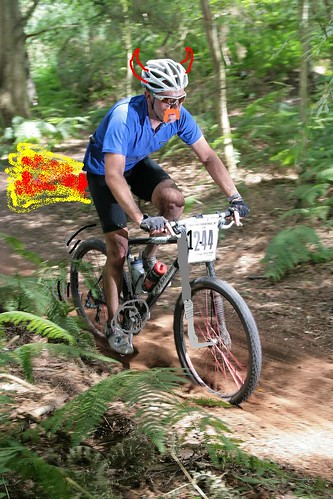 [/img]
Please forward any royalties to me, ta.
DrP
PMSL! 😆
Take a look at [url= http://pixlr.com/editor/ ]Pixlr[/url] - runs in the browser and has 90% of photoshop functionality.
i think you need to realise the difference between high dynamic range compressed into an image and tone mapping they are quite different in visual style but are both labeled under under HDR. i use HDR software in my work quite a lot, never tone mapped and image flickr style though
Does it accommodate people of differing sexual persuasions?
Knowing him as I did as a student I think he would actively encourage it.
I don't understand that and would be grateful if you could explain please, MrSmith.
Yea, we have it on the laptop (set to use a lot of virtual memory or whatever tis refered to as when you use the HD as spare RAM but still runs acceptably quick).
Does a lot of stuff that you don't 'need', but can occasionaly be usefull for removing blemishes.
a heavily tone-mapped example
[img]  [/img]
technically HDR images are tone mapped but they can be done purely to compress a higher dynamic range into a printable image without affecting the colours.
i use bracketeer, it doesn't have any tone mapping controls and can't produce the wacky tones so is perfect for rendering brightly lit interiors without changing the colour of the fabrics/furnishings
[img]  [/img]
(not my pic)
Mr S, Lordy that first pic of yours is utterly FOUL!!! 🙂
HDR always makes cloud look like the sky in a doomsday film.
it's not my pic!
i wouldn't have uncorrected barrel distortion in an interior shot either 🙂
technically HDR images are tone mapped but they can be done purely to compress a higher dynamic range into a printable image without affecting the colours.
So it's the same thing then, no?
Help me please for I am frightened. 🙁
molgrips - MemberAlthough there is a place for it in the world I can't quite look at a photoshopped photo as a photo.
You probably look at photoshopped photos all the time without knowing it.
Look at it this way. If you were using film and doing your own darkroom development, you'd be making choices about paper and exposure time as a matter of course to get the effect you want. Photoshop is just this. Your camera isn't the source of truth, it's just a computer's choice of what you might want. Handing over half the creative process to a machine. That might be fine, but as long as you realise that what comes out of your camera can be a raw material not a finished thing
Bear in mind your camera is already processesing stuff for you unless you shoot RAW, and if you shoot RAW without putting it through some software yourself you're being a bit silly imo
I think some of you are confusing heavily processed or altered pictures with Photoshop in general. It's not all HDR and flashy effects.
Looks like every day's a school day, thanks.
HDR can be a useful technique to deal with scenes where you would otherwise have to compromise with either clipped highlights or blocked in shadows. The CGI-type effect always looks shite.
Here are a couple of examples of mine and you're free to tear them to shreds...
[url= http://farm5.static.flickr.com/4103/5190031374_73f30963e4.jp g" target="_blank">
[url= http://www.flickr.com/photos/stuartie_c/5190031374/ ]323/365[/url] by [url= http://www.flickr.com/people/stuartie_c/ ]stuartie_c[/url], on Flickr
and
[url= http://farm6.static.flickr.com/5008/5306449295_6bf01903f4.jp g" target="_blank">
[url= http://www.flickr.com/photos/stuartie_c/5306449295/ ]364/365[/url] by [url= http://www.flickr.com/people/stuartie_c/ ]stuartie_c[/url], on Flickr
I bought Elements about a year ago and can recommend it.
I found it easy to learn what I wanted and mostly just use it for a wee bit of contrast/levels tweeking, cropping, fixing horizons and such like. A bit of sharpening can work wonders with action shots too. Previously I was always quite happy with my pics but a wee bit of adjustment can make my favourites better.
Its also great for stitching together panoramas which I like.
On the subject of HDR I hate the blatantly HRD'd stuff but I think its quite appropriate in the examples from Stuartie_c above and I'm all for that. Having said that I don't think Elements is the right tool for HDR. I like Photomatix.
Wouldn't bother with elements if you're not interested in 'shoping stuff, but I would recommend Lightroom. It's ace, has a nice workflow and is pefect for fixing levels etc quickly.
Original:
[img]  [/img]
Lightly lightroomed:
[img]  [/img]
Looks like every day's a school day
Wouldn't that be nice?
Personally u have to decide weather your a photography or technician.Agood photographer can set the camera up properly,which few do and then get some great results.A technician fires away at anything and then makes it all right with photoshop or some other software.Granted its nice to be able to sharpen something up or add a little contasr or colour depth otherwise your just a computer jock and wasting valblke shotimg time sitting in front of the screen.Take a coarse and learn how to take a photo properly
Coasting, some examples of your work, please...
Also, I take it that you prefer black & white over greyscale?
I purchased the Photoshop elements/Premire elements 9 bundle at the beginning of jan and have found it excellent for organising and tweaking photos, for the money you cannot really go wrong!
I have used gimp (free) and it is excellent too if you follow a few online guides.
I take it that you prefer black & white over greyscale
so an image with just black and white(no midtone greys) over a 'normal' black and white image?
[img]  [/img]
[img]  [/img]
Agood photographer can set the camera up properly,which few do and then get some great results.A technician fires away at anything and then makes it all right with photoshop or some other software
Stupid.
The greatest photographers did their own darkroom processing. How come dark room processing is fine but using Photoshop with digital images makes you less of a photographer?
Photoshop isn't about correcting mistakes, it's finishing the product. Like putting polish on a piece of furniture or using T-Cut on car paintwork.
No matter how good you or the camera is, no camera is perfect. Every photo is an attempt by the photographer to capture some of what he or she saw in the way they want. Photoshop is one more tool to help with that.
I've not read everything but has anyone mentioned paint.net? Free download and easy to use. Has loads of funtions but if your juts after the basic crop and resize stuff its very good.
Lightroom is awesome but if you are struggling for the cash for elements then lighroom is the wrong choice, it's just too expensive. Although you can do crazy things with elements it is also brilliant at just doing that final tweak to a photo to make it great. I don't adjust photos very often but when I have to elements seems really easy to use and give great results (compared to photo impact that I used to use). As others have said the way to go is take the thirty day trial and crank through the tutorials to get upnto speed rather than pecking around the interface
Mr Smith, I really like your B&W image (not grayscale) you couldn't point me in the direction of a tutorial on how to achieve that with Elements could you?
BB
not my pic. sorry can't help with elements as i don't use it.
Personally u have to decide weather your a photography or technician.Agood photographer can set the camera up properly,which few do and then get some great results.A technician fires away at anything and then makes it all right with photoshop or some other software.Granted its nice to be able to sharpen something up or add a little contasr or colour depth otherwise your just a computer jock and wasting valblke shotimg time sitting in front of the screen.Take a coarse and learn how to take a photo properly
Got to take issue with this - 'proper' photographers use photoshop. If you're shooting raw you need to really as it's not 'developed' until you have run it through lightroom/photoshop/camera RAW etc... using lightroom is like changing the film in a analogue camera - wanna shoot velva? boost the saturation, and tweak the colour levels.
Furthermore where do you draw the line? When I started taking photos on my film slr I could only easily get film upto ISO400 - does this mean that I shouldn't use the ISO6400 setting on my 7D? Having technolgy at your disposable lets you be a better photographer, and opens up shooting opportunities massively - by being able to boost shadow detail I can save on having to take remote flashes with me... Most compacts nowadays whack on a bunch of contrast and boost the saturation before outputting a jpeg - is that allowed or is that just being a technican?
so an image with just black and white (no midtone greys) over a 'normal' black and white image?
I was perhaps being a little abstruse. Coasting's thinking is black or white; it's either one thing or another.
Try paint.net,> http://www.getpaint.net/
/p>
It is a free fairly functional editing program. You can add layers, adjust levels etc. If you only want to do some basic editing for photos to sort out some adjustments this should be all you need. Very simple to use. Much easier to use than a paid for fully featured program you are unlikely to use to all the features anyway.
IMO the photographer makes the photo not the software, OK, the software can enhance an already good photo but a crap photo will always be a crap photo no matter how much post processing it receives. Sharpening a pic may give you a nicer pic, but until the photographer learns to focus properly they can't, IMHO, consider themselves to be a photographer. They have a camera, they take pictures so they're a photographer, but you know what I mean.
Using Photoshop to change background gives you two photos and not one, I can't consider that to be a photo, it's a montage of two. If you have to remove an unwanted object from the photo, you have only done half the work of a photographer by leaving it in the shot in the first place!!! Or you haven't been able to set the camera properly...
Where do you draw the line? I guess where the photographer can plan and predict the photo they will take using the available technology (photography)against the technician who has to manipulate the photo to get the results they want (chancer). 😉
Define 'photo'.
i draw the line at what makes my job easier and how much i'm getting paid to produce images.
i love photoshop me.
Define 'photo'.
Why?
Why?
I beg your pardon, I forgot to say please. From your previous response, you appear to use the term to describe several different things. I was just curious as to what the term actually meant to you. I'm trying to understand your post.
A photo is any image that come out of the camera.
A photo is any image that come out of the camera.
So you don't consider development to be part of the process of creating a photo?
Development? What development?
You asked me what a photo is and the answer is any image that leaves a camera.
The original point was the difference between a photograher and a technician, both have a place as I said earlier and I even use Photoshop to fine tune.
If you're talking about post processing then of course there is a place for it, but I does not make a good photographer, it might make a good photograph.
What if a "technician" takes a photograph? And how can a "photographer/technician" who took a photo not be a good photographer if the photo they took is, or "might" be, a "good photograph"? Why am I even bothering to try and decipher this stuff?
Why am I even bothering to try and decipher this stuff?
I wouldn't if I were you, you're looking for a problem where there isn't one. 🙄
Define 'development'
😉
Define 'define' 👿
Don/Thre Fissh, ok only playing 😉
OP, Are you using RAW files? if so Lightroom is great for doing loads in batches, might be useful if you take a lot of race shots like the one you posted.
I just started using Elements & is great for what I want at the moment.
Adobe do a month trial on Lightroom & Elements & Nikon's Capture do the same trial too.
Well thats what I did, had a play with all three 😉
Me too.
diafine is a developer.
just sayin 🙂
IMO the photographer makes the photo not the software
What if it's the photographer using the software?
OK, the software can enhance an already good photo but a crap photo will always be a crap photo no matter how much post processing it receives
No-one's arguing otherwise, are they?
but until the photographer learns to focus properly they can't, IMHO, consider themselves to be a photographer
Of course. But Photoshop isn't about correcting bad focus or other mistakes, necessarily. If you are out and about with your camera, you just happen to see something utterly amazing and you whip the camera out and shoot from the hip - do you have to accept the results if they are imperfect, and beat yourself up for not being a real photographer?
If you have to remove an unwanted object from the photo, you have only done half the work of a photographer by leaving it in the shot in the first place!!!
I disagree! Sometimes it is not possible to arrange the world exactly the way you want it before taking your picture, quite clearly! See the tern photos on my other thread. I took it at a zoo, so the background was full of netting. Now I know I didn't do a great job of combining two photos, it's my first attempt - but the result is certainly (or should be with more skill) a better image. I couldn't remove the netting physically, and it would be silly NOT to take the picture just because the netting was there. Sure it would be better to be in Chile on the majestic Pacific coast but life sucks sometimes 🙂
I just don't accept purism in cases like this. You're using technology to approximate a visual scene. And now with your digital camera you are using software whether you like it or not. Doesn't matter to me if the software's in the camera or on a computer.
molgrips - MemberIMO the photographer makes the photo not the software
What if it's the photographer using the software?
[b]If you take the time to read and digest what I've said, you'll see that I accept this scenario[/b]
OK, the software can enhance an already good photo but a crap photo will always be a crap photo no matter how much post processing it receives
No-one's arguing otherwise, are they?
[b]Apparently they are[/b]
but until the photographer learns to focus properly they can't, IMHO, consider themselves to be a photographer
Of course. But Photoshop isn't about correcting bad focus or other mistakes, necessarily. If you are out and about with your camera, you just happen to see something utterly amazing and you whip the camera out and shoot from the hip - do you have to accept the results if they are imperfect, and beat yourself up for not being a real photographer?
[b]I think there are lots of examples of photos being shot from the hip and being very good photos, Alberto Korda's photo of Che being an example, photos from a war zone another. I think the difference is that if a pro photographer takes the shot and it doesn't come up to scratch, it never gets published. The hobbyist, on the other hand will. An both are acceptable.[/b]
If you have to remove an unwanted object from the photo, you have only done half the work of a photographer by leaving it in the shot in the first place!!!
I disagree! Sometimes it is not possible to arrange the world exactly the way you want it before taking your picture, quite clearly! See the tern photos on my other thread. I took it at a zoo, so the background was full of netting. Now I know I didn't do a great job of combining two photos, it's my first attempt - but the result is certainly (or should be with more skill) a better image. I couldn't remove the netting physically, and it would be silly NOT to take the picture just because the netting was there. Sure it would be better to be in Chile on the majestic Pacific coast but life sucks sometimes
[b]And it's a fine photo, but accept it for what it is, a manipulated image and not a photo in its own right. That is not a bad thing. You answer the question yourself, a wildlife photographer would aspire and get the shot of the animal in its natural habitat, wherever in the world it is. A little bit of editing is fine, Alberto Korda/Che and cropping, but when there is a reliance on the technology to make a bad photo good or to trick the viewer, then this is moving away from photography for me.. If you want to shoot from the hip accept the photo for what it is, warts an' all![/b]
I just don't accept purism in cases like this. You're using technology to approximate a visual scene [b][WTF does this mean?][/b]. And now with your digital camera you are using software whether you like it or not. Doesn't matter to me if the software's in the camera or on a computer.
[b]At no point have I said that technology doesn't have a place, it certainly does, the HDR photos clearly show this and allow the photographer to display an artistic abilty. What I'm saying is that the technology allows people to think that taking a picture is easy and even if the picture isn't 100% perfect it can be manipulated and hey presto, I'm a photographer!!! 😆 Photography [u]for me[/u], is seeing the photo before you take the shot, composing, seeing the light adjusting the settings before and not on the computer afterwards. Have a look [url= http://www.google.es/images?q=Vivian+Maier&oe=utf-8&rls=org.mozilla:es-ES:official&client=firefox-a&um=1&ie=UTF-8&source=og&sa=N&hl=en&tab=wi&biw=1272&bih=602 ]here[/url] at some recently discovered pictures from a self taught amateur. You don't need the latest gizmos, simply the eye of an artist and the ability to use the camera. Based of your non-acceptance of purism these photos are crap. 🙄 interesting POV. [/b]
This has to be one of the dumbest photo threads ever. All photos from a digital camera are processed - looking at a page of 1 and 0 from the sensor data is not very visually stimulating. You can do the processing by default, inside the camera's own computer, or you can do it yourself in your own computer. Either way, you are "editing" the photo, making a bad photo (1 and 0 sensor data) into a good photo. Some choices of processing parameters are more aesthetically pleasing than others.
Beyond that - suppose I take a shot of a pretty flower. Suppose there's a Coke can in the way. Do I a) move my position to avoid the Coke can (even though the flower is then not optimally positioned, b) move the can, c) remove it in Photoshop, or d) pack up and walk away. Please explain how b and c are artistically or morally different.
You define "photography" how you like, but to talk about a separation between a "photographer" and a "technician" really misses the point, IMO.
So what you're saying is that you don't have to think about composition, simply take any old photo and change it later.
If I remove something significant from the photo that makes me a technican right?
So does that include removing the colour information? That's a fairly major part of the output of a digi camera...
🙄
[url= http://www.alisonwoodhamphotography.co.uk/ ]Mrs Monsta[/url] uses Elements 8. She says "it's way easier to use than P'shop" and she'd never used any post processing software. Actually, it's good to see PE is getting recognised as a product in its own right, rather than a photoshop 'lite' which is what it isn't.
Lightroom is good - but at five times the price (new) of PE you'd expect it to be. But look, you can buy LR at a later date and it has a plug-in for Elements so the two can work together. There are plenty of plug-ins for PE too, so you can extend its range as you become more au-fait with it.