
How do you do [url= http://www.guardian.co.uk/culture/gallery/2010/jul/31/art-sculpture#/?picture=365355004&index=7 ]THIS[/url] - one place close to the lens (statue) and one part far away (part of cliff) in focus, and the rest blurry?
It would have to be two exposures stitched together to get that effect.
Depth of field is what allows you to keep the subject in focus and the remainder blurred. To maximise the effect you need a f number as small as your lens allows and zooming will add to the effect.
It will also depend on the distance between you and he subject as well as the zoom you are using. If you have an iPhone the iDoF Calc app is useful for showing what happens when you change various parameters.
looks sh!t but i would say photoshop.
you can't do it with a normal lens. It's either done in photoshop processing or (and this is *very* unlikely) some kind of specialist lens of attachment that allows for two different focuses.
I agree with RS
yep, very bad photoshopping
Looks like crappy over-use of gaussian blur to me.
I'm guessing the photog wanted the statue in focus with the background out of focus and could not achieve it 'in camera' so...
Looks like crappy over-use of gaussian blur to me.
I'd agree...
DrJ - if you have PS and want to try similar
Open your image in PS
Create a new layer.
Apply Gausian blur to the new layer, adjusting strength of the blur to taste & add a layer mask.
Select 'Brush' tool with 'colour' set to black. Use the brush to 'erase' the blur to reveal the detail you want to highlight.
If you take it too far turn the 'colour' to white and paint the blur back in......
'Flatten' the layers and Save As...
It's a technique I use quite a bit on wedings and portrait shots - only the blur is a lot more subtle..! I use the brush to 'paint' the eyes and teeth back in - ladies love to see their skin in lovely and soft, they don't like blurry eyes..... 😉
It looks god awful.
DrJ, how did you guys get on yesterday on you Dubh Loch ride? I was with Sanny when we rode this. http://www.singletrackworld.com/forum/topic/jocks-road-what-are-you-waiting-for
@mcmoonter - got me mixed up with someone else 🙁 - looks like an awesome ride, though!! 🙂
As for the picture, I like it!
LOL agreeing with all the above - it is shite Photoshopping. My mum could do better.
I'd say its been done on post, and not very well either.
If you have an iPhone the iDoF Calc app
or you could press the button on the camera ?
(and this is *very* unlikely) some kind of specialist lens of attachment that allows for two different focuses.
I hope you have the patent Julian ??
I think it's done with a tilt/shift lens (or with a plate camera). The photographer has got the plane of focus running from front-right to back-left.
By doing this he has both isolated the statue against an out of focus background and has given a sense of depth and context by having part of the background in focus.
I think it's a very good photo.
They used the same effect on Sherlock last night. I noticed it because it looked so bad.
The difficult bit is looking at an Anthony Gormley installation and not puking, shaking with rage or hitting it.
or hitting it.
followed by a visit to A&E ? Also therapy for anger issues...
simonfbarnes - MemberI hope you have the patent Julian ??
I remember seeing it in a Jeff Goldblum film (Mr Frost I think?) over twenty years ago, so not a new idea and not impossible, just highly unlikely
donald - MemberI think it's done with a tilt/shift lens (or with a plate camera). The photographer has got the plane of focus running from front-right to back-left.
By doing this he has both isolated the statue against an out of focus background and has given a sense of depth and context by having part of the background in focus.
I think it's a very good photo.
[b]Not[/b] tilt-shift as that still has one plane of focus, whereas that photo has two planes of focus - the statue and the cliffs. GLad you like it, I don't but the world would be a boring place if we all liked the same stuff
Cokin do a filter (P111 from memory) which split the focus, crude and a bit naff, but would give you a simular effect.
Found it here you go:
[url= http://www.warehouseexpress.com/buy-cokin-p111-split-field-1-filter/p1000660 ]http://www.warehouseexpress.com/buy-cokin-p111-split-field-1-filter/p1000660[/url]
or you could press the button on the camera ?
Which button is that simon? 😕
(I like the PhotoBuddy app on the iPhone. DoF calculator + sunrise/sunset times and various other useful gadgets)
Not tilt-shift as that still has one plane of focus, whereas that photo has two planes of focus - the statue and the cliffs. GLad you like it, I don't but the world would be a boring place if we all liked the same stuff
*Could* be tilt-shift, there [b]is[/b] one plane of focus, it's just almost parallel with the axis of the lens, which makes me question whether its possible to get the plane of focus THAT far away from normal (no experience). If not, it's going to be photoshopped and it's not a great result, but I like the concept.
Which button is that simon?
probably the DoF preview button that most SLR's have.
And just to confirm it is possible, this was done with a homemade tilt-shift lens apparently:
[img] 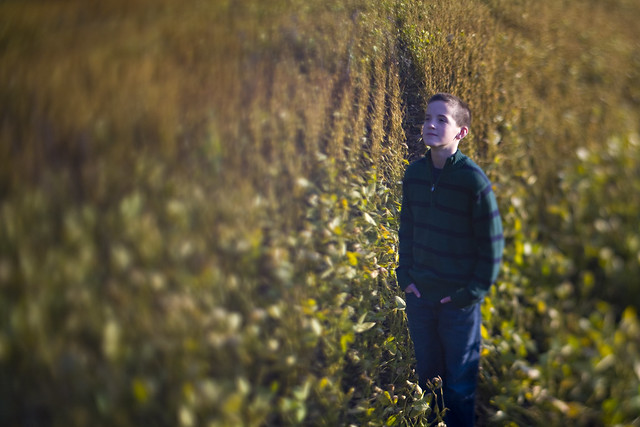 [/img]
And just to confirm it is possible, this was done with a homemade tilt-shift lens apparently:
There's only one plane of focus there, where the boy is
[img] 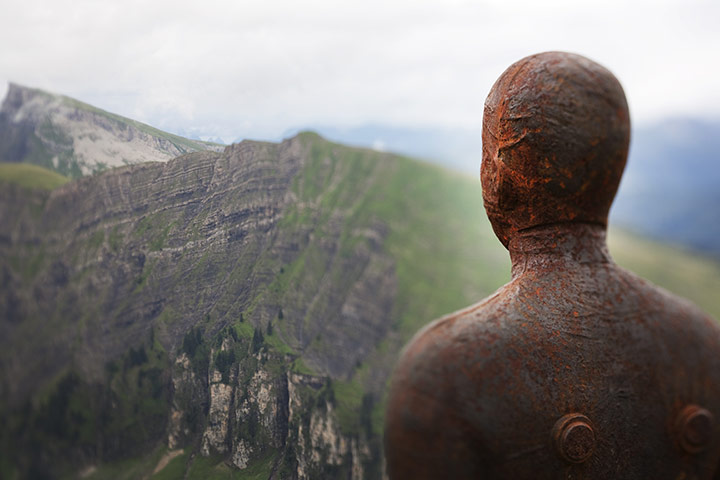 [/img]
two definite planes of focus there. No link between the two that I can see. There's a definite blurred line between the statue and the cliffs.
In fact,looking at the lighting and so on, especially around the statue's head, it's quite obviously photoshopped in the method described by marsdenman, above
probably the DoF preview button that most
SLR's have.
Unless you combine that with some walking backwards and forwards with a tape measure and different lenses then it doesn't really do a great job of what Mintman was suggesting.
i.e. clearly illustrating how f-number, subject distance and focal length alter the DoF.
That is one method you could assume, yes. But to me the mountain is nearly parallel to the sensor plane and to get THAT short a DoF at that distance would require a very odd lens, you'd almost undoubtedly get the entire rest of the cliff in focus with any normal lens.
But I can still see one plane, you can't see the valley floor so you can't see it progress toward the statue. The exposure around the head is easily raised with dodging to improve contrast to the background but done badly so looks a bit odd.
But whatever method, I think this is the effect they were looking for (follow the statues gaze).
[img]  [/img]
And just to confirm it is possible, this was done with a homemade tilt-shift lens apparently:
but it looks horrible 🙁 I'd have cropped out all that fuzzy stuff. IMO intentional depth of field effects are a shabby trick best avoided.
What does that image show? I can't see what you;re trying to emphasise with the lines you've added
Badly photoshopped, the bolt on his back is in focus, but so is the front of his face. Therefore I would expect to see a lot more of the right side of the statue in focus if it was real.
Or... you can use a split field filter, which is basically half a magnifying lens placed over the end of the camera lens. Gives a sharp near focus in one half of the field of view while the lens is focused normally at or near infinity.
They used to be popular in the 1970s, but now look a bit sh1te.
However, as the statue is on Formby beach, not up a mountain, that'd have to be some pretty special filter... 😉
EDIT: Oh, there really is a rusty bloke up a mountain? Shoulda read the OPs link first...
Looks like that overdone lens blur/faux miniature thing that everyone is doing now. Completely unneccesary IMHO.
I'm a bit unsure.... But I think it's been taken on a large format camera - the plane of focus (achieved by moving the back of the camera around) can be set in any direction you like - in this case, through the back of the statue's head and on toward the far cliff.
The odd light around the statue's head [i]is[/i] dodgy photoshopping, but I think it's just where the photographer has used the dodge tool.
So there is only one focal plane - running out through the image. I used LF cameras a lot at uni and saw similar strange focal effects from studes messing about with camera backs.
IMHO
nbt - the CK is trying to show the potential plane of focus if a tilt/shift had been used, resulting in both near & far objects being in focus.
I'm aware of what he's *trying* to show, but I don't think that image supports his view. I cannot see a single plane of focus - I see two distinct areas
@user removed: I doubt anyone (sane) lugged LF kit up a mountain. Could easily be a TS lens on a Digital SLR body though. Will do the same thing, without breaking your back, or the bank.
Having a 2nd look at the pic, the hill/mountain on the left had side is out of focus then sharp, then out of focus then again sharp on the statue.
Must agree with sfb on this one
IMO intentional depth of field effects are a shabby trick best avoided.
belgianbob - Member@user removed: I doubt anyone (sane) lugged LF kit up a mountain. Could easily be a TS lens on a Digital SLR body though. Will do the same thing, without breaking your back, or the bank.
I lugged two up Snowdonia once!
A MPP 5x4 plus a Cambo 5x4 in my student days, the MPP was mine, but the Cambo belonged to a female friend, who after 2 miles gave up carrying hers up and lumbered me with both!
Never again!
😉
@ski:
Ah, the student days. I used to lug a Sinar all over the place when I was young and digital imaging was just a flicker in a maths genius's eye... and yes, I'd have carried a girls Cambo up Snowdon too, cos, y'know... Girls and that.
But NOW, in the 21st century, anyone location shooting in mountains with a large format rig probably has a lot of issues to do with things being 'ultimate' or 'perfect', is being paid absolutely wads, and/or has a team of assistants.
😉
All IMHO, of course!
I'm aware of what he's *trying* to show, but I don't think that image supports his view. I cannot see a single plane of focus - I see two distinct areas
Clearly as the whole SIDE of his face is in focus it shows the focal plane is not into/out of the image - the back right hand side of his head should be as in focus as the back left. It is not, this means the focal plane is not parallel to the sensor/viewer. Now as there's no ground/anything in the mid-ground you can't follow that line outwards, but it's fairly easy assume that since the plane appears to dividing the head side to side that following that plane across the valley may well have it impact the side of the mountain opposite. If it did that it would yield a vertical focussed line, as it has on the statue, which would continue to infinity. Which it does (though at infinity everything seems a bit soft, probably due to a poor Q t/s lens?).
If it had been photoshopped I'd at least have expected the head to be centrally focussed and equally unfocussed either side.
I'm not sure where you think the two different planes exist, please indicate so we can compare and see if what you're saying is a more sensible thought process.
I can see the photoshop idea is a compelling one, but if you look at photo 3 of that sequence you can see he has done the same over-dodging around the subject in non-T/S style shots too.
What does that image show? I can't see what you;re trying to emphasise with the lines you've added
I'm aware of what he's *trying* to show, but I don't think that image supports his view
Make your mind up! The red line is the intersect of the plane of focus with the subjects, showing continuity across the valley in a single plane.
I am currently trying to get hold of the photog just to find out 🙂
The simplest way to do that is just take a hyperfocal shot of the whole thing and then get a 5 year old loose with the blur tool.
Easy to do,
Still looks awful.
If it had been photoshopped I'd at least have expected the head to be centrally focussed and equally unfocussed either side.
I was going to 'correct' that to say, if it had been photoshopped 'better', however, that's not right as it is the photogs interpretation of his image so, far from me to say what's correct.
However, CK, await feedback from the photog, if it comes - i'm 99% sure you will find the image was sharp back to front and he's simply done a bit of ps'ing, as already discussed.
ooh, transmute - check you and your fancy focussing ways, been a good while since I used that technique - all but impossible now as the majority of modern lenses don't even have a focus scale...hyperfocal
The previously mentioned DoF apps will tell you the hyperfocal distance for any given lens/aperture.
nbt - Member
I'm aware of what he's *trying* to show, but I don't think that image supports his view. I cannot see a single plane of focus - I see two distinct areas
You clearly aren't aware or don't get it......
The plane shown is the theoretical plane where if an object were to pass through it would be in focus.
In this image two distinct areas pass through the plane of focus, hence you see two distinct areas. As mentioned by CK, if the photo extended to floor level and back up again, there would be a continuous line in focus that would join your 'two distinct areas' together.
That really is a good example of why some people should be prevented from having access to a computer with PS on it. Just 'cos someone can take a reasonable photo doesn't mean they have the skill or knowledge to fiddle with it. I was told repeatedly that any work done in PS should be invisible to a viewer, or else be deliberately obvious. That example is crap. I would have shot it using a small aperture with an ND filter to keep the background blurred, or shot it with a really small aperture to get everything sharp. That just looks half-assed. The cast statue has been masked and a radial blur added to the b/ground, then another graduated blur applied from the left-hand side, leaving a small area between that's still in focus. There's no lens made that can do that. Rubbish work, I'd be ashamed and embarrassed to produce something like that, even if someone asked me to.
TBH it's a fairly well recognised photographer and some of his other work is actually fairly nice. I've still not been able to get hold of him though 🙁
Having been away and had a think, I've got the idea now 😳 I was thinking in 2D and once I thought in 3D it suddenly clicked. I still think it's done in PS as opposed to with a TS lens, but I see how it could be done.
check you and your fancy focussing ways, been a good while since I used that technique - all but impossible now as the majority of modern lenses don't even have a focus scale...
Luckily I only have the budget for nice old kit! 🙂
Although I think only one current Canon prime lens doesn't come with a scale and pretty much anything above the budget model zooms still has one, so with decent second-hand kit it's still possible without spending a fortune! 🙂
That really is a good example of why some people should be prevented from having access to a computer with PS on it.
Agreed. Further to your description of the process, it also appears as though the adjustment brush has been used to increase the exposure on and around the statue on several of the shots. It's a matter of opinion of course, but I think the effect is quite awful.
I know David Levene, he uses tilt shift lenses from time to time and would never photoshop stuff the way some on here have suggested. Ive used tilt shift lenses myself and that effect would be very easy to create without any photoshop nonsense, not everybodys cup of tea tho.
Ive used tilt shift lenses myself and that effect would be very easy to create without any photoshop nonsense, not everybodys cup of tea tho.
Images 3, 7 & 8 all appear to have localised exposure adjustments/differences. Is this possible with lenses/filters?
Id say there may be a bit of burning or dodging but not much more, the rule for wire images and newspapers is you can do whatever you could do in the darkroom, so cropping, burning, dodging, a bit of saturation is ok but no major image manipulation is permitted.