Is there any decent easy to use simple photo catalogging software out there that I can used.
I hate transferring and saving photos in any sort of order. I can think of anything better to do whenever I sit down to sort out the photos on the computers and camera.
If there was a piece of software that made my life easier and didn't involve staring at masses of folders, I might try and do it.
In my experience, the best thing to do is to create a new folder for each time you download your photos to the computer, with the name made up of:
CCYY-MM-DD-<description of photos>
If you remember to download your photos from your camera regularly ( esp after important events) it'll keep everything easy to find.
If you want to get clever you can then look at adding IPTC information into your JPG files in order to add more meta information.
That ^^^ is pretty much what I do with the many thousands of photos I save each month. Drag and drop is just the easiest and most reliable way to do it IMHO.
Yes, you're still looking at 100s of folders, but at least they're presented in time order. I also use the same method to backup onto external drives. Most of these drives come with backup software, but I may not want to save every single last image so drag and drop it is.
Ah well.
I will have to try and get motivated then - 4 months of baby, 4 weeks at the in-laws, various mountain biking days..........bugger.
And don't forget to back them up....
I use that method too, the only problem with it is finding something if you're not sure when it was taken and mistaken about what you called it...
Picasa does a very good job of finding all the images on your computer so even if you don't catalogue them well, they will all be filed.
I use THE RENAME which can rename the filename based on EXIF data, so you can easily sort the files into datestamp order.
i've never seen the point of labelling a file with the date first and then the description. if i want to find things by date order just change the view to 'details' and sort by date. this way you can also sort the files by name order as well, which will give you another option to quickly find what you want if you know where to look.
Just as an aside, if you call your folder, say, 11_06_25_chorley, just press start, and type "chorley" into the search box, then select "pictures", and voila! All the pics you've ever taken of Chorley will appear!
i've never seen the point of labelling a file with the date first and then the description. if i want to find things by date order just change the view to 'details' and sort by date.
If you take a photo on a certain day, and then edit it later, the edited file will be listed at the edit date, not the date the photo was taken.
My photos are renamed to date and time taken by the software that uploads them from the card in the format YYYYMMDD_HHMMSS
They are then archived into month and year folders.
A separate set of archives holds duplicates that cover events (holidays, birthdays, get-togethers etc).
A picture might help:
[img] 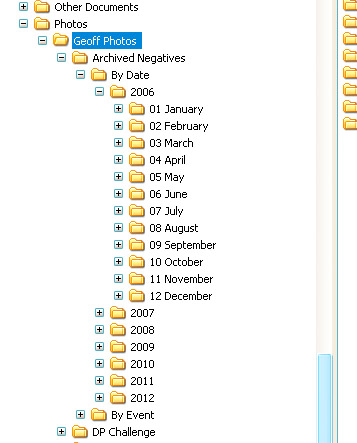 [/img]
i've never seen the point of labelling a file with the date first and then the description. if i want to find things by date order just change the view to 'details' and sort by date.
Just had a quick look - I currently have 41,197 files in 1,054 folders, totalling just shy of 100gb. NO WAY could I "just sort by date" with all files in one folder!
Lightroom here, but it's not cheap. I genuinely would struggle to do my job without it. I believe that Picasa does something similar for free though?
I use Lightroom too, you can add tags to images and then search the Library using them and various other criteria, it's great imo but not cheap/free. The actual RAW files are just saved in dated folders.
Picasa is very good at presenting you with photo's ordered by the date the image was taken.
It's a really good bit of software.
Just had a quick look - I currently have 41,197 files in 1,054 folders, totalling just shy of 100gb. NO WAY could I "just sort by date" with all files in one folder!
52,418 files, 252 folders, 199GB...and I rarely struggle to find any photo.
Lightroom here, but it's not cheap. I genuinely would struggle to do my job without it
if your job struggles to pay the £200 for a bit of software that massively increases you productivity and ease of working then you probably aren't charging enough.
52,418 files, 252 folders, 199GB...and I rarely struggle to find any photo
you;re obvisouly a better person than me then 😕
Er, I was more commenting on the expense of buying Lightroom as a home user, whereby £200 is quite a lot of money. My employers had no qualms in paying for it.
On a slightly related note does anyone know of any way (preferably free and easy :)) to find duplicate photos across multiple folders ideally from exif data - I've been really slack with photo management, importing pics from 3 cameras (and a selection of cameraphones) through several pc's often not deleting the card before using it again then using a different pc to download the card again. Then backing things up to a home server or external drive into different backup folders. The end result being that I'm now trying to get organised and get everything ordered on the home server but I've got 4 or 5 versions of some pics with different filenames.
I could import them all and visually select them but I've got 30+Gb of pics 🙁
I've just bought PSE9 if it helps.
@MikeG - possible (using utilities and scripts), but a major pain, at a guess. Is it worth the trouble, just for a few images? I'd just go ahead with your cataloguing and then delete duplicates as and when you come across them.
By date would be great if I had remembered to set the date on my camera, it is all over the place.
I think I will just have to go for the tried and tested, dump everything in the one folder and hope I don't need any of them ever.
On a slightly related note does anyone know of any way (preferably free and easy :)) to find duplicate
[url= http://www.digitalvolcano.co.uk/content/duplicate-cleaner ]try this[/url] It is some time since I used it but I think it was okay
I think picasa has a feature to find duplicates but you still need to remove them by hand
All the pics you've ever
taken of Chorley will appear!
That's gonna be one small folder 🙂
I know a man who is now divoreced beacuse picassa 'found' some pics he didn't want his missus to see, and I believe presented them as a screen saver as well.

