
Those lovely people at the pensions regulators need me to fill in an online form.
They can't post me a proper paper copy.
I need something called note pad or xl.
Do I have either of those things on an assus flip book or iPad. If not can I get them?
Isn't technology ****ing wonderful. Grrrrrrr.
se if you can download excel from the app store
Go back to them and ask what their assisted digital strategy is.
They shouldn't make you fill out anything electronically.
or just be awkward! 😆geoffj - Member
Go back to them and ask what their assisted digital strategy is.
They shouldn't make you fill out anything electronically.
I managed to get excel on the chromebook.
Filled out all the boxes have saved it but it won't upload as it's not a csv.
How do I make stuff a csv?
Do I really need to get a new computer just to talk to the pensions people?
when you save the file you should be able to specify file type and select *.csv, probably defaults to *.xlsx
In Excel use "save as" and change the file type to csv - might be "Text (CSV)". Save as will be under the 'office' button, top left of the screen.
I presume this is to do with automatic enrolment? They are a bit inflexible.
These are my save as options.
No I don't know how to do a screenshot!
[img] 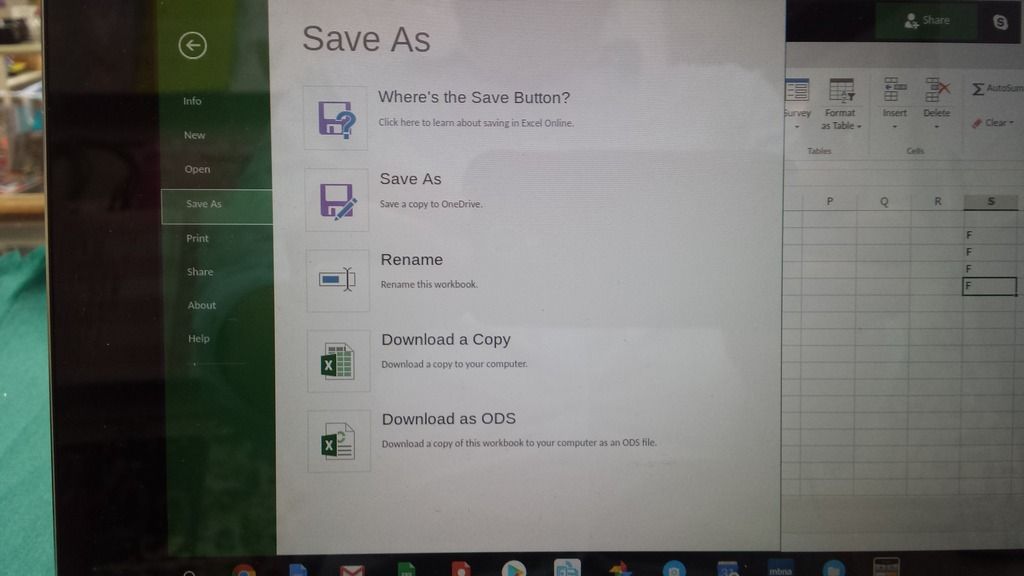 [/img]
Microsoft Excel is free on the iPad, simple and easy to use then.
save as, select csv - comma separated text file. might not give ye many options though, dunno.
Put excel on the ipad but the macros weren't activated.
Whatever that is.
just fill it out as best ye can, save it as something(let them worry about filetype.) and send it back.
It won't send as it's not a csv.
I wouldn't mind but none of our staff are taking a pension.
When you go to 'save as' and give it a file name there will be an option to save it as a file type. Thus will currently be set to .Xlsx probably. Change this file type to text (csv) and save
Use google sheets
You're using excel online, you can't do CSV on that - you need the proper version.
If your flip book is a chrome book then I don't know if you can do much - you can try and install OpenOffice on it.
I've spent all ****ing night trying to do it. That **** on the pension helpline spent an hour filling in the form with me why can't they just email me a form to post back.
For ****s sake.
Will try the google thing.
£109.99 just so I can fill a form in for those lazy ****s at the pension office.
The google thing worked.
Once again STW know more about stuff than the people who are paid to know about stuff.
Beers all round.