Netgear seems to keep stumbling over its self, dropping connection needing constant reboots.
What to get? Another Netgear, never had problems until now or something from Billion?
Anything else to consider?
B
got one of these for Cable:
[url= http://www.amazon.co.uk/NetGear-WNR2000-100UKS-Netgear-WNR2000-Wireless-N/dp/B001E1SRZE ]http://www.amazon.co.uk/NetGear-WNR2000-100UKS-Netgear-WNR2000-Wireless-N/dp/B001E1SRZE[/url]
£20 posted?
[img] 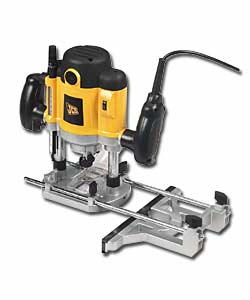 [/img]
I find this router excellent, does all I need it to.
[img]  [/img]
bravo 😉
Have you checked to see if there's newer firmware for your model?
I've had a bunch of Netgears, and they've all been bobbins out of the box and great after being flashed. (quiet at the back)
hmm will try that
Don't. It might make a mess of the desk your computer is on.
Oh, you meant Cougars plan!
What is your ISP. I have a Netgear router and I use Sky broadband. Recently mine has been dropping out too.
Your not with Sky by chance are you( wondering if it is a router or network problem)
Trend T5 is the normal answer, not some cheap yellow thing.
I thought the answer was always Billion 7800n? Ours is great.
Isp is zen. Its quite old so will try the firmware update 1st
seems I have the latest firmware
My netgear 834DG did this a while back. Nothing would fix it so I put my BT home hub back on
HH lasted about four months and blew so put netgear back on and it's been fine or a year
Leave it unplugged overnight and see what happens
I'm really tempted by a Billion 7800 though!
b r - Member
Trend T5 is the normal answer, not some cheap yellow thing.
They are nice. DeWalt do some nice ones too, but overkill for the amount of use mine gets I'm afraid. The JCB stuff comes with a 5yr guarentee which is why I chose it, just bought one of their drills too after my Black & Decker finally died (found a date stamp on it, 1980! It is slightly older than me!) New one is a vast improvement though, technology has moved on massively in the last 30yrs, and that's just on a lower-mid range drill. Can't comment on the router, it's my first, but it's fine for my purposes.
Haha!
Turn the router off for 15 mins or so, do that every few hours to force the isp equipment to regrade/sync/etc the line. I used to have to do that on occasion when the line had become flaky. Used to work better than just resetting.
Turn the router off for 15 mins or so, do that every few hours
Shouldn't be necessary. My jigsaw has a tendancy to overheat but that is ages old. If you do find yourself having to turn it off (or worse, it turns itself off) there is something wrong with it and it needs sorting.