I've been having ongoing wireless network issues and have been slowly working my way through the possible causes.
I've noticed on my Mac - which periodically drops the wireless connection - there is a mysterious wireless connection with no SSID. I can see it and can even attempt to connect to it, but it doesn't appear in my list of SSIDs to remove it. I'd just like to get rid of it but can't.
Any ideas?
GCHQ.
Out of interest, you aren't using BT Infinity with a HomeHub5, are you?
From my understanding you can only remove or forget "known networks". The machine will try and connect to any network it sees. I assume you have "ask to join networks" enabled, if not you should.
BTW we had lots of trouble with BT over the weekend (London based) some devices would connect but the two Mac Book's would not
BT issues with a HH5 here too, but not on the HH4 I also run.
The problems are only on the 5Ghz channel (turn that off you'll have no issues). Not the hub as I had BT send me a new one. Not 5Ghz specific as it's fine on the HH4.
Only on macs too, seems ok on iOS and android devices.
Not spent the time getting further to the bottom of it though.
The fix for your issue, IA, is:
Which is what I was going to tell stilltortoise.
IA we had no trouble with iOS nor my old 2009 Mac Mini but both the 2011 Mac's - went on for 3 days 😐
Bt Infinity with Home Hub 3 for me.
Is it the BT openzone thing which turns your wireless router into a public* wifi access point ?
* For BT openzone users only. You can turn this off but then forgo your own access to other openzone points.
That has its own SSID, ATP- "BT-WiFi-with-FON" on mine.
Stilltortoise: does a neighbour have a hidden network?
does a neighbour have a hidden network?
I don't know but I could ask. "Do you have a hidden network? I can see it :-)"
We had loads of trouble last week and over the weekend with our hh4 and our mbp not connecting to it. Did a Google search and found loads of references to people having issues with 5ghz and 2.4ghz. Logged onto hh4 using my phone and renamed the 5ghz signal so when I openned wifi preferences on the mbp I could make sure I chose the 2.4ghz signal. It asked me for the password and bingo no problems since. Connects first time every time and not dropped once.
The fix for your issue, IA, is:Which is what I was going to tell stilltortoise.
Nope, that's not a fix. That was the first step in my diagnosis, split out the 2.4 and 5 gig networks on the HH5.
Followed by disabling the 5 ghz. The same on the HH4.
Currently disabled .ac on the HH5 so it's the same protocols as the HH4 on 5Ghz which seems to have improved matters but I reserve judgement till i'm sure it's not dropping.
Unrelated (?) is the fact my HH5 seems to reboot every day at 10am (looking at the logs)
Had you done that then, IA? Sorry, wasn't clear from earlier, read that you'd disabled the 5Ghz channels.
I can only say that I had the self-same issue, and the above did it for me.
IA we had no trouble with iOS nor my old 2009 Mac Mini but both the 2011 Mac's -
Don't think there's 5Ghz on the 2009 mini?
I can only say that I had the self-same issue, and the above did it for me.
Right, but that's not solving it, it's just making your machine only use the 2.4Ghz... I'd rather have the 5gig.
Don't think there's 5Ghz on the 2009 mini?
Thanks, yes its starting to make some sense, certainly credible explanation
No, its making the machine use 5Ghz 🙂
I'm on my 5Ghz SSID right now, MBP mid 2012, connected, nice and solid. You do understand that this advice means that you create a new, dedicated 5Ghz SSID, not just disable it?
Like this:
[img] 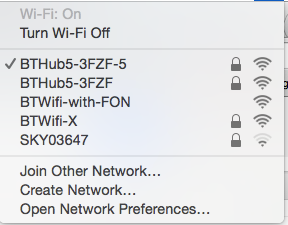 [/img]
I'm on my 5Ghz SSID right now, MBP mid 2012, connected, nice and solid. You do understand that this advice means that you create a new, dedicated 5Ghz SSID, not just disable it?
Yes, that's what I did first.
And at first it seemed solid.... then got up to its old tricks.
Ah right, I see.
I'll run some continuous pings today, see if it ever gets flakey. Will let you know.
Also a mid 2012 MBP btw so the same wifi card. But I saw it on a late 2012 MBA too.