When we moved in here nearly five years ago and were sorting out a broadband connection we went with Shell \(cos cheapest) and we've never changed. However, after a couple of rounds of corporate shenanigans (Shell sold their broadband to TalkTalk, who have now sold it/us to Utility Warehouse), we now find ourselves with Utility Warehouse. Same FTTC connection, same 12mb (count'em) speed, same router as when it was all initially set up.
UW have sent us a new router "for enhanced experience yadda yadda" and I keep getting reminder emails to plug it in. Thing is, the existing router is now just a dumb modem as all the WiFi stuff is handled by a TP-Link Deco mesh setup. I can't really be arsed fannying about with it, it just works.
I get that UW probably sent out a load of new routers as otherwise they're having to support tonnes of different ones from different previous suppliers, but from my perspective there's no reason why I can't just keep using the existing one, right?
If everything works then ignore the emails and leave the new one in the box.
Sky used to only let you use their supplied routers (unless you "hacked" the username, password and some other details out of them). Not sure if that's still the case, despite now being with Sky again myself.
TL:DR
"No"
(stick it in a cupboard just in case though)
It's possible/likely that, in the event of a problem with your connection, they'll insist that you use their router. I'd consider setting it up, ensure it all works, then (if you still feel the neef to), disconnect it and install your current router again. Trying to set it up for the first time when you already have connection issues is likely to lead to an extended outage period for you.
It's hardwired in to the Deco set up so should be minimal faff to swap it over. Just plug the cable in to the right ports on the new router. If you're lucky the power adapter will be the same fitting so no need to even unplug it from the wall. Then surely no further set up required?
Like other have said, if you then have a support issue it saves a load of them squirming and delaying by blaming your old router.
Yeah, depends on the ISP - some ISPs will only let you use their modem, as their network is looking for a specific device MAC ID at the end of the cable. I think Virgin tend to do that.
Sky used to only let you use their supplied routers (unless you "hacked" the username, password and some other details out of them). Not sure if that's still the case, despite now being with Sky again myself.
If it's Sky fibre, you can actually use your own device - if your router can handle it, you can plug the ONT cable directly into your router, with a few settings.
But TLDR: if it works, no need to worry!
Sky used to only let you use their supplied routers (unless you "hacked" the username, password and some other details out of them). Not sure if that's still the case, despite now being with Sky again myself.
Everyone loves messing around with Wireshark. The problem IIRC was that the supplied Sky router was utterly crap.
As everyone else is saying, if it's still working there's no reason to change and as long as you've got the settings you can carry on using a third-party one.
It's hardwired in to the Deco set up so should be minimal faff to swap it over. Just plug the cable in to the right ports on the new router. If you're lucky the power adapter will be the same fitting so no need to even unplug it from the wall. Then surely no further set up required?
That could leave you double NAT'ed though. Ideally the new router needs to be turned to modem mode (if it even has that).
Just plugging the new router without changing the config will leave it's wifi active which is not ideal if you have a mesh system that you prefer.
Do you have config access to the new router so you can turn that off and check other settings?
If everything works then ignore the emails and leave the new one in the box.
Sky used to only let you use their supplied routers (unless you "hacked" the username, password and some other details out of them). Not sure if that's still the case, despite now being with Sky again myself.
maybe I hacked it out but for the Sky (and now NOW) BB I've got I'm using a TP link as the sky router didn't support some of the port forwarding I needed for my home automation
It's likely there are no longer firmware updates etc for the old router they sent out and *possible* it has some security vulnerabilities. But how much real risk that presents is another matter.
Do you have config access to the new router so you can turn that off and check other settings?
Yep, I think so, but frankly I can't be arsed.
Connect a new router: In our case. No.
TL:DR if you leave a new one in the box, make sure you're not being charged monthly for it.
Over a period of 3 / 4 years or so as our connection improved or changed, the same provider sent a new router or booster and we just went with that, put the old one in the cupboard and carried on. The old ones just basically sat there. I was just pondering on the bill and noted we were still paying a monthly "rental" for all the old equipment as well as the currently used modem.
So off to the shop sharpish and they were all returned including the new one and deleted from the bill. I bought the same model as most recent modem off ebay for €50, plugged it in and it fired up. All we pay for now is the line connection. Nothing else. No equipment.
Thing is, the existing router is now just a dumb modem as all the WiFi stuff is handled by a TP-Link Deco mesh setup.
Be a little careful here as "the router is just a modem" and "the mesh is handling Wi-Fi" are not necessarily the same thing. As described, either side could be on actual 'router' duty (dishing out IP addresses etc). Presumably you'll know how it's set up if you initially set it all up, but this matters if you do decide to swap to the new box.
Personally I'd switch them, on the grounds that they're unlikely to be sending out new routers to all their customers without good reason (if you're still on a Shell-supplied router then that in itself is arguably a good reason). If we assume that the ISP is operating in good faith then the only downside I can foresee is that it's a bit of faff. Hey, it might help your connection speed! But if it does turn out to be worse for whatever reason then you can always just put the old one back, you shouldn't need to touch the Deco system at all.
(Personally I'd want to get away from UW and find a different provider, but that's a longer post.)
Vodafone sent us a new one a year or so ago but there as nothing wrong with the one we had so it just sat in the box until about a month ago when the old one packed in. Pain in he arse redoing all the WiFi passwords.
Be a little careful here as "the router is just a modem" and "the mesh is handling Wi-Fi" are not necessarily the same thing. As described, either side could be on actual 'router' duty (dishing out IP addresses etc). Presumably you'll know how it's set up if you initially set it all up, but this matters if you do decide to swap to the new box.
Yeah, fair enough, and to be honest one of the reasons I'm hesitant is that I can't quite remember what I did last time...
I was just pondering on the bill and noted we were still paying a monthly "rental" for all the old equipment as well as the currently used modem.My Ex-FiL was paying about a tenner a month to rent his old router/modem. They cost (IIRC) £6 each to buy, Minimum order quantity was something like a pallet of 120 from one of the China based wholesale operations. Was an old (ancient) clone of a cheap and cheerful router that hadn't been sold (retail) in europe for a decade or so.
I was just pondering on the bill and noted we were still paying a monthly "rental" for all the old equipment as well as the currently used modem.
Wait, what? Who in the hell were you with? I've never heard of this being a thing other than 'better wifi' type products where they basically rent you a mesh system.
(It sounds like the sort of stunt BT would pull, if I were to guess)
@Cougar prices quoted in Euros would imply somewhere on mainland Europe with somewhat different broadband market competition. Rickmeister is probably paying €5 a month for the connection with the balance made up of equipment rental. The ISP supplied bit of kit probably generates lots of lovely browsing info for the provider to sell on.
@Cougar Deutsche Telekom (we are in Germanycestershireland).
If we had just thrown the old stuff away, basically we would have been paying for it. Everything had a barcode, the guy in the shop scanned it and it immediately came off our account. We were "renting" 4 routers just because the old ones hadn't been returned when we got a new one. Now we just rent the line and €50 got us a router from Ebay which was a third of the years rental.
Ah, I didn't think about that. And, good heavens.
Have you checked your old router is not one of the ones taking part in a chinese botnet?
Although chances are any new "free" router is just as insecure!
Same FTTC connection, same 12mb (count'em) speed, same router as when it was all initially set up.
I assume you have checked if there are better deals and speeds out there?
I've never heard of this being a thing other than 'better wifi' type products where they basically rent you a mesh system.The only person i know who has done that in the UK ended up with something that *looked* like a decent OE set up, just with an extra logo. Turns out it had a downspecced radio, less RAM, slower processor and software that was locked down so hard she could barely even change the default password. That went back and some shouting ensued (It was advertised as the OE equipment, including model numbers/specs etc).
I was threatened with a non-return fee for a 'loaned' router by Sky, under the guise of their green credentials. More like a final cash grab from leaving customers.
I assume you have checked if there are better deals and speeds out there?
The speed is as much as the line will provide and, yeah, we could possibly save £5-ish a month shopping around. A fiver is a fiver, no doubt, but to be honest it's in the "is it worth it for the faff" lethargy zone, especially as we both work from home and there's always an outage on the swap over day(s).
I've just stuck our postcode into the Openreach site
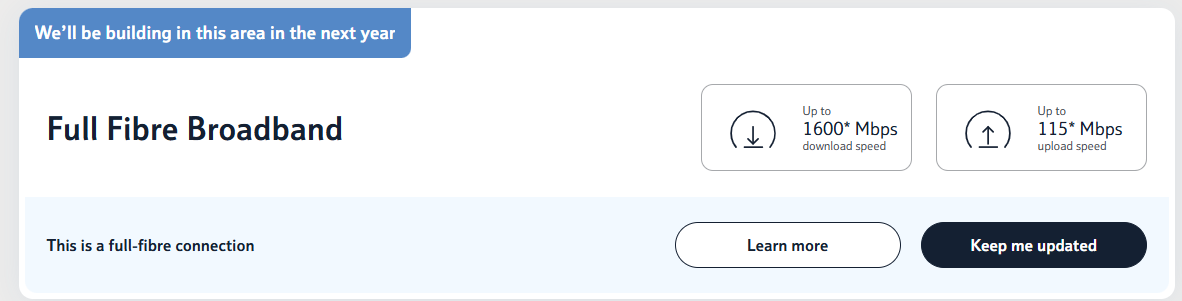
Please please please please

Pain in he arse redoing all the WiFi passwords.
No-one sensible does this. Much quicker to change the SSID and password of the new router to match the old values.
I've just stuck our postcode into the Openreach site
Please please please please
As the move over to full fibre happens, this may be possible.
That said, we applied at our last address and fell into the utter chaos and ****tery that is Openreach...and gave up 5 months after ordering full fibre.
(Posted from a new house with 500 raging mb of speed)