UPDATE: Reviews section refreshed, redesigned, searchable: Go take a look
That just makes it all the more important to protect your primary email though
Yeah. I can't stress this enough TBH. If someone gains access to your email account, they can go to town with "I forgot my password" on all manner of websites. I'd think rather have my bank account compromised than my email account.
I use two different accounts (well, several actually) on different providers; one I use for day-to-day emails and the other is where all my accounts are registered to.
When that basket is Apple, personally I'm satisfied my eggs are safe. YMMV.Something about these don't sit right with me. Eggs in one basket.
2FA [i]should[/i] make this impossible, although I'd guess a lot of (most?) people don't use it.If someone gains access to your email account, they can go to town with "I forgot my password" on all manner of websites. I'd think rather have my bank account compromised than my email account.
So, yes, chances are mine were there! Not cos it was a plain word password though, surely?!
No but as you've now told the internet you use the same password on every one of you accounts the last 20 years you've just created a bit of problem for yourself.
'Have I been pwned?' is great for checking this kind of thing.. This is not news to some of our mods
There are more than that one.
In the good old days when we could ask folk their password to fix Lotus Notes, one guy was sweating over giving his password. Eventually did - it was 'analrape'. Still don't know why he didn't change it first, much lolage in the team.
2FA should make this impossible, although I'd guess a lot of (most?) people don't use it.
Moreover, most sites don't even offer it yet.
The problem here is that it's always a trade-off between security and convenience, and faced with that choice many people would lean towards convenience. Using 2FA is an extra step. Using password managers is an extra step. Using longer passwords takes longer to type. People can't be bothered with all that.
I think for the longest time people just trusted that if you set a password somewhere, it was safe. This as it turns out was (and is) incredibly naive. I've done password reset requests on websites before now and been sent an email containing my password. This shouldn't be possible - it means that they're storing your password completely unencrypted, so if their database gets hacked then the hackers can simply read off your password. And it still happens -
see http://plaintextoffenders.com/
(The examples of compromised sites previously, last.fm and myspace, were using MD5 encryption which is fast enough to be decrypted by brute force. So better but still not ideal.)
Times are changing though. The more that high profile sites like Adobe get breached, the more people might start to realise that they might have to start compromising a little convenience in favour of better security practices. (Probably not, but one can hope.)
In the good old days when we could ask folk their password to fix Lotus Notes, one guy was sweating over giving his password.
I once did a password audit at a previous employer (back in NT4 days when you could crack password data with a broken biscuit). That was eye opening. As well as many variations on "dave123," one lass in the office had a password of "bondage69."
Lol at the NHS IT security stuff.
For 12 years we had 4 different windows logins at my practice. One for docs, one for nurses, one for admin, one for reception. Same password for everyone that never changed. (Prior to that we had no passwords to log in to windows)
Earlier this year the IT guys decided we needed individual logins so we all had our desktops reconfigured and were given individual logins. Each person's username was firstnamelastname and we all have the same password which is Surgeryname123. Absolutely no way I could pretend to be someone else.
Now I think we are past 90 days we've all had to change our passwords but I notice that there is now a generic login for use by anyone who wants to use the laptop in the meeting room. 2 sets of usernames and passwords written on a piece of paper sellotaped to the desk next to it. This login seems to have been given to the medical students and new registrars that started this week rather than them getting their own ones.
Luckily we do need either a smart card or another individual username and password to access the clinical system.
And during the period later when they replaced 23 computers the username and password that the IT guys were using to access all the PCs in the building with full admin rights was written down on the white board in the manager's office. I took a photo of it in case I needed to change anything after they had gone.
It's not great security that's for sure.
[i]Amazon? Paypal? Your bank?[/i]
I know I'm pretty stupid, but not that... anyway, I didnt say I used it on everything!
Has anyone used Bruce Schneier's Password Safe? I'd appreciate comments from fellow IT numpties about how demanding it might be.
My password is easy to remember as it's my PIN number for my bank card. Good luck trying to hack that, it's four numbers, there are literally thousands of combinations, would take for ever sitting typing them in one by one.
It must be the most secure method because all the best bike locks use the same.
[img] 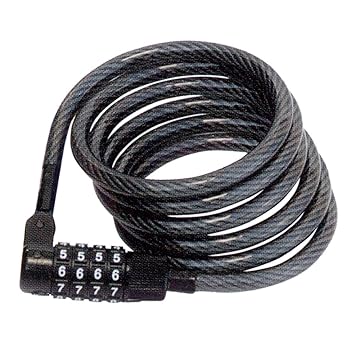 [/img]
Is it pissgibbon?
It is now.
We use lastpass it's a total pain in the arse.
Certain sites will block it auto logging in and make it very difficult to get in.
Dare use the same password twice and it gets the arsehole.
Truthfully cyber security is pretty brilliant these days, but the weak point it always the password and there has to be a better way! Someone will always tell you "you should never use the same password for multiple sites" yeah great - my lastpass account has more than 70 sites on it. That's not gong to happen. So I use the same one over and over (because whilst lastpass is great on PCs it's terrible on devices).
Biometrics, god dam we need biometrics.
I don't use a password manager, I use a number of different passwords for different places, my bank and building society accounts use a 'memorable word' system where you have to tap in three random characters from whatever that 'memorable word' happens to be.
One system I use is an old car registration that I used to have, along with the car model, which gives a pretty random selection of letters and numbers. For others I use words from some ethnic mythology or other mixing letters and numbers; American First Nations mythology is a good source of really quite extraordinary names, and there are a lot of different tribal mythologies to choose from!
I also use two factor on my phone and pad, fingerprint unlocking and six-digit passcode, so good luck getting into either of those any time this century.
I do similar to CZ (except I don't admit my password sources on the Internet...)
Everything I care about has unique passwords. Everything else has a password created from one of a handful of roots but amended based on the site URL. Eg, if my root was "bobbins" then the password here might be "bobstwbins." (This is a massive oversimplification, I'd also do some text manipulation on "stw" to turn it into something else so it's not immediately obvious.)
[quote=CountZero ]I don't use a password manager, I use a number of different passwords for different places, my bank and building society accounts use a 'memorable word' system where you have to tap in three random characters from whatever that 'memorable word' happens to be.
One system I use is an old car registration that I used to have, along with the car model, which gives a pretty random selection of letters and numbers. For others I use words from some ethnic mythology or other mixing letters and numbers; American First Nations mythology is a good source of really quite extraordinary names, and there are a lot of different tribal mythologies to choose from!
I also use two factor on my phone and pad, fingerprint unlocking and six-digit passcode, so good luck getting into either of those any time this century.
This is great until you are forced to change one, then you have to remember which site doesn't fit your pattern. 😡
I'm reluctantly using Lastpass which is actually pretty good, it autofills in apps on Android as well as websites.
I tend to click Edit Site and use the notes field to store all the other data you need. Not sure if there's a better way of doing that.
Most of my passwords are based on bikes and bands. Plenty of random-type words there.
My passwords are either lyrics or whatever I can see at the time of creating the password. I've had some interesting ones over the years. Pi55Gibb0n is tempting me.
Most of my passwords are based on bikes and bands.
That reminds me. I must pick up the latest Piss Gibbon CD.
one lass in the office had a password of "bondage69."
Did you marry her?
Three jobs ago (about 2001) I was asked write the company's password policy. It was three pages of documentation guidelines and then the words 'length is strength' followed by a short paragraph on choosing a phrase you could remember. No enforced change policy or complexity policy except it must be longer than 12 chars.
Did you marry her?
I considered it "a good lead."
Incidentally,
Does anyone have the original article? It's behind a paywall.
From the OP article:
"The result is that people create odd-looking passwords and then have to write them down, which is of course less secure than something you can memorize"
Balls.
Writing down complex unmemorable passwords for users at home is one of the most secure solutions as it's extremely less likely you'll get someone breaking into your house and looking for a list of passwords than it is to have your password hashes stolen online by hackers and then run through a cracker.
On going for long memorable phrases, tools that check for strength based on the same algorithms and dictionary checks a cracker would use, suggest a shorter random password is as strong or better than a long phrase. Though both may take years to crack, but with quantum computing round the corner that could all change.
It sounds like the advice change is based more on the fact people don't do the best thing and take the easiest option, rather than what is a strong password. i.e. suggest making it easier to remember (weaker) but very long (stronger, but a pain in the arse to type).
Problem I can see is with different passwords for each site, which is still a must in my book. Otherwise, one compromised site means changing it on 1000s of sites. Long phrases even if memorable are going to be tricky unless you make them relevant to the site, then people are going to make them easy to guess.
Anyway, more stuff on it here:
https://nakedsecurity.sophos.com/2016/08/18/nists-new-password-rules-what-you-need-to-know/
I've done password reset requests on websites before now and been sent an email containing my password. This shouldn't be possible - it means that they're storing your password completely unencrypted,
Maybe, maybe not. We used to confirm the password as part of the process of saving it into our DB. The only time we had it in clear was during that transition from the form submission into the database. You couldn't, for example, ask for your password to be sent to you after that as we didn't have it unencrypted or in an easily decrypted form.
We don't even do that any more.
Deadkenny - how do you know how good the tools that show how hackable a password is? E.g. One site I use says my 18 character password made up from words in a Horse Staple etc style, is WEAK (their worst rating - equivalent to password) even if I use TitleCase or add a single symbol to the end. Only when I add a number does it move up. If I used 6 characters but with caps,lower,symbol,number it says it is GOOD - their second best. and P455w0rd! Gets its best rating. I am sceptical.
Cougar - password managers make my nervous. If there is a vulnerability all your passwords are hacked - I doubt the average user has any hope of understanding the risk associated with any particular password manager, so other than going with a popular one (all the more reason to try and find an exploit) it might be blind faith. I have a system for remembering them which works well, until either I am forced to update. Each site has a unique password and it wouldn't be obvious how you get my Facebook password if you saw my Twitter one etc. But I have been considering hashing them for added securit - it makes using them on a mobile a PiTA though. Typing real words on a keyboard is actually ok, but a hash or other nonsense is tough.
"The result is that people create odd-looking passwords and then have to write them down, which is of course less secure than something you can memorize"Balls.
Of course it is, but 90% of password security advice is based on corporate culture not home use. So, if you write down passwords at work, it's far more likely that someone will take the post-it off your monitor or keyboard. Shoving them into your address book stored in the drawer next to the spare batteries etc is pretty secure in a security-by-obscurity sort of way. That said though, it's bloody useless if you forget the password when you're on holiday or at the shops.
EVERYTHING you have should be secured with two-factor authentication where possible, it's as close as you can get to impossible to hack (ignoring the system itself being compromised). I have a yubikey that generates Google Authenticator codes for some stuff, GA codes on my phone for other stuff, texts for some stuff that doesn't support GA and, of course, bank code generators.
Written down can of course be (in a secure way) online, but that's a single point of vulnerability, but store it in a way custom and only known to you and it's not an obvious target. Unlike password managers.
Corporates (lack of) security is very alarming, especially the way default passwords are emailed out in some places and no one changes them, then they're used as the same password for lots of systems.
Interestingly NIST are also saying SMS for two-factor auth is also out.
One of our rules specifies 25+ char randomised passwords for admin accounts (in certain 'special' environments) and although we use password DBs copy and paste is also disabled in these environments as part of the standard lockdown - I can frequently be heard swearing trying to type in some of these passwords (especially on Monday mornings or Friday afternoons). I'm sure 2-factor authentication would have paid for itself many times over already in saving on wasted time...
Interestingly NIST are also saying SMS for two-factor auth is also out.
SMS is a funny one. In theory, like email, it's insecure. In practice, short of a targeted attack it's safe. I assume nobody wants access that urgently to my spamtrap email account so that it's safe.
I usually print off a little pic and leave it with my laptop to remind me of my new password when I change it. After a day or 2 they become automatic.
This was the last password reminder pic
[img]  [/img]
Pic left on desk. If anyone guesses from that, I'll.. well I'll.. flippin change it won't I! 🙂
Gizzard, Lizard, Wizard?
.. or maybe a combination of those. We have some bizarre policies in place here. It's a right pain when you have to change them.
Is it mingebiscuit?
I think they've messed up there security analysis tbh.
The reason "HORSE" is less secure than "HOR5E" is because you can complete the rest of the word from the starting few letters, because the words architecture is set by the English language layout.
ie,
5 letter word starting in HOR
I bet most people would guess "HORSE" pretty quickly.
So they claim CorrectHorseStapleBattery is 44 bits of entropy, but it isn't, because our language has fixed rules as to what letters follow which other ones.
Anyway, that's really beside the point, as password security is not linear imo.
Once you move away from a simple password "1234" or your mums names or whatever, the practical level of security means the following:
1) You are more likely to get "hacked" by some backdoor (key logger etc) or software flaw. ie, the hackers won't "Crack" your password they'll crack the system for entering & validating that password, over which you have no control.
2) If someone really wants it (your password), they'll just hold a gun to your head and ask for it.
3) It's not like in the films where you can brute force a password any longer. Pretty much all systems will not allow repeated and rapid password entries without flagging an attack attempt, so even say 100 possible combinations of password are pretty secure in reality
4) Writing passwords down on a piece of paper kept in your home is actually, imo, pretty secure. To get that list requires physical interaction, ie the attacker must be in your home, that immediately rules out 99.9999% of all attack vectors, and once they are in your home, then see point 2) above....
5) The most likely attacker on a singlular basis is going to be someone you know, someone who can watch you enter your password, steal your bank card etc. They are also therefore easiest to trace and catch.
you mean like a friend of family member with e.g. money worries?The most likely attacker on a singlular basis is going to be someone you know,
you mean super easy to steal by someone who in your opinion is "the most likely attacker". 🙂Writing passwords down on a piece of paper kept in your home is actually, imo, pretty secure.
Is it mingebiscuit?
No, but they're good live.
The reason "HORSE" is less secure than "HOR5E" is because you can complete the rest of the word from the starting few letters, because the words architecture is set by the English language layout.
Except that crackers are well versed in the notion of letter substitution. It's trivial to include 0 (zero) alongside o and O in a dictionary attack.
3) It's not like in the films where you can brute force a password any longer. Pretty much all systems will not allow repeated and rapid password entries without flagging an attack attempt, so even say 100 possible combinations of password are pretty secure in reality
Where this falls down is when you're not actually attacking live accounts. In the two cases mentioned previously, the user database was compromised meaning that the hackers had an offline copy of usernames and password hashes. Any login delays or automatic lockouts are immediately moot.
Now, the passwords were encrypted (hashed), but using MD5. MD5's flaw here is that it's cryptographically fast - it's easy to compute MD5 hashes. With a modest PC you can brute-force a six-character password in as many seconds, an eight-character password in a couple of hours. How many folk have passwords longer than eight characters? Statistically few, I'd wager.
Pffff! You can decrypt MD5 online no need for a PC.
maxtorque: I think at least some of the analysis is also based on how hard it is to get to your password if a hacker gets hold of the hashed/encrypted version of it.
In the good ol days of NT passwords that Cougar mentioned you'd have [url= https://en.wikipedia.org/wiki/L0phtCrack ]L0phtCrack[/url] banging away trying dictionary and rainbow table attacks.
Something like "HORSE" would be found almost instantly as it is a simple dictionary word, "HOR5E" would be found seconds later as it is a standard letter substitution.
Edit: as Cougar has explained while I was typing..
Pffff! You can decrypt MD5 online no need for a PC.
You can decrypt many MD5 hashes simply by Googling the hash.
In the good ol days of NT passwords that Cougar mentioned you'd have L0phtCrack banging away trying dictionary and rainbow table attacks.
Indeed (that's what I was referring to earlier when I was talking about password audits).
This is doubly easy because of the way NT stored passwords. Essentially, passwords were encrypted in six-character chunks. So our correcthorsebatterystaple would be held as CORREC THORSE BATTER YSTAPL E. And as discussed, you can brute-force six-character passwords with a broken biscuit.
Looking forward to Pissgibbon getting so popular my very corporate employer is forced to add it to the list of easily guessed passwords we aren't ment to use.
I wasn't sure whether to post this here or on the "women in tech" thread, but this seems to be a little less "men are good with computers because they have a penis." So, in the context of your password on a Post-It in a desk drawer being fine, have a read of this.
https://twitter.com/HydeNS33k/status/895318837758877696
Like that Cougar.
[s]Cheating[/s] Watching her tweet feed and still she got in. 😀
I've visited plenty of similar client sites: biometric fingerprint scanners and RFID tags? Just wait for someone to hold the door open for you.

