
MegaSack DRAW - This year's winner is user - rgwb
We will be in touch
how do I stop my laptop from sleeping/hibernating or what ever it is that mean the guys in India have to ring me up at 3am to press a button to remotely access the laptop?
It is a windows 7 machine.
I have set the 'Change when computer sleeps' to NEVER for everything. Is this enough?
I really don't want another 3am phone call where I press powerup and then they can start work.
Must be something in the control panel about power saving options?
Oh and check the bios, there might be something in there.
EDIT: http://www.sevenforums.com/tutorials/819-hibernate-enable-disable.html
and this http://www.sevenforums.com/software/28125-msdn-blogger-releases-insomnia-keeping-windows-7-a.html
Sorry Geoff - quick edit to show what I had tried
Control Panel > Power Options >Create a Power plan
I think that is what I did
There's an addon for Firefox called ReloadEvery - it will refresh a web page every n seconds/minutes
that should stop it sleeping
"power options" from the Run box. Select 'high performance' and then 'change plan settings' to set sleep to 'never' if it isn't already.
You can also configure 'change what the power buttons do' to set "off" to mean off.
W7 doesn't come with 'high performance' just 'power saver' and 'balanced'.
You have the option to change when it sleeps and hibernates on battery and plugged in, and for both default power profiles. Make sure you get the right option 🙂
If you get a rant POSTING AT 3am you know you werew rong
W7 doesn't come with 'high performance' just 'power saver' and 'balanced'.
Yeah it does
there's a button for other plans, it's in there
Worth also checking it is not set to hibernate
W7 doesn't come with 'high performance' just 'power saver' and 'balanced'.
That's odd, considering I copied it verbatim from my W7 laptop when I wrote that.
my windows 7 (professional) has got a high performance option!
hijacking the thread a little but does anyone know if ready boost will increase the performance of my laptop when i've already got 8gb RAM? not that I need it, just curious.
W7 home premium then doesn't have a high performance profile 🙂
Ready boost does work if you have little RAM, doesn't do much if you have a lot.
You know, you could always google it like I did 🙂
you could google pretty much anything and have more sense than most of the comments on here
take it to bed with you and press a button every ten minutes.
does anyone know if ready boost will increase the performance of my laptop when i've already got 8gb RAM? not that I need it, just curious.
Depends not on how much RAM you've got, but how much RAM you're using. If you've got 8Gb and using 2Gb, no, it won't make any difference. It's also dependent the speed of the flash (USB or SD) in comparison to the write speed of your hard disk; it's essentially write cache for the HDD, so if you've got a really fast disk then a USB pendrive isn't going to make much difference.
It might have separate power options in the Bios.
W7 home premium then doesn't have a high performance profile
Mine does
[img] 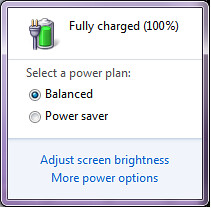 [/img]
HaHaa! Molgrips has a crap laptop that can't do High Performance! 😉
Why do they need to access the laptop, just out of interest?
I think that's the Fisher Price version you have Molgrips 😉
[img]  [/img]
Ello, what's this? I just found some more! Four, I win!
[img] 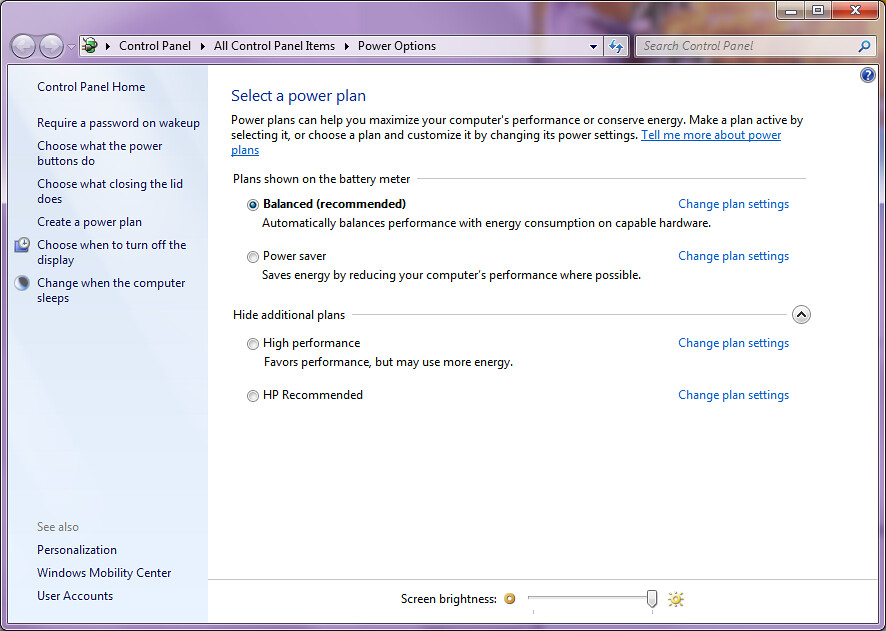 [/img]
You've only just found it?
Good job you don't have to make a living in IT eh?
🙂
If I wanted it, I'd have found it. I have however substantially tweaked the settings to the way I want.
Fortunately I'm clever enough that I don't have to make a living setting up PCs 😉
Sounds like a thread on why the op should be using a mac.
Don't macs have power management options then?
Don't macs have power management options then?
Of course, and shock horror, it doesn't need an army of stw it [i]experts[/i] to get them to do what you want!
Neither does the PC one.. We can all do it fine, and WCA is being dense.
molgrips - Member
Neither does the PC one.. We can all do it fine, and WCA is being dense.
POSTED 40 MINUTES AGO # REPORT-POST
With all due respect, it took half a dozen posts to identify which settings to fettle. Too many variants and too many flavours! 🙄
No it bloody didn't. Not only do you use a mac and blether on about it when it's pointless, but you can't read either.
it took half a dozen posts to identify which settings to fettle.
Well, no, it took one post and a lot of chatter. You must be new to the Internet.
molgrips - Member
No it bloody didn't. Not only do you use a mac and blether on about it when it's pointless, but you can't read either.
POSTED 16 MINUTES AGO # REPORT-POST
Cougar - Member
it took half a dozen posts to identify which settings to fettle.
Well, no, it took one post and a lot of chatter. You must be new to the Internet.
POSTED 35 SECONDS AGO # REPORT-POST

Y'know, if you used a PC, you might be able to cut and paste in a readable manner.
(-:
[img]  [/img]
\o/
o/\o