
Hi,
We have a small'sh network, 20 PC's mix of XP & Win7
Server A - 1 x Domain controller Server 2012 (192.168.1.4)
Server B - 1 x Windows 2008 storage server (192.168.1.9)
BT Business broadband hub, all PC's have internet. (192.168.1.254)
Old DC died few months back, setup the new server 'A' with DHCP & DNS enabled.
Everything was fine but yesterday all shared folders on server B were not accessible. (Nothing else has changed apart from a load of MS updates on the servers)
When I go to each PC there are red x's on the shared/mapped drives linked to server B
On each client if i ping server B it connects fine using its name and IP address. Each existing mapped drive was setup using the server name, if i delete the share and setup again using the 192.168.1.9 it connects fine.
I know this is obviously a DNS issue, but dont know where to start?
On server A which is the DC and has DNS services running the DNS server IP has been entered as the servers IP, that is 192.168.1.4
On server B the DNS has been given the above IP, 192.168.1.4
All clients are DHCP.
Any ideas?
Our BT Business broadband package does give DNS server IP's , should these be entered into the DNS server settings on server A NOT 192.168.1.9?
*Sorry for long post, tried to make it simple as possible
How are DNS updates being made on that server. Via DHCP? or are they statically created?
What DNS server address do the clients say they are using (ie from an ipconfig command).
Any possibility that DHCP is also running on the router?
Cheers,
might not answer you but...
excuse my ignorance, on the DC in DNS manager 'interfaces' tab it says "select the IP addresses that will serve DNS requests " - All IP addresses check box is selected
Forwarders Tab
192.168.1.254 is entered (the BT HUB)
IF i IPCONFIG /ALL my PC it says
IP - 192.168.1.14
SUBNET - 255.255.255.0
DHCP - 192.168.1.4
GATEWAY - 192.168.1.254
DNS - 192.168.1.4
i'll check on bt hub
Cheers all again...
This is form the BT router LAN section
Private Network
Router/Gateway Address: 192.168.1.254
Subnet Mask: 255.255.255.0
Private Network DHCP Info:
Range: 192.168.1.64 – 192.168.1.253
DHCP Configuration
DHCP Server Enabled
Unchecking will stop the DHCP server from assigning IP addresses to LAN DHCP clients.
DHCP Network Range
If you change the IP address range, you must renew the DHCP lease for all devices on the network.
192.168.1.0 / 255.255.255.0 (default)
172.16.0.0 / 255.255.0.0
10.0.0.0 / 255.255.0.0
Configure manually
Router Address:
Subnet Mask:
First DHCP Address:
Last DHCP Address:
DHCP Lease Time: hours (24 hours default)
Select Default Address Allocation Pool for the DHCP Server
New Device DHCP Pool:
This selection modifies the default LAN network used by the DHCP server for address assignments to new devices. The default setting is Private Network. Change it only to Public Network when you want every new device getting a public address assigned. The recommendation is Private Network. You can change the setting for each individual device below.
Well, your ipconfig suggests that you're getting DHCP from your server, but it also looks from your router config that a DHCP server is enabled on there too - that's not good unless you have an unusual network configuration. What sits between your clients and the router? Switch/firewall anything else?
Is the PC (your pc?) on which you ran ipconfig currently having the same problem with mapped drives? If not try ipconfig on one of the others which is.
But, if it's a simple network and the only thing between your clients and servers and the router is a switch, you don't want 2 DHCP servers running (they won't play nicely) - if the router assigns addresses it will probably give clients the wrong dns (i.e.192.168.1.254 and that won't know your server names).
I'd definitely turn off DHCP on the router first.
Looking at your router settings, is there actually a tick in a box next to where it says "DHCP Server Enabled" ? I don't think your copy/paste has picked it up ?
cheers
What sits between your clients and the router? Switch/firewall anything else?
its very simple, nothing fancy.
main bt internet line comes into bt hub,
cat5 from bt hub into 3com unmanaged hub
all clients/servers connected to 3com hub
the only firewall is the bt hub
all pc's are having the same problem, it is intermittent, i just tried a share to the sales drive it worked but took ages, then tired again and it came back with the classic error.
on server B the one were having trouble with DNS is static 192.168.1.4
its a pain as it was all working fine and nothing has changed.
do you have more than 1 network card in server B?
or has something else been set with that same IP? you sure it's excluded from dhcp lease range?
Did the updates on the servers require a reboot? If so, assuming DHCP is running on the router, the DHCP serevr on the server will probably have seen a DHCP server on the network and not have been happy.
Have a look in the event log for errors on the DNS server.
But samuri is right, if DHCP is running on the router, deal with that first. You might need to restart the DNS server (or just the service) afterwards, but while you have 2 DHCP servers you are going to be chasing your tail to fix any other issues.
next time you have the issue go on one of the pc's and from the command prompt do:
arp -a
you'll see the mac address of the thing that has that IP listed under physical address - see if it's different from the ones that work - you should be able to track it down via that.
hi screen shot of actual hub :)[img] 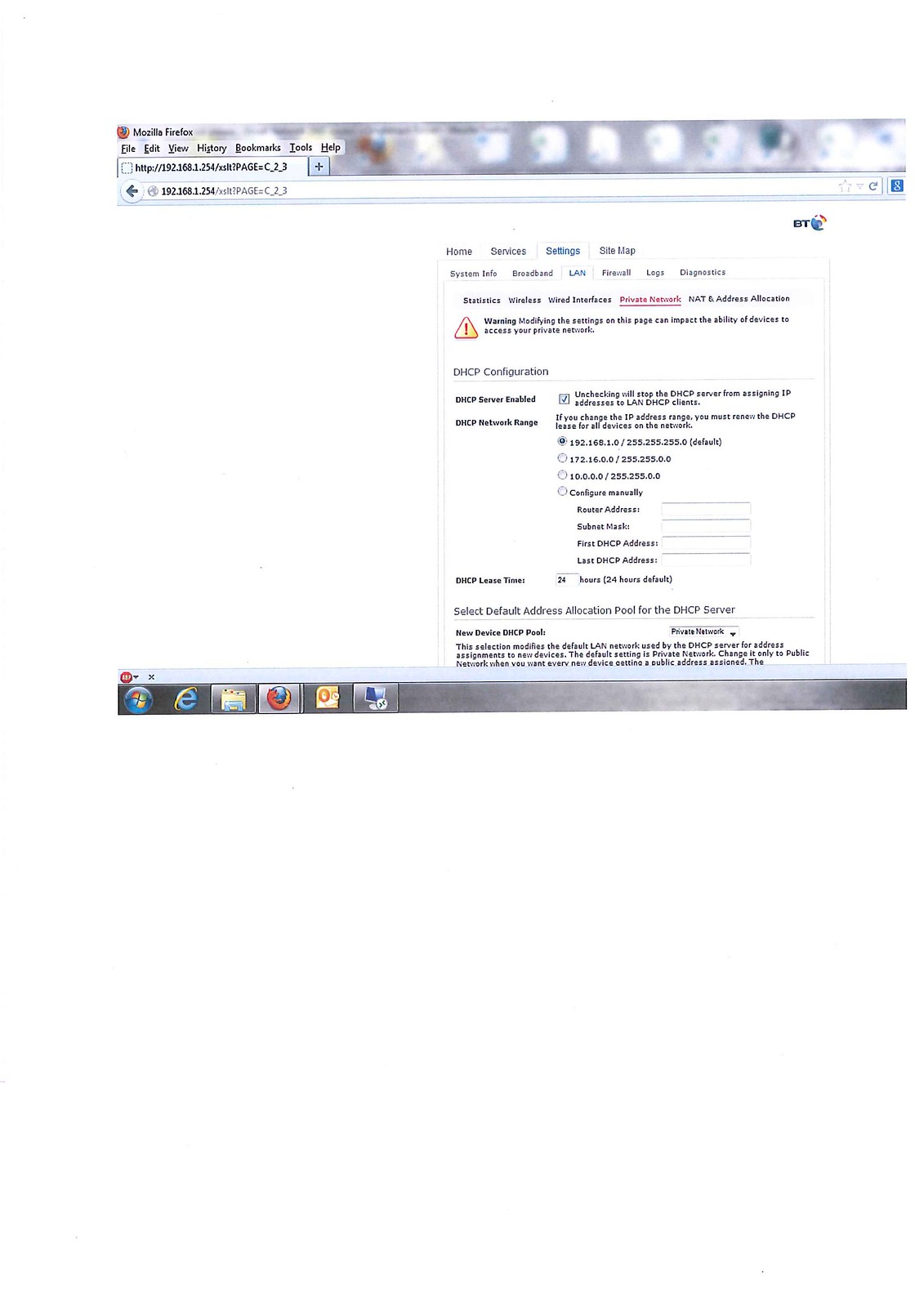 [/img]
has something else been set with that same IP? you sure it's excluded from dhcp lease range?
That's a very good point, also.
Cheers all again.
Server B has two GB cards, one is being used.
After the updates i was forced to reboot BOTH server A & B
next time you have the issue go on one of the pc's and from the command prompt do:arp -a
you'll see the mac address of the thing that has that IP listed under physical address - see if it's different from the ones that work - you should be able to track it down via that.
did this and.... worryingly....
Server A - 192.168.1.4
&
Server B - 192.168.1.9
Both shows as DYNAMIC NOT STATIC??
Think it is time to UNCHECK DHCP on the BT HUB...
Agree on sorting out the two DHCP sources first.
If that doesn't fix it then ping server B by name (server name only) from a client PC, if that doesn't work then ping it fully qualified, does that work?
Do another ipconfig/all on a client PC, what does it have in the "Primary DNS Suffix" field (near the top)? It should match the DNS suffix of server B (the bit after the server name on a fully qualified name).
nothing has changed
ahh lol. Give me a minute I've spilled me tea...
So it sounds like there's a fundamental flaw in the network configuration.
this:
Forwarders Tab
192.168.1.254 is entered (the BT HUB)
is good
this:
DHCP Server Enabled
is bad
What's probably happening is that your clients are spinning up and screaming over the network "gimme an ip address", since it's all unmanaged the first thing to respond is likely to be the bt hub (it has nothing else to do: the dc's busy being a dc & R&RAS is a pita overhead for it).
What Id'd probably do is get rid of DHCP from the DC, but configure the hub to hand out ipaddresses with a manually configured DNS entry, pointing at the DC. So when it hands out leases the clients will have 192.168.1.4 as their only DNS server.
Any server should have a reservation and manually configured ip.
When that's done I'd visit every client and do an ipconfig/flushdns and then ipconfig/registerdns. I'd also do an arp table flush as on an unmanaged network all a client really needs to talk is the mac address of the object it wants to shout at.
Just ooi, what's your domain name, it's not something that is publicly registered? We had load of trouble with "bigcorp.net" and "dozercorp.com" in a training environment as the clients would resolve server1.bigcorp.net to be some server out on the internet rather than the box sat next to them.
cheers again, my brain is starting to fry.. 🙂
stupid question again...
how come all shared folders on Server A (the DC) are fine?
Could be because there is an ip address conflict with server B and something else?
thanks for all the help, its given me light at the end of the tunnel..
a few more...
if i turn DHCP off on the hub OR decide to do it on the DC, I assume all client shave to restart log on etc for changes to take effect.
the reason i ask is that im doing on these changes LIVE (everyone is in working)
think i really should leave it as it is and stay on late and sort it.
cheers again, much appreciated.
Anything in the event logs: either on the clients or the servers?
is there a command prompt thing i can use to ping and see if more than one device is using 192.168.1.9?
Anything in the event logs: either on the clients or the servers?
sorry forgot to answer earlier...
On Server A (DC) there are no obvious errors
However on Server B it is giving event ID [b]2012 SRV[/b]
the message it gives basically says there are network errors and as there are so many it is giving this warning.
Turning DHCP off on the hub would be your best bet, let the DC handle it (DNS integration then, although not a massive deal in your size environment). This shouldn't have any immediate impact on the clients as they already have their IPs
clients can get a new IP via ipconfig/renew at a command prompt (need admin rights though I think). I'm not sure off the top of my head though if it will look for another DHCP server if it can't contact the one that issued it's current IP, I suspect it will but otherwise yeah you'd need to reboot the clients.
Could try a ping -a 192.168.1.9 to see what DNS thinks now has that IP (but this might be what you think it should be as if the router's DHCP issued something else the same IP it wouldn't have updated your DNS with that change).
You could also (as an admin) map a drive to \\192.168.1.9\c$ and look at what user profiles are there, if your users don't roam between PCs it should just be the name of person using the PC that's been issued the IP.
Also server B should have an event log message if a duplicate IP was detected, been a while since I saw one but I think that gives you additional info to help track down the source (might give you the MAC address)
you have overlapped the dhcp lease range with your statically assigned IP's
your range from that screenshot is from 192.168.1.0 - 254
so you'll be trying to give out 192.168.1.4 and 1.9 to client PC's
configure manually and start the leases for clients at 192.168.1.50 - 100 or something, you don't need all 254 IP's anyhow.
you have overlapped the dhcp lease range with your statically assigned IP'syour range from that screenshot is from 192.168.1.0 - 254
so you'll be trying to give out 192.168.1.4 and 1.9 to client PC's
configure manually and start the leases for clients at 192.168.1.50 - 100 or something, you don't need all 254 IP's anyhow.
this makes sense, so......
even though ive given both server static IP's .9 & .4 could in theory still be given out to a 'client'?
oh i just turned off DHCP in the HUB
forgot as well nbtstat -a 192.168.1.9 should give you the computer name, if it's server B then if a duplicate IP did cause an issue its back as it should be now (but if the DC issued server B's IP and the router issued a client the same IP and that client has since been shutdown it will use 192.168.1.9 again when it's powered up and cause you problems again)
[i]even though ive given both server static IP's .9 & .4 could in theory still be given out to a 'client'? [/i]
yes.
I'm with FuzzyWuzzy. Turn off DHCP on the HUB. Make sure your DHCP pool on the server doesn't overlap your static addresses (servers). Should be able to do that live without issue. When the clients start up tomorrow, it should all be sorted.
Yep, sounds like duplicate leases. Do you know if BT has quietly updated your hub?
GROUP HUG if i could...
cough...
nbtstat -a 192.168.1.9
did that and it did come back with the server name
i just restarted my PC and it logged on ok and came back with all the correct IP settings when i did IPCONFIG /ALL
also it connected straight away to a shared drive on Server B (hopefully it will keep this setting)
right i need to go onto server A and change the lease (hands shaking), just to check...as suggested I should changed the current scope..
192.168.1.1 > 192.168.1.253
to
192.168.1.50 > 192.168.1.150 (just to give some leeway as we have a good number of printers etc)
Do you know if BT has quietly updated your hub?
just read this sorry...
i dont know is the honest answer but i know Bt did a hug roll out to office 365 and it messed up loads of email. saying that the hub must have been updated as the content filtering option has gone.
yes correct monkey - always exclude part of the range that you set statically - to avoid such issues 🙂
damn, just checked shared drives to server B again and it red x and wont connect.
i guess restarting both servers and hub tonight will help?
There are three rules in IT:
1. Something has always changed
2. If its Active Directory related, make a cup of tea and then try again
3. If in doubt give it a bounce
yes or do an ipconfig /flushdns from a client and try again
and if possible from the hub restart the dns and dhcp services - dunno if you can do that - and restart the dns server service from your DC
cheers 'again'
and if possible from the hub restart the dns and dhcp services
sadly all you can do it manually 'restart' or just pull the plug.
just noticed, some XP machines dont seem to be effected?
my PC is WIN 7 just tried the sales shared drive on Sever B it failed, went to an XP machine it was fine.
as typing this checked again and mines connected again!
To all that helped...
Without tempting fate everything seems to be working, shared drives on Server B instant access.
Looks like everything has sorted itself, IPCONFIG on my PC shows an IP of .54 and DNS of .9 server A
Fingers crossed...
Many, many thanks once again
Glad it seems to be working.
This made me laugh: 😀
Nothing else has changed apart from a load of MS updates on the servers
🙂
i nearly lost it there at one point!
well done monkey, time to kick back 🙂
Glad it all worked out, well done mate.
24 hours later....
[img]  [/img]
aaahhh spoke too soon, not a major thing...
it seems since turning off DHCP on the BT hub it seems any wireless device cannot gain an IP address?
is there a way round this?
You'd need to configure the hub as a DHCP relay agent. I suspect that this isn't possible with a standard BT business hub. I'd be looking to shut down DHCP on the windows box, and re-instate it with a similar config (wiht your reserved static addresses for the servers) on the BT hub. AD-interated DNS will simply just work, so long as you configure the BT hub to set 192.168.1.4 as the sole DNS server for each client.
cheers, i just got it working on my phone, just gave it a static and the dns and gateway and it works!
its a secret connection anyway just for the chosen few 😉
cheers, i just got it working on my phone, just gave it a static and the dns and gateway and it works!
But... you may find that said wireless devices don't automatically work elsewhere
aaaahhhhhh, i'll check when i get home but the settings i changed were specifically for the HUB that appeared when it did a scan