Heeeeeeellp...
So I was using my PC th other night. Went away for my tea and when I came back it was frozen. Mouse cursor still moved but nothing responding and keyboard dead. I suspect a failed attempt at going to standby.
Hit the switch to froce a reboot. Blue screen. Oh dear.
Reboot and try Last Known Good Config. Blue screen.
Reboot and try Safe Mode. Blue screen.
Reboot and try Safe Mode Command Prompt. Blue screen.
Reboot and try booting from the Vista install DVD. Does the loading bar, makes it to the Windows screen with green loading bar then blue screens.
Booted with the Samsung HDUTIL disk. That worked and the drive diagnostics passed.
Any ideas where I go from here?
I've got hold of http://www.ultimatebootcd.com/ and I'm currently trying the various disk utils on that. Some can see the drive. That plus the fact that it is a fairly new drive (six months old) and that I get to the boot menu when booting normally suggests that it isn't completely shagged.
For reference the blue screen is a
[code]*** STOP: 0x00000024 (0x00000000001904AA, 0xFFFFFA60021C40B0, 0xFFFFFA60021C4150, 0XFFFFF8000A4B8B38)[/code]
I am techy (just stumped on this one) so don't be afraid to suggest complex fixes.
Any help greatly appreciated!
It sounded like a filesystem fault until you ran the HDD utils
Possibly a RAM fault. Have you tried rebooting with one memory stick in either slot?
I'm pretty sure I've eliminated RAM issues: I booted up with [url= http://www.memtest.org/ ]MemTest86+[/url] and that passed fine.
And I can plug an old drive with XP x64 on it into the same SATA port and it boots fine.
Anyone?
Currently 80% through a surface scan and no errors so far.
I reckon what I probably need is something that can boot from CD and check over the partition info, MBR and NTFS info.
I'm guessing if it blue screening the Vista Recovery tools then it is something fairly buggered about the basic drive layout data (bad partition info or MBR?)
Any ideas?
Thought that said 'greek' help needed. Oh well, back in the cage Dimitri...
Have you tried the Vista recovery options which is normally available from the same screen as Sage Mode?
"Sage Mode"?
Edit: Ah, safe mode? I've tried everything on the Windows did not shut down properly what would you like to do?" menu. I don't think it offered me any recovery options from there though.
(Really must check my spelling!!)
On some machines you get a Vista Recovery menu option which will try to automatically fix any problems.
If the UltimateBoot CD gives you a command line then you could try a chkdsk.
Okay surface scan complete - no errors.
NTFS is intact cos I'm looking at it right now with Active@ NTFS Reader for DOS.
But examining the MBR reveals illegal values suggesting that it is knackered. In XP land I would boot to prompt from the cd and run fixmbr to sort it out.
But sadly that causes a blue screen (with XP and Vista boot disks).
The disk may be readable in another machine if you can remove it. Is the disk SATA or IDE?
My guess would be dodgy RAM or HD but you've done that so can't be. Could be corrupted files.
It's a SATA disk and I'm 99% sure it is an MBR issue as [url= http://www.hdat2.com/ ]HDAT2[/url] performed a sector by sector test and it was fine, but when I used it to check the MBR it complained about dodgy values.
fixmbr in XP or bootrec /fixmbr in Vista would probably sort it - if I could get to them without it blue screening 👿
It is more than likely corrupted files but it looks like you will need to remove the disk to resolve. A re-install with format would fix the issue but I'm guessing you have some important files that would need to be removed!
I had this with my media center pc the other week with a 1TB drive, in the end I stuck another (small cos it was all I had kicking around) disk in, installed windows, put the original one back in and copied off the files I needed, formatted and reinstalled vista on the 1TB drive and it's all been working fine since. I think it might have been heat induced as the media center is in a small case under the tv and the fans/heatsinks and ventilation holes were all blocked with dust.
I have a second drive with XP x64 on it. So I can get to another OS fairly easily.
But if I can't boot to that with the bad drive attached or I get a blue screen. And I can't hotplug in the bad drive or.. I get a blue screen.
****in windows!!!!!! Aaargh!
I have a external SATA caddy which is useful for attaching a disk like this. Where abouts are you?
Okay so working on the assumption that the MBR is bad:
[img] 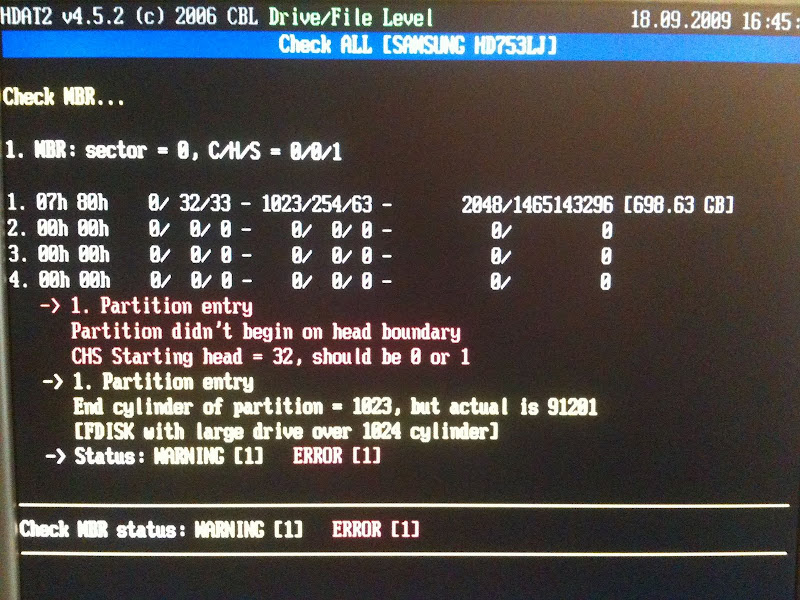 [/img]
I reset the MBR to zero using MBRWork from the Ultimate Boot CD:
[img] 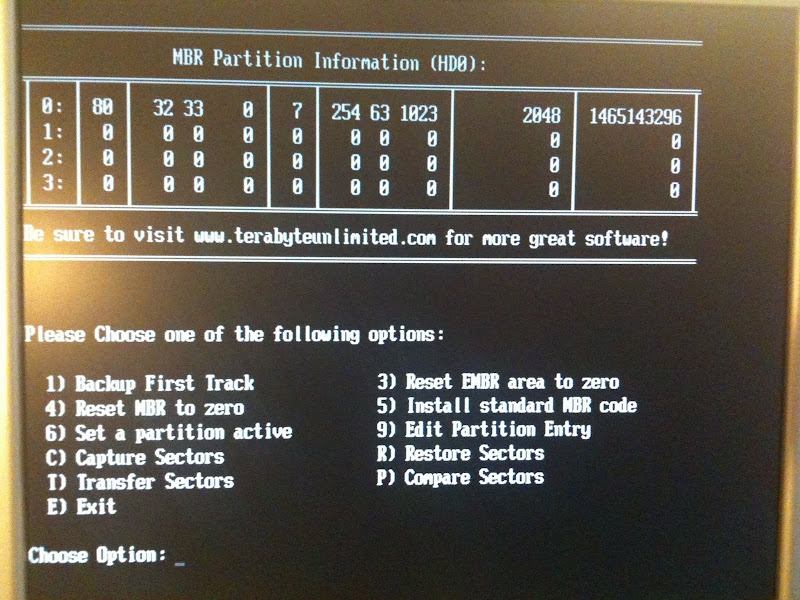 [/img]
(Ignoring the dire warning that the disk will be useless till I re-partition)
I could then boot up the Vista Recovery without it blue screening. Finally! 😀
So I tried the "Startup Repair" option, which whirred for a bit then blue screened.
Looks like it has faithfully restored the dodgy MBR though. 😥 😥 😥
SUCCESS! Sorted it !!!! 😀 😀 😀 😀 😀 😀 😀 😀 😀
[img]  [/img]
I doubt anyone here cares, but on the off chance you ever find yourself in a similar situation then....
• I highly recommend using [url= http://unetbootin.sourceforge.net/ ]UNetbootin to create a bootable USB stick[/url] containing [url= http://www.sysresccd.org/ ]SystemRescueCD, which contains various recovery tools.[/url]
• Then boot from the USB and start the XFS linux gui.
• Then use the excellent [url= http://www.cgsecurity.org/wiki/TestDisk ]TestDisk to recover the partition table and rebuild the boot sector[/url].
• Then [url= http://gparted.sourceforge.net/ ]check out the state of the NTFS partition in GParted[/url] (which in my case reported [code]"Cluster accounting failed at [i]xxx[/i] extra cluster in $Bitmap"[/code] 16 times)
• Then mount the NTFS partition using [url= http://www.ntfs-3g.org/ ]ntfs-3g, which will also attempt to recover the volume[/url].
• Then you can use xfburn to backup files from the mounted NTFS to CD/DVD.
• slaughter one chicken and drink its blood by the light of a full moon.
• And by that point your NTFS disk might be in a good enough state to get the Vista Recovery mode to start up without blue screening, so you can Repair and chkdsk /f as normal.
But I'll never get those two days back! 🙄
Shame it looked like quite nice weather this weekend. 😀