For reasons far too boring to explain, I use 2 laptops (well, 1 laptop, 1 Chromebook) both sat on my desk at home. They are used pretty much simultaneously, but for different things.
What I'd like is a single separate keyboard and mouse that I can use for both, and have a switch to flick when I move between machines.
So I can type on the Chromebook then click a button/switch/whatever and the keyboard disconnects from the Chromebook and connects to the laptop.
Does that make sense? And if so, does such a think exist?
You need a KVM switch, not sure if it will work with the chromebook though
One of these? that's from a quick search, so better options maybe available.
This assumes you don't share a monitor between them too? If you do, a KVM switch is what you want
Does switching one USB receiver (for a wireless keyboard/mouse) between laptops count as a switch?
Firstly, why do you need a chromebook as well as a laptop? Everything on the Chromebook will be done via Chrome and you can get Chrome on your laptop...?
Otherwise, if your keyboard and mouse are wired you can get a device to switch over the USB connections.
Logitech MX keyboard and mouse. Connects to 3 devices - Windows, macOS, Android or iOS in any combination. Supports bluetooth and / or a dongle.
If you don’t need video, just usb devices then I’ve used one of these for a few years, works well: UGREEN USB 3.0 Switch, 2 In 4 Output USB 3.0 Sharing Switcher Box KM Switch Hub for Mouse, Keyboard, Scanner, Printer with 2 Pcs of 1.5M USB 3.0 A to A Cable https://www.amazon.co.uk/dp/B01N6GD9JO/ref=cm_sw_r_cp_api_glt_fabc_JFFBCSBT4DXQ1NFX7NTC?_encoding=UTF8&psc=1
As trailwagger said you need a KVM, a Keyboard, Video and Mouse switch. Do you also use an external monitor and need to share it between both laptops?
Most (ifnot all) chrome books will support an external keyboard and mouse, just plug them in to check.
If you do need to share a monitor you need to pay attention to resolution and refresh rate
Does switching one USB receiver (for a wireless keyboard/mouse) between laptops count as a switch?
That's the current solution, I was hoping for a more streamlined option.
Firstly, why do you need a chromebook as well as a laptop?
The laptop is for work and is heavily locked down, the Chromebook is my personal devise and is used for personal stuff (STW, parkrun admin, social media, etc) hence needing 2 devises.
Seems a KVM switch might be the way forward, thanks all.
I had a similar setup and use this:
https://www.amazon.co.uk/gp/product/B074TZKGVR/ref=ppx_yo_dt_b_asin_title_o00_s00?ie=UTF8&psc=1
It's a tenner. Have the USB dongle/receiver for the wireless keyboard plugged in to it, then each side is wired into one laptop/PC
I used to use that ugreen usb switch thing above which worked fine.
You can also get multi-device keyboards/mice like this https://www.amazon.co.uk/Dell-Multi-Device-Wireless-Keyboard-Mouse/dp/B08BCNQRN5
Though now I have a Dell D6000 usb-c hub with all the monitors and usb stuff plugged in, and just switch the usb-c cable over, like this https://www.ebay.co.uk/itm/265293953776 as I don't switch over very often.
I looked at KVM, but I'd also need a usb-c to display adapter for both devices, and it seemed like too many cables and adapters linked together. easier just switching the monitor outputs over.
There is software (inputDirector) that you can get that allows your mouse / keyboard to move between devices so it acts like a second monitor - although I've not seen it working on a home to work laptop.
I just use remote desktop to access multiple machines including other laptops.
Not keyboard, but my mouse (generic no-name from amazon) can either be USB dongle or bluetooth and changed with the flick of a switch between the two connecting methods...
If you could get a keyboard which is similar then dongle into work laptop and bluetooth sync to Chromebook?
that should work, I'd imagine
Logitech MX keyboard and mouse. Connects to 3 devices – Windows, macOS, Android or iOS in any combination. Supports bluetooth and / or a dongle.
+1. Bit spendy but decent kit. Buttons on keyboard and mouse to switch between devices.
Another vote here for the Logitech set up, typing this now on my own PC, single button press and it's back to the works laptop. Just need to make sure it's connected to the right device before typing...... Mouse is the same, button on the side to cycle through connected devices.
Was reading the thread racking my brains for the software I used to use at my last job (a while ago now) that let me use the same keyboard and mouse across the Mac and PC on my desk.
Thankfully this is STW so of course another user posted it, Synergy (Thanks @TheBrick for saving my poor brain from wasting its energy for the rest of the day scouring my sketchy memory).
Logitech MX keyboard and mouse. Connects to 3 devices – Windows, macOS, Android or iOS in any combination. Supports bluetooth and / or a dongle.
This. I have the mouse, it's brilliant. A button underneath hops between desktop, work laptop and personal laptop. It's seamless. It came with a Nano dongle but I don't even know that is now, the days of BT mice being toilet are long gone.
I originally bought a Logitech Nano mouse alongside my laptop back in 2008. I loved it, it's not skipped a beat in over a decade. I found myself wanting a second mouse as I was using multiple devices, thought "what I really want is the same again but it's surely discontinued." Turns out, the modern MX looked near-identical so it was a no-brainer. It arrived, I was astonished at how similar they actually were. I took them into the kitchen to show my girlfriend, at which point the old one slipped out of my hand, crashed onto the earthenware tiles and never worked properly again. I was the proud owner of two Logitech mice for about seven minutes.
My initial thought was "well, bugger, looks like I'm buying another one then." It was only then that I discovered the device-switch feature on it. I was hugely sceptical but as it turned out it Just Works. Happy days.
Was reading the thread racking my brains for the software I used to use at my last job (a while ago now) that let me use the same keyboard and mouse across the Mac and PC on my desk.
Thankfully this is STW so of course another user posted it, Synergy (Thanks @TheBrick for saving my poor brain from wasting its energy for the rest of the day scouring my sketchy memory).
Microsoft do a free version of this, it's called something like "mouse without borders." It's slightly glitchy but may be worth a punt for the asking price.
I've gone the Logitech route. One work laptop, and one home PC with the objective of having one screen, one wireless keyboard and one wireless mouse to control both. I've also got a simple HDMI splitter which means I can switch between the two machines with the three button presses.
Might try the Microsoft version, guess this is it Cougar?
https://www.microsoft.com/en-gb/download/details.aspx?id=35460
I was in the same position as you except with 3 devices so I got the Logitec keyboard and mouse that you see.
I then decided that I wanted to be able to direct any of the devices to use the stand alone microphone and camera as well as their built in ones and also project to the big screen I had. This allowed me to work on any machine with the single keyboard, mouse, camera and microphone while still being able to use the built in keyboard etc on the others at the same time - think boring Zoom meeting on one laptop you half listen and look at while doing something interesting on the main screen and keyboard don a separate machine.
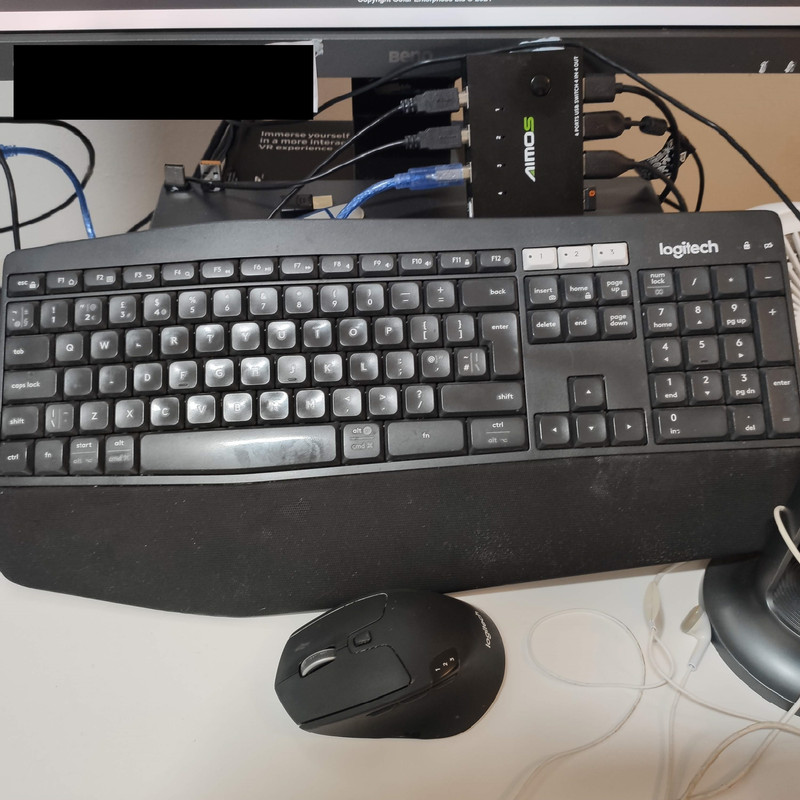
Three machines are plugged into the AMOS box on the left and the screen, keyboard, camera and microphone are plugged in on the right. I only use one of the 3 possible dongles for the keyboard which is plugged into the AMOS box, the others are sat on the below the screen.
It works well for me but if it is just the keyboard and mouse then the Logitec is all you need.
I use a Logitech K780 keyboard and M720 mouse.
Can be connected to 3 computers via bluetooth or dongle (mix and match).
I use mine with a mac, pc and linux machines.
Similar to the MX keyboard and mouse, just a little bit cheaper.
Might try the Microsoft version, guess this is it Cougar?
Looks about right. It's been a while.
Another vote for the Logitech MX keyboard & mouse. Works exactly as you stated, and is also a great keyboard. Great bit of kit.
[i]Another vote for the Logitech MX keyboard [/i]
Just spotted the A and S stickers have worn off the keyboard. I wonder why just those two, the rest seem fine.
FPS gamer?
Just as an aside. I bought one of the below from Amazon last week to switch a wireless Logitech mouse and keyboard, plus a headset, between a work laptop and my personal computer.
Rybozen USB 3.0 Switch Selector,... https://www.amazon.co.uk/dp/B07S5H6T18
Initially it worked fine but have noticed some random stutters with the mouse and keyboard. Also on teams calls people have said my voice sounds odd(er than usual). Tried plugging in a 5v usb charger in case it needed some extra power, but no difference.
So last night I plugged everything directly into my personal computer. The stuttering with mouse/keyboard was still happening. So I unplugged the usb switch completely and the issue went away.
Need to investigate further but it appears that the switch may be rubbish and throwing out a load of EMF interference.
I use Remote Desktop from one laptop to another to achieve the same. If Chromebook has an app I’d give that a go.