Forum menu
Am I right in thinking HD is 1366x768, HD+ is 1600×900, or does it vary by manufacturer? I'm tempted by a [url= http://shop.lenovo.com/SEUILibrary/controller/e/gbweb/LenovoPortal/en_GB/catalog.workflow:expandcategory?issBase=ProductsCategory&issCategory=/Notebooks/ThinkPad%20notebooks/ThinkPad%20Edge/E530 ]Lenovo E530[/url] and I can't find any mention of the actual resolution.
to be classed as HD a monitor/tv must have a minimum of 720 vertical lines. Full HD is considered as 1920 x 1080.
There are now a lot more monitors coming out at 2560 x 1440 these are considered as HD+
That laptop has a res of 1366 x768, which is fairly low compared to todays standards, but it is a budget laptop so is to be expected.
Some of the listed configurations offer HD+ instead of HD, I just wanted to check the difference.
HD, HD Ready, Full HD, HD+ the list goes on and that's before you get into contrast ratios and refresh rates. Basically it's a mine field created by marketing men. As shindiggy states Full HD is 1920 x 1080, also known as 1080p and not to be confused with 1080i.
What really matters is the size of the images you are trying to view. IMO there is not much point having a higher resolution than the input signal. If your graphics card does not support a Full HD output, there is not much point having a Full HD monitor unless you are future proofing yourself.
You're all talking about TVs, not laptop displays.
Am I right in thinking HD is 1366x768, HD+ is 1600×900,
Yes.
There are now a lot more monitors coming out at 2560 x 1440 these are considered as HD+
No, that's WQHD.
there is not much point having a higher resolution than the input signal.
Whilst true, I don't think it's going to be an issue so long as your graphics adapter was made in the last twenty years.
Yes I was talking about HD displays for watching HD video. I'm not sure how a laptop display that is 1366 x 768 can honestly claim to be HD and 1600 x 900 can claim to be HD+ when in reality a full HD image starts at 1920 x 1080. More marketing speak ?
Whilst true, I don't think it's going to be an issue so long as your graphics adapter was made in the last twenty years.
I have a 7 year old, top of the range, for the time, Sony Vaio and that cannot work with even HDV images which are 1440 x 1080i. The then top end graphics adapter is not up to it.
More marketing speak ?
Ostensibly. TV panels and monitors use different naming schemes (for some value of 'scheme').
cannot work with even HDV images
Driving an external panel is a different kettle of eels to running a dedicated monitor. The 2Mb [sic] graphics card in my old 486 could run at 1024x768.
My laptop has a 1080p display. When I play blu-rays on it though, it doens't look as sharp as I would expect.
Any reason why, or is it just because I am really close?
Though as an aside, a (whatver)x768 computer display would still be regarded as HD in TV parlance.
It's not really fair to say "a full HD image [i]starts [/i]at 1920 x 1080", what you're describing there is officially "HD Ready 1080p", the term 'full HD' is, ironically, a marketing term and meaningless. 720p is still HD.
My laptop has a 1080p display. When I play blu-rays on it though, it doens't look as sharp as I would expect.Any reason why, or is it just because I am really close?
Could be.
What's the native resolution? I'm thinking, if it's scaling from 1920x1080 up to 1920x1200 rather than letterboxing (for instance), that would make it look pants.
There will probably be a difference between the laptop screens actual native resolution and also that available via the external HDMI port.
I used to have a similar laptop for work and I am sure the laptop screen supported 1600x1200 with the HDMI port capable of supporting resolutions up to 1920x1080-60hz.
Please note that the external HDMI port will support EDID so should automatically adjust its output resolutio and refresh rate to match the display device it is attached to, not always a good thing!
Native res is 1920x1080.
I thought the Lenova E5xx series had a 15.6"screen with a native Screen resolution: 1366x768, my mistake.
Hm. Dunno then. I'll have a think.
4K Resolution is on the way... 4096×2304 😯
Any reason why, or is it just because I am really close?
Even if they were the same LCD panel, its likely the TV and possible Blu-ray player have lots of image and video processing algorithms in to make the picture look better, especially if its displaying at 100hz.
Some media player programs have this stuff too, like VLC, but you need to fiddle with quite a few options.
Holy sheet.
IMAX computing has arrived.
Now I am talking about cameras rather than monitors but 4k has been here for a while.
5k 5120 x 2700 is here now http://www.red.com/products/epic
[img] 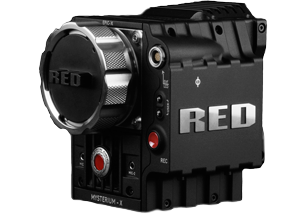 [/img]
And before you get too excited we are talking circa US$50,000 plus lens.
Just got a full HD 15.6" laptop as I was adamant I didn't want a 'HD' 1366x768 screen. Would have settled for a HD+ and yes they all do seem to be 1600x900 but thankfully got a full HD one.
Lenovo do a full hd on the Y580 but it will set you back £999 delivered at the moment. A damn good spec for the money though as it is i7, blueray, hdd + ssd and GT660m graphics.
Medion also do full HD laptops for a lot less or you could try the Dell outlet for an XPS 15z if you are on a budget or older XPS 15 L502x if you wait for one to show up with the excellent full hd screen. But tbh I will not buy another Dell unless they sort their customer services out.
I had a Dell XPS with a 1920 x 1080 screen and a bluray burner for a year before they finally gave me my money back. Customer services were actually very good. It must be the amount of practice they get dealing with poor product.
Technicians normally came to my home address within 24 hours and replaced most of the machine in about 5 visits.
This was a machine that I spec'ed up from their options list rather than an off the shelf model. It became apparent after a lot of phone call to India that the power supply was not up to running everything at once.
Thanks. I've just tried to order one but the Lenovo website payment handling is a but useless. Credit card declined multiple times (definitely not over the limit) and Paypal isn't working either. I might just give up on them and go for a Dell instead.
4K Resolution is on the way... 4096×2304
Easily doable. An iPad 3 is 2048×1536 on a 9.7 inch display.
Just take that same tech and double the size.