UPDATE: CLASSIFIEDS section refreshed, redesigned, searchable: Go take a look
I'm thinking about upgrading my 1080p actioncam to a new gopro. The current laptop *just* copes with 1080p so would likely fall over dealing with 4k.
For those of you using the newer 4k gopro and the like, what laptops are you using to edit the footage?
Do you 'need' a laptop?
Laptops are basically crap for everything except portability. They cost a fortune for a low spec, overheat everything because of space constraints and the batteries always fail. You need to spend well over a grand to get anything decent and it will be almost impossible to fix or upgrade. They do look nice in a coffee shop though...
On the other hand you could build an absolute beast of a tower computer with more than enough power to edit 4k on a hobby basis for around 700 quid plus 200 quid for a monitor. This would be fully upgradable and if something broke you could repair it, Plus it would be fun!
Not good for moving around though - but phones are so powerful these days that coffee shop editing can be done on an S10
Just my 2 cents and what I'm about to do*
*it may cost more than £700
My 5 year old Dell laptop is relatively happy working on 4k video.
(caveat - it was a little overspecced at the time I bought it and I'm running Linux so might arguably have lower overheads?)
depends on budget and the software you are going to use. I personally would't use a laptop for video editing.
Interested in this also. My pc is getting a bit long in the tooth now and really struggles with 4k so looking to upgrade. Watched a few videos on YouTube about doing custom builds on a budget. Never built a pc but it looks fairly straightforward.
Seems like a big expense to make your sick edits a bit sharper. Is it worth it?
Missus started a YouTube channel as a bit of a hobby and her old laptop was really sucking the fun out of it. She got one of these over Christmas and it's really good.
She uses the DaVinci Resolve video editing software and is improving all the time.
Depends what youre doing, there's video editing a few clips together for youtube, which isn't all that more taxing on the PC than just being able to playback the files.
Then there's 56core/112 thread, 512gb RAM, and and graphics cards that cost as much as your car "shall we get the runner to fetch lunch while this renders" video editing.
Missus started a YouTube channel as a bit of a hobby and her old laptop was really sucking the fun out of it. She got one of these over Christmas and it’s really good.
She uses the DaVinci Resolve video editing software and is improving all the time.
Funnily enough i just bought that exact laptop a few weeks ago to replace my 10 year old P.C tower
Very impressed with it so far, my old P.C tower cost more 10 years ago than the laptop cost me a few weeks ago, kept my old monitor and wireless keyboard and mouse and run the laptop through them, saves so much space not having a bulky, noisy tower that just sucks in dust through three fans, plus the laptop has the added bonus of being able to convert into a tablet
Was a P.C tower person for years but the laptop is so much better for my needs today
thisisnotaspoon
Depends what youre doing, there’s video editing a few clips together for youtube, which isn’t all that more taxing on the PC than just being able to playback the files.
Then there’s 56core/112 thread, 512gb RAM, and and graphics cards that cost as much as your car “shall we get the runner to fetch lunch while this renders” video editing.
True. I was reading the OP in terms of the former rather than the latter.
The render thing is key though. As I said my old Dell will chop together a few 4k clips no problem, but the render time and 'effort' for that compared to even 1080p is night and day.
"Seems like a big expense to make your sick edits a bit sharper. Is it worth it?"
That question is precisely why I'm asking my question. I'm not exactly competing with Attenborough in output stakes, but I do fancy the new cameras with the smoothing / less jerky output and perhaps a drone.
But as you point out, if it requires spending +£2k on a computer then I may just use existing camera plus buy a £100 handheld gimbal and have a jolly nice holiday with the change...
"The render thing is key though. As I said my old Dell will chop together a few 4k clips no problem, but the render time and ‘effort’ for that compared to even 1080p is night and day."
May I ask what graphics processor* you laptop has?
* I'm not a computer person but I gather that is the important bit for this stuff.
No idea off the top of my head. My approach is to use the thing until it does start to fall over trying to do what I want it to and then look for a new one...
My computer really struggles to edit video clips which is annoying as I've some good footage from holidays and japes that is sat there in the hard drive.
That laptop looks good if it is capable of editing 4K/1080 with dying.
I read that the Microsoft Surface something or other Was also a worthy candidate and has the advantage of being relatively small.
I recently swapped from a hero 3 to a 7 and my dell xps15 struggles with 4k editing. I think its because it has an integrated graphics card, ssd, 16gb ram and decent processor should be good enough. No option to upgrade the card so am stuck with recording 1080. If you have space I'd go desktop, also means when you buy a go pro 12 8k you can probably get away with some cheap upgrades to your pc rather than a new super expensive laptop.
"7 and my dell xps15 struggles with 4k editing. I think its because it has an integrated graphics card, ssd, 16gb ram and decent processor should be good enough. No option to upgrade the card so am stuck with recording 1080. If you have space I’d go desktop, also means when you buy a go pro 12 8k you can probably get away with some cheap upgrades to your pc rather than a new super expensive laptop."
That's useful to know Woots. It looks like your laptop has a better graphics card than mine too, so mine definitely won't cope. Cheers
I'm thinking of getting one - anyone know if my Surface Pro 7 will cope? i5 8gb ram 128gb sad, Intel iris plus graphics
https://hothardware.com/reviews/microsoft-surface-pro-x-and-surface-pro-7-review?page=4
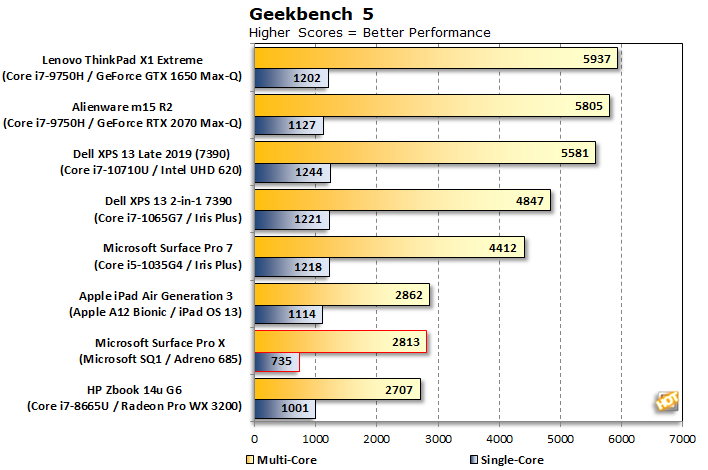
Edit: Also https://www.laptopmag.com/benchmarks/cpu-performance
Video editing usually requires a good processor so you'd definitely want something like an i7.
I edit 4k on my pc but I also use it for games and it does 4k fine, i7 8700k with an Nvidia 1080ti and 16gb DDR4 ram.
If you buy a laptop with USB-C you can buy external graphics processors these days.
Can you use a PlayStation to edit video?
Given they already have a powerful graphic card and lots of processing power.... 🤔
Video editing usually requires a good processor so you’d definitely want something like an i7.
Its almost all done on the graphics card, and its the graphics processor that does the grunt work not the graphics ram so generally newer cards with less ram outperform older cards with lots of ram, i.e. entry level new cards are generally better than say 980ti/1080ti for the same budget.
scruff9252
May I ask what graphics processor* you laptop has?
* I’m not a computer person but I gather that is the important bit for this stuff.
Just checked.
i7 4500 CPU
16Gb RAM
The graphics card is an AMD Radeon HD8870m. Think it has 2Gb of onboard RAM.
I'd guess (since it's a 2013 card) that the Radeon is the bottleneck in my system if anywhere. Like I said the laptop was pretty well specced CPU and RAM wise when I bought it 5 years ago.
At the moment it does what I need it to 4k wise, but admittedly I'm not editing long projects with loads of clips, etc. I do see a marked difference editing and rendering in Windows 10 versus Ubuntu. In Windows editing 4k is not that smooth an experience all the time but in Linux it's WAY better even using the same editor (Shotcut).
Does anyone just us a tablet to edit video?
Does anyone just us a tablet to edit video?
Yes, but mainly for short videos intended for Instagram.I use a programme called LumaFusion to piece together footage from a variety of sources including a DJI Osmo Pocket and Mavic Pro2. Does the job for short footage, but file handling is a bit faffy for longer edits I think.
We edit day in and day out. H264 in 4K is still pretty tricky edit smoothly even on fairly powerful work stations.
I agree laptops are always a bit underwhelming for editing. You lack screen space for asking anything serious. That said they are often a necessity for editing in lots of environments.
Don't forget you can always transcode your footage or use proxies to edit, which many of us do in the production world.
I'm currently editing using the odd bit of GoPro 7/8 h.264/h.265 and do okay most of the time by using a combination of transcoding and proxies where necessary.
With h.264 it's all about the processor speed as it decompressed complex frames from the footage - so you need the most powerful chip you can buy.
Its almost all done on the graphics card, and its the graphics processor that does the grunt work not the graphics ram so generally newer cards with less ram outperform older cards with lots of ram, i.e. entry level new cards are generally better than say 980ti/1080ti for the same budget.
H.264/h.265 editing is almost always restricted by the processor.
The graphics cards tend to handle effects / layering etc but ultimately the CPU is the bottleneck.
There are options in premiere pro (intel h.264 acceleration) where you can shift the burden to the gfx card but it doesn't work particularly well.
We have Ryzen 9 / 1080ti 64Gb work stations and it's mostly realtime with the odd hiccup.
We tend to edit 10bit 200mbps h.264 though.
I've just upgraded my home machine to make it a bit more contemporary and able to handle chunky editing, plus 3D cad stuff when I'm working from home.
2010 Mac Pro 5.1, 2 x 6 core processors, 128 GB ram, 1TB SSD, 3B HD, 8GB RX580 graphics card, 2 x 24" monitors
It may use a bit more power than a typical laptop, but it seems pretty capable, and all for not much than that HP Envy laptop/tablet.
H.264/h.265 editing is almost always restricted by the processor.
This is the bit where I always get a bit confused as we used H.264 as the proxy file to allow us to playback files on the desktop PC's. i.e. everything was recorded to transport drives + backups, + external backups, then each of those drives would have the main file (in whatever format the edit wanted it) usually at 50Mbs longGOP and the h.264 at say 1000k which was really just a backup so we could scan through it looking for stuff and make sure everything was Ok before sending off the transport drives.
More than one way to skin a cat and all that.
It also depends on the software to a very large extent. It should allow you to create a low bitrate proxy of the original (because you're only really seeing it in a thumbnail), which you use to do the editing (refered to as the offline edit). Then once you finish editing it uses that to create your 1080/4k ready for the online edit (where you tweak it, add graphics etc). The last stage you can't avoid needing a bigger PC (or patience). But that's where my experience runs out, I only had to deal with the technical side of things, I never got invited to the Bafta party 😂
Seriously unless you are publishing the videos somewhere with a revenue anticipated don't bother investing, everyone will watch it on their phone and not appreciate the quality and effort put in.
Do a phone edit no more than 1 min long and have done with it.
So, sort of on topic - Hero 7 or Hero 8, for making short 'sick edits' of longer rides, paddle boarding, skiing etc?
Like the idea of changing battery etc without 'uncasing' and smaller is better (right?). £70 to be saved.
They are offering £100 trade on the 8 if you have an old junk camera lying arround.
I used to say stick with a 4 as nothing changed significantly, but the stabilisation makes the newer ones worthwhile. And the 8 does look to do that even better.
Yeah, saw the trade in. The camera you trade has to be at least $99 and at their discretion though, so by the time I've posted that off etc, it may be too long. It would be good to have it to play with, skiing in a couple of weeks.
I used these online chat to confirm they'd accept my old compact. They said yes but have me a discount voucher that knocked £95 off anyways. Worth a go..
I specifically bought the cheapest digital camera I could find on eBay for this exact purpose, cost me about £4 including postage iirc. Worked fine for me, no quibbles 🙂
I have the 8 and it is a very nice bit of gear.
I really like the new battery door (metal, easy to open/close) though it does come off easily and the frameless design makes it sooo much easier to keep switching mounts - mine has no wobble but some seem to.
But having no removeble lens is a bit of a worry as one scratch/crack and the whole unit is toast
The portrait/landscape is more useful than I'd expected as are the presets. the whole product feels a bit more finished than previous generations.
I reckon its worth the extra except if the lens issue is the deal breaker.
But the files are just massive in 4k60 and too big to edit properly - I mainly use mine on 1080!
So, sort of on topic – Hero 7 or Hero 8, for making short ‘sick edits’ of longer rides, paddle boarding, skiing etc?
Like the idea of changing battery etc without ‘uncasing’ and smaller is better (right?). £70 to be saved.
I own both.
If I'd known before I would've stuck with the 7 and not bought the 8.
My quick summary for the 8.
+ Better interface, more modes with stabilisation, no cage, 100mbps
- New stabilisation modes over-stabilise in "boost", no-cage system has been replaced by a poor quality fitting system (has play in it.), fixed lens cover as opposed to replaceable is a step back. Doesn't seem any better PQ. Voice activation is not as good.
I find having multiple HD's for raw footage/scratch/final cut helps with encoding time and doing things quickly, especially if you have multiple videos like Picture in Picture. I haven't kept up with times, still on 1080/GoPro Hero 3 so not sure if SSD's have made this irrelevant for 4k.
That question is precisely why I’m asking my question. I’m not exactly competing with Attenborough in output stakes, but I do fancy the new cameras with the smoothing / less jerky output and perhaps a drone.
But as you point out, if it requires spending +£2k on a computer then I may just use existing camera plus buy a £100 handheld gimbal and have a jolly nice holiday with the change…
You don't need to use it as 4k.... and in any case if you want to keep video you'll need endless storage as well.
Recommended spec for GoPro studio is quite modest, even for 4k editing.
Desktop would be better, most LT CPUs are still dual core, but even the most basic 8th Gen onwards i3 is quad core now, 6-core i5 would be better.
1GB GPU with supporting OpenGL 3.2 is pretty much anything these days.
4GB of RAM is modest.
I reckon its worth the extra except if the lens issue is the deal breaker.
You can still get cases that take ND, or polarizing filters. Which his probably a sensible investment. The other (expensive) option might be to wait and see if Backbone release anything, then you get access to M12 and C-mount lenses. Less useful for mountain biking as it's inherently bulky, but great for filming off the bike.
100mbps
is that long-GoP or iframe?
Yes, but mainly for short videos intended for Instagram.I use a programme called LumaFusion to piece together footage from a variety of sources including a DJI Osmo Pocket and Mavic Pro2. Does the job for short footage, but file handling is a bit faffy for longer edits I think.
Yeah - I have used Lumafusion for some little video edits while using my iPad on the tube, but it would be a bit painful for longer projects.
is that long-GoP or iframe?
It's always long GoP on these sorts of things unfortunately.
Intra has creeped on to some devices (GH5) but the cards aren't cheap.
SSD’s have made this irrelevant for 4k
SSDs are nice to have but you're hardly shifting lots of data with this sort of edit. It's all on the CPU.
4K mode is the best on GOPRO as you get the most detail to play with.
It's all about starting with more.
It’s always long GoP on these sorts of things unfortunately.
Intra has creeped on to some devices (GH5) but the cards aren’t cheap.
Seems an odd option then, who specifies 100mbs long-gop? Even the BBC will accept 50 for prime time. Or was that only 50 in .mxf files? There was something to do with Sony's hardware encoding chips that meant we still used nanoflashes as they were the only standalone recorder that would do it.
TBH the only time I ever set things up in iframe was when testing cards to destruction. 280mbs iframe soon finds the ones that are about to fail before you start filming 😂

