
Hi,
I've written a document on my own laptop which has word 2013 on it. I've added sections that expand and collapse so I can reduce the size of the document.
I've emailed it to work but that has word 2010 and the expand / collapse sections have disappeared as its not compatible.
Is there anyway I can recreate this in word 2010? I cannot find anything in Google. One article mentions the "more tab" on the ribbon but my work hasn't got that option.
I can highlight a section and hide it but I'd like something more user friendly.
Is it possible to write a macro and add a button?
I'm kind of pushing my limits in word here so any help is much appreciated.
Thanks
In true STW-style this is not what you asked for but...
If you have used proper heading styles then the Navigation Pane makes it pretty easy to jump around a document without needing to hide and show sections:
[img] 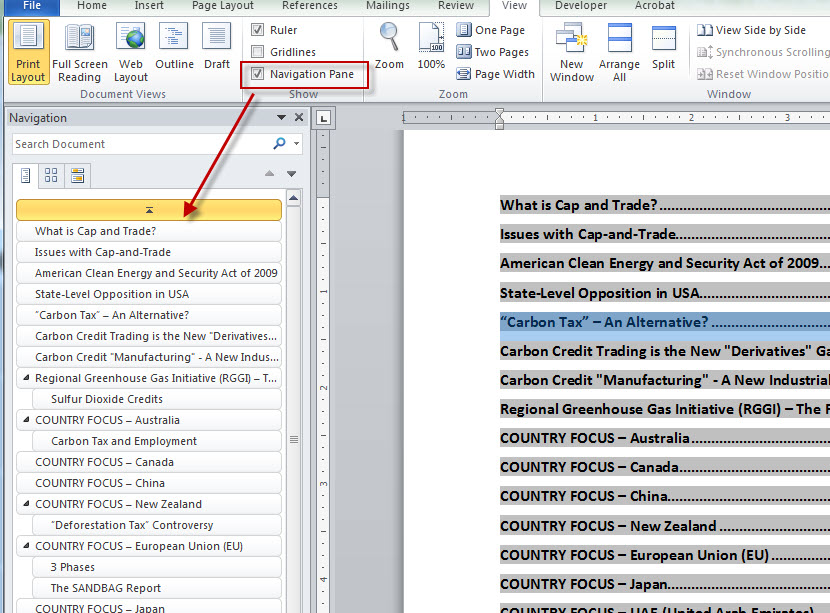 [/img]
I only have Word 2013 to refer to, but I thought "Outline" mode did what you want since as far back as Word 2.0. It should be on the View section of the ribbon.
Is the 2013 version saved as .docx? Try saving as .doc instead.