Forum menu
Terramaster F2
I am all of a sudden getting a "Not secure" message at the front of the web address bar in Chrome and E. Pretty sure I've not altered any settings (running Bitdefender - disabled antivirus at present just in case it was that) Can see drive on network but can't connect to TNAS software.
I'm not used to this stuff, so be gentle please!
Ta Guys n Gals 🙂
You should be able to tell the browser to ignore the warning, and connect anyway?
It doesn't give me the option to bypass?⁷
hmm not my specialist subject, but.. you can see the drive on the network, can you access it?
And you not seeing any option like "advanced":
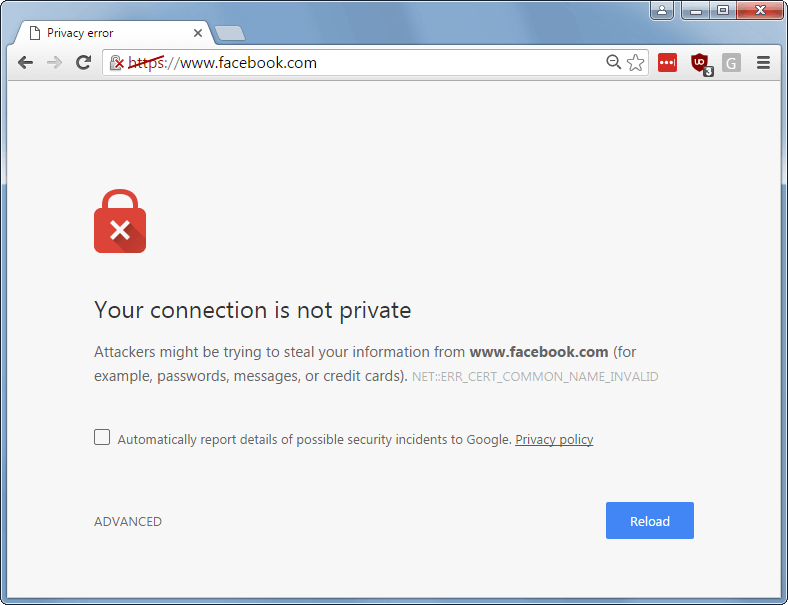
Can see it, can't access it, no option like your screen shot.
Just says not secure in red next to web address click on that and no options to ignore.
reboot (the NAS) time then.. unless anyone has any other idea's?
How do you usually connect to it? Do you connect by typing the network address into a browser? Is that a local address (on your home network (E.g. 192.168.1.100 or similar) or a WAN address (E.g. something like www.WD.com/NAS_access/j8QQ2nn )
Sometimes you can force your browser house HTTPS by typing https:// instead of http://
I would have my suspicions that the drive firmware has gone a bit wonky and is just throwing a weird error message.
Screenshot please.
Is the clock on your PC set correctly? It might think the certificates have expired if the time is wrong.
I type the address in the browser 192.168.....
Clock is set correctly.
Thanks everyone.
Will try to upload a screenshot but not got host site yet..
Thanks cougar
I'm not doing anything differently from when it was working.
Imgur. Many others.
See up there ^^ there's an error message, CERT_COMMON_NAME_INVALID? What's yours say?
[url= https://i.ibb.co/kg3zLqJ/15970895386991986723609395378404.jp g" target="_blank">https://i.ibb.co/kg3zLqJ/15970895386991986723609395378404.jp g"/> [/img][/url]
Can you ping that IP address?
Are you sure that is the correct IP? Is it set manually, or using DHCP? If it is DHCP, your router could have assigned a different IP.
Have you downloaded the Tnas app? It will check the ip address, just in case your router has assigned a different one.
If you've got the right ip address, and a reboot didn't help, that's a bigger problem
Not that I have needed it, but there's a program for my QNAP called QFINDER Pro that runs on the laptop & finds any QNAP NAS drives on the network.
Is there something similar for your NAS?
Been away, will try the above suggestions later today, thanks👍
This is a bit late - but if you are getting certificate errors in Chrome, you need to go into the 'Advanced' option and click on 'continue to this site' (or similar wording). If that option isn't shown, download Firefox as its a bit more relaxed about enforcing the secure connection standards.
Chrome (and most other browsers) has been updated to apply the certificate rules more stringently, so its likely that the certificate used by your NAS (or potentially the total lack of certificate) on your NAS is falling foul of the rules. If this device is only exposed on your internal network, this isn't a massive concern - but if you expose it to the Internet you may want to take this as a warning that its no longer considered secure.
Been away, will try the above suggestions later today, thanks👍
Ping on 192.168.0.17 4 packets sent/received no loss.
Tried Firefox got this:
[url= https://i.ibb.co/xCsL3D4/15971630194536991580968452546056.jp g" target="_blank">https://i.ibb.co/xCsL3D4/15971630194536991580968452546056.jp g"/> [/img][/url]
Don't know how to add permissions or get any further!
Ta
Seem to be stuck here,no help from Terramaster "your product is no longer supported"
So, if I mount the HD's from the NAS into my external HD case I see raid folders, is there any software I can put onto my PC to enable me to read these and transfer them to another HD in a readable format.
I have lots of music and Photo's that I don't want to loose.
try typing http://192.168.0.17 into the address bar, so it doesn't try to use https
You won't lose anything - have you got an app on your phone you can try (music/photo/management)?
See that Chrome screenshot? Can you scroll down and show us the rest of it?
What does the "Learn more" give you? Or the [>] next to 'connection not secure' in Firefox?
I have lots of music and Photo’s that I don’t want to loose.
Where are your backups?
Using Firefox, on the login prompt for TCloud try admin as the username and admin as the password (these are the default values for a Terramaster NAS based on a quick google).
Thanks Cougar, I appreciate your help and as I said I'm a complete novice with PC's I have a back up of both my laptop and Pc but i think there are some files I don't have that are on my NAS and therefore would like to access them.
Also - directly mounting the disks to your PC doesn't look like the answer - see https://www.terra-master.com/de/faq/category/detail/?id=3372 - it looks like you'd need another terramaster NAS enclosure.
i think there are some files I don’t have that are on my NAS and therefore would like to access them.
don't worry about all that, nothing will happen to your files, you just need to access the NAS.
Have you tried forcing a http connection?
By forcing do mean typing HTTP or HTTPS before the IP?
You'll need to remove the :8181 bit also.
Have you tried the TNAS desktop application to find your NAS on the network & check that the IP address is correct?
If you can find it on there, you might be able to map the drives directly & access them via windows explorer on your laptop??
The terra master app for finding your NAS should be available at
Have the TNAS PC app on my PC - it can't see the NAS.
I used to be able to map the drives but no longer.
This is what I xan see on file explorer
[url= https://i.ibb.co/dtrs4dV/15972370233557335980541728079371.jp g" target="_blank">https://i.ibb.co/dtrs4dV/15972370233557335980541728079371.jp g"/> [/img][/url]
what happens when you click on the device web page in device manager, i.e http:192.168.0.17:49152 ? It looks like you were trying to connect on :8181 earlier on?
There is a FAQ on terramsters web site that gives some guidance on what to do if the local client can't find the device - https://www.terra-master.com/de/faq/category/detail/?id=3300 - so probably worth checking that.
Have you recently changed updated your anti-virus or local firewall settings? Can you try temporarily disabling these to see if they are blocking access?
what happens when you click on the device web page in device manager, i.e http:192.168.0.17:49152 ? It looks like you were trying to connect on :8181 earlier on?
Looks like 49152 is a UDP port so won't be accessible via web browser. Usually :8080 is web/http so I'd probably remove the :8181 and just type 'http://192.168.0.17' into Firefox.
If you're on Windows 10 or Mac you could try SSH to see if you can access it that way. If you can access it (and the files) via SSH then you can retrieve them. However, if what I've just said sounds foreign it'll probably be hard for you to accomplish that. The first step would be to open Windows Powershell or a Mac terminal and type 'SSH root@192.168.0.17'
This also sounds similar, with some suggestions: https://www.reddit.com/r/TerraMaster/comments/gfsc10/terra_master_f2210_not_found/
No idea what it means, but I found this on a reddit post:
Nix-geek
2 points
·
1 month ago
·
edited 1 month ago
sorry this happened to you, too. I lost 5.7 TB of data in my Terramaster.First, take the drives out, and put them into a machine that can boot a live USB disk. Make a Linux USB live of some kind. I used Fedora 32 server. boot the live USB and try to mount the array that way. If you can, pull the data off it. If you cannot, try to use photorec (testdisk) to pull data out of the array.
level 2
pastech
3 points
·
1 month ago
Working...!!!Thanks for the advice. I tried with Ubuntu ('cause that's what most recommend), but it was such a hassle. So then I tried Manjaro, and it's working... busy copying data to another external HDD right now...
Thanks...
from someone who was having issues accessing a terramaster NAS.
It sounds like Manjaro might help you, whatever that is.
Manjaro is another Linux I think.
This method worked for rescuing data from my synology when the motherboard died (which could be your problem). Terramaster seem to suggest it won't but it is free to try.
Link below will help you -
https://ubuntu.com/tutorials/try-ubuntu-before-you-install#1-getting-started
Make a bootable USB, boot into Linux and see if it can read your NAS drives through your external HD case (Linux can read raid arrays). If it can, you will be able to copy them to any other drive on your pc.
If this doesn't work, you probably need to get hold of another terra master NAS
Oh, you might have to go into bios to get your pc to boot off the USB instead of the usual hdd.