Last time I bought a desktop computer it was a dell and was big enough to cause some damage if you accidentally knocked it.
Some good reasons for considering a Mac mini, it’s really small footprint, silent, fast and for an Apple thing, relatively good value.
only negative is I’ve only bought laptops for a long time now, as they’re portable and therefore more versatile. This wouldn’t be, I’ve seen some seriously good deals on the MacBook Air m4, but I keep coming back to the little mini. I don’t at this time need a portable mac, but you never know. Also it irks that even now there’s no touch screen on a mac.
I’m all over windows 11, before anyone mentions windows.
It's only the mobility thing stopping me, although I do already have an M3 Air. The Mini base models are a steal. In your shoes though i'd probably wait for the M5 Air then either get that, or get one of the inevitable deals on M4 Airs.
FWIW as for laptop touchscreens, I've had my latest work laptop about six months and only accidentally found out it has a touchscreen last week.
It's only the mobility thing stopping me, although I do already have an M3 Air. The Mini base models are a steal. In your shoes though i'd probably wait for the M5 Air then either get that, or get one of the inevitable deals on M4 Airs.
FWIW as for laptop touchscreens, I've had my latest work laptop about six months and only accidentally found out it has a touchscreen last week.
Used my work laptop touchscreen for the first time last week, it was usable, but not really that great. Windows touchscreen functionality isn’t as well implemented as in iOS, one day Apple will merge the Mac OS and iOS touch. One day.
I've read up on m5 vs m4 and for what I need it for the m4 base model will be more than enough. Though more spec is always good, just apples pricing for “more” is hard to swallow.
I’ve considered a MacMini on occasion. I’ve not followed through. I always end up going for a MacBook Pro. I don’t often travel with it but its portability and having its screen and my Studio Display makes for some handy 2-screen use.
If price isn’t a problem then put aside that Mini itch and grab a MacBook of whatever flavor seems ideal for you. My SO got a MacBook Air M3 earlier this year to replace an i5 MBP 13”. It’s so good I am almost tempted to get an Air when my M1Pro gets too old. The Air is slim, light, and probably fast enough.
Need a big monitor - buy a Mac Mini.
Need portability - buy a MacBook Air. No need to wait for M5 they all wizz along nicely.
Touchscreen - personally never seen the need for it on a 'normal' computer (fine for tablet or phone).
Sorry, not going to talk you out of it. If you main requirement is desktop-y stuff and you don't need portability, it's a fine choice.
I use an Intel NUC mini-PC, which is the Windows equivalent of a Mac Mini. The ultra small form factor is great, but the downside is limited cooling - it's basically a laptop chip. If you want a touch screen, you can do that with a NUC running Windows. Otherwise, I'd look at what you want to use it for and decide if Windows or Mac is best for that.
larger screen at a decent height, proper keyboard.
If you're only going to work at a desk at home why would you buy a laptop?
Don't buy it otherwise you're an Apple W⚓.
I’ve seen some seriously good deals on the MacBook Air m4
Are there any deals on the M4? There are some dodgy grey imports but that's it.
only negative is I’ve only bought laptops for a long time now, as they’re portable and therefore more versatile.
Why do you need a second computer, wouldn't a docking station & stand (to allow you to use the laptop screen as an effective 2nd screen), be much cheaper & take up no space compared to a base unit?
I love my M2 mac mini. And I think the base model of the M4 mini is about as close to a bargain as you're going to get from Apple.
You just need to decide whether you want a laptop or not! Personally I use my mini for work, and my 2015 Macbook for sofa stuff. It has been retired from serious duties now but it's still fine for browsing, youtube, spreadsheets, email etc.
Where are all the amazing deals on Mac Mini's?
I'm actually on the verge of buying something. As long as I can run it with 2 regular off brand monitors. I'm not paying Apple prices for a screen.
I have the M4 Mini, bought rather than upgrade my laptop which I was using with my big screen. It's ridiculously compact and really overkill for what I use it for. No regrets here - I'd buy the same again.
it's £529 for the base model at Amazon. I run my M2 mini with one huge Iyama monitor (it can handle two), but you can run up to 3 screens on the M4 versions.
Im in a similar position and thinking mini for at home when I want to do stuff and an iPad for portable stuff/sat on the sofa. If Im doing anything that needs to use a keyboard then I much prefer having a proper full size keyboard and sitting at a desk to do it
Im in a similar position and thinking mini for at home when I want to do stuff and an iPad for portable stuff/sat on the sofa.
Aaah the old...
• Tablet for time wasting stuff.
• Laptop used on the sofa for more important stuff - possibly a bit of shopping.
• And for really important stuff the laptop has to be used at the dining table!
Im in a similar position and thinking mini for at home when I want to do stuff and an iPad for portable stuff/sat on the sofa.
Pretty much although as I wfh the dining table has been upgraded to a home office with decent monitors and perferals.
Aaah the old...
• Tablet for time wasting stuff.
• Laptop used on the sofa for more important stuff - possibly a bit of shopping.
• And for really important stuff the laptop has to be used at the dining table!
I’ve seen some seriously good deals on the MacBook Air m4
Are there any deals on the M4? There are some dodgy grey imports but that's it.
i suspect that’s what they all are, reviews state US keyboard and converter plug. Maybe the great Amazon would be different idk.
it's £529 for the base model at Amazon. I run my M2 mini with one huge Iyama monitor (it can handle two), but you can run up to 3 screens on the M4 versions.
exactly, I know it’s £500 but it’s pretty quick apparently and Mac OS for 500 quid and it’s roughly the size of a hockey puck.
I have the M4 Mini, bought rather than upgrade my laptop which I was using with my big screen. It's ridiculously compact and really overkill for what I use it for. No regrets here - I'd buy the same again.
fantastic and good to hear.
I love my M2 mac mini. And I think the base model of the M4 mini is about as close to a bargain as you're going to get from Apple.
You just need to decide whether you want a laptop or not! Personally I use my mini for work, and my 2015 Macbook for sofa stuff. It has been retired from serious duties now but it's still fine for browsing, youtube, spreadsheets, email etc.
agreed the base m4 model is as close to an Apple bargain as I’ve ever seen.
I have a few windows laptops here if I really need one. For mobile stuff I find I’m using my iPad mostly.
We’re all iOS here, which is why I got to considering a move back to Macs.
I have 2, an old one that's used as a media center connected to a TV screen in the living room and it's replacement that my wife uses for her WFH job. She wanted a mac but didn't need a laptop so it fit the bill, at the time there were deals that made it pretty comparable to a small form factor PC in price, so a bargain (for an Apple product). I have no regrets, they both do exactly what we want from them.
Where are all the amazing deals on Mac Mini's?
I'm actually on the verge of buying something. As long as I can run it with 2 regular off brand monitors. I'm not paying Apple prices for a screen.
depends on your definition of amazing I guess
john Lewis 529
here for 499 (pretty sure I got my AirPods from here so should be ok) https://a1techdeals.com/apple-mac-mini-m4-desktop-pc-2024-model-16gb-256gb-ssd-silver?gad_source=1&gad_campaignid=20745007396&gbraid=0AAAAApMrWOes7lfNhEKTvE1gMioAVXS8E&gclid=CjwKCAiAuIDJBhBoEiwAxhgyFnDtHxag83Qaib1-nfsgai-27vyC9OvT2taXEUqmooKX6u2ZkzMhLRoC9lAQAvD_BwE
theres others at less than 500, but caution and credit card required
I bought a Mac mini 3 months ago I went and bought a MacBook Pro about 3 weeks back the Mac mini is for sale I have no use for it t never came out of the box
What do you want to do with it, Apple are planing to launch a budget MacBook for about £600 it has a phone processor in it but equivalent or slightly better than M1 but probably with 16gb of memory. I'm typing this on an M1 air and I edit 4k video and use Logic Pro on it and it works fine mostly. I sometimes run of RAM when I'm using for work as I have lots of apps open at once but the 16gb should solve that, there are also some deals M2 and M3 airs around at the moment.
What do you want to do with it, Apple are planing to launch a budget MacBook for about £600 it has a phone processor in it but equivalent or slightly better than M1 but probably with 16gb of memory. I'm typing this on an M1 air and I edit 4k video and use Logic Pro on it and it works fine mostly. I sometimes run of RAM when I'm using for work as I have lots of apps open at once but the 16gb should solve that, there are also some deals M2 and M3 airs around at the moment.
didnt know that. So a phone or ipad with a much bigger screen and keyboard ?
does the m1 air have 8 or 16 gb ram, or unified memory as it’s now referred to. If its 8 the m4 mini is all i need.
i plan on using it for all sorts of stuff, surfing, pics, vid editing, some coding projects and i have to get back into exploring some nlp work after not touching it for a few years. But Obviously mainly surfing stw.
So a phone or ipad with a much bigger screen and keyboard ?
No. A MacBook Air with a (very good) processor that has previously only been used in a phone. But it is only a rumour, there's zero guarantee it will actually happen. My pet hate is people reporting what they have read on Mac Rumours as facts that people should base buying decisions on. Buy what you need, when you need it.
There are plenty of reputable sources claiming a “budget” MacBook is on the way early next year. It will be interesting to see what performance it offers as it’s still going to be midrange window pc price. £600 is being touted as the target price
I considered purchasing a Mac mini for photo and video editing.
by the time you spec it up to download 256gb cards from the GoPro, you’re probably best off with a MacBook Air or pro.
i think that Apples pricing structure encourages us to buy 2k MacBook Pros!
On a laptop, I can sort of understand needing to pay Apple prices for storage. But on a desktop? Surely just use external storage?
I have also been tempted by a Mini for a while but I've always ended up concluding that an Air + one-cable into monitor with attached keyboard and mouse is the optimal setup.
concluding that an Air + one-cable into monitor with attached keyboard and mouse is the optimal setup.
Probably true IF the Air has enough horsepower and ports for your needs.
I’ve had a mini for nearly a year and it hasn’t skipped a beat. It flies along and opens Lightroom and Photoshop almost instantly. I think I’ve heard the fan kick in twice.
The Apple pricing for additional storage is extortion. I just use a 4tb external SSD.
I bought a bog standard M2 mini back in 2023 as a cheap way to check to see if Mac OS would work for me as a WFH device. Loved it sufficiently that I ended up buying a Mac book air for days in the office.
home setup is m2 mounted on a vesa mount on th back of a Samsung ultra wide monitor, Mac keyboard with number pad and a Magic Mouse. Sound is via a Fosi audio amp to a pair of mission speakers. After years of corporate issue dell laptops on docking stations, it’s been a revelation working in this. Silent, never runs out of power and sips electricity. Runs infinite tabs of office type stuff, fusion and photo work no problem and hosts home assistant and plex 24/7 too.
Wouldnt consider myself part of the apple cult but ive had minis since the first intel ones, theyre just amazing. The locked garden environment is a slight downer but the fact evrything just works outweighs it.
Mac keyboard with number pad and a Magic Mouse
now those are interesting choices. I've been a longtime Mac user but have never liked the laptop style keyboards (have a mechanical keyboard without numbered for better ergo) and found the magic mouse a completely unusable RSI nightmare - gave me pain in my hand within hours. Magic Trackpad on the other hand is a lovely thing (I have both that and a Logitech mx master on the desk, which is better for some tasks)
I love the Magic Mouse for working in Logic Pro, where you do a lot of scrolling left to right.
Unfortunately - here's something a bit shit about the modern mac mini's actually - the Bluetooth is so woeful that ny magic mouse doesn't work on my mini. Should probably get a USB Bluetooth receiver, but i just use a normal mouse now
The locked garden environment is a slight downer but the fact evrything just works outweighs it.
What ‘locked garden’ on a Mac computer would that be, then? Completely different architecture to Apple mobile devices, I can’t think of any professional grade software that won’t work on a Mac.
It’s for that reason that professionals in the print and graphic arts industry, as well as music and photography use Macs, while for office work PC’s running MS ‘ware predominate.
Speaking as someone who started working on Macs in print and prepress with Photoshop 3 and load of other software packages around twenty five years ago, there was very little I couldn’t run on my machine even then; iPhones and iPads are designed for a completely different market, where users aren’t going to want the risk of malware being loaded onto their devices. There was an incredibly irritating Worm virus that spread around through infected photoshop files; we would ‘disinfect’ files from one agency, send them back, only to receive modified versions with the virus back in them!
It’s for that reason that iOS devices were specifically designed to operate within a ‘walled garden’!
I can’t think of any professional grade software that won’t work on a Mac.
https://remarksoftware.com/products/office-omr/features/
https://www.winsteps.com/facets.htm
Give a Mac mini a go, I can see a few scenarios and you don't really lose in any of them. There's a learning curve to moving to Mac OS if you've only used Windows, but it isn't that steep for the average user.
possible scenarios
- You get the Mac mini, you love it ... Result!
- You get the Mac mini, you hate it & sell it for a small loss due to the heathy second hand values
- You realise you should have got a MacBook as you need some portability, either sell the Mac mini or keep it and enjoy the continuity features you get when moving between two apple devices linked to the same iCloud account.
Also Amazon (and others?) have the base M4 mini at £499 for Black Friday
I can’t think of any professional grade software that won’t work on a Mac.
https://remarksoftware.com/products/office-omr/features/
https://www.winsteps.com/facets.htm
Any 3d cad engineering software will not work on a m series mac unless you go down the parallels route ( others are available UTM Fusion et al) but then it’s so hobbled it’s unusable for professionals
If this is not your use case then fine but if it is expect months of trawling forums littered with students trying to get illegal copies of software working on a platform they were never never designed for
Windows 11 for arm does run ok however if you need that one piece of software there isn’t a Mac equivalent for
I find MacOS awkward to recommend because it has some huge productively flaws* that are pointed out year-after-year and never addressed by Apple. Microsoft does at least make changes in response to criticism.
* eg: giving focus to a window then requires a second click inside it; apps randomly start opening in the background when launched from the dock; maximised does not mean maximised, it means useless; Finder windows open to a different size every time; the sound is unbalanced left/right on the Air; the WLAN sucks (my ancient X1 Carbon with a WiFi 5 card is more than 4x as fast thanks to the ridiculous implementation by Apple); "use your iphone to set up this laptop" never works; the supplied storage is pitiful; the supplied charger will allow the battery to drain during high workloads; the pointless liquid glass thing makes it look like a primary school art project; and if you thought OneDrive in Windows is annoying it's nothing compared to iCloud.
** apart from that though it's fine.
I find MacOS awkward to recommend because it has some huge productively flaws*
That's funny because I've been using a Mac for over 30 years and never noticed being inconvenienced by these "huge flaws".
I find MacOS awkward to recommend because it has some huge productively flaws* that are pointed out year-after-year and never addressed by Apple. Microsoft does at least make changes in response to criticism.
I do find this sort of vitriolic attack a bit odd. These hardly seem 'huge productivity flaws' (I mean, compared to the number of times I've booted a machine into windows over the years wanting to do some work and had some massively slow minor OS update kill it for 15 minutes). Most of it I've never noticed and certainly doesn't seem true of the version I'm running now.
* eg: giving focus to a window then requires a second click inside it;
I've been clicking between safari, WhatsApp and notes that I've got open at the moment and whether I click with the mouse or cmd-tab the cursor is in the active window and I can start typing without another click.
- apps randomly start opening in the background when launched from the dock;
never noticed this. nothing I open now seems to do it.
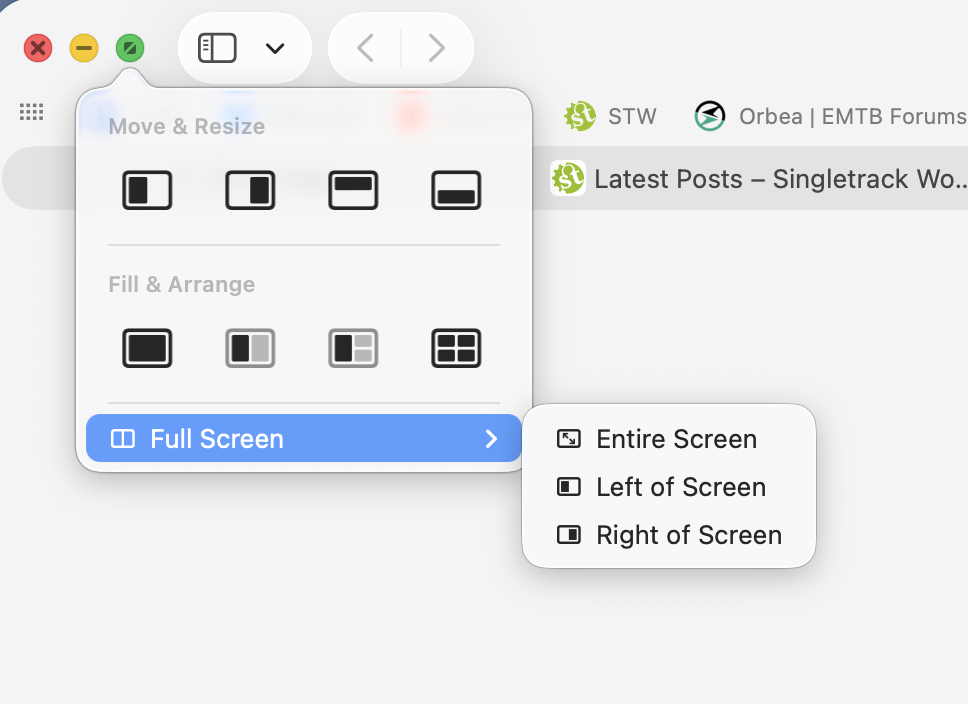
- maximised does not mean maximised, it means useless;
maybe this depends on how you work, but because drag between windows was a core part of the OS 'fullscreen' wasn't the default. But clicking the green dot definitely goes fullscreen now, and a hover gives you all sorts of 'full screen type' arrangements.
- the supplied charger will allow the battery to drain during high workloads; t
that sounds like it might be a problem specific to a particular spec/device at some point rather than a general problem. It's also not really a fatal productivity flaw unless you're trying to say you set off a rendering job and the machine drains the battery and shuts down.
- Finder windows open to a different size every time; the sound is unbalanced left/right on the Air; the WLAN sucks (my ancient X1 Carbon with a WiFi 5 card is more than 4x as fast thanks to the ridiculous implementation by Apple); "use your iphone to set up this laptop" never works; the supplied storage is pitiful; and if you thought OneDrive in Windows is annoying it's nothing compared to iCloud.
Again, nothing I've ever actually experienced.
- The pointless liquid glass thing makes it look like a primary school art project;
The new icons are ugly, but iOS had an option to turn down the transparency in the .1 release. On the MacOS I've barely noticed the change.
What *does* help productivity is that the Mac OS has basically worked in a consistent way since OSX launched in 2001 - pop up dock, apple menu. Whereas I used Windows daily for 20 years but they've messed around with so much of the interface in each version since Windows 7 I always now find it bewildering.
I'd get a BBC or an Acorn tbh. I can't see this Apple thing taking off at all.
well I couldn’t resist. Bought the base m4 model.
its cheaper to get a new one than it is for a refurb one direct from Apple! Bonkers.
thanks to everyone who posted.
Re usability or productivity of osx vs windows. Suspect neither will be perfect. Microsoft have a chequered history of operating systems and updates, some over the last 20 years have been properly poor. If it wasn’t for work, I’d ditch MS completely, windows 10 and now 11 and the continuous revolving door update approach is infuriating. I’ve had macs before, a 24” iMac which was actually pretty good, I’m hoping things have improved since then too, it’s good that it’s still based on the same os framework. Looking forward to the continuity thing.
I’m not expecting every app to work on osx. But there’s ways of sorting everything out.
i quite like the Liquid Glass ui, not the worst ui I’ve worked with.
I’m not expecting every app to work on osx. But there’s ways of sorting everything out.
In some cases that way is to buy a Windows machine. Not a problem if you're just using a browser and MS Office for routine stuff, but, if you use specialized software, it's best to check compatibility first.
Rather than start another Mac Mini related thread I'd thought I'd ask this here.
I'm also looking at a base M4 mini to replace a late 2013 iMac*
I currently have a Samsung T5 SSD acting as additional storage for music (I know ... cloud and all) and a spinning HDD as a time capsule.
The plan is to replace the spinning HDD acting as the time capsule and start again - fresh install just moving what I genuinely need - mainly photos and a few documents.
I'm hoping with a cable change the T5 should just work as an external drive that I can point Music to.
For those that have already gone down the M4 route have any of you gone with a Thunderbolt 4 external drive?
*Its still plenty capable for what I use it for but is becoming less and less supported with browser options etc. It will live on though as a Chrome OS machine ...
For those that have already gone down the M4 route have any of you gone with a Thunderbolt 4 external drive?
No but I've thought about it, and looked out for a good deal on SSD and enclosures this Black Friday. But a plain old Samsung T7 seems to be fast enough for storing photos.
Good question, for those who didn’t subscribe to Apple’s extortional prices for additional storage, what is the STW storage of choice for speed & cost (to a degree) for say a 2-4 gb drive to connect to a Mac mini ?
I should have said I bought mine from John Lewis for 499.
Wouldn’t bother with a Thunderbolt enclosure (unless you’re editing 8K footage or doing some crazy LLM/ML stuff), as USB4 should suffice - perhaps this UGreen one from Ali - and bung in a TB or 2TB stick https://www.aliexpress.com/item/1005006447117044.html
what is the STW storage of choice for speed & cost (to a degree) for say a 2-4 gb drive to connect to a Mac mini ?
I use a Crucial 4tb SSD
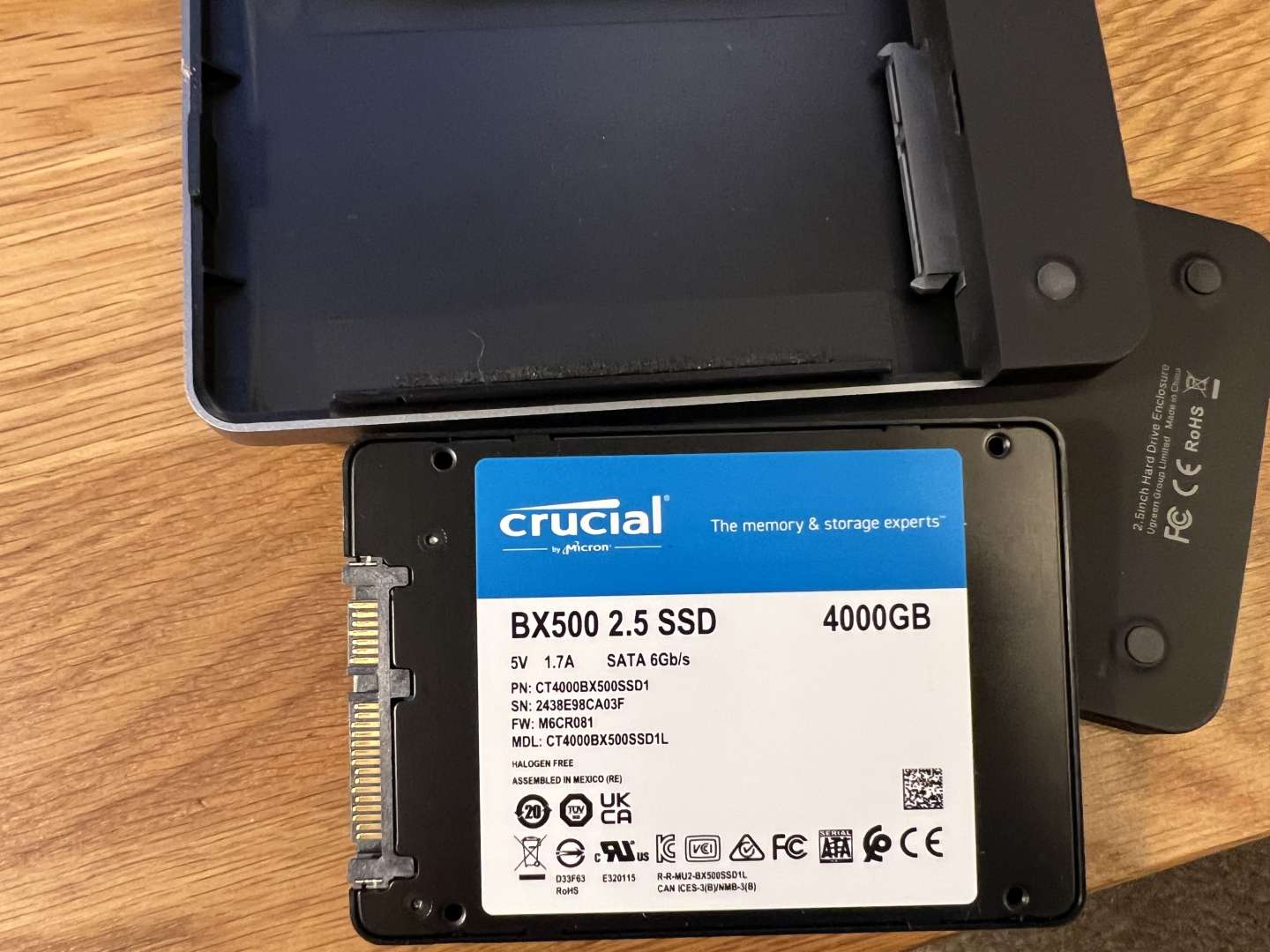
inside a Ugreen USB C caddy
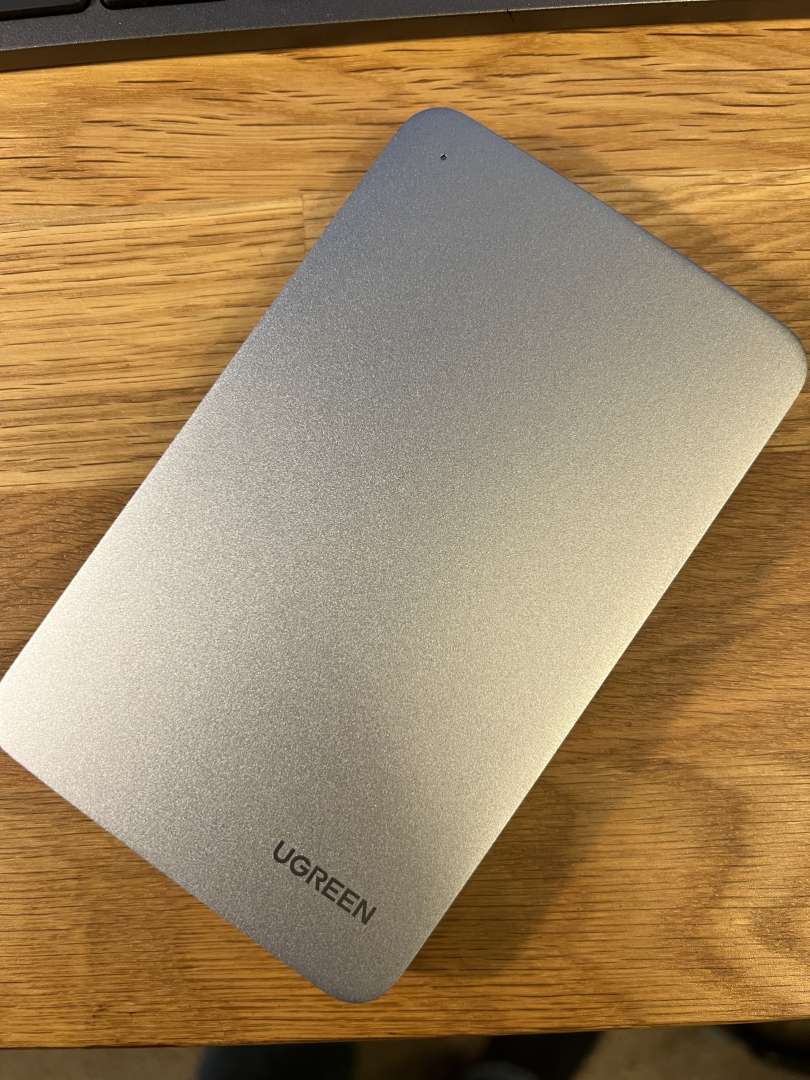
The SSD was originally used internally on another computer. I just repurposed it by making it an external drive.
Thanks
anyone used one of these designed for the Mac mini docks ?
why do the Amazon links not work ?
it’s a SATECHI Mac Mini M4 Hub & stand
I have the previous version of the satechi mac mini hub under my M1 mini and its a neat product, I stuck a 2GB NVME SSD in there for local storage and its fast enough to retrieve 4k films etc that are stored there. It's very unobtrusive and the front ports sometimes come in handy. I think the M4 one also has a small cut out making the power button more accessible, which could be useful. The satechi build quality and finishing matches the Mac which is a nice aesthetic
I noticed they do an SSD enclosure without ports that sits on top of the M4, whilst still matching the design/dimensions of the Mac, and I might have been tempted by that if it has been available when I got mine.
I have the previous version of the satechi mac mini hub under my M1 mini and its a neat product, I stuck a 2GB NVME SSD in there for local storage and its fast enough to retrieve 4k films etc that are stored there. It's very unobtrusive and the front ports sometimes come in handy. I think the M4 one also has a small cut out making the power button more accessible, which could be useful. The satechi build quality and finishing matches the Mac which is a nice aesthetic
I noticed they do an SSD enclosure without ports that sits on top of the M4, whilst still matching the design/dimensions of the Mac, and I might have been tempted by that if it has been available when I got mine.
that looks good, is usb4 and supposedly faster.
not sure I’m after more ports, so this might fit the bill. SATECHI USB4 NVMe SSD Enclosure for Mac Mini M4
not sure I’m after more ports, so this might fit the bill. SATECHI USB4 NVMe SSD Enclosure for Mac Mini M4
This one seems like it uses one of the TB4 USB-C ports on the back of your Mini and in return you get some USB-A ports on the front. At present I am using one TB4 port for my monitor and one for an external SSD, so in my case I'm not sure it's a good swap.
Well I’ve ordered the base spec mini.
Now which dock!
I’ll initially be using an HDMI cable for a monitor as the only option I have is only an HD one but I will be trialling using an old iPad as a second [I’m still thinking of a justifying reason]. I don’t believe this justifies the use of anything other than an HDMI cable.
I’d like, in due course, to get an SSD for the enclosure and also run a separate SSD for a time capsule.
The Satechi dock would allow this but I’m not sure I need the USB A or SD card reader.
Maybe a word of warning for the users of a base spec 256gb Mini. This is mine based on the usual MS Office plus Lightroom & Photoshop:
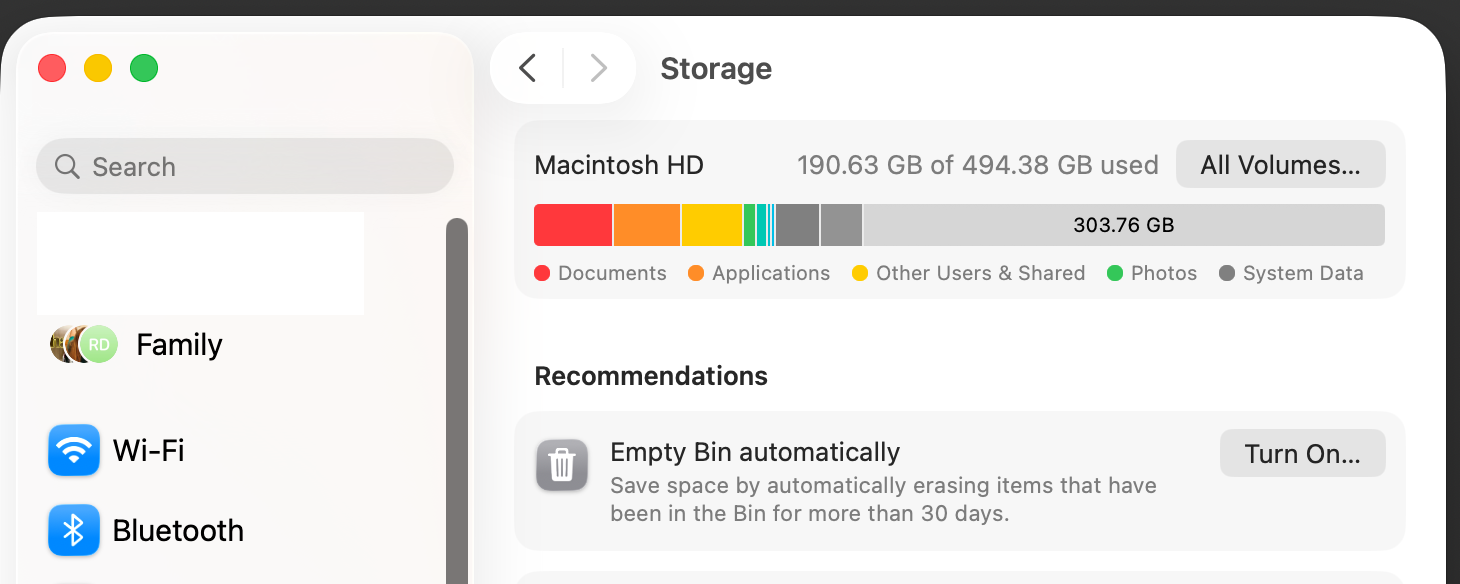
I'm not really that far of using 256gb and that's with me managing all the media in an external SSD.
(I upgraded, at significant expense, to the 500gb version)
I’ll initially be using an HDMI cable for a monitor as the only option I have is only an HD one but I will be trialling using an old iPad as a second
Is it possible to turn an iPad into a monitor? Edit: just checked, and it looks like you can. I'm using a Dell Ultrasharp with mine. Not as nice as the old 27" Retina screen but still very good.
@north of the border - that’s a mix of interesting and worrying! My current iMac is only a 256gb version and with 80gb of photos on it it still has plenty of space (I think) but I’m now going to go and check! I don’t have a need for Office, Lightroom etc …
I bought this, idk why, but hopefully it works out.
https://satechi.net/products/mac-mini-m4-stand-hub-with-ssd-enclosure
@north+of+the+border having just bought one that isn’t the best news I’ve heard so far on this. Hadn’t come up as a problem with the base model that I’d found. Will feedback once I’ve set it up tomorrow.
Ours is a family machine so it has 4 different accounts using it. That's possibly the reason why it's used fair chunk of the internal storage.
You will probably be fine.
Well it arrived. Setup was a piece of proverbial.
played about with it for a while and it’s very quick and super responsive. Love it.
 Continuity is useful & I know you can achieve the same with android and windows, but this was effortless.
I knew the dimensions before I bought it, but it seems even smaller irl.