Forum menu
Here's an example:
[img]  [/img]
If I wanted to straighten the level of the road but still be able to see the wheels of the bike I need to do it without cropping. I don't care if it looks odd, or has extra background to enable this. If it looks like a pic stuck to a bit of card that'll be perfect.
How can I do it?
Can I do it with Apple Aperture?
Cheers in advance 🙂
Picasa does just what you describe.
Edit: I [i]think[/i].
Two thought
Its possible Photoshops content aware fill might fill in the gaps after cropping
Never has much joy with it myself
Or use the warp selection to contract the sky and expand the road
Both are photoshop not Aperture
I don't have Photoshop here
Have you ever had a free trial on that machine?
(unless it really is merely an example, ...)
is it you on the bike ?
(I only ask because the "trees" in background look fairly vertical and so the road may be like that anyway ?)
I'm not a photoshopper but I'd have thought you could clone that road surface reasonably easily
There is enough there to play with on the Tarmac and the sky is flat so easy to comp in, content aware fill is useless, I do a lot of retouching and have never used it. I wouldn't use the warp tool either as it tends to smear details if overdone and you would have to stretch the background a fair bit, better off with the clone stamp and a bit of masking/blending.
No, it's not me! 🙂
Is it possible to paste it onto a larger background, then rotate?
Rotate first, then you know exactly where you need to clone.
Haha!
It's a lot easier than any of your suggestions when you think out of the box a bit...! 😉
Screenshot the image, crop screenshot. All done on my iPad in about 30 seconds in the end.
You said you didn't want it cropped 😕
OK. Maybe I wasnt that clear. I wanted the horizon level and the whole of the bike and the floor on show. If you just rotate, it auto crops and you loose the bottom of the wheels.
Like I said, something like sticking the pic at a silly angle on a bit of card. I've cropped the screenshot, not the pic.... 🙂
Like this. (I could have left the whole original in)
[url= https://farm8.staticflickr.com/7578/15467965140_d174349196_b.jp g" target="_blank">https://farm8.staticflickr.com/7578/15467965140_d174349196_b.jp g"/> [/img][/url][url= https://flic.kr/p/pyRn99 ]Untitled[/url] by [url= https://www.flickr.com/people/27857042@N00/ ]PeterPoddy[/url], on Flickr
Now that you've levelled the road can you rotate the foliage in the background anticlockwise so that its growing vertically again? 🙂
And just why do you need to look at lean angles on an NC700X PP? Been grinding your pegs again? 😉
Still absolutely loving mine.
Hah! Just popped into the other place and it seems you have! 😀
Ah I was thinking you wanted it to look nice and have a complete background 😳
But then I was assuming anyone could master a crop and rotate tool without help 😉
Stoner.... Err. No. Maybe.
There're a blinkered, humourless lot on the NC forum. I can't help poking the fire a bit. 😀
Mr S, I'm no computer expert! 🙂
something like this?
[img] 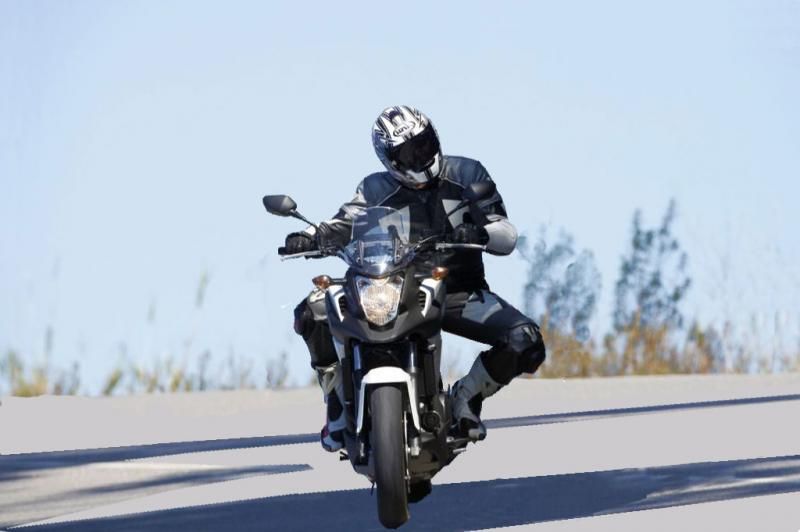 [/img]
No, I wanted the pic to stay as it was, but with the road level. The pic has been tilted to make a mediocre lean angle look more dramatic, see, and I wanted to get it back to roughly how it was taken. As I said in my OP [i]"I don't care if it looks odd, or has extra background to enable this. If it looks like a pic stuck to a bit of card that'll be perfect."[/i]
There're a blinkered, humourless lot on the NC forum
Now why doesn't that surprise me? 😉
could you skew the image to the right and then crop the sides? Would straighten up the bike a bit though but only as much as your rotation above.
had a quick go with a skew. Didn't work right.
This took me about 2 minutes to see how it would look:
[img]  [/img]
I cut out the bike and then skewed the left side of the background up to level and the right side down. Then used the clone tool to fill in the gaps before putting the bike back.
It was a rush job using photoshop elements so it's obviously not right with some gaps needing filling and the shadow bends but with a bit of time and careful area selections and maybe increasing the height of the road a touch you could probably make it passable.
[img]  [/img]
The pic has been tilted to make a mediocre lean angle look more dramatic,
I don't think it has - I think the camera is level and the road is on a tilt, which is why all the foliage in the background is leaning to the right when you've rotated the image