Forum menu
So, just looking for some reassurance that I have the below correct...
My network is made up of a variety of components, and I've put what I believe to be their speeds below. I'm assuming that these numbers indicate that when everybody's home and connected and iPlayer is slow on the TV and a game on the PC is laggy or an iPad is slow at opening web pages it's because of my broadband speed?
laptop = wifi g = 54 Mbps
iPad = wifi n = 150 Mbps
broadband (mine, at least) = 5405 Kbps down / 448 Kbps up = 5.4 Mbps / 0.448 Mbps
router = gigabit = 1024 Mbps
network card = gigabit = 1024 Mbps
homeplugs (TV and lodger's computer) = max 200Mbps
Thanks!
depends on your router but anythign wireless is likely to be limited to the slowest device connected so 54Mps.
but of what's there the broadband is the 'weakest link'.
Thanks!
:/ typical it's the one thing I can't do anything about (until fibre to box makes it to our village, of course!).
you can always bandwidth cap all the devices in the house except yours 🙂
😀
"What's that darling? Eastenders is breaking up and blocky on the TV? I knew something was up with the broadband, TeamFortress 2 is [i]almost[/i]* unplayable at the moment as well - have to hope it resolves itself in time for us to watch that movie later..."
*perhaps largely because I'm not a 14 year old American.
Have you tried an I-plate?
http://www.broadbandbuyer.co.uk/Shop/Reviews.asp?ProductID=7256
Can't guarantee it'll make a massive difference but for the price it's worth a punt.
iPlates make no difference if your internal wiring is ok. All it does is disconnect the bell wire from the internal wiring.
You only need lines 2 & 5 connecting up on any internal wiring. (wire 2 is Blue / White stripes, wire 5 is White / Blue stripes), anything else can usually be disconnected.
Your BB is certainly the weakest leak.
If I were to be picky the wifi speed you're getting will be limited by the speed of the wifi routers wifi. Doesn't matter if the iPad can do 150Mbps if your router can only do 54Mbps - the ipad will do 54Mbps (or less in practice). IIRC the speed of 802.11n (what the iPad has) is dependant on the number of attenias the thing has as it's a MIMO implementation.
Thanks for the iplate recommendation / thoughts... having read those links I'm going for one because I *think* our broadband isn't able to be plugged into the main socket (due to the crumbling bodges of the idiot 'improver' who had it before us). And I'm not tech / confident enough to want to play with wires myself!
Router is a BiPAC 7800n which does wifi n to 300 Mbps (if supported, natch) and has three antennas.
EDIT: Argh! Our BT phone plate has two plugs in it - one a BT line with the broadband and a fax and one a T-Mobile line with the phone. Grr!
and a game on the PC is laggy
This isn't speed, it's latency. Go to a command prompt and ping a local server, eg 'ping www.bbc.co.uk' note the response time in ms and post it here.
Thanks for the iplate recommendation / thoughts... having read those links I'm going for one
Don't get an iPlate, they're pointless. Get one of [url= http://www.adslnation.com/products/xte2005.php ]these[/url] instead.
Our BT phone plate has two plugs in it - one a BT line with the broadband and a fax and one a T-Mobile line with the phone. Grr!
You have two separate lines?
Could you post a picture please?
ping www.bbc.co.uk
Pinging www.bbc.net.uk [212.58.246.93] with 32 bytes of data:
Reply from 212.58.246.93: bytes=32 time=30ms TTL=57
Reply from 212.58.246.93: bytes=32 time=30ms TTL=57
Reply from 212.58.246.93: bytes=32 time=30ms TTL=57
Reply from 212.58.246.93: bytes=32 time=30ms TTL=57
Ping statistics for 212.58.246.93:
Packets: Sent = 4, Received = 4, Lost = 0 (0% loss),
Approximate round trip times in milli-seconds:
Minimum = 30ms, Maximum = 30ms, Average = 30ms
Currently with one computer doing nothing much, one computer doing stuff, one xBox doing something and an internet radio playing merrily.
Sorry, was wrong about two separate lines (though I know we have two, FWLIW), but it is a double socket. Like this (you can just make out the second socket rhough the glare!):
If anybody is following any middle class thread, I had to move a Le Creuset box out of the way to take the photo :p
and thanks.
[img] 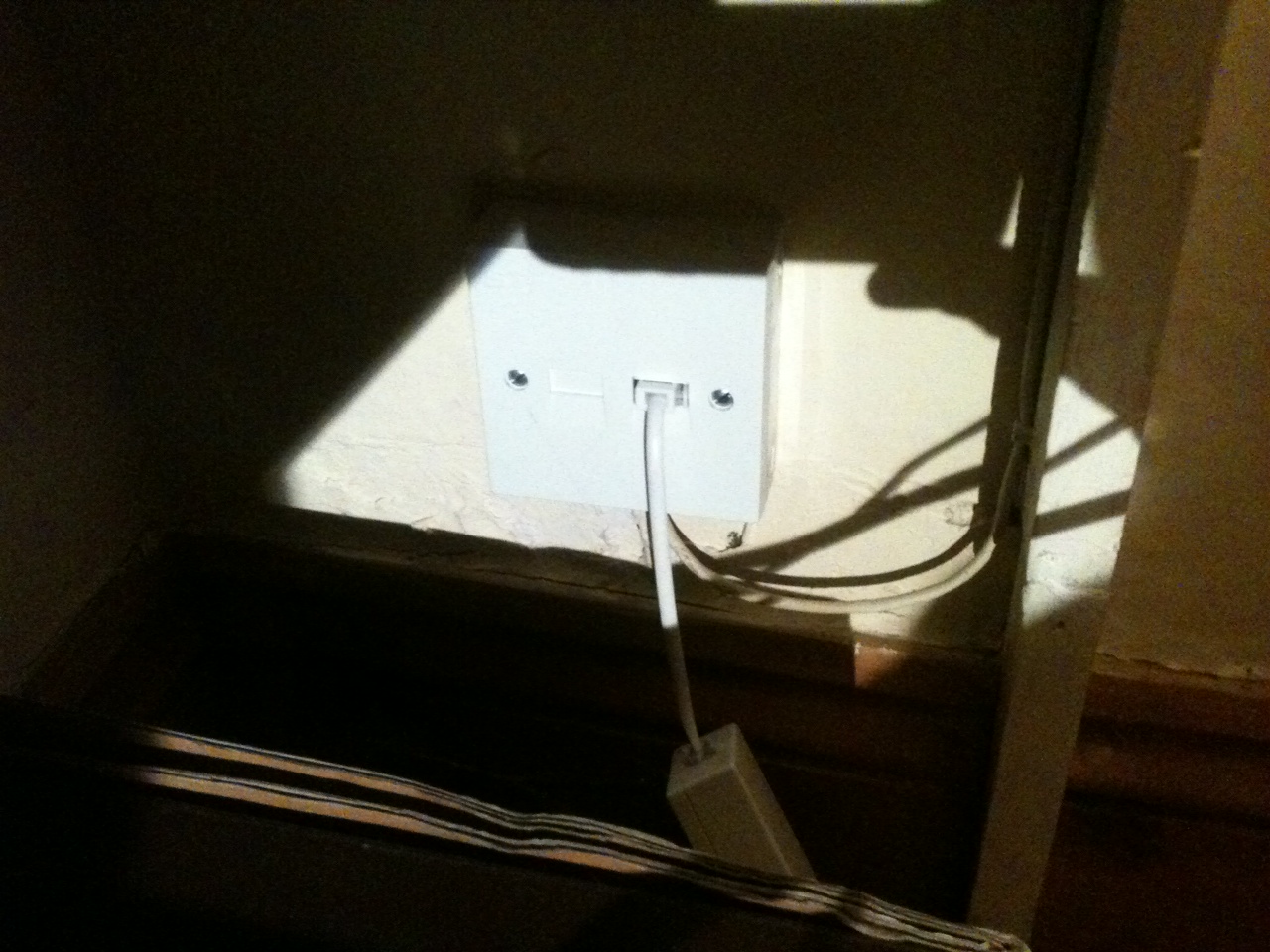 [/img]
Ok.
Two things. That's not a master socket, it's an extension; all other things being equal, you'd fit the plate on the master. You'd (probably) fare better by relocating the router next to the master socket and then just pushing the phone side of the line to the fax etc.
Latency is good; you're not going to get much better than that, so your issue is Something Else.
I'm utterly confused about this double socket thing. What's the crack, is that just a splitter? Ie, are both sides ostensibly the same?
They can be splitters OR separate lines and AFAIK they CAN be used as master sockets
Urm what is the actual router brand ?
I have 1mb internet - country and i can stream 4od or iplayer on the ipad and download from itunes and the mrs can be on youtube
Its not super instant but its not noticably bad
From what you posted above i cant see why your having an issue unless lodger is torrenting the shit out your bandwidth
Hmm. Have no further idea on the wall socket. Will open it up and have a look (and take a photo). And ask my wife what she thinks each side does, as she spoke to the BT chap!
The router is a Billion 7800n. I've always thought it to be great, but am v open to being told otherwise. Reference torrenting, I've asked before - a year or two ago - and he said no. I'll ask again - and maybe start checking broadband usage!
It's on the TV that it's really noticable, unwatchable really.