UPDATE: Reviews section refreshed, redesigned, searchable: Go take a look
So tell me what weird and wonderful stuff you have done with your Pi ?
sold it for half what I paid for it, pretty much unused. 🙄
Halloween skull - which is what I'm working on right at the moment (it's been in use since the first Halloween after RPi first came out, just making some slight changes and trying something different).
I've got 5 of them, 2 first gen, a 2, a 3 and a zero. The other first gen is going to be used as a IoT central heating controller (currently a work in progress), the 2 is connected to the TV and occasionally used for Scratch by mini aracer (also have Kodi on there, but now have a BT box instead), the 3 has mainly just been used for performance testing with the aim of using it as a Thin Client. No idea what I'm doing with the zero yet.
...actually I'm forgetting I've also used one for controlling one of these via a web interface:
https://thepihut.com/products/phenoptix-mearm-pocket-sized-robot-arm
How did it do with Kodi aracer?
I've been thinking about putting a monitor / Pi in the bathroom for my wife's Christmas present.
I was in a rehearsal studio recently which had one set up as an 80's and 90's console emulator, with Master System, Mega Drive, NES, SNES, Famicom, CD32 etc all on there. Pretty impressive too.
My daughter has expressed an interest in one of these for Christmas, but what can it do that she couldn't already do on her laptop?
I feel it would sit unused.
[quote=makecoldplayhistory ]How did it do with Kodi aracer?
It was OK, but not 100% stable - just needed restarting occasionally. Though it was added on to standard Raspbian, I think the dedicated media centre distros may be better.
put like that Muffin, nothing.
Seen as the start of a project, it's a great tool, educationally as well as the end results being pretty bloody brilliant.
http://www.itpro.co.uk/mobile/21862/raspberry-pi-top-22-projects-to-try-yourself
See it as the Mecano of her generation.
@Aracer - thanks. Wondering if a dumb TV and Kodi / Firestick may be better.
[quote=the-muffin-man ]My daughter has expressed an interest in one of these for Christmas, but what can it do that she couldn't already do on her laptop?
Interact with things in the real world - ie robotics and similar things. At least that's the main point for one I can see (apart from it being a very cheap computer, though it won't do anything her laptop can't from that perspective).
Depends what she's into and how old she is - IME kids get quite excited at just turning LEDs on and off using a "computer". Which reminds me I'm also putting something together for our local primary school using them to do stuff like that from Scratch.
My daughter has expressed an interest in one of these for Christmas, but what can it do that she couldn't already do on her laptop?
It's a miniature computer, but its USP (other than size and price) is that it has a bunch of input / output pins that can be used to Do Stuff. If she wants to learn programming and / or has an interest in electronics, it's ideal.
@Aracer - thanks. Wondering if a dumb TV and Kodi / Firestick may be better.
The Pi 3 has a lot more grunt than previous iterations for throwing video about.
Interested if anyone's got a touch screen for it. The official touch screen is tempting in that it doesn't require external power, but the resolution is extremely low.
[quote=Cougar ]If she wants to learn programming and / or has an interest in electronics, it's ideal.
I'd argue if we're just talking programming it's unnecessary if she already has a laptop. I appreciate the original idea was to do that, but things have moved on - I presume most kids nowadays at least have access to a tablet, and you can do a lot of the learning coding stuff on one of those. I can't think of anything coding wise you can do on a RPi you can't do on a laptop.
Electronics is a different matter - if she does have any interest in that then get her one, no question.
[quote=Cougar ]The Pi 3 has a lot more grunt for throwing video about.
Yeah - I was doing it on a 2, got the BT box before I got around to trying it on the 3.
I'd argue if we're just talking programming it's unnecessary if she already has a laptop.
It's not needed, sure, but making something with flashing lights is going to be a lot more appealing to a kid than writing a stock control program.
Sorry - I didn't want to start an in-depth analysis of the pros and cons.
My daughter is 13 - she has an interest in computing and does well at it at school. But she's never come home and said 'Dad, I must build this awesome robot and need a Pi to act as a controller'.
I think I'll give it a miss until that day. I can't programme so I'd be useless at offering assistance, she'd be on her own.
Ta! 😀
Why not ask her if she wants to?
There's not enough women pursuing technical careers, if it were my daughter she'd have been brought up on Lego Mindstorms rather than dollies. (-:
So tell me what weird and wonderful stuff you have done with your Pi ?
Left it in my desk drawer still in it's box for 2 years!
I have a Pi in the shed, connected to a webcam in a birdbox.
I'm thinking I might add a few more webcams, to see if I can spot any more wildlife around the garden.
Also want to setup a weather station.
So tell me what weird and wonderful stuff you have done with your Pi ?
Mine is sitting in my desk drawer unused.
Undoubtedly a massive success, and yet even as someone who works in Software/Electronics I just struggle to see the point.
The Pi 3 has a lot more grunt than previous iterations for throwing video about.
Youtube app playing video (probably at 720p but would need to check) was coming in at about 15% CPU load per (virtual) core on my Pi2.
The only real instability I've seen on my openelec/kodi thing is the youtube app itself, and youtube's API.
Need to find a use for the original Pi in my box of bits. Proper original, from before the time when they managed to squeeze in some mounting holes.
Had mine as a iPlayer/redbull.tv player but that got a bit superseded by the chromecast, then it was a google calendar driven central heating controller for a bit, then an internet radio. Currently not being used, though. I use Arduinos far more. Much easier to make them talk to things but harder to make them talk to the internet, which the Pi is much better at but I am much worse at programming.
Running an OSMC build of Kodi as a media centre for TV and server for my music collection. Use my android phone as a remote control
[quote=the-muffin-man ]Sorry - I didn't want to start an in-depth analysis of the pros and cons.
No worries - we enjoy that sort of thing, and it's probably quite useful for a lot of people.
My daughter is 13 - she has an interest in computing and does well at it at school. But she's never come home and said 'Dad, I must build this awesome robot and need a Pi to act as a controller'.
I'd be tempted to say go for it in that case. If she does have some interest in that area, and she's expressed interest in one, then she probably does have some idea what you can do with one and is capable of working it out for herself. At 13 with aptitude in computing I'm sure she's quite capable of putting something together with it - maybe worth getting an add on board or other stuff as well so she can just do things (others can advise - I tend to hack mine in a way I'd not recommend for a 13yo - though I suppose I need to sort that out if I'm getting a class of primary school kids using them!)
[quote=fifeandy ]Undoubtedly a massive success, and yet even as someone who works in Software/Electronics I just struggle to see the point.
We're kind of explaining the point here 😕
This
[img] 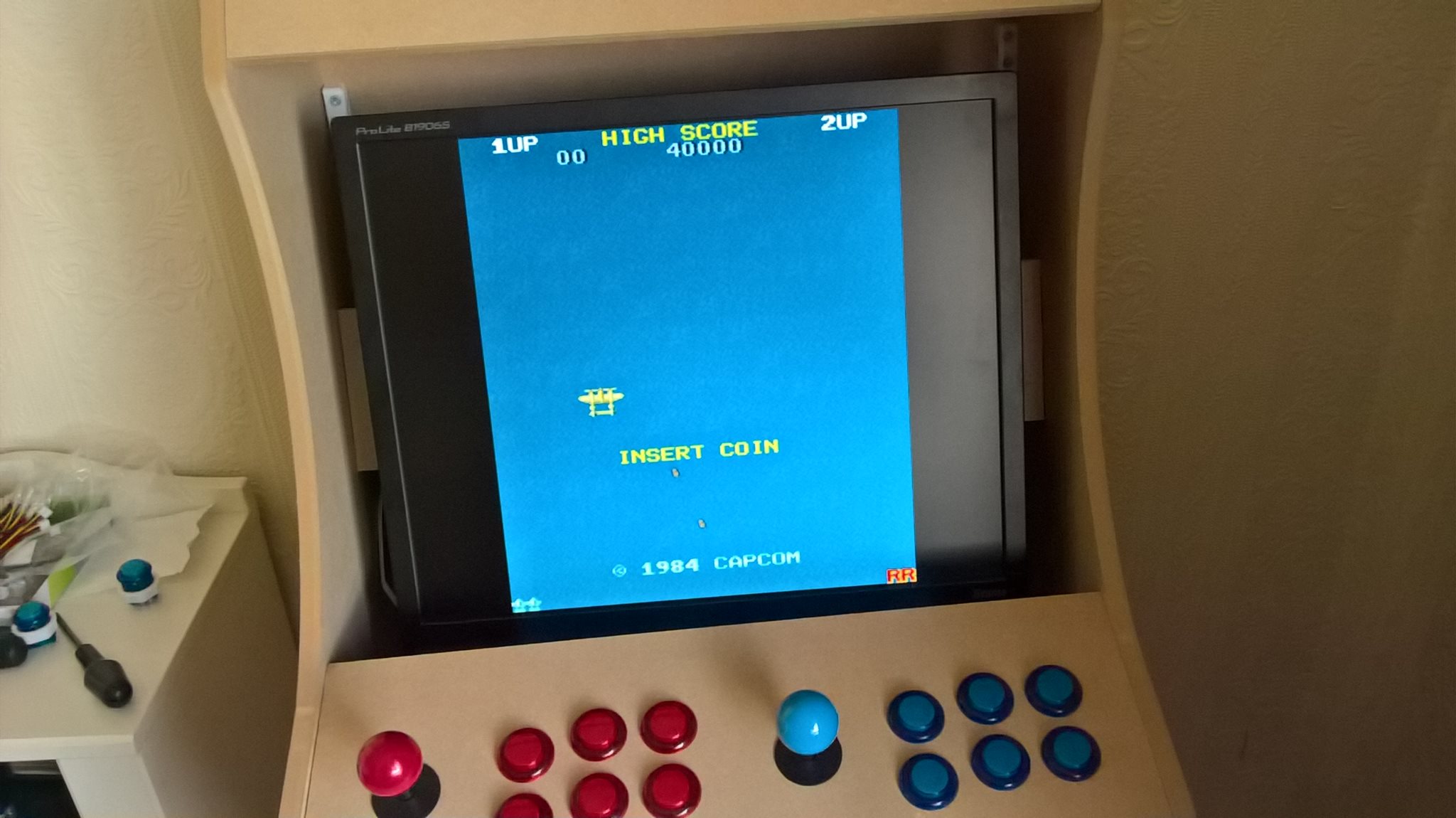 [/img]
Not finished yet, fully working just need to finish the cabinet off etc.
[quote=andytherocketeer ]Need to find a use for the original Pi in my box of bits. Proper original, from before the time when they managed to squeeze in some mounting holes.
Ah, now I've checked I realise I actually have 3 first gen and 6 in total (one is like that, ordered the day it was released). Will have to check what's on the other one - I suspect it's probably what I was using for a printserver, can now dedicate that as the robot arm controller 🙂
[quote=nickjb ]I use Arduinos far more. Much easier to make them talk to things
In what way? I don't find any problem in getting a RPi to talk to things (admittedly I've never owned an Arduino, but I've done stuff with breadboarded ATmegas, and indeed both more and less powerful AVRs, so I have some idea about interfacing with them).
For me mostly software. I can write a few lines of code that I actually understand and can it write from scratch. With a Pi I seem to need to cut'n'paste huge swathes of code just to get it running and its mostly gibberish. I believe there are some physical benefits with the IO too but I'm not near enough the limit for it to make much differnce. I know a couple of my techy friends will use an Arduino to talk to the 'thing' then connect that to a Pi to talk to the internet. Also being able to turn it off and on and near instantly be running is very useful for me.In what way?
At 13 with aptitude in computing I'm sure she's quite capable of putting something together with it
When I was 13 I had an aptitude in computing and an interest in electronics, and would almost certainly have blown the shit out of the GPIO pins inside of an afternoon. (-:
It's not needed, sure, but making something with flashing lights is going to be a lot more appealing to a kid than writing a stock control program.
Get a micro:bit then! And save a bit of cash! The young 'un loves hers, just plugs into the laptop and she happily makes little hearts and scrolling messages.
[quote=nickjb ]With a Pi I seem to need to cut'n'paste huge swathes of code just to get it running and its mostly gibberish.
Turn on an LED on the command line:
[code]
echo 11 > /sys/class/gpio/export
echo out > /sys/class/gpio/gpio11/direction
echo 1 > /sys/class/gpio/gpio11/value
[/code]
Or flash in a bash script:
[code]
echo 11 > /sys/class/gpio/export
echo out > /sys/class/gpio/gpio11/direction
while true
do
echo 1 > /sys/class/gpio/gpio11/value
sleep 1
echo 0 > /sys/class/gpio/gpio11/value
sleep 1
done
[/code]
Though I do usually control stuff from C and whilst you can just use that command line stuff, I tend to use a library, so simple commands rather than cutting and pasting lots of stuff (admittedly I normally use my own custom library which does involve lots of low level hacking, but then I'm using hardware PWM to control servos).
I know a couple of my techy friends will use an Arduino to talk to the 'thing' then connect that to a Pi to talk to the internet.
😯 - seems like a lot of work - about the only IO I can think that isn't directly available is analogue input, which is why I've sometimes connected an AVR or PIC - though I now tend to do that properly with a dedicated chip connected with SPI.
[quote=Cougar ]When I was 13 I had an aptitude in computing and an interest in electronics, and would almost certainly have blown the shit out of the GPIO pins inside of an afternoon. (-:
That's kind of why I was suggesting he also get an add on board she can just plug in rather than hacking it like grown ups do 😉
Mine's supposed to be running homebridge so I can control the blinds through Siri.
But it's not working yet...
I have a few Pi's..
Poor Mans SONOS (Perfectly Synced) - [url= https://sites.google.com/site/picoreplayer/home ]PiCorePlayer[/url]
Arcade Classic Gaming Console - [url= https://retropie.org.uk/ ]RetroPie[/url]
3D Printer WiFi Controller & Camera - [url= https://octopi.octoprint.org/ ]OctoPi[/url]
^Has a 3.5" Touchscreen
Starting to build a Temperature & Humidity logger, eventually will control with an Arduino, required to upload data and notify of min/max temps.
Built this a couple of years ago, now gathering dust!
[img]  [/img]
I have an old BigTrak and a robot arm that require mating together, but I haven't got round to it yet, like most of my projects!
I want to build a controller for the LED strip lighting, so I can sync it around the house and eventually have it going to music.
Like many, I have loads of ideas, just not a lot of time!
If you looking to get stuck into a Raspberry Pi, check out this free Pi Magazine
[url= https://www.raspberrypi.org/magpi/ ]MagPi[/url]
As I understand it an Arduino is a programmable controller board aimed purely at interfacing with things and prototyping, but you program it from external computers.
Whereas a Pi is an all-in-one mini computer that can run a variety of operating systems, and having a bunch of interface options as well to talk to things (including Arduinos).
A Pi running Raspbian is a bargain way for kids to get a computer they can program with, without needing a laptop/tablet/etc (except maybe to flash an SD card).
Arduinos however are perhaps more flexible in that there are a wide variety of kits and components and they do dedicated tasks. They might perform more reliably or efficiently, although I don't know for sure, based on not having the overhead of a full blown OS.
They're perhaps a bit more IoT (though the Pi has IoT specific OS, e.g. Windows 10 IoT, though that's not something kids will get on with. It makes the Pi more like an Arduino in a way. There's no desktop. Need to develop externally and deploy to it).
A Pi can also be used for non hardware things. Running web servers etc. Been using one of mine as a VPN server.
rossendalelemming > that cab's ace. I'd love to have a go at something like that myself.
I have an old BigTrak
Oooh! So have I. There's an idea.
I run my weather station with a Pi2:
http://www.wunderground.com/weatherstation/WXDailyHistory.asp?ID=ISTIRLIN11
Updates every minute, using a Maplins weather station. I think it's cool.
Total cost was £100.
(Using the setup here: http://www.weather.dragontail.co.uk/index.php?page=pywws_setup)
It did have its own Twitter account for a while but it kept corrupting the SD card.
I run Kodi on the Pi3.
I have one running OpenHab and a number of sensors that control various switches and lights.
I've got a couple or Pi's and an "Orange Pi" clone. I use the Orange Pi to run Octoprint and control my 3D printer, on a Pi2 I have installed [url= http://www.pimusicbox.com/ ]PiMusicBox[/url] so it's an internet radio streaming device (hook a JBL flip up to it via bluetooth).
So tell me what weird and wonderful stuff you have done with your Pi ?
A 'line-in' for Sonos to connect a CD player into the system. Essentially the Pi is an Internet Radio server that broadcasts the CD player output. Sonos then picks that up as an Internet Radio station
I have 3 in a house:
#1 - monitors the temperature upstairs (upside down house with bedrooms downstairs), controls the electric heaters wirelessly and allows me to remotely switch the heating on and off.
#2 - monitors the downstairs temperatures and the output from the solar pv the data from which it uploads to the pvoutput.org web site
#3 - monitors the hot water temperature
The data from all three is uploaded every 5 mins to the [url= https://www.initialstate.com/ ]initial state[/url] web site which I use as a dashboard to see what's going on when I'm not there.
I had basically no programming knowledge before getting the Pi's and because of them I've learnt a reasonable amount of Python which I've utilised my business.
Pi's are cool, but you need a project.
[quote=allthepies ]I've got a couple or Pi's and an "Orange Pi" clone.
Interesting - how does the OPi compare and what's the distro/software - is it completely compatible with a RPi?
Here's the skull I'm currently fiddling with
So if Santa was to leave one on Christmas day what would we need to start with?
Probably some sort of project kit to get the ball rolling and inspire interest would be ideal. Or recommendations of good reading (books preferred).
Thanks
The camjam edukit robot is good for kids and you can build on it
Minecraft pi let's you interface with the real world, also good for teaching coding such as teleporting around, building houses etc
Sensor based webcam smsing images
As above having an idea of what you want to do helps, loads of free resources out there
The plan for Christmas is a rabbitcam and weather station, probably add some counters logging movement in the hutch and run
Dmorts in line Sonos CD player? Tell me more I have a pi doing nothing and need to justify keeping my cd's!
I've used some at work hooked up via some USB relay boards to some remote controls to simulate button presses and hence find bugs in the various layers of remote control handling (a lot more than I expected).
You could do the same with a PC, but then you'd need an entire PC, and the desk space, cabling, and power starts getting annoying.

