Forum menu
How do i make a pic black and white but pic to show just additional colour?
Like this? (not mine)
[img] 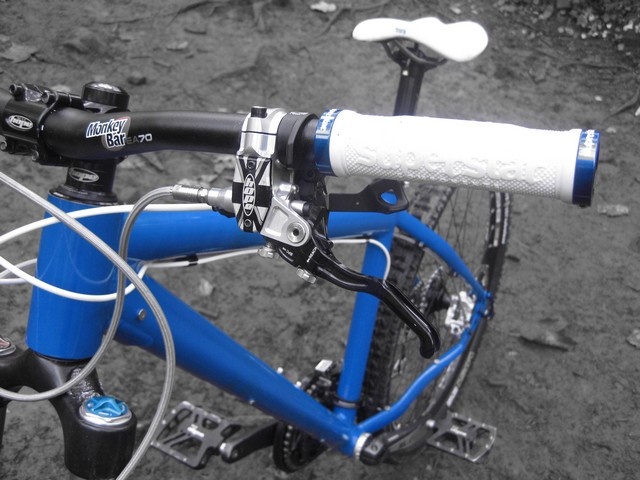 [/img]
yes
There's probably a better way, but I add a channel mixer or saturation layer mask to get the black and white, then use the brush tool on that layer to bring the colour back where i want it from the layer beneath....
the quick way is the HSL window (change the saturation setting to -100 for all the colours to remove)
[IMG]  [/IMG]
First you need picture editing software that lets you select and desaturate parts of an image.
Simple way, select either the bits you want to stay full colour, or the bits you want b&w - select whichever is easiest to select, using the most appropriate tool, assuming your picture editing software allows you to invert a selection (most do). Invert the selection if appropriate, so you have the bits you want b&w selected, then desaturate.
For more control, just what stumpy said.
If I was doing the example above (in Photoshop), I'd probably have selected the blue frame using either the Magic wand tool or Select>Colour range... (selecting by colour looks like it would have worked in this case, and is mostly a lot easier than trying to draw/paint a selection by hand), tidy up the selection using QuickMask, make a hue/saturation adjustment layer using the selection as a mask, desaturate.
Oops forgot to post the pic which goes with the above
[IMG]  [/IMG]
From this
[img]  [/img]
To this
[img]  [/img]
Not bad for a first half arsed attempt 🙂
try playing with the contrast/brightness a bit on the background, looks too middle greyish.
great 1st attempt though.
I wouldn't bother - it always looks shabba
singletrackhor - cheers for the comments
bb - stfu
There's an app for that.
http://itunes.apple.com/us/app/color-magic-deluxe/id355468834?mt=8
Edited for better link
Good first try. As singletrackhor said, adjust the curves on the background to give a bit more contrast, especially in the midrange, 'cos the mono image often tends to look a bit 'flat'
I use the colour replacement tool in photoshop, put it to grey and then wherever you "paint" it changes it to grey but keeps the tone. Simple 😛