I have a load of pics from various sources and with incomprehensible names
renaming them along the lines of "year month 001" would be nice
Irfan nearly does it and I think I can find a complex, time-consuming way of getting there, but is there any software that'll just do it (note, has to read the tags, windows "date created" is not correct)
free would be nice (or cheap anyway)
ideally not online as there's plenty of Gb of stuff to sort
TIA,
scaredy
Try [url= http://www.faststone.org/FSResizerDetail.htm ]FastStone[/url], it has a renaming element.
I use a thing called Bulk Rename Utility
[img] 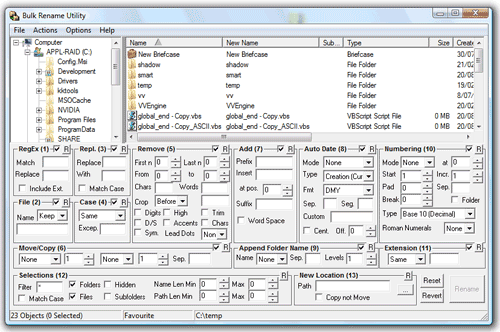 [/img]
http://www.bulkrenameutility.co.uk/
It can do pretty much anything you like and is incredibly fast.
That looks a doddle to use. 😉
Yeah definitely an interface designed by a programmer.
But it is brilliant at its job.
The date stuff is in Section 8 there.
Picasa
Select all the pix you want to rename.
Press F2
Give it name.. job done.
My naming patterns are
YEAR MONTH DAY LOCATION PHOTOGRAPHER
101023_Forest of Dean_RedThunder
EDIT: In the renaming process it will add a sequential number if required.
thanks gents
still not seeing what I really want but irfan & faststone (thanks the don - already tried) both can/have done enough
what I now have is a list of files whose names are "year month ####"
what I really wanted was the numbering to restart every month but can't find a way without processing each month separately (and I'm too lazy, since the actual number is meaningless anyway)
graham, do you reckon yours can achieve that automatically ?
edit:
<blind date> same question to redthunder please, Cilla </>
Section 10 there handles adding numbering to files.
It can reset the numbering on a per-folder basis or you can set the match so that it only applies to certain files (so you could add the dates in one pass then number all the Jan ones, then all the Feb ones etc
But I don't [I]think[/I] it can number automatically per month.
Just read the manual and yes it can.
That Break option in section 10 tells it to watch character nnn and reset the numbering when that character changes. So you could use that I reckon.
I just download my pix from the camera and shove them in a directory with the style [YMD loc name] I mentioned above.
Rename with the F2 method if required.
Just download Picasa and it's and as pikey bonus it's free as is the other program mentioned above.
http://picasa.google.com/thanks.html
Cheers, will have a look at that lot
grahams - that is an excellent programme (once you RTFM 😳 ). looking forward to doing irreparable damage with it !