UPDATE: CLASSIFIEDS section refreshed, redesigned, searchable: Go take a look
The main thing is stick it on manual
I was advised by [url= http://www.pascalbaetens.com/site/index.php ]this guy[/url] to stick it on "P for Professional".
are you saying you look at the scene and think 'oh yeah 1/250 f4.5 ISO 400'
Yeah this is what I don't get. Using fully manual without a light meter is basically guess work isn't it?
Okay you can use the [url= http://en.m.wikipedia.org/wiki/Sunny_16_rule ]Sunny 16 rule[/url] to make an educated guess, but the camera gets it right 95% of the time so why waste the brainpower?
If I'm shooting biking pics, I don't want to be faffing with manual exposure. If I want to freeze the action I set it to shutter priority and let the camera control aperture and ISO. If I want a bit of blur, then I set it to aperture priority and let the camera sort the rest.
I was advised by this guy to stick it on "P for Professional".
[P] (which stands for 'Program' IIRC) is basically automatic only without locking all the controls out like full auto does.
If I want a bit of blur, then I set it to aperture priority and let the camera sort the rest.
Surely what you want there is Shutter Priority again, so that you can control the blur?
I've had mine for ages now and still really like it. I've added an MD-D80 battery grip to mine, so I've got loads more battery life (2 batteries in it) and the option to use AA's if I do run flat somewhere. The grip also makes it feel nicer and adds shutter release button and command wheels for easier portrait orientation shots.
Manual is definately worth spending a reasonable amount of time in as you will then understand better what the other modes are doing and how the results can be compromised. Also, I find mine tends to over exposue slightly if left to it's own devices, so I like to bring it back to achieve the result I want.
A word about tripods. If you find youself wanting one, get a good one and be prepared to spend £150+ on it. Do not buy one of those generic all in one jobs you get in Jacobs and the like. Buy a decent Manfrotto (or other good quality tripod manufacturer) set of legs and head and it will out last any flimsy plasticy crap and be way, way more stable - which give better results.
I also have a bunch of lenses too, it can get to be quite an expensive hobby!
@cougar yup. Don't know what I was thinking there. I need some coffee...
Had a D90 for about a year now (replaced a D50), been very pleased with it so far.
I bought the Nikon 70-300mm VR lens recently & love it to bits up to 200mm, the quality is great.
The other lens I have is the 18-105mm VR, not the best lens in Nikons range, but still very pleased with the results from it.
Next will be a 50mm prime, still thinking over which to go for, a 1.4 or the cheaper 1.8?
I also picked up a cheap grip off ebay, which gives me a 2nd release button for portraits, it also came with two extra batteries a AA battery adapter and wireless remote, all for £40!
Only thing I would like to see (hoping it will come out on a firmware update 😉 is a 100% selected view, quick preview button, for quickly checking sharpness, other than that, it would have been nice to get NX2 included 😉
some of my D90 shots here:
[url= http://www.flickr.com/photos/scotiedog/ ]http://www.flickr.com/photos/scotiedog/[/url]
Aperture for controlling background blur, shutter for controlling motion blur...
RS - cheers 🙂 Baby/kid pics on my flickr page if anyone's interested.
Cougar - I'm in the UK, in Cardiff.. pint would be good but I think you are still a long way away aren't you?
I was advised by this guy to stick it on "P for Professional".[P] (which stands for 'Program' IIRC) is basically automatic only without locking all the controls out like full auto does.
Yes, I know - it was a joke to say that professionals don't necessarily obsess about choosing the settings.
quick preview button, for quickly checking sharpness
If you press the middle of the selector thing it zooms in to show the actual pixels, so you can assess the sharpness. Is this what you have in mind?
Mintman - MemberI've got a D90, use my F1.8 50mm lens most and love it. The clarity the lens gives is so much better than my other stock lenses it's great.
Got any examples you can show us here with that lens Mintman?
ta.
If you press the middle of the selector thing it zooms in to show the actual pixels, so you can assess the sharpness. Is this what you have in mind?
yea, something that you could pre set to whatever % you would want to view would be cool, but anyway, a single button press to check would be neat.
ski - you can do that already (at least on D300). Not sure if it is something you need to configure in the menus ...
Some other preview/playback tips, camera geeks:
pressing OK, while zoomed in on an image during playback will take you back to normal size (zoom you right out)
Pressing the Fn button on the front of the camera while zooming in will immediately remove the 'zoom' box.
Nice tips stumpy01. Is there a way to just view the image without all the surrounding text? I currently find myself zooming in one click before showing the screen to someone because that gets rid of the text.
^^^^ - you can scroll up (or down) through to 'highlight' view, which has less clutter around the display I think, but then you get people saying 'why is the sky flashing', or whatever.
I do find it annoying that there isn't a 'just look at the picture' screen with no other information.....
My camera has pre-configurable zoom in live view for manual focusing 🙂 Although I really wish it had a split screen instead...
Next will be a 50mm prime, still thinking over which to go for, a 1.4 or the cheaper 1.8?
Confusingly, the choice is greater than that - there are several 50mm Nikon primes out there. 😕
There are two older 'D' lenses:
[url= http://www.dpreview.com/products/nikon/lenses/nikon_50_1p4 ]Nikon AF Nikkor 50mm f/1.4D[/url]
[url= http://www.dpreview.com/products/nikon/lenses/nikon_50_1p8 ]Nikon AF Nikkor 50mm f/1.8D[/url] (this is what I have)
And two newer AF-S ones:
[url= http://www.dpreview.com/lensreviews/nikon_50_1p4g_n15/ ]Nikon AF-S Nikkor 50mm 1:1.4G[/url]
[url= http://www.dpreview.com/products/nikon/lenses/nikon_50_1p8_g ]Nikon AF-S Nikkor 50mm f/1.8G[/url]
[u]As I understand it[/u], the older D ones are a bit lighter and smaller as they use the body motor to do focussing instead of having a motor built into the lens.
The D lenses also both have aperture rings (which you don't really use with a DSLR but can be handy if you want to reverse the lens for macro and still have control over aperture). The D lenses are also much cheaper and can be had second hand.
The AF-S ones obviously have the AF-S Silent Wave Motor built into the lens to do the focussing, which means they focus a bit quieter and faster, plus you can very easily manually override the focus by just touching the focus ring (on the other ones you have to flick a switch first to disengage the focus motor).
As for f/1.4 versus f/1.8: do read the reviews but my (very amateur) experience is that it if you are actually shooting at f/1.8 then it is hard enough to get the focus right (very shallow DOF) so I doubt I'd use that extra two-thirds of a stop that much.
I wonder how many people have DSLRs and use auto mode?
Yeah this is what I don't get. Using fully manual without a light meter is basically guess work isn't it?
Okay you can use the Sunny 16 rule to make an educated guess, but the camera gets it right 95% of the time so why waste the brainpower?
DSLRs have built in light meters!
DrJ - Memberski - you can do that already (at least on D300). Not sure if it is something you need to configure in the menus ...
Only had the camera a year & still learing how to use it, must have missed that option, need to have anoter read of the bible/manual again I think?
Sky pictures are extremely difficult for this reason - the sky is a huge thing! Most good sky pictures are half sky and half something else like scenery I think.
I'm going to be an awkward bugger and disagree - because 50/50 is exactly what you would expect people to shoot or see in many photos.
It's more dramatic if its 1/3 beach/mountain/land 2/3 sky or the other way round 2/3 beach/mountain/land 1/3 sky.
I just mentinoed it because some of the OPs pics were all sky - pics of clouds and stuff.
DSLRs have built in light meters!
Indeed, but if you use the built-in light meter to tell you the correct exposure then how is that any different to sticking it in a priority mode?
Cougar (not sure how to quote yo on here)
I'll disagree with you - getting a beginner to start to use a DSLR in manual even if it's for a day is IMO the best way to understand how the three interact and the by-products of altering each (motion blur, depth of field, noise etc). You could read it in a book if that's better for your learning style but for me hands on experience is always the best way.
I'm in the UK, in Cardiff.. pint would be good but I think you are still a long way away aren't you?
Yeah. I'm travelling south this weekend, but not really near Welsh Wales Boyo. Ah well, just a thought.
Yes, I know - it was a joke to say that professionals don't necessarily obsess about choosing the settings.
Ah. I did wonder if I was missing something; I've currently got too much blood in my caffeine stream.
graham s - it's completeley different! - it's just using the lightmeter in the camera rather than a sekonic or whatever. You can still exp comp either way aswell and control any factor (or the aper/shutt depending on which mode you're in).
Cougar ... I'll disagree with you
Feel free. We'll just have to agree to differ. I think it's more likely to get someone overwhelmed, frustrated and pissed off, personally.
They are ok, the wife's recovering nicely it seems and the nipper is now feeding ok.Got some lovely pictures of them, despite using the automatic settings
Seriously though, are you saying you look at the scene and think 'oh yeah 1/250 f4.5 ISO 400' then set your camera to that before shooting?
Good to hear family grips is doing well.
Re the photos, it's horses for courses. If you know what you're looking for, in my case cyclists, I can preset in manual for pretty much every shot. The light isn't going to change dramatically. If you're walking around a city taking pictures of buildings you can preset pretty much everything within reason. You should be able to know that the subject is moving too fast to get a crisp shot at 1/125sec due to the light conditions, so what do I have to do to achieve a faster shutter speed. Stick it on Auto? One possibility or solve the problem by knowing how the camera works.
If you're out randomly taking candid shots, I would still say you can, to a degree, preset the camera in auto. But maybe the image is more important than the image quality, a news photographer for example, where conditions and/or opportunities are constantly changing.
How did the guys use the manual function on film cameras?
Horses for courses.
graham s - it's completeley different!
Ok I'm missing something here - can you (or someone) talk me through how you would take a shot in Manual and get the right exposure?
You can still exp comp either way aswell and control any factor (or the aper/shutt depending on which mode you're in).
Umm.. surely there is no exposure compensation in manual?? That only alters the automatic exposure doesn't it? *confused*
[b]Edit[/b]: ahh hang on - are we talking at cross-purposes here? When I say "Manual", I mean fully manual ('M' on the dial) - the P,A,S modes would be "Auto", since they work out exposure automatically.
[img]  [/img]
I think manual mode has it's place in terms of learning what effects what.
But I wouldn't want to do that in a situation where I was pressed for time & trying to get some good shots quickly.
However, with a still life or a willing model at home or wandering around a pretty town to get some pics, sure just stick the camera in manual & learn what does what.
Use P mode to get a starting point - then switch the manual & enter the settings of the P mode shot. Then fiddle around that base setting.
With Nikon cameras you can experiment easily in P mode as you can alter the shutter/aperture around the selected exposure to maintain that exposure using the command dials (obviously within the limits of what combination will still give you that exposure). Obviously this won't allow you to creatively over or under-expose a shot as the camera is still trying to maintain what it deems to be 'the correct exposure' which often isn't what you are trying to achieve.
There really is no right or wrong, it's just about finding what works for you.
With regards to this:
Seriously though, are you saying you look at the scene and think 'oh yeah 1/250 f4.5 ISO 400' then set your camera to that before shooting?
when i did a Wildarena day photographing birds of prey, it was amazing how well the guy who was running the day was able to predict the changing light conditions as the cloud rolled over. He would say something like:
"You are probably shooting at 1/250 f8 at the moment or thereabouts. Be aware there are some clouds coming over so you'll lose X stops of light so will need to increase your aperture by Y amount, your shutter by Z or increase your ISO."
He was almost always spot-on, but his job is photographing wildlife & he's been doing it for years.
& this tread was ticking along so sweetly, I did wonder when the bickering would start 😉
GrahamS - Member
graham s - it's completeley different!
Ok I'm missing something here - can you (or someone) talk me through how you would take a shot in Manual and get the right exposure?
I think what bazep means is that in manual mode, the camera will still give you an indication of under/over exposure. So you can tinker with settings until you get it to read 'correct exposure'. What the advantage of this is over S or A modes I am not sure.
I generally only use manual mode when trying to do something 'creative' with the exposure that the camera won't like, although quite often this can be sorted with exposure compensation, rather than resorting to manual. I also use manual when shooting a series of photos that I plan to stitch (not that I ever get round to stitching them!)
this won't allow you to creatively over or under-expose a shot as the camera is still trying to maintain what it deems to be 'the correct exposure' which often isn't what you are trying to achieve.
That's when I use the exposure compensation.
I usually shoot in Aperture priority. I have a pretty good idea what my camera reckons a "correct" exposure is for a given scene and I just twiddle the exp comp up or down to adjust that as required.
(Unless of course I'm deliberately [url= http://www.luminous-landscape.com/tutorials/optimizing_exposure.shtml ]exposing to the right[/url] so I can frob with it later - in which case I'd probably have to go to manual).
Edit:
I generally only use manual mode when trying to do something 'creative' with the exposure that the camera won't like, although quite often this can be sorted with exposure compensation, rather than resorting to manual. I also use manual when shooting a series of photos that I plan to stitch (not that I ever get round to stitching them!)
yeah that sounds more like what I do. (especially the not getting round to editing part!)
pretty much what Stumpy said - exp comp works in manual too (on my camera anyway). the light meter is just the lgith meter - you have control (if you don't leave it in auto anyway) to change any settings through a number of methods. Not sure about exp comp on auto settings as my cam doesn't have an auto option.
exp comp works in manual too (on my camera anyway)
So what does it do in manual?
my cam doesn't have an auto option.
What cam you using?
& this tread was ticking along so sweetly, I did wonder when the bickering would start
Discussion != bickering.
it basically tells the light meter to meter based on the comp so exp comp -1 means the light meter assumes minus one is 0 (if that makes sense). D300.
PS - and when you start working with lights (flash or studio) you do start thinking in shutter speed, fstops and to a lesser degree ISO levels by nessesity (primarily due to sync speeds, effect of shutter speed on depth of light etc).
Gotcha - so basically it just adjusts what 0 means on this display
[img]  [/img]
here
[img]  [/img]
but doesn't actually alter the shutter/aperture setting?
[url= http://www.dpreview.com/reviews/nikond300/page6.asp ]The D300 [i]does[/i] have P, A, S auto modes by the way.[/url] just hidden away on a button rather than on a dial.
Yes - if it's in manual you change the actual S,A&ISO settings obv. It's just the meter indicator you see through the viewer takes the comp in to consideration so if you program your cam to expose to the left then you can still use the LM as it's easier to see rather than figuring out where a 1/3d or 1.5stops to the left is on the guage.
A is for Aperture though - not "Auto". Program is still user manageable - you can turn the knobs and it will change the inputs.
Got any examples you can show us here with that lens Mintman?ta.
My flickr account is here [url= http://www.flickr.com/photos/40364853@N03/ ]flickr[/url] but not many taken with the 50mm lens. The only one on there that springs to mind is the Edinburgh Tattoo one, taken at night (some flood lights admittedly) on minimum aperture and I couldnt do that with the stock 18-55mm lens that I also have.
I'll add some 50mm photos later today and i'll let you know. Please not i'm not exactly professional!
Okay gotcha. I've no idea if it works like that on the D80 to be honest. I guess it probably does.
Incidentally the meter indicator looks a LOT finer grained on the D300 compared to the D80, which doesn't even appear on the top panel and is fairly small on the viewfinder image:
[img] 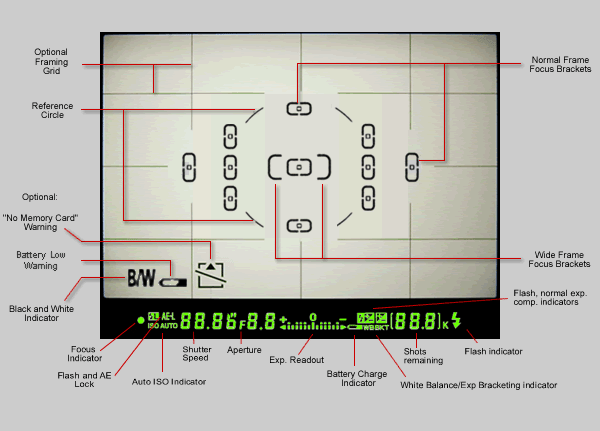 [/img]
A is for Aperture though - not "Auto".
yer I know but it's an "Auto mode" (i.e. it calculates the shutter speed for the 'correct' exposure automatically). As I said I think we were probably talking at cross-purposes earlier.
I was going with the official Nikon naming: P/A/S/M as "[b]P[/b]rogrammed [i]Auto[/i]", "[b]A[/b]perture-Priority [i]Auto[/i]", "[b]S[/b]hutter-Priority [i]Auto[/i]", and [b]M[/b]anual respectively.
The completely auto [s]idiot[/s] scene modes are officially called the "Digital Vari-Programs". And confusingly there is an "Auto" digital vari-program which I suspect is what you think I meant.
There's some useful stuff here for the first time user of a D90:
[url= http://www.kenrockwell.com/nikon/d90/users-guide/index.htm ]Ken Rockwell's D90 User Guide[/url]
Ken Rockwell is very opinionated and you have to take a lot of his stuff with a pinch of salt, it's worth a read though...
I have taken his recommendation and configured an "extra vivid" custom colour setting on my D90. In the right situations it works (and saves time doing the same thing in Picasa later...=
[url= http://www.kenrockwell.com/nikon/d300/picture-control.htm ]Picture Control[/url]
Programmed Auto
What you've got there, I'd suggest, is "semi-automatic."
The completely auto [s]idiot [/s]scene modes are officially called the "Digital Vari-Programs".
That's almost as bad as Canon; the scene modes outside of the noddy presets like "Sport" are called "the creative zone."
Ken Rockwell is very opinionated and you have to take a lot of his stuff with a pinch of salt,
[img]  [/img]
What you've got there, I'd suggest, is "semi-automatic."
Yep, fair description - but then you're left with:
"What does the P stand for?", "Semi-Automatic" 😀
And possibly the further confusion:
"Oh right, [url= http://en.wikipedia.org/wiki/Semi-automatic_pistol ]like a gun[/url], so one shot at a time, but no need to wind on to the next one.."

