UPDATE: CLASSIFIEDS section refreshed, redesigned, searchable: Go take a look
I only said that to annoy binners.
Tbh I have not used it yet, just went through the startup thingy. But the keyboard layout, that is really f'in stupid. Why do that?
https://www.w3schools.com/browsers/browsers_os.aspAnd there's also this, 2016 market share
a better indicator of usuage.
Pie charts are out?
molgrips - Member
I only said that to annoy binners.Tbh I have not used it yet, just went through the startup thingy. But the keyboard layout, that is really f'in stupid. Why do that?
change it to american that'll give ye yer @ & " back. can even change your modifier keys is you want to swap the apple and control buttons to be like a pc.
I want my " \ | and @ in the right places.
I also got a MacBook recently, it's a nightmare, at least it was second hand. The OS is so dumbed down, the screen isn't bright enough to use on a sunny day near a window, there's terrible image retention on the screen. As far as I can see to install software you have to open the dmg file, then click and drag an icon in a pop up window, then there's no confirmation that anything has happened and that window stays open, then I have to open something else to open my software. The finder thing is terrible compared to windows explorer. The magnetic cable pops out constantly. It gets too hot to sit on my lap and sounds like an aeroplane taking off. I can't connect things like my android phone or mp3 players etc to it, I wouldn't be able to connect it to a projector in an office meeting either.
It makes a good tray for putting my plate on for tv dinners though and I'll look really cool in a café if I wasn't too embarrassed to take it out in public.
I also got a MacBook recently, it's a nightmare
Send it back then? Although the fact you bought it seems surprising, as you seemed intent on hating it out of the gate.
I wouldn't be able to connect it to a projector in an office meeting either.
Why on earth not? We use Macs and have never had a problem connecting to a projector either in our own office or at client presentations.
The magnetic cable pops out constantly.
Mine never does unless I pull at the Mac forgetting to take it off beforehand – and when it does that it is preferable to stressing a connection which could break more readily.
Oh and there's a separate bar that appears at the top of the screen with half the controls of your software, eg in iTunes half the controls are on the gui then half of them are up in this menu bar at the top! And there doesn't seem to be an equivalent photo viewer which you can just use to scroll through photos looking for the one you want. And drop down menus in chrome seem to be very clunky.
Although the fact you bought it seems surprising
I want to use Logic, so kind of had to commit to Mac.
And there doesn't seem to be an equivalent photo viewer
Highlight the file - press the space bar.
And you can tailor the Dock however you please (position, size, automatically hide etc.
the screen isn't bright enough to use on a sunny day near a window, there's terrible image retention on the screen.
Go to system preferences > displays > brightness
You can make it as bright as you like, or have it adjust to light automatically
Then go to system preferences > displays > colour
Where you can set different colour profiles, until you're happy with it
Why can't I have a screen full of icons I can click on like an iPad or my old laptop?
Why can't I have a screen full of icons I can click on like an iPad or my old laptop?
F4
Highlight the file - press the space bar.
How quaint
Why can't I have a screen full of icons I can click on like an iPad or my old laptop?
From inside any application, just hit CMD and the tab key to choose any application you like
How well would a phone sell if you couldn't have icons on the screen?
It's just silly.
What does pressing the spacebar do? Some kind of preview?
Is there a list somewhere of these kinds of gestures?
@bigjim sounds like your Mac has a series of faults. There should be no ghosting on the screen, no modern computer of any kind should run hot with fans on all the time, and Mac screens should be top notch.
Is there a list somewhere of these kinds of gestures?
They only tell you after you've taken the solemn vows, and we get your initiation ceremony out of the way. It can be traumatic, but it's worth it in the end
"Why can't I have a screen full of icons I can click on like an iPad or my old laptop?”
its called launchpad, the button with six squares on it, you can probably assign a hot corner or a trackpad gesture for it too.
[img] 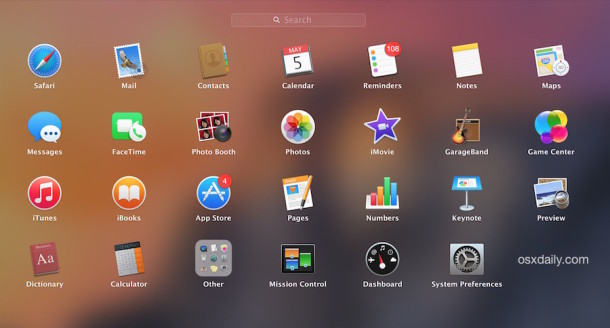 [/img]
What does pressing the spacebar do? Some kind of preview?
yeah, previews any type of file. Can't believe there is no Windows equivalent for this. It's one of the things I really miss when I'm on my work PC!
What does pressing the spacebar do? Some kind of preview?
Yes - images, documents etc (some filetypes such as .pdf files will preview)
Can I have launch pad as my home screen? Can I put a STW icon on it?
launchpad...trackpad gesture
Pinch your fingers to the centre of the trackpad.
Edit : You can find the trackpad gestures in System Preferences/Trackpad.
And then there are Spaces too - a great way of organising different areas of work/home etc. For example, I have a desktop working in applications, a desktop for my browser, desktops for apps (such as Slack, Front etc) and all I need do is press ctrl + (left/right) to swipe between them. Or two figure gesture on my magic mouse.
Four-finger side swipe on a Macbook. (For Molgrips)
Also, to see how good the trackpad and software is integrated, I like to pinch/squeeze the Launchpad screen so you can barely see it, then release and it just pops back. All stages of "ghosting" to full image are there and lend themselves to pissing about.
Sad, I know, but pretty neat...
🙂
How would you look your architect mates in their rimlessly glazed eyes?
Shudders. These be [i]corporate architects[/i].
Metal, or metal resin frames for me - not in any way rimless.
Oh, and W10 as well - when Bentley stopped supporting Mac back in about 2004/5 was the death of Mac for us.
Can't believe there is no Windows equivalent for this. It's one of the things I really miss when I'm on my work PC!
There's a preview panel in explorer
And then there are Spaces too - a great way of organising different areas of work/home etc. For example, I have a desktop working in applications, a desktop for my browser, desktops for apps (such as Slack, Front etc) and all I need do is press ctrl + (left/right) to swipe between them. Or two figure gesture on my magic mouse.
Windows 10 has that. Also Linux has had it for what must be decades...
They only tell you after you've taken the solemn vows, and we get your initiation ceremony out of the way. It can be traumatic, but it's worth it in the end
😆
Actually beginning to wonder what I am going to do with this thing. I spent ages getting my working processes set up nicely on the PC, and to start again is a bit of a PITA. Also we do have some Windows only software that I *may* need to work on, so there'll be VMs involved, which means a Windows license, and blabla. May not be worth it tbh.
There's a preview panel in explorer
ffs 😆
3 years I've been swearing at least once a day at the fact that I can't even preview an audio file without loading some poxy music player 😆
May not be worth it tbh.
probably not, why would you waste time learning a new OS for zero gain?
if somebody gave me a windows PC (i have used macs exclusively for 25years) i wouldn’t waste my time on it but pass it on to somebody who would benefit from it as it certainly would be of no use to me.
probably not, why would you waste time learning a new OS for zero gain?
Some of us have to use more than one OS for our jobs.
All my word docs are littered with ":w" where I've tried to save it.....
It was literally going begging, so I thought I might as well give it a go out of curiosity if nothing else. And I do like learning new things.
It's just needless difference for the sake of it that pises me off. I've no problem learning new gestures and features. I've even used unity on Ubunty FFS and I liked it. I got used to the close buttons being in the opposite corner.
All my word docs are littered with ":w" where I've tried to save it.....
When I use textedit the absence of hjkl navigation really irritates me for the first 5 seconds.
It's just needless difference for the sake of it that pises me off.
Absolutely, that's what I really hate about Windows computers.
I support Windows at work, have done for years. I use a mac at home. Sometimes I manage to use both in the same day without getting mixed up. I can even find # without having to Google it.
And I do like learning new things.
*raises eyebrow*
v
yeah it's the same as f1 and f2, but if I sit by the window on a bright day it just doesn't go bright enough. My dell laptop before did.
The spacebar preview is just that, a preview, in fact it's a preview of preview, you can't rotate an image for example without clicking again to go to full preview.
There's no rgb port on my macbook pro - this has always been a bit of an essential for meeting room projectors in my experience, though it's been two years since I had to so maybe they've all been replaced with hdmi or whatever this thing uses. I've managed to avoid a good dongle collection so far!
Obviously you get familiar with what you use, but so far windows just seems to work where as this needs more steps to do basics.
I'm dreading buying a new car, all the buttons will be in different places for no reason!
What will I do if I turn on the air con, but I actually meant to change the radio station?
I'm done for.
I fear change of any sort. It's why I never leave the house and spend a lot of time curled up in the corner rocking back and too, gently crying
Luckily the government has decided to take us back to the 1950's, so I won't have to worry about any of this any more
Phew!
yeah it's the same as f1 and f2, but if I sit by the window on a bright day it just doesn't go bright enough. My dell laptop before did.
Take it back if not suitable.
The spacebar preview is just that, a preview, in fact it's a preview of preview, you can't rotate an image for example without clicking again to go to full preview.
It's actually called Quick Look. Works on videos, audio so does exactly what it's meant to do.
There's no rgb port on my macbook pro - this has always been a bit of an essential for meeting room projectors in my experience,
Again, why did you buy it if it didn't have a feature you needed?
though it's been two years since I had to so maybe they've all been replaced with hdmi or whatever this thing uses. I've managed to avoid a good dongle collection so far!
You'll be able to get an appropriate cable. What outputs do you have? i.e what model MBP is it?
Obviously you get familiar with what you use, but so far windows just seems to work where as this needs more steps to do basics.
It really doesn't. It's just learning how to use the tool. Look at it like the first time you drive somewhere, you'll probably follow all the main roads etc. Go there a few times, you'll learn shortcuts, best roads to use to get there quicker etc.
I guess I should add I am system agnostic. I dislike Apple as a company for many reasons, but when it comes to the laptop market they've been given a pass by MS and their OEMs being a complete shitshow. This has improved recently, with MS doing what it should have done years ago and built it's own hardware, but even then the prices are not much different and stuff like support and release dates still lag behind. For example, [url= https://www.theguardian.com/technology/2017/jul/26/what-are-the-best-macbook-pro-alternatives ]this article[/url] lists alternatives to the MacBook Pro. But when are half of them in the UK? I contacted most companies, and never even got replies. The Razor is nice tho.
They'll all still have inferior trackpads tho 8)
They're great for drawing pickchures though
So is MS Paint...
[url= https://i.imgur.com/7ZeY6Uu.jp g" target="_blank">https://i.imgur.com/7ZeY6Uu.jp g"/> [/img][/url]
I converted to a Mac a few years ago (October 2011 the receipt is dated, same machine, still going, still as good as it ever was....) , some things are different, some aren't.
What I did was sit and learn how to use it, and how to do things I wanted to do. It's not hard.
I'm not really a computer person*, the reason I bought a Mac was that I was jeffed-off with Windows crashing and fouling up all the time, having to bugger around with it all the time, the Mac fixed that, so I was happy, and I still am.
I'm also glad I opted for the trackpad, it makes a LOT more sense as it replicates how a lot of stuff is done on a touchscreen device.... But again, you need to learn it. (I like learning) Mrs PP doesnt like the trackpad and struggles with it, opting to try and click stuff on the screen, like with a mouse, rather then use the gestures that have become second nature to me.
*That said, I've actually been an IT trainer (SAP) for a while and the bloke that taught us also taught us a lot of keyboard shortcuts and I do use a lot of these even now. It's quicker.
I'd say, personally, that it's more the use of a mouse that seems old fashioned to me, they just feel clunky and slow compared to the trackpad, and they lack functions. Using the Windows machine at work always feels like a backward step to me because of the mouse. I'm also used to both systems, but W10 isn't as clear to me as OSX. Too crowded, too much going on, too many buttons to click.
But that's just me. 🙂
It really doesn't. It's just learning how to use the tool.
Not really. When you type or do other things quickly your fingers get trained in a certain way. For example, the close buttons I are in the top right of the window in Ubuntu and the top right in Windows. It was months and months before my mouse stopped going to the top right to close a window.
It is possible to learn two systems instinctively, but it's a pain and it takes longer.
It's just perverse of Apple to make their keyboards different to the way everyone else does.

